1. Introduzzjoni
This manual provides essential information for the proper use and maintenance of your WiMiUS Q4 4K Action Camera. Please read it thoroughly before operating the device to ensure optimal performance and longevity. Keep this manual for future reference.
Prekawzjonijiet tas-Sigurtà
- Tesponix il-kamera għal temperaturi estremi jew dawl tax-xemx dirett għal perjodi twal.
- Evita li twaqqa’ l-kamera jew li tissottomettiha għal impatti qawwija.
- Żomm il-kamera 'l bogħod minn kampi manjetiċi qawwija.
- Ensure the waterproof case is properly sealed before submerging the camera in water.
- Uża biss aċċessorji u chargers approvati.
2. Prodott Aktarview
Komponenti tal-Kamera
Familiarize yourself with the main components of your WiMiUS Q4 Action Camera:
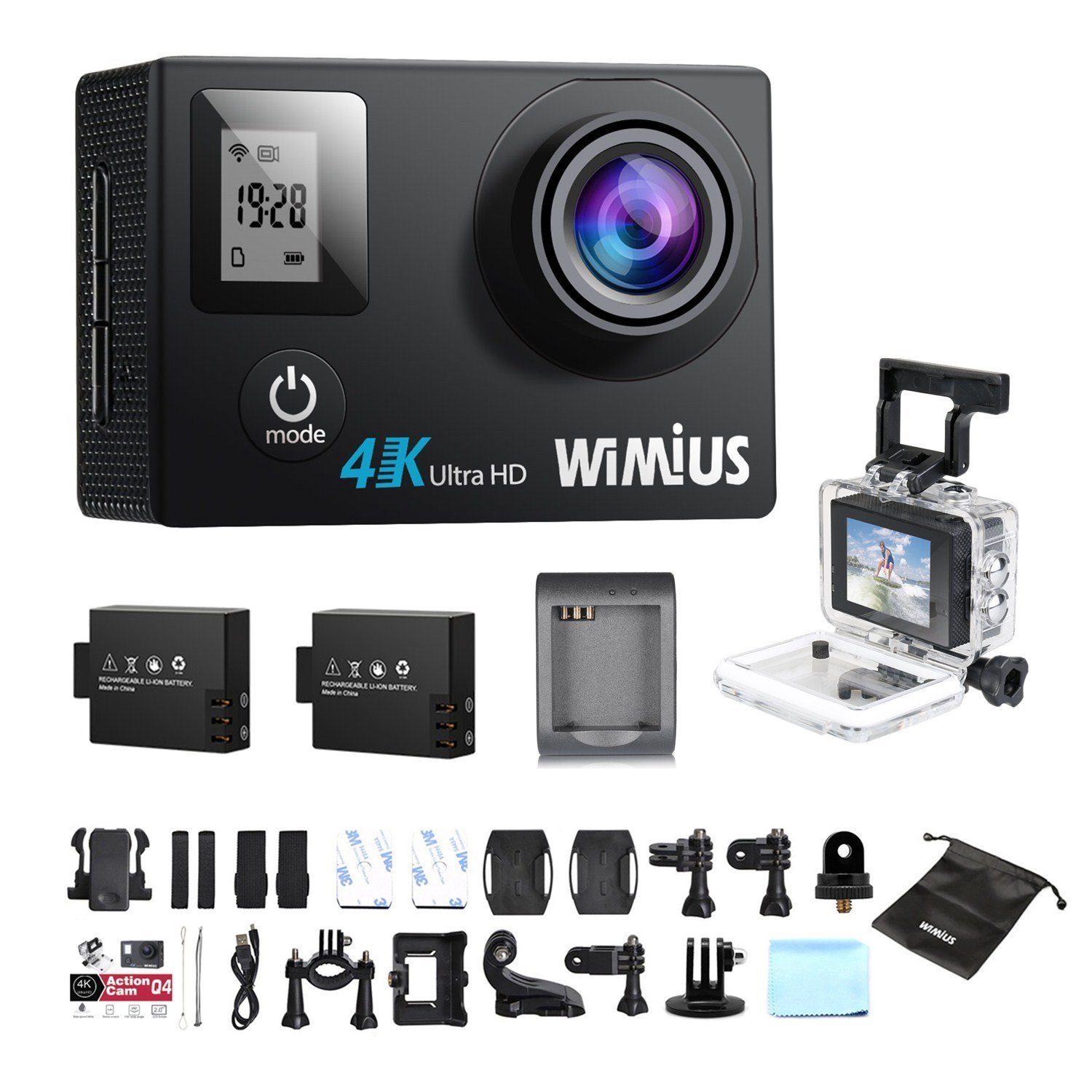
- Lenti: Jaqbad vidjows u ritrattitage.
- Buttuna tal-Enerġija / Modalità: Powers the camera on/off and switches between modes.
- Buttuna tax-Xatter/OK: Starts/stops recording, takes photos, or confirms selections.
- Buttuni 'l fuq /' l isfel: Navigates menu options.
- Main LCD Screen (2.0 inches): Wirjiet diretti view, playback, and menu interface.
- Status Screen (0.66 inches): Shows current mode, battery status, and recording time.
- Port Micro USB: Għall-iċċarġjar u t-trasferiment tad-dejta.
- Port Mikro HDMI: Għall-konnessjoni ma' display estern.
- Slott tal-Karta MicroSD: Għall-inserzjoni ta' memory card.
Aċċessorji Inklużi
Your camera comes with a comprehensive kit of accessories:

- Waterproof Case (up to 40M)
- Rechargeable Li-ion Batteries (x2)
- Cable USB
- Various Mounts and Adapters (e.g., helmet mount, bicycle mount)
- Pads li jwaħħlu
- Drapp tat-Tindif
- Bands and Straps
3. Setup
3.1 Installazzjoni u Iċċarġjar tal-Batterija
- Iftaħ l-għatu tal-kompartiment tal-batterija fil-qiegħ tal-kamera.
- Insert a fully charged Li-ion battery, ensuring the correct orientation.
- Agħlaq l-għatu tal-kompartiment tal-batterija sew.
- To charge, connect the camera to a USB power source (e.g., computer, USB wall adapter) using the provided USB cable. The charging indicator light will illuminate.
- Charging typically takes 2-3 hours. The indicator light will turn off or change color when fully charged.

3.2 Installazzjoni tal-Kard MicroSD
A MicroSD card (not included) is required for recording. The camera supports up to 64GB Class 10 or UHS-I MicroSD cards.
- Locate the MicroSD card slot on the side of the camera.
- Daħħal il-kard tal-MicroSD bil-kuntatti tad-deheb iħarsu lejn wara tal-kamera sakemm tikklikkja f'postha.
- Biex tneħħiha, imbotta l-karta bil-mod 'il ġewwa sakemm toħroġ 'il barra.
- It is recommended to format the MicroSD card in the camera before first use and periodically thereafter to ensure stable recording.
3.3 Użu ta' Kaxxa li ma jgħaddix ilma minnha
The waterproof case allows the camera to be used up to 40 meters underwater.
- Ensure the camera is dry before placing it inside the waterproof case.
- Close the case firmly, ensuring the rubber seal is clean and free of debris.
- Perform a dry test by submerging the empty case in water for a few minutes to check for leaks before inserting the camera.
3.4 Aċċessorji tal-Immuntar
Utilize the various mounts and adapters to attach your camera to helmets, bicycles, or other surfaces. Refer to the accessory diagram for specific attachment methods.
4. Istruzzjonijiet Operattivi
4.1 Tixgħel/Jitfi
- Qawwa Mixgħul: Press and hold the Power/Mode button for 3-5 seconds.
- Itfi: Press and hold the Power/Mode button for 3-5 seconds.
4.2 Għażla tal-Modalità
Press the Power/Mode button repeatedly to cycle through the main modes:
- Modalità ta' Reġistrazzjoni tal-Vidjo: Indicated by a video camera icon.
- Modalità tar-Ritratti: Indicated by a camera icon.
- Modalità Daqq: Indicated by a play icon.
- Menu tal-issettjar: Indicated by a gear icon.
4.3 Reġistrazzjoni tal-Vidjo
- Switch to Video Recording Mode.
- Press the Shutter/OK button to start recording. A red indicator light will flash, and the recording time will appear on the screen.
- Agħfas il-buttuna Shutter/OK mill-ġdid biex twaqqaf ir-reġistrazzjoni.
Video Settings (via Settings Menu)
- Riżoluzzjoni: Select from 4K 30fps, 2.7K 30fps, 1080p 60/30fps, 720p 120/60/30fps.
- Reġistrazzjoni Loop: Set to 2min, 3min, 5min, or Off. When enabled, the camera will continuously record, overwriting the oldest files meta l-karta tal-memorja tkun mimlija.
- Vidjo Time-Lapse: Set intervals (0.5s, 1s, 5s, 10s, 30s, 60s) or Off. The camera will capture frames at set intervals and compile them into a video.
- Mozzjoni bil-mod: Available at 1080p/60fps and 720p/120fps.
4.4 Tieħu Ritratti
- Aqleb għall-Modalità tar-Ritratti.
- Agħfas il-buttuna Shutter/OK biex tieħu ritratt.
Photo Settings (via Settings Menu)
- Riżoluzzjoni: Up to 16 Megapixels.
- Fqigħ tar-Ritratti: Capture multiple photos in quick succession (e.g., 3P/1S, 5P/1S, 10P/1S).
4.5 Konnessjoni tal-WiFi u Użu tal-App
The camera features Wi-Fi connectivity for remote control via a smartphone app.
- Enable Wi-Fi on the camera via the Settings Menu. The Wi-Fi name (SSID) and password will be displayed.
- Download the compatible WiMiUS app from your smartphone's app store (e.g., App Store for iOS, Google Play for Android).
- On your smartphone, connect to the camera's Wi-Fi network using the provided password.
- Open the WiMiUS app to control the camera, view foo ħajtage, u trasferiment files.
4.6 Menu Navigation and General Settings
Access the Settings Menu by cycling through modes. Use the Up/Down buttons to navigate and the Shutter/OK button to select.
- Lingwa: Select your preferred language (French is available).
- Data/Ħin: Issettja d-data u l-ħin korretti. Note: The date/time setting may reset to 2016/09/01 00:00:00 when batteries are changed. This is a known behavior; reset manually after each battery change.
- Vehicle Mode: (OUI/NON - Yes/No) This mode typically enables automatic recording when the camera detects power, useful for dashcam functionality.
- Karta tal-Format: Erases all data on the MicroSD card.
- Irrisettjar tal-Fabbrika: Restores all settings to their default values.
5. Manutenzjoni
5.1 Tindif tal-Kamera u l-Lenti
- Uża drapp artab u mingħajr suf biex tnaddaf il-korp tal-kamera.
- For the lens, use a specialized lens cleaning cloth or pen to avoid scratches. Do not use abrasive materials.
- Ensure the camera is off and dry before cleaning.
5.2 Kura tal-Kaxxa li Ma Tirqaqx mal-Ilma
- After each use in water, rinse the waterproof case with fresh water and allow it to air dry.
- Inspect the rubber seal for any dirt, sand, or damage. Clean or replace if necessary to maintain waterproofing.
5.3 Kura tal-Batterija
- Aħżen il-batteriji f'post frisk u niexef meta ma tkunx qed tuża.
- Do not expose batteries to high temperatures or direct flame.
- Jekk taħżen għal perjodi twal, iċċarġja l-batteriji sa madwar 50% tal-kapaċità tagħhom.
5.4 Ħażna
When not in use, store the camera and accessories in a protective case to prevent damage from dust and impacts.
6 Issolvi l-problemi
This section addresses common issues you might encounter with your WiMiUS Q4 camera.
| Problema | Kawża Possibbli | Soluzzjoni |
|---|---|---|
| Il-kamera ma tixgħelx. | Batterija baxxa jew eżawrita. | Iċċarġja l-batterija kompletament. Kun żgur li l-batterija hija mdaħħla sew. |
| Ma nistax nirrekordja vidjow/nieħu ritratti. | No MicroSD card, card full, or card error. | Insert a MicroSD card. Delete old files or replace card. Format the card in the camera. |
| Date/Time resets after battery change. | Standard behavior for this model. | Manually reset the date and time in the settings menu after each battery change. |
| Kwalità fqira tal-immaġni f'dawl baxx. | Limitations of the camera sensor in low light conditions. | Ensure adequate lighting. Adjust exposure settings if available. |
| Sound is muffled in waterproof case. | Waterproof case seals the microphone. | This is normal. For better audio, use the camera without the waterproof case in dry conditions. |
| Problemi bil-konnessjoni tal-Wi-Fi. | Incorrect password, app issues, or signal interference. | Verify Wi-Fi password. Restart camera and smartphone. Ensure app is updated. Try resetting camera Wi-Fi settings. |
| Accessories breaking easily. | Material quality or improper use. | Handle accessories with care. Consider purchasing higher quality third-party mounts if needed for demanding activities. |
Passi Ġenerali għas-Soluzzjoni ta 'Problemi
- Ibda mill-ġdid il-Kamera: Power off and then on again.
- Check MicroSD Card: Ensure it's correctly inserted and formatted. Try a different card if issues persist.
- Irrisettjar tal-Fabbrika: If problems continue, perform a factory reset via the settings menu. Note that this will erase all custom settings.
7. Speċifikazzjonijiet
Key technical specifications for the WiMiUS Q4 Action Camera:
- Ditta: WiMiUS
- Mudell: Q4
- Riżoluzzjoni Still effettiva: 16 Megapixels
- Riżoluzzjoni tal-vidjo: 4K (30fps), 2.7K (30fps), 1080p (60/30fps), 720p (120/60/30fps)
- Daqs tal-iskrin: 2.0 inches (main LCD), 0.66 inches (status screen)
- Teknoloġija tal-Konnettività: Wi-Fi
- Fond li ma jgħaddix ilma minnu: Up to 40 meters (with waterproof case)
- Stabbilizzazzjoni tal-Immaġni: Nru
- Teknoloġija tas-Sensor: CMOS
- Tip ta' Lenti: Angolu wiesa '
- Kulur: Gold (Note: Product title indicates 'Noir' (Black), but specifications list 'or' (Gold). This manual refers to the Q4 model generally.)
- Ħażna: Supports MicroSD cards up to 64GB (Class 10 or UHS-I recommended)
8. Garanzija u Appoġġ
For warranty information and customer support, please refer to the documentation provided at the time of purchase or contact your retailer. Specific details regarding warranty duration and terms are typically included with your product packaging.
Software updates and spare parts availability information are not provided in the product specifications. Please check the manufacturer's official website or contact customer service for the most current information.


