Introduzzjoni
This manual provides detailed instructions for the setup, operation, maintenance, and troubleshooting of your Aula Moon Slasher SI-2008 Mechanical Keyboard. Please read this manual thoroughly before using the product to ensure proper function and longevity.
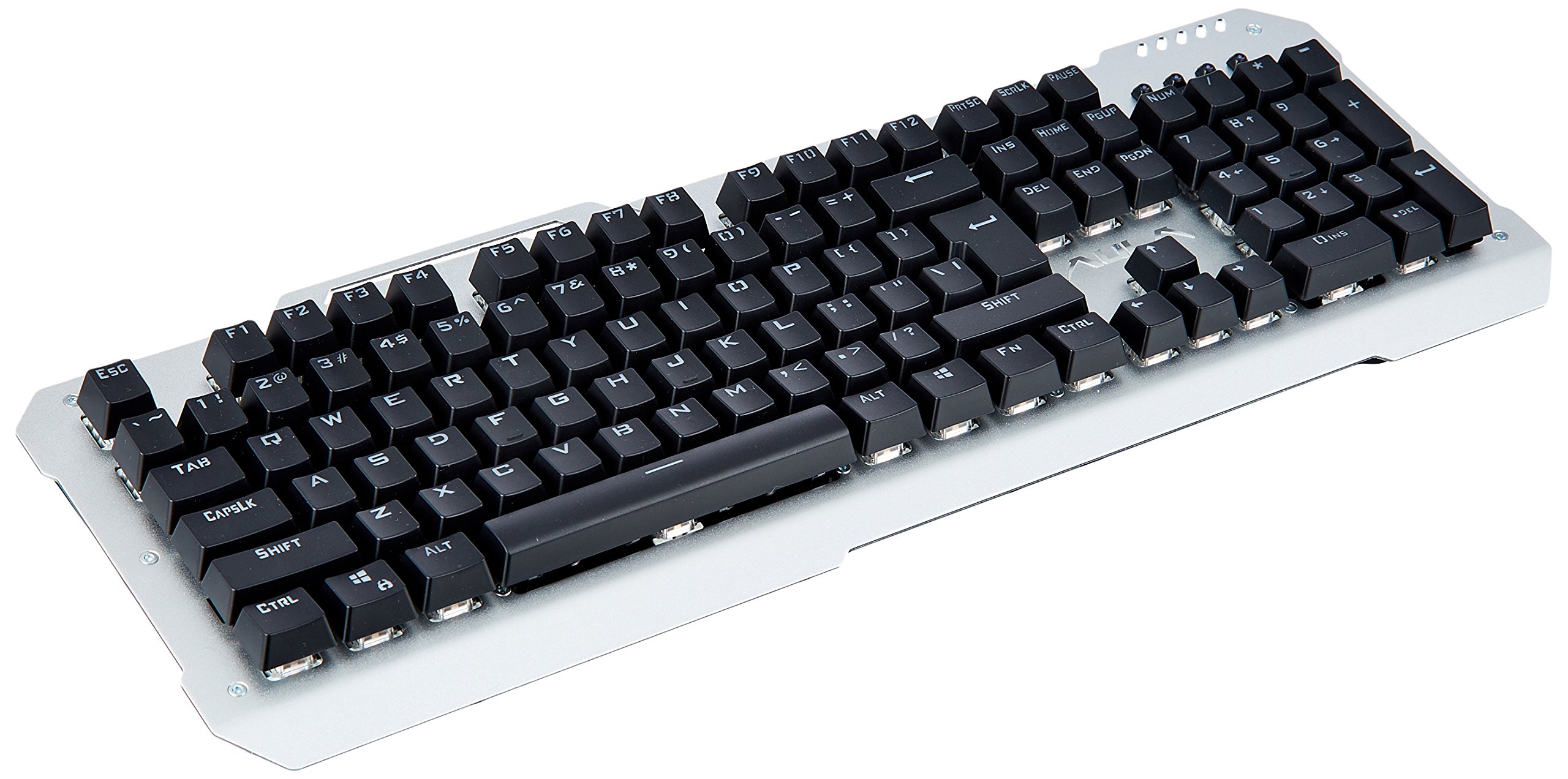
Immaġni: Minn fuq għal isfel view of the Aula Moon Slasher SI-2008 Mechanical Keyboard. It features a silver-colored metal frame with black keys, a standard 104-key layout including a numeric keypad, function keys, and navigation keys. The Aula logo is visible above the arrow keys.
Setup Istruzzjonijiet
- Ħoll it-Tastiera: Carefully remove the keyboard from its packaging. Ensure all components, including the manual and warranty card, are present.
- Qabbad mal-Kompjuter: Locate an available USB port on your computer. Insert the gold-plated USB connector of the keyboard into the USB port.
- Installazzjoni tas-sewwieq: The keyboard is typically plug-and-play. Your operating system (e.g., Windows 10) should automatically detect and install the necessary drivers. No additional software installation is usually required.
- Test Inizjali: Once connected, open a text editor or word processor and test typing to ensure all keys are functioning correctly.
It-tħaddim tat-Tastiera
Karatteristiċi ewlenin:
- Swiċċijiet mekkaniċi: The keyboard features blue mechanical switches, providing tactile feedback and an audible click.
- Rainbow Backlight: The keyboard is equipped with a rainbow backlight.
- Disinn li ma jgħaddix ilma minnu: The keyboard is designed to be waterproof, offering protection against accidental spills.
Kontroll tad-dawl ta' wara:
The keyboard features various backlight modes and brightness levels. Use the Fn key in combination with specific function keys (F1-F12) or other designated keys to cycle through lighting effects, adjust brightness, or turn the backlight on/off. Refer to the included physical manual for specific key combinations, as these can vary by model revision.
Ċwievet tal-Funzjoni:
Standard function keys (F1-F12) perform their usual operations. In combination with the Fn key, they may activate multimedia controls or other system functions. For example, Fn + F1 might mute audio, Fn + F2/F3 might adjust volume, etc. Consult the physical manual for exact mappings.
Manutenzjoni u Kura
- Tindif: Biex tnaddaf it-tastiera, skonnettjaha mill-kompjuter tiegħek. Uża drapp artab u damp cloth to wipe the surface. For dust and debris between keys, use compressed air. Avoid harsh chemicals or abrasive cleaners.
- Reżistenza għat-tixrid: While the keyboard is waterproof, it is recommended to clean up any spills promptly to prevent long-term damage or residue buildup. Do not immerse the keyboard in water.
- Ħażna: Meta ma tkunx qed tużaha għal perjodi twal, aħżen it-tastiera f'post niexef u frisk 'il bogħod mix-xemx diretta.
Issolvi l-problemi
| Problema | Soluzzjoni |
|---|---|
| It-tastiera ma tirrispondix |
|
| Ċerti ċwievet mhux qed jaħdmu |
|
| Backlight is not working or flickering |
|
Speċifikazzjonijiet tal-Prodott
| Karatteristika | Dettall |
|---|---|
| Brand | Aula |
| Numru tal-Mudell | SI-2008 |
| Serje | Moon Slasher |
| Kulur | Iswed |
| Tip ta' Tastiera | Mekkaniċi |
| Tip ta' Swiċċ | Blue switch |
| Konnettività | Wired (Gold-plated USB connector) |
| Dawl ta' wara | Backlight tal-qawsalla |
| Karatteristika Speċjali | Disinn li ma jgħaddix ilma minnu |
| Apparati Kompatibbli | Laptop |
| Sistema Operattiva | Windows 10 |
| Piż tal-oġġett | 1.27 kg |
| Dimensjonijiet tal-Pakkett | 50.3 x 22 x 6.3 ċm |
Garanzija u Appoġġ
Dan il-prodott jiġi ma 'a 1 Snin Garanzija. Please refer to the included warranty card for detailed terms and conditions. For technical support or warranty claims, please contact your retailer or the manufacturer directly. Keep your purchase receipt as proof of purchase.
Komponenti Inklużi: Manual, Warranty Card.


