Introduzzjoni
This manual provides comprehensive instructions for the setup, operation, and maintenance of your Vestel RC4870 Universal Remote Control. This remote is designed for use with various television brands, including Digihome, Bush, Telefunken, Celcus, JVC, and Dual/TV, offering a convenient way to manage your entertainment system.
Prodott Overview
The Vestel RC4870 is an infrared remote control featuring a standard layout for intuitive navigation and control of your television. It requires two AAA alkaline batteries for operation.
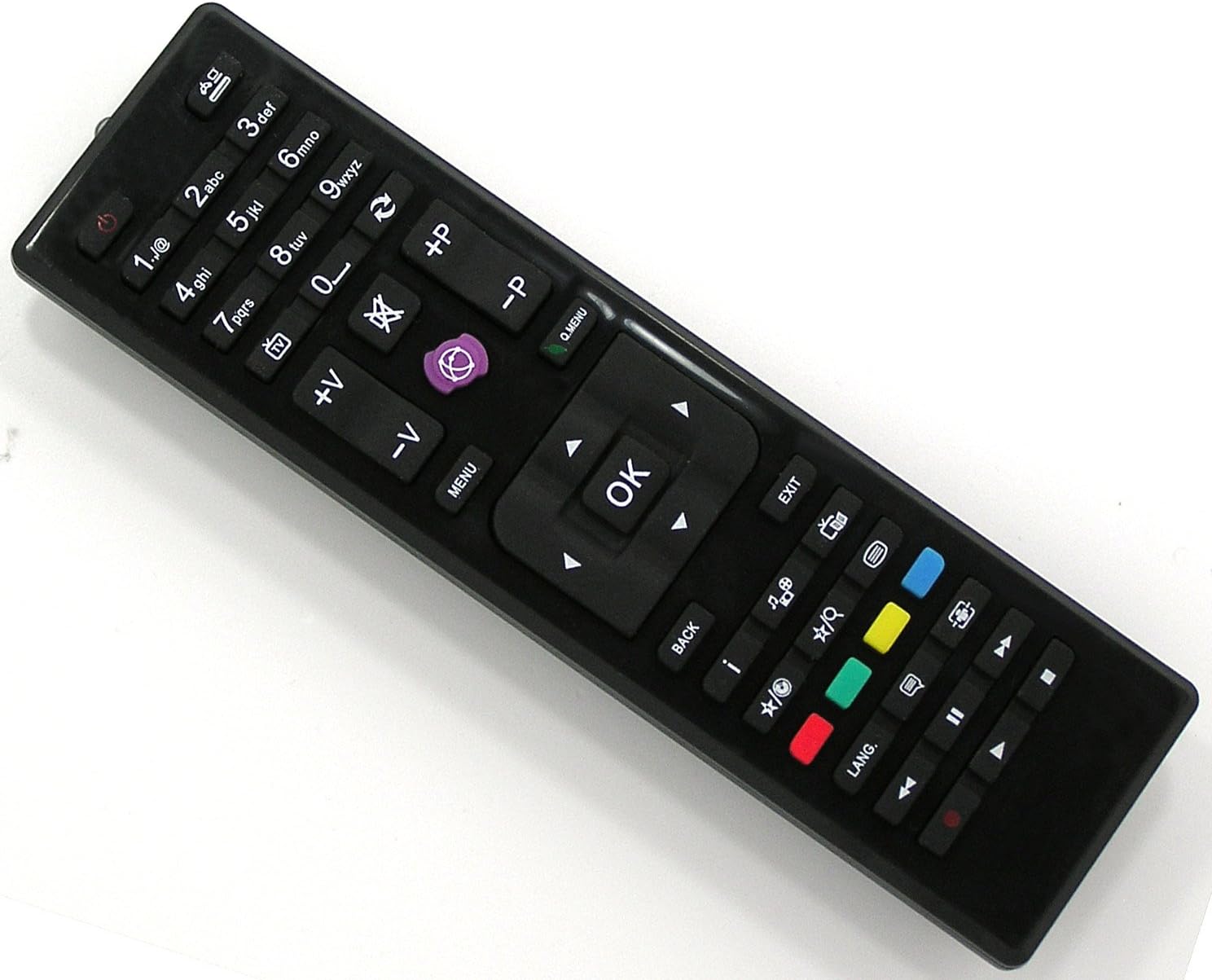
Image: The Vestel RC4870 Universal Remote Control, a black remote with various buttons for TV operation.
Setup
1. Installazzjoni tal-batterija
- Sib l-għatu tal-kompartiment tal-batterija fuq wara tal-kontroll remot.
- Żerżaq l-għatu 'l isfel jew agħfas il-lukkett biex tiftaħu.
- Insert two AAA alkaline batteries, ensuring the positive (+) and negative (-) terminals align correctly with the markings inside the compartment.
- Replace the battery compartment cover, pushing it until it clicks securely into place.
2. Użu Inizjali
The Vestel RC4870 is a pre-programmed universal remote control. For most compatible Vestel, Digihome, Bush, Telefunken, Celcus, JVC, and Dual/TV models, no additional setup or code entry is required. Simply point the remote at your television and begin operation.
Istruzzjonijiet Operattivi
Iffamiljarizza ruħek mal-buttuni u l-funzjonijiet tagħhom:
| Buttuna/Taqsima | Funzjoni |
|---|---|
| Qawwa (● with line) | Ixgħel jew jitfi t-televixin. |
| 0-9 Buttuni Numru | Agħżel direttament il-kanali tat-TV. |
| 1./@ | Used for special characters or specific functions depending on TV model. |
| +P / -P (Channel Up/Down) | Changes the television channel up or down sequentially. |
| +V / -V (Volume Up/Down) | Jaġġusta l-livell tal-volum tal-awdjo. |
| Mute (crossed-out speaker) | Iċċekkja jew iwaqqaf l-awdjo tat-televiżjoni. |
| Sors/Input (rectangle with arrow) | Cycles through available input sources (e.g., HDMI 1, AV, USB). |
| MENU | Jiftaħ il-menù prinċipali tat-televiżjoni. |
| Q.MENU (Quick Menu) | Accesses a quick menu for common settings. |
| Vleġeġ tan-Navigazzjoni (Up, Down, Left, Right) | Jinnaviga permezz tal-menus u l-għażliet. |
| OK | Jikkonferma l-għażliet fil-menus. |
| ĦRUĠ | Joħroġ mill-menu jew funzjoni attwali. |
| LURA | Terġa' lura għall-iskrin jew il-menu preċedenti. |
| jien (Informazzjoni) | Juri informazzjoni dwar il-programm jew l-input kurrenti. |
| Buttuni Kkuluriti (Red, Green, Yellow, Blue) | Functions vary by TV model and context, often used for teletext, smart TV features, or specific application shortcuts. |
| Kontrolli tal-daqq (Play/Pause, Stop, Rewind, Fast Forward, Previous, Next) | Controls media playback from connected devices or internal media players. |
| LANG. (Language) | Changes audio language or subtitle options. |
| TV/Radio Toggle (TV icon / Radio icon) | Jaqleb bejn il-modi tat-TV u tar-Radju. |
| EPG (Grid icon) | Jaċċessa l-Gwida Elettronika tal-Programmi. |
| Sottotitolu (Rectangle with dots) | Jixgħel jew jitfi s-sottotitli. |
| Text/Teletext (Square with lines) | Jaċċessa s-servizzi tat-teletext. |
Manutenzjoni
Tindif tal-Kontroll mill-bogħod
- Uża drapp artab u niexef biex timsaħ il-wiċċ tal-kontroll remot.
- Għal ħmieġ iebes, neħħi ftitampmt id-drapp bl-ilma jew cleaner ħafif u li ma jobrox.
- Tużax kimiċi ħarxa, solventi, jew pads tat-tindif li joborxu, għax dawn jistgħu jagħmlu ħsara lill-finitura tar-remote jew lill-komponenti interni.
Sostituzzjoni tal-batterija
Ibdel il-batteriji meta r-rispons tar-remote isir kajman jew jieqaf jaħdem. Dejjem ibdel iż-żewġ batteriji fl-istess ħin b'batteriji alkalini AAA ġodda. Tħallatx batteriji qodma u ġodda jew tipi differenti ta' batteriji.
Issolvi l-problemi
- Ir-remote mhux qed jirrispondi:
- Iċċekkja jekk il-batteriji humiex imdaħħla sew bil-polarità korretta.
- Ibdel batteriji qodma b'oħrajn ġodda.
- Kun żgur li m'hemm l-ebda ostaklu bejn il-kontroll remot u s-senser infra-aħmar tat-TV.
- Kun żgur li tinsab fil-medda effettiva tat-tħaddim (sa 10 metri).
- Xi buttuni mhux qed jaħdmu:
- This could indicate a specific button malfunction or a compatibility issue with a particular TV function. Verify if other buttons work.
- Clean the remote control, especially around the non-working buttons, to remove any debris.
- Jaħdem mill-bogħod b'mod intermittenti:
- Weak batteries are a common cause; replace them.
- Ensure consistent line of sight to the TV's IR receiver.
Speċifikazzjonijiet
- Ditta: Vestel
- Mudell: RC4870
- Teknoloġija tal-Konnettività: Infra-aħmar
- Apparati Kompatibbli: Television (Digihome, Bush, Telefunken, Celcus, JVC, Dual/TV)
- Apparati Massimi Appoġġjati: 1
- Tip ta 'Kontrollur: Kontroll tal-buttuna
- Medda massima: 10 Meters
- Tip ta 'batterija: AAA Alkalin (2 meħtieġa)
- UPC: 718347444233
Garanzija u Appoġġ
Information regarding specific warranty terms and customer support for this product is not provided in the available data. Please refer to the product packaging or contact your retailer for details on warranty coverage and technical assistance.


