1. Introduzzjoni
This manual provides comprehensive instructions for the operation and maintenance of your MIDAS DM16 16 Input Analogue Live and Studio Mixer. The DM16 is designed for both live performance and studio recording environments, featuring award-winning MIDAS microphone preamplifiers and robust construction.
Please read this manual thoroughly before operating the device to ensure proper usage and to maximize its lifespan.
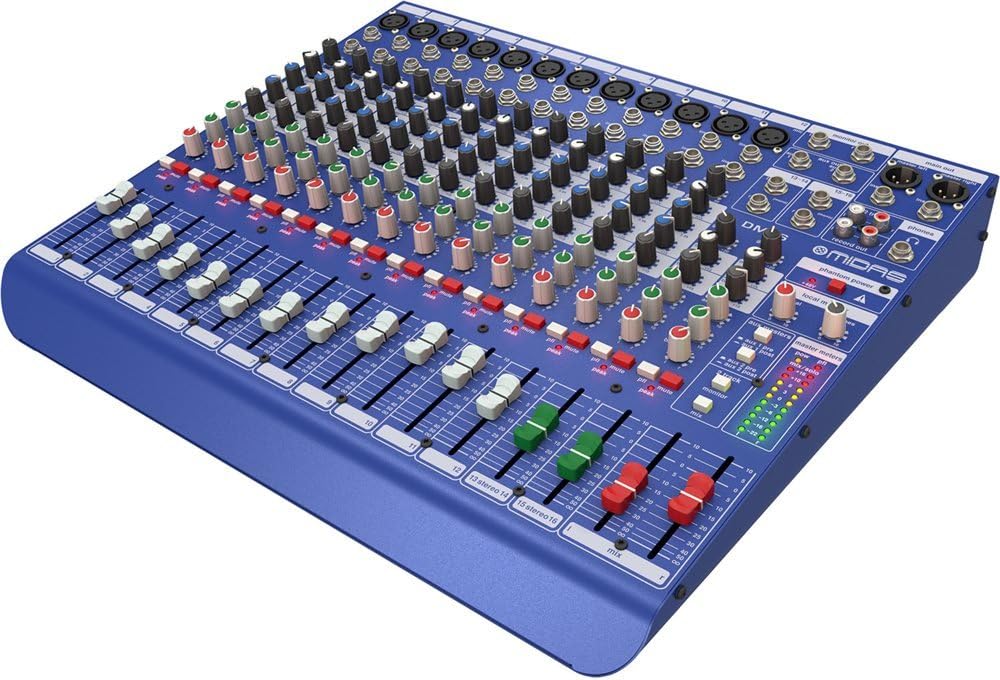
Figura 1.1: Angolat minn quddiem view of the MIDAS DM16 mixer.
2. Setup
2.1 Spakkjar u Spezzjoni
Upon receiving your MIDAS DM16, carefully unpack the unit and inspect it for any signs of damage that may have occurred during transit. Retain the original packaging materials for future transport or storage.
Inkluż fil-Kaxxa:
- MIDAS DM16 16-Input Analogue Live u Studio Mixer
- Korda tal-Enerġija
- Manwal għall-Utent (dan id-dokument)
2.2 Konnessjoni tal-Enerġija
The DM16 operates on a standard AC power supply. Connect the provided power cord to the AC inlet on the rear panel of the mixer and then to a suitable power outlet. Ensure the power switch is in the 'Off' position before connecting to power.
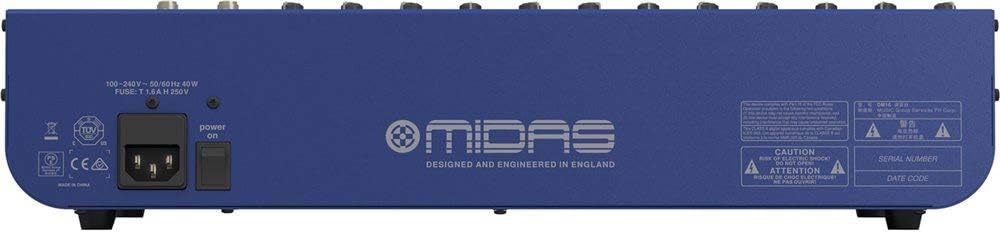
Figure 2.1: Rear panel of the MIDAS DM16 showing power input and warnings.
2.3 Konnessjonijiet ta' Input u Output
The DM16 features a variety of input and output options for connecting microphones, instruments, and other audio devices.
- Inputs tal-Mikrofonu: 12 mono input channels with XLR connectors for microphones. These channels feature MIDAS microphone preampliifikaturi.
- Inputs tal-Linja: 2 electronically-balanced stereo line input channels on 1/4" TRS connectors for instruments or line-level devices.
- Riżultati Prinċipali: Connect to your main PA system or recording interface.
- Sends Awżiljarji: For monitor mixes or effects sends.
- Ħruġ tal-headphones: For monitoring audio.
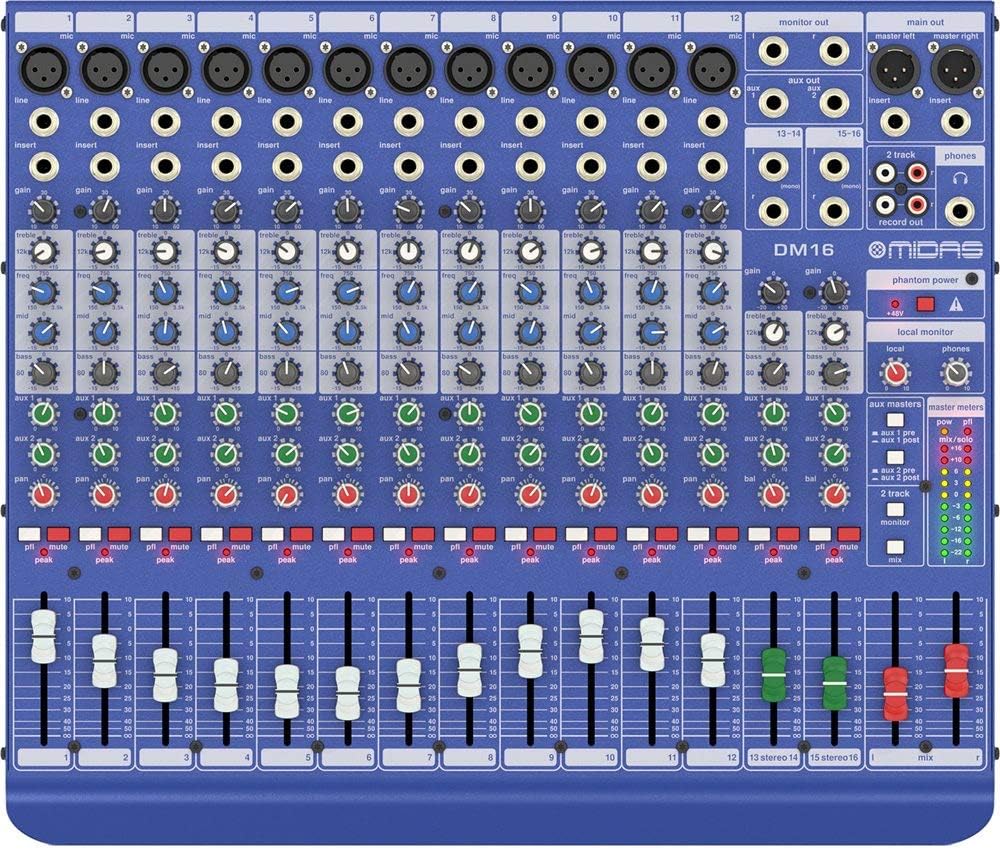
Figura 2.2: Fuq view of the MIDAS DM16 showing all input/output connections and controls.
3. Istruzzjonijiet Operattivi
3.1 Kontrolli tal-Kanal
Each mono input channel on the DM16 features the following controls:
- QLIGĦ: Adjusts the input sensitivity for the microphone preampaktar ħaj.
- EQ: A 3-band equalizer with a swept mid-band for precise tone shaping.

Figura 3.1: Dettaljat view of the 3-band EQ section on a mono channel.
- AUX 1/2: Controls the level sent to the auxiliary outputs. These can be switched pre/post fader.

Figure 3.2: Aux masters section with pre/post fader switching.
- PAN: Adjusts the stereo position of the channel.
- MUTE: Jissikket il-kanal.
- LED PEAK: Indicates when the input signal is clipping.
- FADER: Controls the output level of the channel to the main mix.

Figure 3.3: Channel faders for precise level control.
3.2 Qawwa Phantom
The DM16 provides +48V phantom power for condenser microphones. This is a global switch, meaning it applies to all microphone inputs simultaneously. Ensure all connections are made before activating phantom power to prevent damage to non-phantom powered devices.

Figure 3.4: Phantom power switch.
3.3 Monitoraġġ
Use the headphone output and monitor controls to listen to the main mix or specific auxiliary sends. The monitor section includes controls for local monitor and phones output levels.

Figure 3.5: Monitor and headphone controls.
4. Manutenzjoni
Proper maintenance ensures the longevity and optimal performance of your MIDAS DM16 mixer.
- Tindif: Use a soft, dry cloth to clean the exterior of the mixer. Avoid abrasive cleaners or solvents that could damage the finish or controls.
- Protezzjoni mit-Trab: Żomm il-mixer mgħotti meta ma tkunx qed tużah biex tevita li jakkumula t-trab, speċjalment madwar il-faders u l-kumpilazzjonijiet.
- Ventilazzjoni: Kun żgur li jkun hemm fluss tal-arja adegwat madwar l-unità biex tevita li jisħon iżżejjed. Timblokkax il-fetħiet tal-ventilazzjoni.
- Ħażna: Aħżen il-mixer f'ambjent frisk u niexef 'il bogħod mix-xemx diretta u minn temperaturi estremi.
5 Issolvi l-problemi
This section addresses common issues you might encounter with your DM16 mixer.
- Ebda Qawwa:
- Check if the power cord is securely connected to both the mixer and the power outlet.
- Ivverifika li l-iżbokk tad-dawl huwa funzjonali.
- Kun żgur li s-swiċċ tal-enerġija fuq il-pannell ta' wara jkun fil-pożizzjoni 'On'.
- Ebda Ħsejjes tal-Ħsejjes:
- Iċċekkja l-konnessjonijiet kollha tal-kejbil tad-dħul u tal-ħruġ.
- Ensure channel faders and the main mix fader are raised.
- Verify that the MUTE buttons on active channels are not engaged.
- Check the gain settings for each channel.
- Confirm that your connected speakers or monitoring system are powered on and functioning correctly.
- Ħoss Mgħawġ:
- Reduce the GAIN setting on the input channel if the PEAK LED is frequently illuminating.
- Lower the output level of the connected source device.
- Iċċekkja għal kejbils difettużi.
- Żanżin jew Ħoss:
- Kun żgur li l-kejbils kollha huma protetti kif suppost u f'kundizzjoni tajba.
- Iċċekkja għal ground loops; ipprova qabbad it-tagħmir awdjo kollu mal-istess power strip.
- Żomm il-kejbils tal-awdjo 'l bogħod mill-kejbils tal-enerġija.
Jekk tiltaqa' ma' kwistjonijiet li mhumiex koperti hawn, jekk jogħġbok irreferi għat-taqsima tal-appoġġ.
6. Speċifikazzjonijiet
| Karatteristika | Dettall |
|---|---|
| Tip ta' Prodott | Analogue Live u Studio Mixer |
| Channels Input | 16 (12 mono, 2 stereo) |
| Mikrofonu Preampliifikaturi | Award-winning MIDAS preampliifikaturi |
| EQ on Mono Channels | 3-band with swept mid band |
| Aux Jibgħat | 2 (with pre/post fader switching) |
| Sors tal-Enerġija | Corded Elettriku |
| Piż tal-oġġett | 11.02 liri (5.0 kg) |
| Dimensjonijiet tal-Prodott (L x W x H) | 17.24 x 14.57 x 3.74 pulzieri (438 x 370 x 95 mm) |
| Pajjiż ta' Oriġini | Iċ-Ċina |
| Numru tal-Mudell | DM16 |
| Teknoloġija tal-Konnettività | Awżiljarju |
7. Garanzija u Appoġġ
7.1 Informazzjoni dwar Garanzija
Your MIDAS DM16 mixer is covered by a limited warranty against defects in materials and workmanship. Please refer to the warranty card included with your product or visit the official MIDAS websit għal termini u kundizzjonijiet dettaljati tal-garanzija.
Nota: The warranty may not cover damage caused by improper use, unauthorized modifications, or natural disasters.
7.2 Appoġġ għall-Klijent
For technical assistance, troubleshooting, or service inquiries, please contact MIDAS customer support through their official webis-sit jew l-informazzjoni ta' kuntatt ipprovduta fid-dokumentazzjoni tal-prodott tiegħek.
Riżorsi onlajn:
- Official MIDAS Websit: www.midasconsoles.com
- Product Support Page: (Specific link if available, otherwise general websit)
When contacting support, please have your product model number (DM16) and serial number ready.


