1. Introduzzjoni
Thank you for choosing the Lenco PDR-030 DAB+/FM Portable Digital Radio. This manual provides essential information for setting up, operating, and maintaining your device. The PDR-030 offers high-quality digital radio reception (DAB+) and traditional FM radio, along with features such as an integrated rechargeable battery for portability, an RDS display, station memory, and an alarm clock function.
Komponenti Inklużi:
- Lenco PDR-030 Digital Radio
- AC Power Adapter (220 Volt)
- Manwal għall-Utent
2. Informazzjoni Importanti dwar is-Sigurtà
- Tesponix l-apparat għax-xita jew għall-umdità biex tevita nar jew xokk elettriku.
- Kun żgur li l-volt tal-adapter tal-enerġijatage taqbel mal-provvista tal-enerġija lokali tiegħek.
- Tiftaħx is-casing. Irreferi s-servizz kollu lil persunal kwalifikat.
- Evita li tpoġġi l-unità ħdejn sorsi ta’ sħana jew fid-dawl tax-xemx dirett.
- Handle the integrated battery with care. Do not attempt to replace it yourself.
- Żomm l-apparat 'il bogħod minn kampi manjetiċi qawwija.
3. Prodott Aktarview
Familiarize yourself with the main components and controls of your Lenco PDR-030 radio.
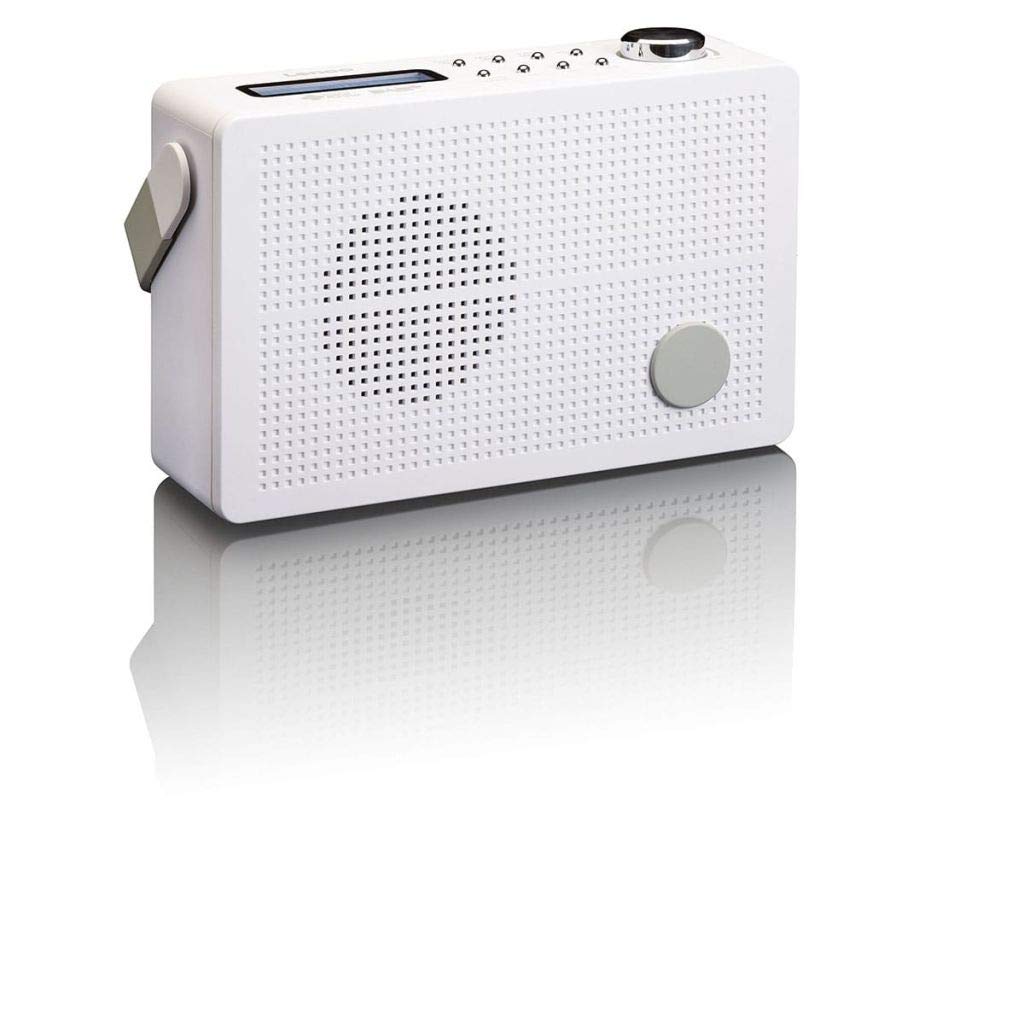
Figura 3.1: Front Panel of Lenco PDR-030 Radio. Features include a blue backlit LCD display, power/source button, alarm, sleep, info/menu, preset buttons, select/snooze, scan, previous, next buttons, and a rotary volume knob.
Kontrolli u Karatteristiċi Ewlenin:
- Wiri: Two-line illuminated LCD for time, date, station name, and information.
- Power/Source Button: Turns the radio on/off and switches between DAB+ and FM modes.
- Buttuna tal-Volum: Jaġġusta l-livell tal-ħruġ tal-awdjo.
- Antenna teleskopika: For optimal radio signal reception.
- Jack tal-headphone (3.5mm): Għal smigħ privat.
- Alarm/Sleep/Info/Menu/Preset Buttons: For various functions including setting alarms, sleep timer, accessing information, menu navigation, and managing station presets.
- Select/Snooze/Scan/Prev/Next Buttons: For station tuning, menu selection, and snooze function.
4. Setup
4.1 L-Ixgħel tar-Radju
The PDR-030 can be powered by the included AC adapter or its integrated rechargeable battery.
- Qawwa AC: Connect the supplied 220V AC power adapter to the DC input jack on the radio and then to a wall outlet. The radio will automatically begin charging the internal battery.
- Qawwa tal-batterija: The integrated Lithium-ion battery allows for portable use. Ensure the battery is sufficiently charged before use without the AC adapter.
4.2 Setup ta' l-antenna
Extend the telescopic antenna fully for optimal reception of both DAB+ and FM signals. Adjust its position for the best signal quality.
4.3 Initial Power On and Station Scan
- Agħfas il- Qawwa / Sors buttuna biex tixgħel ir-radju.
- Upon first use, the radio will automatically enter DAB+ mode and perform a full scan for available digital radio stations. This may take a few minutes.
- Ladarba l-iskennjar ikun lest, ir-radju se jissettja fuq l-ewwel stazzjon disponibbli.
5. Istruzzjonijiet Operattivi
5.1 Power On/Off
Agħfas il- Qawwa / Sors buttuna biex tixgħel jew titfi r-radju.
5.2 Għażla tal-Modalità (DAB+/FM)
Agħfas il- Sors button repeatedly to switch between DAB+ and FM radio modes.
5.3 Stazzjonijiet tal-Irfinar
- DAB+ Mode:
- After the initial scan, use the Prev u Li jmiss buttons to navigate through the list of available DAB+ stations.
- To perform a new full scan, press the Menu button, navigate to "Full Scan" using Prev / Li jmiss, u agħfas Agħżel.
- Modalità FM:
- Agħfas il- Skennja button to automatically scan for the next available FM station.
- For manual tuning, press and hold the Prev or Li jmiss buttuni biex tirfina l-frekwenza.
5.4 Saving and Recalling Preset Stations
Ir-radju jippermettilek taħżen sa 10-il stazzjon DAB+ u 10-il stazzjon FM issettjati minn qabel.
- Biex Issalva Preset:
- Intuna l-istazzjon mixtieq.
- Agħfas u żomm il- Issettjati minn qabel sakemm jidher "Preset Store" fuq id-displej.
- Uża l- Prev / Li jmiss buttuni biex tagħżel numru preset (1-10).
- Agħfas Agħżel biex tikkonferma u ssalva l-istazzjon.
- Biex Recall Preset:
- Agħfas il- Issettjati minn qabel buttuna fil-qosor.
- Uża l- Prev / Li jmiss buttons to select the desired preset number.
- Agħfas Agħżel to tune to the preset station.
5.5 Kontroll tal-Volum
Dawwar il- Buttuna tal-Volum lejn l-arloġġ biex iżżid il-volum u kontra l-arloġġ biex tnaqqasu.
5.6 RDS Functionality (FM Mode)
In FM mode, the RDS (Radio Data System) function displays information such as station name, program type, and other broadcast data on the two-line LCD display.
5.7 Funzjoni tal-Arloġġ tal-Allarm
The PDR-030 can be used as an alarm clock with two separate alarm times.
- L-issettjar ta' Allarm:
- Agħfas il- Allarm buttuna.
- Użu Prev / Li jmiss biex tagħżel Allarm 1 jew Allarm 2, imbagħad agħfas Agħżel.
- Follow the on-screen prompts to set the alarm time, duration, source (Buzzer or Radio), frequency (Daily, Once, Weekdays, Weekends), and volume.
- Ensure the alarm is set to "On" and press Agħżel biex isalva.
- Funzjoni Snooze: Meta l-allarm jinstema ', agħfas il-buttuna Snooze buttuna biex is-silenzju tagħha temporanjament għal perjodu stabbilit.
- Timer ta 'l-Irqad: Agħfas il- Irqad button repeatedly to set a sleep timer (e.g., 15, 30, 45, 60 minutes) after which the radio will automatically turn off.
5.8 Konnessjoni tal-Headphones
Connect 3.5mm stereo headphones to the headphone jack for private listening. The internal speaker will be muted automatically.
6. Manutenzjoni
6.1 Tindif
Wipe the radio's exterior with a soft, dry cloth. Do not use abrasive cleaners, waxes, or solvents as they may damage the finish. Ensure no liquids enter the device.
6.2 Kura tal-Batterija
The integrated Lithium-ion battery is designed for long life. To maximize battery lifespan:
- Evita li tiċċarġja l-batterija kompletament ta' spiss.
- If storing the radio for an extended period, charge the battery to approximately 50% and store in a cool, dry place.
- Do not attempt to replace the battery yourself. Contact qualified service personnel if battery issues arise.
7 Issolvi l-problemi
| Problema | Kawża Possibbli | Soluzzjoni |
|---|---|---|
| Ebda qawwa | AC adapter not connected or faulty; battery discharged. | Check AC adapter connection. Charge the battery. |
| Riċeviment DAB+/FM fqir | Antenna mhux estiża; żona tas-sinjal dgħajfa; interferenza. | Fully extend and adjust the telescopic antenna. Move the radio to a location with better signal. Avoid placing near other electronic devices. |
| L-ebda ħoss | Volum baxx wisq; headphones imqabbda; mute attivat. | Increase volume. Disconnect headphones. Check if mute is active (if applicable). |
| L-allarm ma jiddoqqx | Alarm not activated; alarm volume too low; incorrect time setting. | Ensure alarm is set to "On". Check alarm volume. Verify current time and alarm time settings. |
8. Speċifikazzjonijiet
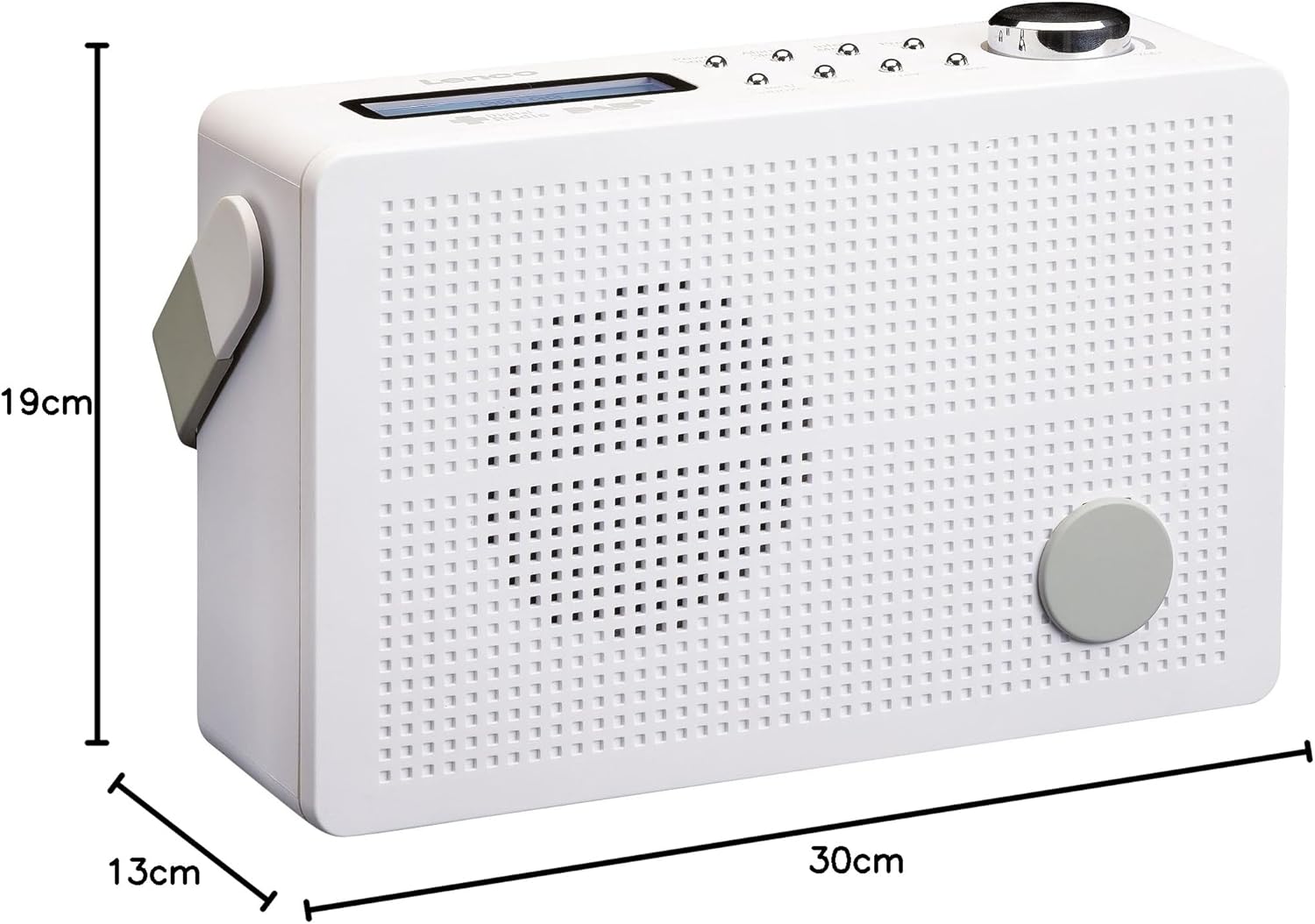
Figura 8.1: Lenco PDR-030 Dimensions.
| Karatteristika | Dettall |
|---|---|
| Numru tal-Mudell | PDR-030 |
| Teknoloġija Tuner | DAB+, FM (Ukw) |
| Sors tal-Enerġija | Battery-Powered (Integrated Lithium-ion), AC Adapter |
| AC Voltage | 220 Volt |
| Dimensjonijiet tal-Prodott (W x D x H) | 21.4 x 6.5 x 13.8 cm (approx. 22.5 x 8.5 x 15 cm as per another spec) |
| Piż tal-oġġett | 9 g (Note: This seems incorrect, likely 670g from description) |
| Tip ta' Materjal | Plastik |
| Interface tal-Ħardwer | 3.5 mm Audio (Headphone Jack) |
| Karatteristiċi Speċjali | Portable, RDS Display, Alarm Clock, Station Memory (10 DAB+, 10 FM) |
Note: Some dimensions and weight specifications provided by the manufacturer may vary slightly. The description states 670 grams for weight, while specifications list 9g. Please refer to the product packaging for the most accurate information.
9. Garanzija u Appoġġ
Lenco products are designed for reliability and performance. This product typically comes with a 24-month manufacturer's warranty from the date of purchase, covering defects in materials and workmanship. Please retain your proof of purchase for warranty claims.
For technical support, service, or warranty inquiries, please refer to the contact information provided on the Lenco official website or your local retailer. Do not attempt to repair the device yourself.
Għal aktar informazzjoni, tista' żżur il- Lenco Store on Amazon.