1. Introduzzjoni
The Amkette Trubeats S50 is a versatile smart wireless Bluetooth speaker designed to enhance your audio experience. It features multiple connectivity options including Bluetooth, USB, Micro SD card, and AUX input, along with an integrated FM radio. The speaker also includes a digital clock with alarm functions and can be controlled via a dedicated smartphone application. Additionally, it can function as a power bank to charge your mobile devices.
2. Kontenut tal-Pakkett
Jekk jogħġbok immarka l-kaxxa għall-oġġetti li ġejjin:
- Amkette Trubeats S50 Smart Wireless Bluetooth Speaker
- Cable tal-Iċċarġjar tal-USB
- Cable AUX
- Manwal għall-Utent (dan id-dokument)
3. Prodott Aktarview
Familiarize yourself with the various parts and controls of your Amkette Trubeats S50 speaker.
3.1 Quddiem View

Figura 1: Quddiem view of the Amkette Trubeats S50 speaker, showing the speaker grille and LED display.
3.2 Il-Panel tal-Kontroll ta' Fuq

Figure 2: Labeled diagram of the Amkette Trubeats S50 speaker's top control buttons: Mode, Volume Down/Previous, Play/Pause/Answer Call, Volume Up/Next, Clock, and Microphone.
- Buttuna MODE: Press to switch between Bluetooth, FM, AUX, USB, and Micro SD modes.
- K-/ Button: Press to decrease volume; long press for previous track/station.
- Play/Pause/Answer Call Button: Press to play/pause audio; press to answer/end calls.
- +/N Button: Press to increase volume; long press for next track/station.
- Buttuna tal-ARLOĠĠ: Press to set time and alarms.
- Mikrofonu: Għal sejħiet mingħajr idejn.
3.3 Rear Ports and Switch

Figure 3: Labeled diagram of the Amkette Trubeats S50 speaker's rear ports: AUX, Micro SD, USB Host, USB DC, and On/Off switch.
- Input AUX: Qabbad apparati awdjo esterni billi tuża l-kejbil AUX ta' 3.5mm.
- Slott tal-Karta Mikro SD: Daħħal kard Micro SD biex tisma' l-awdjo.
- Port Ospitanti USB: Insert a USB drive for audio playback or use as a power bank.
- USB DC Input: Connect the USB charging cable to power the speaker.
- Swiċċ mixgħul / mitfi: Power the speaker on or off.
4. Setup
4.1 Iċċarġjar tal-Ispeaker
- Connect the small end of the USB charging cable to the USB DC Input port fuq wara tal-ispiker.
- Qabbad it-tarf il-kbir tal-kejbil tal-iċċarġjar USB ma' adapter tal-enerġija USB (mhux inkluż) jew mal-port USB tal-kompjuter.
- L-indikatur LED juri l-istatus tal-iċċarġjar. Iċċarġjar sħiħ tipikament jieħu madwar sagħtejn.
Nota: The speaker does not have a visible battery level indicator. It is recommended to charge fully before first use and when the battery is low.
4.2 Tixgħel/Jitfi
- Biex tixgħel, żżerżaq il- Swiċċ ON/OFF on the rear of the speaker to the 'ON' position.
- Biex titfi, żżerżaq il- Swiċċ ON/OFF to the 'OFF' position.
5. Istruzzjonijiet Operattivi
5.1 Tqabbil tal-Bluetooth

Figure 4: Speaker in Bluetooth pairing mode, indicated by 'BT' on the display.
- Power on the speaker. It will automatically enter Bluetooth pairing mode, indicated by 'BT' flashing on the LED display.
- Ippermetti Bluetooth fuq l-ismartphone jew apparat ieħor tiegħek.
- Fittex għal available devices and select "Amkette S50" from the list.
- Once paired, the speaker will emit a confirmation tone, and 'BT' will stop flashing.
- Issa tista' ddoqq l-awdjo mit-tagħmir tiegħek permezz tal-ispiker.
5.2 L-Użu tal-Input AUX

Figure 5: Speaker connected to a smartphone via AUX cable for wired audio playback.
- Qabbad tarf wieħed tal-kejbil AUX ta' 3.5mm mal- Input AUX port fuq wara tal-ispiker.
- Connect the other end of the AUX cable to the audio output jack of your external device (e.g., smartphone, MP3 player, laptop).
- Agħfas il- Button MODE repeatedly until the speaker enters AUX mode.
- Daqq l-awdjo mit-tagħmir konness tiegħek.
5.3 Using USB/Micro SD Card
- Daħħal USB drive fil- Port Ospitanti USB or a Micro SD card into the Slot tal-Kard Mikro SD fuq wara tal-kelliem.
- Żgura l-awdjo tiegħek files (MP3 format recommended) are stored on the drive/card.
- Agħfas il- Button MODE repeatedly until the speaker enters USB or Micro SD mode. Playback will begin automatically.
- Uża l- K-/ u +/N buttuni għan-navigazzjoni tat-traċċi u l-kontroll tal-volum.
5.4 Tħaddim tar-Radju FM

Figure 6: Speaker displaying FM frequency, with app control for station selection.
- Agħfas il- Button MODE repeatedly until the speaker enters FM radio mode.
- Skanjar Awtomatiku: Fil-modalità FM, agħfas fit-tul il- Play/Pawsa buttuna biex tibda skennjar awtomatiku għal stazzjonijiet FM disponibbli. L-ispiker se jsalva l-istazzjonijiet skoperti.
- Irfinar Manwali: Uża l- K-/ u +/N buttuni biex tinnaviga fl-istazzjonijiet salvati.
- For precise tuning and station management, use the Amkette Trubeats Smart Speaker App (see section 5.7).
5.5 Digital Clock and Alarm Setup

Figure 7: Speaker displaying the current time on its LED screen.
- Ħin tal-issettjar: Agħfas u żomm il- Buttuna arloġġ. The hour display will flash. Use the K-/ u +/N buttuni biex taġġusta s-siegħa. Agħfas il-buttuna Buttuna arloġġ again to set minutes, and adjust with K-/ u +/N. Agħfas Buttuna arloġġ għal darb'oħra biex nikkonferma.
- Issettjar ta' Allarmi: Agħfas fil-qosor il- Buttuna arloġġ to cycle through Alarm 1 and Alarm 2 settings. When an alarm time is displayed, long press the Buttuna arloġġ to enter alarm setting mode. Adjust hour and minute using K-/ u +/N, confirming each with a short press of the Buttuna arloġġ. You can also set the alarm source (FM/SD Card/USB) via the app.
5.6 Użu bħala Power Bank
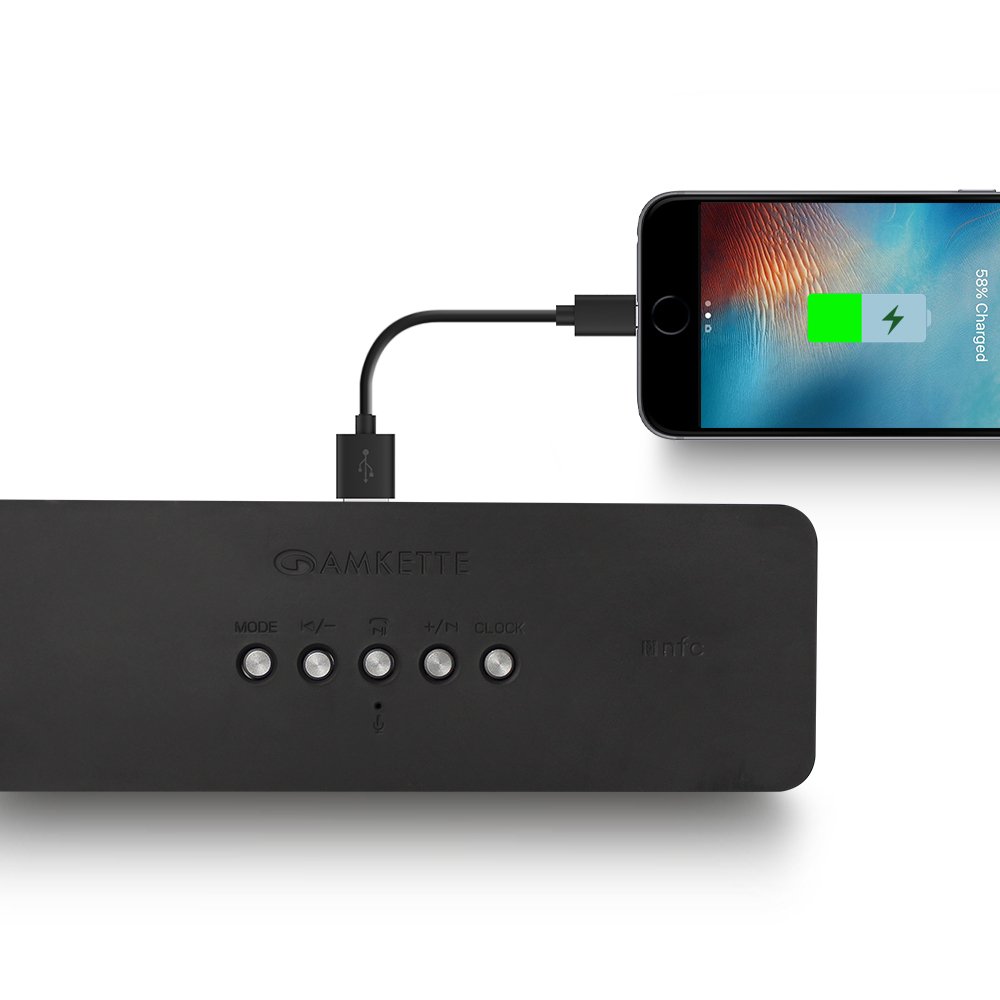
Figure 8: Speaker providing power to a smartphone through its USB Host port.
The Amkette Trubeats S50 can charge your smartphone or other USB-powered devices. Connect your device's charging cable to the Port Ospitanti USB on the rear of the speaker. The speaker's internal battery will then supply power to your device.
5.7 App Control (Android Only)

Figure 9: Smartphone displaying the Amkette Trubeats Smart Speaker App interface.
For enhanced control, download the Amkette Trubeats Smart Speaker App from the Google Play Store (for Android phones). The app allows you to:
- Switch between different audio modes.
- Control volume and track playback.
- Manage FM radio stations and perform precise tuning.
- Set and customize alarms, including alarm source.
Ensure your speaker is connected via Bluetooth to your smartphone for app functionality.
5.8 Immaniġġjar tas-Sejħiet
When connected via Bluetooth to a smartphone, the speaker can be used for hands-free calling:
- Irrispondi Sejħa: Agħfas il- Play/Pause/Answer Call Button darba.
- Tmiem Sejħa: Agħfas il- Play/Pause/Answer Call Button darba waqt telefonata.
- Irrifjuta Sejħa: Agħfas fit-tul il- Play/Pause/Answer Call Button.
6. Manutenzjoni
- Żomm l-ispiker 'il bogħod minn temperaturi estremi, dawl tax-xemx dirett, u umdità.
- Naddaf l-ispiker b'ċarruta ratba u niexfa. Tużax prodotti tat-tindif jew solventi li joborxu.
- Evita li twaqqa’ l-ispiker jew li tissottomettih għal impatti qawwija.
- Meta ma tkunx qed tużah għal perjodi twal, aħżen l-ispiker f'post frisk u niexef u ċċarġjah perjodikament biex iżżomm il-batterija f'kundizzjoni tajba.
7 Issolvi l-problemi
| Problema | Kawża Possibbli | Soluzzjoni |
|---|---|---|
| L-ispiker ma jixgħelx. | Il-batterija hija eżawrita. | Iċċarġja l-ispiker kompletament. |
| L-ebda ħoss mill-ispiker. | Il-volum huwa baxx wisq; intgħażlet modalità żbaljata; l-apparat mhux imqabbad sew. | Increase speaker and source device volume. Ensure correct mode (Bluetooth, AUX, etc.) is selected. Reconnect the device. |
| Tqabbil Bluetooth ifalli. | L-ispiker mhux fil-modalità ta' tqabbil; l-apparat wisq 'il bogħod; interferenza. | Ensure speaker is in pairing mode ('BT' flashing). Move device closer to speaker. Turn off other Bluetooth devices. |
| Riċeviment ħażin tar-radju FM. | Sinjal dgħajjef; interferenza ambjentali. | Relocate the speaker to an area with better reception. Perform an auto-scan again. |
| L-app mhux qed tikkonnettja mal-ispiker. | Bluetooth not connected; app issue. | Ensure speaker is paired via Bluetooth to your phone. Restart the app and try again. |
8. Speċifikazzjonijiet
- Mudell: S50
- Ditta: Amkette
- Tip ta' Kelliem: Portable Bluetooth Speaker (Outdoor)
- Konnettività: Bluetooth, USB, Micro SD, AUX, FM Radio
- Teknoloġija tal-Komunikazzjoni mingħajr Fili: Bluetooth
- Metodu ta' Kontroll: Buttons, App (Android)
- Modalità tal-Ħruġ tal-Awdjo: Stereo
- Awdjo Wattage: 10 Watts
- Sors tal-Enerġija: Mħaddma bil-batterija
- Ħajja tal-batterija: Sa 12 siegħa (medja)
- Ħin tal-Iċċarġjar: Madwar sagħtejn
- Apparati Kompatibbli: Laptop, Mobile, Tablet
- Dimensjonijiet (LxWxH): 26.7 x 10.9 x 7.9 ċm
- Piż tal-oġġett: 703 Gramm
- Li ma jgħaddix ilma minnha: Iva
- Tip ta 'Immuntar: Immonta fuq il-mejda
9. Garanzija u Appoġġ
The Amkette Trubeats S50 Smart Wireless Bluetooth Speaker comes with a garanzija ta 'sena mid-data tax-xiri. Din il-garanzija tkopri difetti fil-manifattura taħt użu normali.
For warranty claims, technical assistance, or any other support inquiries, please contact Amkette customer support through their official webis-sit jew l-informazzjoni ta' kuntatt ipprovduta mad-dokumentazzjoni tax-xiri tiegħek.
Jekk jogħġbok żomm l-irċevuta tax-xiri tiegħek bħala prova tax-xiri għal skopijiet ta' garanzija.


