1. Introduzzjoni
This manual provides essential information for the proper installation, operation, and maintenance of the ROGER TECHNOLOGY R70/2AC/BOX Control Unit. This unit is designed to manage two 230V AC motors, housed within a durable plastic enclosure. Please read these instructions carefully before proceeding with any installation or operation.
2. Istruzzjonijiet tas-Sigurtà
- Sigurtà Elettrika: Installation and maintenance must be performed by qualified personnel only. Disconnect power before any work on the control unit.
- Kundizzjonijiet Ambjentali: Ensure the control unit is installed in an environment suitable for its IP rating, protected from excessive moisture, dust, and extreme temperatures.
- Wiring kif suppost: All wiring must comply with local electrical codes and the specifications provided in this manual. Incorrect wiring can lead to malfunction or electrical hazards.
- Użu Intenzjonat: This unit is designed for controlling two 230V AC motors. Do not use it for purposes other than those specified.
3. Prodott Aktarview
The ROGER TECHNOLOGY R70/2AC/BOX is a robust control unit housed in a plastic enclosure, engineered for reliable control of dual 230V AC motors. Its design prioritizes durability and ease of integration into various systems.
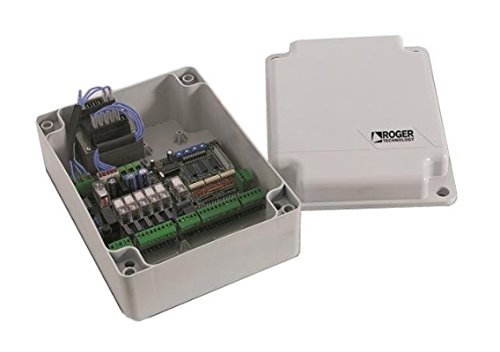
Figura 1: ROGER TECHNOLOGY R70/2AC/BOX Control Unit. This image displays the control unit enclosed in its protective plastic housing, highlighting its compact and industrial design suitable for various applications.
4. Setup
4.1. Immuntar
- Select a suitable, stable, and accessible location for mounting the control unit, ensuring it is protected from direct weather exposure if installed outdoors.
- Use appropriate fasteners to securely mount the plastic enclosure to a wall or support structure. Ensure the mounting surface can support the weight of the unit.
4.2. Il-wajers
WARNING: Ensure all power is disconnected before performing any wiring.
- Provvista tal-Enerġija: Connect the main 230V AC power supply to the designated terminals. Ensure proper grounding.
- Konnessjonijiet bil-mutur: Connect the two 230V AC motors to their respective output terminals on the control unit. Follow the wiring diagram provided with the unit for correct phase and neutral connections.
- Apparat tas-Sigurtà: Integrate all necessary safety devices (e.g., photocells, emergency stops, limit switches) into the control unit's safety input terminals as per the wiring diagram.
- Apparati ta' Kontroll: Connect any external control devices (e.g., push buttons, key switches, remote receivers) to the appropriate input terminals.
5. Istruzzjonijiet Operattivi
5.1. L-Inizjali Tixgħel
- After completing all wiring and ensuring all connections are secure, restore power to the control unit.
- Observe the status indicators (LEDs) on the control board. Refer to the unit's specific documentation for LED status meanings.
5.2. Operazzjoni Bażika
The R70/2AC/BOX unit typically operates through programmed cycles. Depending on the specific application, this may involve:
- Attivazzjoni manwali: Using a connected push button or remote control to initiate motor movement.
- Ċikli Awtomatiċi: Programming the unit for timed operations or responses to sensor inputs.
- Waqfien tas-Sigurtà: Activating an emergency stop or safety sensor will halt motor operation immediately.
5.3. Programming (if applicable)
For advanced functionalities such as setting motor speeds, operating times, or specific sequences, refer to the detailed programming guide provided with your control unit. Programming typically involves navigating a menu system via onboard buttons or a dedicated programmer tool.
6. Manutenzjoni
Regular maintenance ensures the longevity and reliable operation of your control unit.
- Spezzjoni Perjodika: Annually inspect all wiring connections for tightness and signs of wear or corrosion.
- Verifika tal-Għeluq: Ensure the plastic enclosure remains sealed and free from damage to protect internal components from environmental factors.
- Tindif: Keep the exterior of the enclosure clean. If necessary, gently clean the interior with a soft, dry brush or compressed air, ensuring power is disconnected.
- Test tal-Funzjonalità: Periodically test all connected safety devices and control inputs to ensure they are functioning correctly.
7 Issolvi l-problemi
This section addresses common issues you might encounter with the R70/2AC/BOX control unit.
| Problema | Kawża Possibbli | Soluzzjoni |
|---|---|---|
| L-unità ma tixgħelx | No power supply; Blown fuse; Incorrect wiring | Check main power supply; Inspect and replace fuse if necessary; Verify power wiring connections. |
| Motors do not respond | Incorrect motor wiring; Safety device activated; Programming error | Check motor connections; Verify all safety devices are disengaged; Review settings tal-ipprogrammar. |
| Operazzjoni intermittenti | Loose connections; Interference; Faulty sensor | Inspect all wiring for loose connections; Check for sources of electrical interference; Test and replace faulty sensors. |
If the problem persists after attempting these solutions, contact qualified technical support.
8. Speċifikazzjonijiet
| Karatteristika | Dettall |
|---|---|
| Numru tal-Mudell | R70/2AC/BOX |
| Referenza tal-Manifattur | R70/2AC/BOX |
| Manifattur | ROGER |
| Kompatibilità bil-Mutur | Two 230V AC motors (also available for 115V) |
| Tip ta' Kompartiment | Kaxxa tal-plastik |
| ASIN | B01MQQECNB |
| Production Status | Għadu fil-produzzjoni |
| Data Elenkata fuq Amazon.com.be | 20 ta’ Ġunju 2022 |
9. Informazzjoni dwar Garanzija
ROGER TECHNOLOGY products are manufactured to high-quality standards. For specific warranty terms and conditions, please refer to the warranty card included with your product or visit the official ROGER TECHNOLOGY websit. Żomm il-prova tax-xiri tiegħek għal talbiet ta' garanzija.
10. Appoġġ
For technical assistance, troubleshooting beyond this manual, or spare parts inquiries, please contact your authorized ROGER TECHNOLOGY dealer or visit the official ROGER TECHNOLOGY support portal. Ensure you have your product model number (R70/2AC/BOX) and serial number (if applicable) ready when contacting support.
Uffiċjali Websit: www.rogertechnology.com


