1. Introduzzjoni
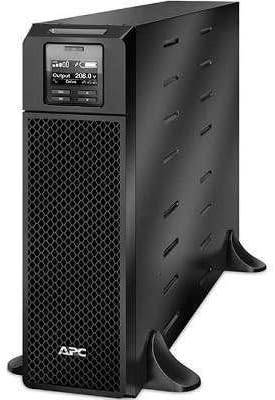
This manual provides essential instructions for the installation, operation, maintenance, and troubleshooting of your APC Smart-UPS SRT 5000VA 208V. Please read this manual thoroughly before attempting to install or operate the UPS. Retain this manual for future reference.
The APC Smart-UPS SRT 5000VA 208V is an Uninterruptible Power Supply (UPS) designed to provide protected power to electronic equipment. It safeguards connected equipment from power outages, sags, surges, and other power disturbances.
2. Informazzjoni dwar is-Sigurtà
Observe all warnings and operating instructions in this manual. Failure to do so may result in injury or equipment damage.
Sigurtà Ġenerali
- Dan l-UPS huwa maħsub għall-użu fuq ġewwa biss.
- Tħaddimx dan l-UPS fid-dawl tax-xemx dirett, f'kuntatt ma' fluwidi, jew fejn ikun hemm trab jew umdità eċċessivi.
- Ensure the ventilation openings on the UPS are not blocked.
- Do not connect appliances that would overload the UPS.
- Is-servizz tal-batteriji għandu jsir jew jiġi sorveljat minn persunal infurmat dwar il-batteriji u l-prekawzjonijiet meħtieġa.
Sigurtà Elettrika
- The UPS contains internal batteries that may present a shock hazard even when disconnected from the AC power.
- The UPS must be connected to a grounded AC outlet.
- Tiftaħx l-għeluq tal-UPS. Ġewwa m'hemm l-ebda partijiet li jistgħu jiġu sservisjati mill-utent.
- Use only the specified power cords and connectors.
3. Kontenut tal-Pakkett
Carefully unpack the UPS and inspect for shipping damage. If any damage is found, notify the carrier and dealer. The package should contain the following items:
- APC Smart-UPS SRT 5000VA 208V Unit
- CD Dokumentazzjoni
- Gwida ta' Informazzjoni dwar is-Sigurtà
- Cable USB
- Kejbil tas-Serje
- Network Management Card (if included with specific model variant)
- Rack-mounting hardware (if applicable)
- Tower stand (if applicable)
4. Setup
4.1 Preparazzjoni tas-Sit
Before installing the UPS, ensure the installation site meets the following requirements:
- Temperatura: 0°C sa 40°C (32°F sa 104°F)
- Umdità: 0% sa 95% umdità relattiva, mingħajr kondensazzjoni
- Clearance: Allow adequate space around the UPS for proper ventilation.
- Piż: The UPS is heavy. Use appropriate lifting techniques and personnel.
4.2 Installazzjoni Fiżika
The SRT 5000VA can be installed in a tower configuration or rack-mounted. Refer to the specific installation guide for detailed rack-mounting instructions.
- Place the UPS on a stable, level surface. If using the tower stand, ensure it is securely attached.
- Ensure all ventilation openings are clear.
4.3 Tagħmir ta' Konnessjoni
Connect your equipment to the output receptacles on the rear panel of the UPS. Do not overload the UPS. Refer to the specifications section for capacity details.

Image: Rear panel of the UPS, illustrating connection points for input power, output receptacles, and communication ports.
4.4 Qawwa Inizjali
- Connect the UPS input power cord to a grounded 208V AC outlet.
- Press the power button on the front panel to turn on the UPS.
- The UPS will perform a self-test. The display will show status information.
5. Tħaddim tal-UPS
5.1 Wiri tal-Panew ta 'quddiem
The front panel LCD provides real-time status information and allows configuration of UPS settings. Use the navigation buttons to scroll through menus and select options.

Immaġni: Dettaljata view of the UPS front panel display, indicating current operational status and settings.
5.2 Funzjonijiet Bażiċi
- Power On/Off: Press the power button to turn the UPS on or off.
- Awto-Test: Initiate a manual self-test through the LCD menu to verify battery and UPS functionality.
- Allarme Mute: Temporarily silence audible alarms via the front panel button.
- Status tal-batterija: Monitor battery charge level and estimated runtime on the display.
6. Manutenzjoni
6.1 Sostituzzjoni tal-batterija
The UPS uses hot-swappable, user-replaceable battery modules. Replace batteries only with APC-approved replacement battery cartridges (RBCs). Refer to the specific battery replacement guide for detailed instructions.
Twissija: Risk of explosion if battery is replaced by an incorrect type. Dispose of used batteries according to the manufacturer's instructions and local regulations.
6.2 Tindif
Clean the exterior of the UPS with a soft, damp cloth. Do not use solvents or abrasive cleaners. Ensure ventilation openings are free of dust and debris.
7 Issolvi l-problemi
This section provides solutions to common issues. If a problem persists after attempting these steps, contact APC technical support.
| Problema | Kawża Possibbli | Soluzzjoni |
|---|---|---|
| UPS mhux se jixgħel | No input power; discharged battery | Verify input power connection; allow UPS to charge for several hours. |
| Il-UPS jagħmel ħoss kontinwu | On battery; low battery; overload | Check input power; allow battery to charge; reduce connected load. |
| Overload indicator is lit | Too much equipment connected | Disconnect non-essential equipment until the indicator turns off. |
| Battery runtime is shorter than expected | Battery nearing end of life; high load | Perform a battery self-test; consider replacing the battery module; reduce connected load. |
8. Speċifikazzjonijiet
| Karatteristika | Dettall |
|---|---|
| Mudell | SRT5KXLT |
| Kapaċità | 5000VA / 4500W |
| Input Voltage | 208V |
| Ħruġ Voltage | 208V |
| Tip ta 'batterija | Aċidu taċ-Ċomb |
| Dimensjonijiet (H x W x D) | 17" x 5.1" x 28.3" |
| Piż | 2 liri |
| Temperatura operattiva | 0°C sa 40°C (32°F sa 104°F) |
9. Garanzija u Appoġġ
9.1 Informazzjoni dwar Garanzija
APC provides a standard warranty for this product. For specific warranty terms and conditions, please refer to the warranty card included with your product or visit the official APC website. Proof of purchase is required for all warranty claims.
9.2 Appoġġ Tekniku
For technical assistance, troubleshooting, or service inquiries, please contact APC customer support. Have your product model number (SRT5KXLT) and serial number ready when contacting support.
You can find contact information on the APC website or in the documentation provided with your UPS.


