1. Introduzzjoni
This manual provides essential information for the installation, operation, and maintenance of your EVGA GeForce GTX 1050 Ti SC GAMING graphics card. Please read these instructions carefully before proceeding with installation to ensure proper functionality and to prevent damage to your system components.
The EVGA GeForce GTX 1050 Ti SC GAMING is a high-performance graphics card designed for an enhanced computing experience, featuring NVIDIA Pascal architecture and 4GB of GDDR5 memory. It is optimized for gaming at 1080p resolution and supports multiple display outputs.
2. Rekwiżiti tas-Sistema
- Motherboard konformi mal-PCI Express b'slott grafika wieħed x16.
- Minimum 300W or greater system power supply (with a minimum 18A on the +12V rail).
- 350MB of available hard-disk space.
- 4GB system memory (6GB or higher recommended).
- Microsoft Windows 10, Windows 8, or Windows 7 (32/64-bit).
- CD-ROM/DVD-ROM drive or internet connection for driver installation.
3. Installazzjoni tal-Ħardwer
- Ipprepara s-Sistema Tiegħek: Itfi l-kompjuter tiegħek u skonnettja l-kejbil tal-enerġija mis-sokit tal-ħajt. Iftaħ il-kaxxa tal-kompjuter tiegħek.
- Sib is-Slott tal-PCI Express: Identifika slot PCI Express x16 disponibbli fuq il-motherboard tiegħek. Dan tipikament huwa l-itwal slot.
- Neħħi l-Għatu tas-Slott: Remove the metal slot cover from the back of your computer case corresponding to the chosen PCI Express slot.
- Installa Karta Grafika: Carefully align the graphics card with the PCI Express x16 slot. Press down firmly and evenly until the card is securely seated in the slot. Ensure the retention clip on the slot engages.
- Sikura l-Kard: Use a screw to fasten the graphics card's mounting bracket to the computer case.
- Qabbad il-Kejbils tad-Displej: Connect your monitor(s) to the appropriate video output ports on the graphics card (DisplayPort, HDMI, or DVI-D).
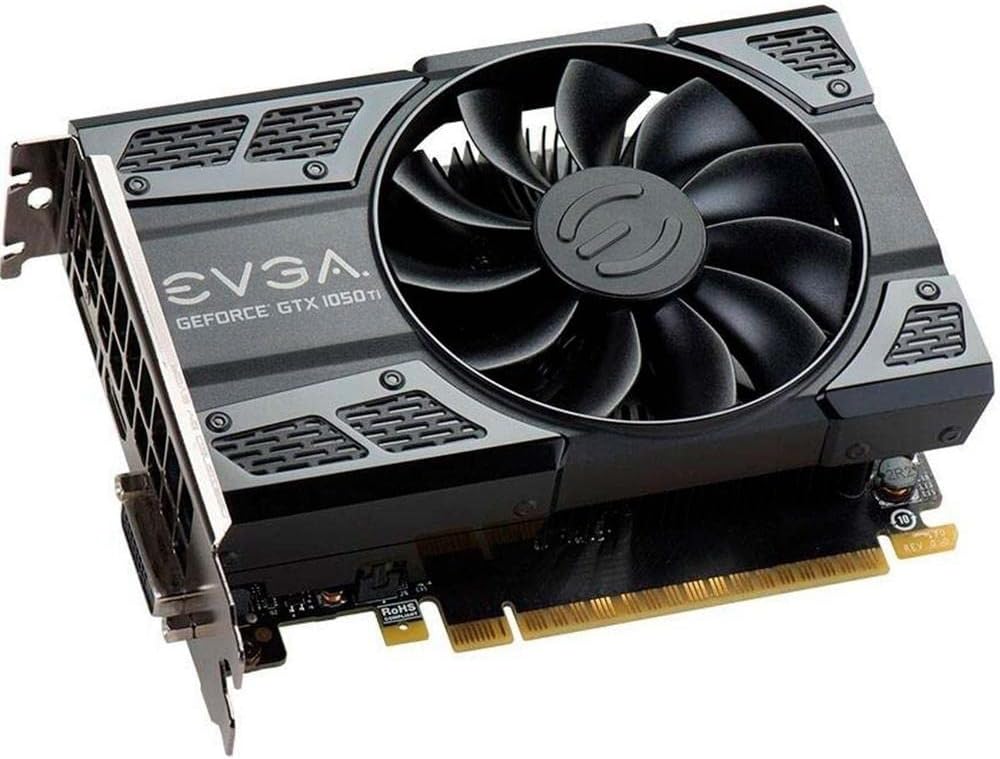
This image shows the front of the EVGA GeForce GTX 1050 Ti SC GAMING graphics card, highlighting its single cooling fan and EVGA branding.
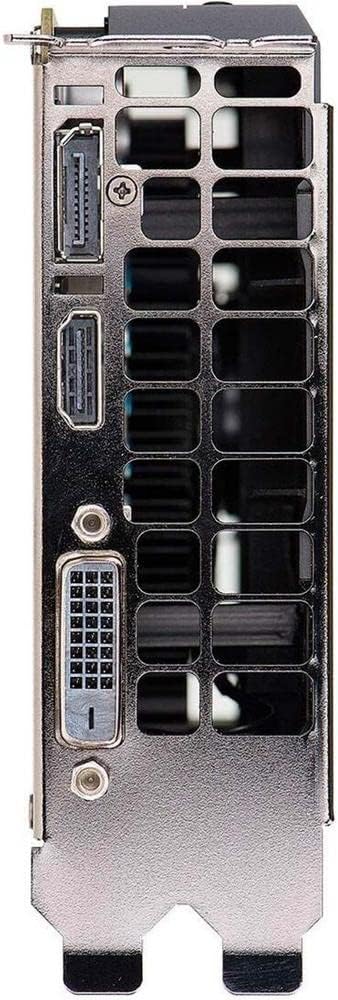
This image displays the video output ports on the graphics card, including DisplayPort, HDMI, and DVI-D connectors.
- Agħlaq il-Kaxxa u Ixgħelha: Agħlaq il-kaxxa tal-kompjuter tiegħek, erġa' qabbad il-kejbil tal-enerġija, u ixgħel is-sistema tiegħek.
4. Installazzjoni tas-sewwieq
After hardware installation, the operating system may install generic drivers. For optimal performance and full functionality, install the latest drivers from EVGA or NVIDIA.
- Niżżel is-Sewwieqa: Visit the official EVGA websit (www.evga.com/drivers/) jew NVIDIA websit (www.nvidia.com/sewwieqa).
- Agħżel il-Prodott: Choose your graphics card model (GeForce GTX 1050 Ti) and operating system.
- Niżżel u Ħaddem: Download the recommended driver package and run the installer.
- Segwi l-Prompts fuq l-Iskrin: Follow the instructions provided by the driver installer. A system restart may be required to complete the installation.
Consider installing EVGA Precision XOC software for advanced monitoring, overclocking, and fan control features, which supports DX12 OSD (On-Screen Display).
5. It-Tħaddim tal-Karta Grafika Tiegħek
Once drivers are installed, your EVGA GeForce GTX 1050 Ti SC GAMING graphics card is ready for use. It will automatically handle graphics processing for applications and games. Ensure your display settings are configured correctly for resolution and refresh rate.
- Issettjar tal-wiri: Access your operating system's display settings to set the desired resolution (up to 1080p for optimal performance) and refresh rate (up to 240 Hz max).
- Setup ta' Multi-Monitor: The card supports up to three monitors simultaneously. Configure extended desktop or duplicate display modes through your operating system's display settings or the NVIDIA Control Panel.
- Logħob: For gaming, ensure your game settings are optimized for your system's capabilities to achieve smooth frame rates.
6. Manutenzjoni
Manutenzjoni regolari tgħin biex tiżgura l-lonġevità u l-prestazzjoni ottimali tal-karta grafika tiegħek.
- Aġġornamenti tas-sewwieq: Periodically check for and install the latest graphics drivers from EVGA or NVIDIA. Driver updates often include performance improvements, bug fixes, and support for new games.
- Tindif tat-Trab: Over time, dust can accumulate on the fan and heatsink, reducing cooling efficiency. Carefully clean the fan and heatsink using compressed air. Ensure the system is powered off and unplugged before cleaning. Avoid touching the fan blades directly.
- Fluss tal-arja: Kun żgur li l-kaxxa tal-kompjuter tiegħek għandha fluss tal-arja adegwat biex tevita li tisħon iżżejjed. Żomm iż-żona madwar il-kompjuter tiegħek ħielsa minn ostakli.
7 Issolvi l-problemi
If you encounter issues with your graphics card, refer to the following troubleshooting steps:
- L-ebda Output tal-Wiri:
- Ensure the monitor is powered on and the display cable is securely connected to both the graphics card and the monitor.
- Verify the graphics card is fully seated in the PCI Express slot.
- Ittestja b'kejbil tad-displej jew monitor differenti jekk possibbli.
- Iċċekkja jekk il-monitor tiegħek huwiex issettjat għas-sors tad-dħul korrett.
- Kwistjonijiet tas-sewwieq:
- If you experience crashes or display artifacts, try reinstalling the graphics drivers. Use a clean installation option if available in the driver installer.
- Ensure you have downloaded the correct drivers for your specific graphics card model and operating system.
- Problemi ta' Prestazzjoni:
- Ensure your system meets the recommended requirements for the applications or games you are running.
- Monitor GPU temperatures using software like EVGA Precision XOC. High temperatures can lead to performance throttling.
- Agħlaq l-applikazzjonijiet fl-isfond li mhumiex meħtieġa biex tillibera r-riżorsi tas-sistema.
- Instabbiltà tas-Sistema:
- Kun żgur li l-unità tal-provvista tal-enerġija (PSU) tiegħek tissodisfa l-minimu ta' wattstage rekwiżiti.
- Check for any loose connections inside your computer case.
8. Speċifikazzjonijiet
| Karatteristika | Speċifikazzjoni |
|---|---|
| Koproċessur tal-Grafika | NVIDIA GeForce GTX 1050 Ti |
| Brand | EVGA |
| Numru tal-Mudell | 04G-P4-6253-KR |
| Daqs tar-RAM tal-Grafika | 4 GB GDDR5 |
| Interface tal-Output tal-Vidjo | DVI-D, DisplayPort, HDMI |
| Manifattur tal-Proċessur tal-Grafika | NVIDIA |
| Arloġġ Bażi | 1354 MHz |
| Boost Arloġġ | 1468 MHz |
| Interface | PCI Express 3.0 |
| Max Monitors Supported | 3 |
| Max Rata ta' Aġġornar | 240 Hz |
| Dimensions (Height x Length) | 4.4 inch x 5.7 inch (Compact Size) |
| Appoġġ tas-Sistema Operattiva | Windows 10 (32/64bit), Windows 8 (32/64bit), Windows 7 (32/64bit) |
9. Garanzija u Appoġġ
For warranty information, technical support, and additional resources, please visit the official EVGA website or contact EVGA customer service. Keep your proof of purchase for warranty claims.
EVGA Official Websit: www.evga.com


