1. Introduzzjoni
The Imperial DABMAN i400 is a versatile audio adapter designed to enhance your existing stereo system with modern radio and streaming capabilities. It provides access to thousands of internet radio stations, digital radio (DAB+), and traditional FM radio. Additionally, it supports audio streaming via Bluetooth, UPnP/DLNA, and USB, offering a comprehensive listening experience.
2. Istruzzjonijiet tas-Sigurtà
- Provvista tal-Enerġija: Uża biss l-adapter tal-enerġija pprovdut. Kun żgur li l-volumtage taqbel mal-provvista tal-enerġija lokali tiegħek.
- Ilma u Umdità: Tesponix l-apparat għax-xita, umdità, jew likwidi li jqattru/jittajru. Tpoġġix oġġetti mimlija b'likwidi, bħal vażuni, fuq l-apparat.
- Ventilazzjoni: Kun żgur li jkun hemm ventilazzjoni adegwata. Timblokkax il-fetħiet tal-ventilazzjoni. Evita li tpoġġi l-apparat fuq uċuħ rotob li jistgħu jostakolaw il-fluss tal-arja.
- Sorsi tas-Sħana: Żomm l-apparat 'il bogħod minn sorsi ta' sħana bħal radjaturi, reġistri tas-sħana, stufi, jew apparati oħra li jipproduċu s-sħana.
- Tindif: Skonnettja l-provvista tal-enerġija qabel it-tindif. Uża drapp artab u niexef. Tużax prodotti tat-tindif likwidi jew aerosol.
- Servizzi: Tippruvax isservi dan il-prodott int stess. Irreferi l-manutenzjoni kollha lil persunal tas-servizz kwalifikat.
3. Kontenut tal-Pakkett
Jekk jogħġbok iċċekkja li l-oġġetti kollha huma preżenti fil-pakkett:
- Imperial DABMAN i400 Internet Digital Radio
- Adapter tal-Enerġija
- Telescopic Antenna with F-connector
- Wire Antenna with F-connector
- RCA Cable
- Kejbil tal-Awdjo (ġakk ta' 3.5mm)
- Kontroll mill-bogħod
- Manwal għall-Utent (dan id-dokument)

Image: Imperial DABMAN i400 with its power adapter, telescopic antenna, wire antenna, RCA cable, 3.5mm audio cable, and remote control.
4. Prodott Aktarview
Quddiem View

Image: The front of the Imperial DABMAN i400, showing its display and control buttons on the top edge.
The front of the DABMAN i400 features a clear 3.2-inch LCD display for navigation and information. Control buttons are located on the top edge of the device for easy access to functions like power, mode selection, volume, and station presets.
Wara View u Konnessjonijiet
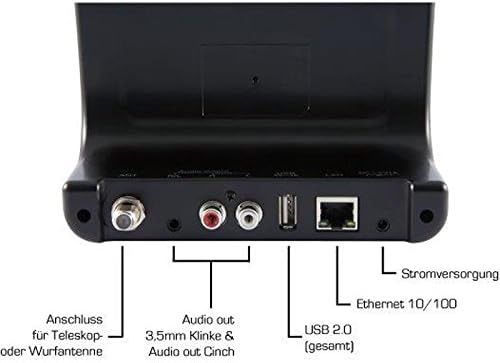
Image: The rear panel of the Imperial DABMAN i400, detailing its various connection ports. From left to right: Antenna connection (ANT), Audio output (RCA L/R and 3.5mm jack), USB 2.0 ports, Ethernet 10/100 (LAN), and Power supply (DC 5V/1A).
- ANT: F-connector for connecting the telescopic or wire antenna for DAB+/FM reception.
- Audio Output (R/L): RCA (Cinch) stereo audio output for connecting to an amplifier jew sistema stereo.
- Ħruġ tal-Awdjo (Ġakk ta' 3.5mm): 3.5mm stereo audio output for connecting to other audio devices.
- USB 2.0: USB port for playing media from a USB storage device.
- LAN: Ethernet port (RJ45) for wired network connection.
- DC 5V/1A: Input tal-enerġija għall-adapter tal-enerġija inkluż.
5. Setup
- Qabbad l-Antenna: Screw the telescopic antenna or connect the wire antenna to the ANT F-connector on the rear panel. Extend the telescopic antenna for optimal reception.
- Qabbad mas-Sistema Awdjo: Use the provided RCA cable to connect the Audio Output (R/L) on the DABMAN i400 to an available audio input (e.g., AUX, CD, LINE IN) on your amplifier or stereo system. Alternatively, use the 3.5mm audio cable if your system has a compatible input.
- Konnessjoni tan-Netwerk:
- Bil-fili (LAN): Qabbad kejbil Ethernet mir-router tiegħek mar- LAN port on the rear of the DABMAN i400.
- Wireless (WLAN): The device will prompt you to set up Wi-Fi during the initial startup wizard. Select your network and enter the password.
- Qabbad l-Enerġija: Ipplaggja l-adapter tal-enerġija fil- DC 5V/1A input on the rear panel, then plug the adapter into a wall outlet. The device will power on automatically or enter standby mode.
- Inizjali Setup Wizard: Upon first power-on, the device will guide you through an initial setup process, including language selection, time/date settings, and network configuration. Follow the on-screen instructions.
6. Istruzzjonijiet Operattivi
Navigazzjoni Bażika
Use the control buttons on the top of the device or the remote control to navigate menus, select options, adjust volume, and change modes.
Għażla tal-Modalità
Press the 'Mode' button (or equivalent on remote) to switch between available modes:
- Radju fuq l-Internet: Access thousands of online radio stations worldwide. Browse by genre, location, or search for specific stations.
- Radju Diġitali DAB+: Enjoy high-quality digital radio broadcasts. The device will scan for available stations in your area.
- Radju FM: Isma' l-istazzjonijiet tar-radju FM analogi tradizzjonali.
- Bluetooth: Stream audio wirelessly from your Bluetooth-enabled smartphone, tablet, or computer.

Image: Bluetooth connectivity icon.
To pair: Select Bluetooth mode on the DABMAN i400. On your external device, search for available Bluetooth devices and select 'DABMAN i400'.
- UPnP/DLNA: Stream mużika files from compatible devices on your local network (e.g., a network-attached storage (NAS) drive or a computer running a media server).

Image: UPnP (Universal Plug & Play) icon.
- Daqq USB: Play awdjo files (e.g., MP3) from a USB flash drive connected to the USB port on the rear of the device.

Image: MP3 music file ikona.
Presets
Save your favorite stations as presets for quick access. Refer to the on-screen menu for instructions on how to save and recall presets.
Air Music Control App
Control your DABMAN i400 using the Air Music Control App available for smartphones and tablets. This app allows for convenient remote control and browsing of stations.

Image: Air Music Control App icon.
7. Manutenzjoni
- Tindif: Wipe the device with a soft, dry, lint-free cloth. Do not use abrasive cleaners, waxes, or solvents.
- Aġġornamenti tas-Software: Periodically check for available software updates through the device's system settings menu to ensure optimal performance and access to new features.
- Ħażna: Jekk se taħżen l-apparat għal perjodu estiż, skonnettjah mill-elettriku u aħżnu f'post frisk u niexef.
8 Issolvi l-problemi
- Ebda Qawwa:
- Kun żgur li l-adapter tal-enerġija huwa konness sew mat-tagħmir u ma' sokit tal-enerġija li jaħdem.
- Ipprova żbokk tad-dawl differenti.
- Ebda Ħsejjes:
- Check the volume level on both the DABMAN i400 and your connected audio system.
- Ensure the audio cables are correctly connected to the appropriate input on your audio system.
- Verify that your audio system is set to the correct input source.
- Cannot Connect to Wi-Fi/Internet:
- Kun żgur li r-router tal-Wi-Fi tiegħek huwa mixgħul u qed jaħdem sew.
- Iċċekkja l-password tal-Wi-Fi darbtejn.
- Try moving the device closer to your Wi-Fi router or use a wired LAN connection.
- Restart your router and the DABMAN i400.
- Poor DAB+/FM Reception:
- Ensure the antenna is fully extended and positioned for optimal reception.
- Try repositioning the device or antenna.
- Check if you are in an area with good DAB+ or FM coverage.
- Kwistjonijiet ta' Tqabbil tal-Bluetooth:
- Ensure the DABMAN i400 is in Bluetooth pairing mode.
- Make sure your external device's Bluetooth is enabled and discoverable.
- Move your external device closer to the DABMAN i400.
- Ipprova neħħi l-akkoppjar u erġa' qabbad l-apparati.
9. Speċifikazzjonijiet
| Karatteristika | Speċifikazzjoni |
|---|---|
| Brand | Imperjali |
| Numru tal-Mudell | 22-241-00 |
| Kulur | Iswed |
| Daqs tal-Iskrin | 3.2 Pulzier |
| Teknoloġija tal-Konnettività | Bluetooth, LAN (Ethernet), WLAN (Wi-Fi), RCA (Cinch) L/R, 3.5mm Audio Jack |
| Karatteristiċi Speċjali | Portable (as an adapter), Internet Radio, DAB+, FM, UPnP/DLNA |
| Portijiet USB totali | 1 |
| Apparati Kompatibbli | Bluetooth devices, UPnP/DLNA compatible devices |
| Sors tal-Enerġija | AC (permezz ta' adapter tal-enerġija) |
| Frekwenzi tar-Radju Appoġġjati | FM, DAB, DAB+, Radju tal-Internet |
| Dimensjonijiet tal-Prodott | 15L x 8.1W x 14H ċentimetri |
| Komponenti Inklużi | Power Adapter, Telescopic Antenna, Wire Antenna, RCA Cable, Audio Cable, Remote Control, User Manual |
| Lingwi Appoġġjati | German, English, French, Dutch |
10. Garanzija u Appoġġ
Garanzija tal-Manifattur
The Imperial DABMAN i400 comes with a manufacturer's warranty. Please refer to the warranty card included in your package or the manufacturer's official website for specific terms and conditions. Spare parts availability is guaranteed for 1 year.
Appoġġ għall-Klijent
For technical assistance, troubleshooting beyond this manual, or warranty claims, please contact Imperial customer support. Contact information can typically be found on the manufacturer's websit jew fl-ippakkjar tal-prodott.


