1. Introduzzjoni
The MEILAN Oval GPS Bike Computer is a high-performance device designed to enhance your cycling experience by providing accurate real-time data and tracking capabilities. Featuring a high-sensitivity GPS chip, Bluetooth, and ANT+ compatibility, it supports various external sensors to offer comprehensive cycling metrics. This manual provides detailed instructions for setup, operation, maintenance, and troubleshooting to ensure optimal use of your device.
2. Kontenut tal-Pakkett
Jekk jogħġbok ivverifika li l-oġġetti kollha elenkati hawn taħt huma inklużi fil-pakkett tiegħek:
- GPS Bike Computer (1 unit)
- Bike Computer Adapter Base (1 unit)
- Charger Cable (1 unit)
- Manwal għall-Utent (unità waħda)
- Bike Computer Out Front Mount (1 unit)
3. Setup
3.1 Installazzjoni tal-Immonta
The MEILAN Oval GPS Bike Computer can be installed in various positions on your bicycle. Choose the most suitable mounting method for your preference and bike type.

The bike computer mounted on a handlebar, providing a clear view for the rider.

Diagram illustrating two common installation positions: on the stem and out-front on the handlebar for optimal viewing.
3.2 Initial Setup (without app)
You can configure the basic settings of your MEILAN Oval GPS Bike Computer directly on the device without needing the app. This video demonstrates the process:
Official video guide on how to set up the MEILAN Oval GPS Bike Computer directly on the device, covering initial power-on, time zone, weight, sound, altitude, and odometer settings.
Key steps from the video:
- Qawwa Mixgħul: Hold the left-side button to power on the device. Press the left-side button briefly to turn on the backlight.
- Idħol fil-Modalità ta' Setting: Long press the left-side button to enter the setting mode.
- Navigazzjoni tas-Settings: Use the middle button to change data and the right button to scroll forwards through functions. Use the left button to scroll backwards.
- Set GMT (Time Zone): Adjust the time zone to your local time.
- Set WT (Weight): Input your weight for accurate calorie calculation.
- Turn On/Off Sound: Toggle the device sound.
- Set ALTI (Altitude): Manually set the current altitude if needed.
- Set ODO (Odometer): Set the initial odometer reading.
- Ħlief Settings: Long press the left button to save and complete the OVAL setting if no sensors are to be connected.
3.3 Pairing Sensors
The MEILAN Oval GPS Bike Computer supports BLE 4.0 and ANT+ dual-mode wireless connections, allowing it to pair with various external sensors for more comprehensive data.

The bike computer is compatible with various external sensors, including speed, cadence, heart rate monitors, and power meters, via Bluetooth and ANT+.
To pair a sensor (e.g., C1 speed/cadence sensor):
- Ensure the sensor icons (speed, cadence, heart rate, power meter) are blinking on the computer screen.
- Activate your sensor (e.g., rotate the wheel for a speed/cadence sensor).
- Once paired, the corresponding icon on the screen will stop blinking.
- To set the wheel circumference (WS), press the right button to enter the WS setting screen. Use the middle button to change the value and the right button to confirm.
- If you have a second bike, you can pair and set its wheel circumference similarly. Otherwise, long press the left button to save and complete the setup.
4. Istruzzjonijiet Operattivi
4.1 Operazzjoni Bażika
The MEILAN Oval GPS Bike Computer features three main buttons for navigation and control:
- Left Button (↻): Power on/off, turn on backlight, scroll backwards in settings, save settings.
- Middle Button (⏸): Change data values in settings, start/pause recording.
- Right Button (🗄): Scroll forwards through functions, confirm selections, save cycle record.
4.2 Wiri tad-Data
The device displays a variety of cycling data to help you monitor your performance:
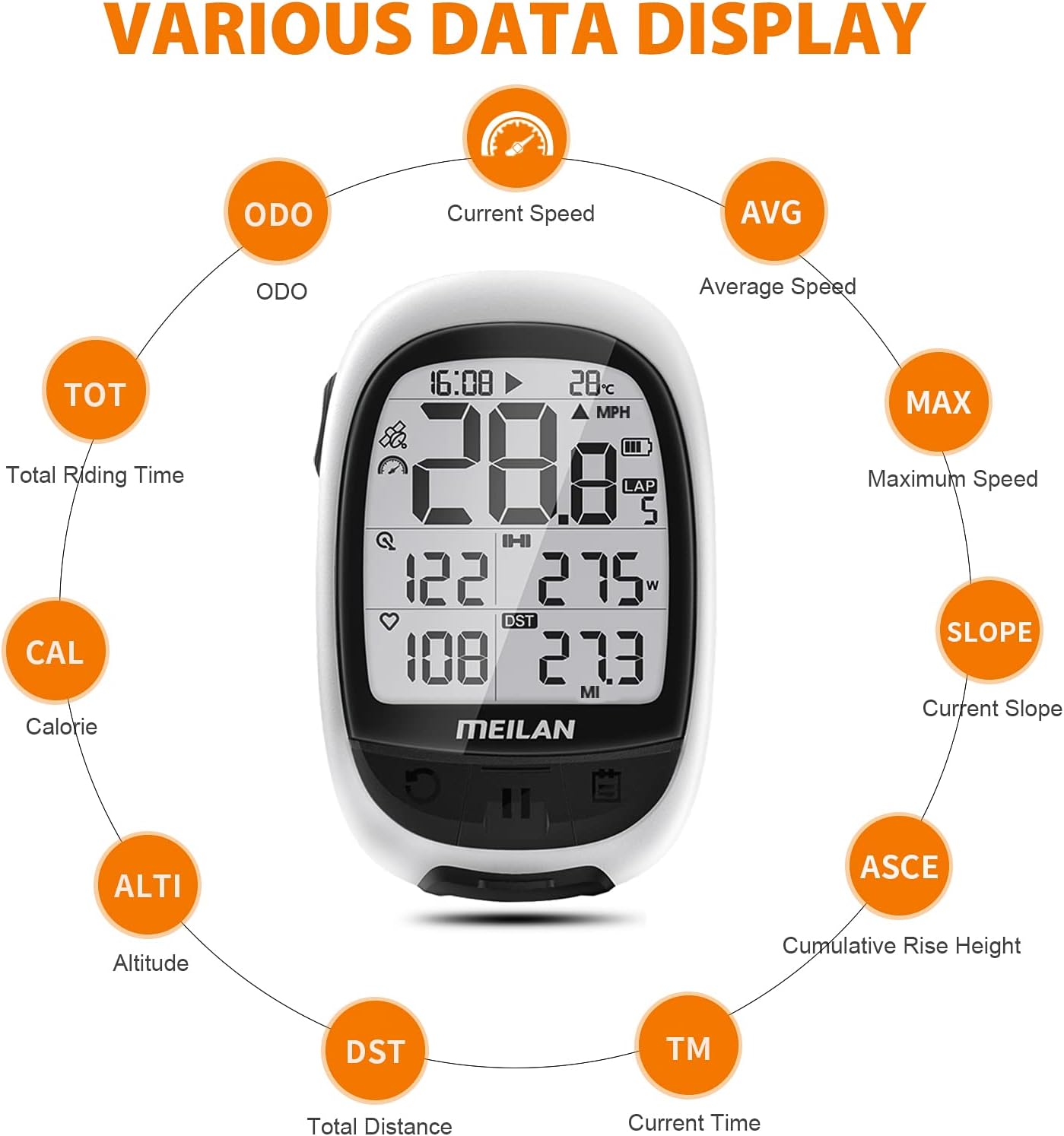
The computer provides a comprehensive display of cycling metrics such as speed, distance, time, altitude, calories, and more.
- Current Speed (ODO)
- Average Speed (AVG)
- Maximum Speed (MAX)
- Current Slope (SLOPE)
- Cumulative Rise Height (ASCE)
- Total Distance (DST)
- Current Time (TM)
- Kaloriji (CAL)
- Total Riding Time (TOT)
- Altitude (ALTI)
4.3 Pożizzjonament tal-GPS
The MEILAN Oval GPS Bike Computer features a built-in high-sensitivity GPS chip that supports GPS, BEIDOU, and GLONASS global positioning systems for accurate location tracking and route recording.

The device utilizes multiple global positioning systems for fast and accurate location tracking.
Before starting your ride, ensure you are in an open, barrier-free area to allow the device to acquire a GPS signal. Once GPS positioning is successful, press the middle button to start recording your ride. You can save a cycle record by long pressing the right button; the next cycle will start from zero.
4.4 Integrazzjoni tal-App
The MEILAN Oval GPS Bike Computer can be easily managed and its data analyzed using the MEILAN APP (or Navihood app, as specified in some product versions). This allows for convenient setup and data synchronization.

Cycling data can be uploaded and shared to platforms like Strava and Komoot via the MEILAN APP on your smartphone.
With the MEILAN APP, you can:
- Quickly set time zone, altitude, and odometer.
- Easily connect the app or the OVAL device with sensors.
- View data at a glance while riding.
- Upload and analyze your cycling data.
Up to 150 hours of riding data can be recorded and uploaded to Strava & Komoot via the MEILAN APP for detailed analysis and sharing.
5. Manutenzjoni
5.1 Iċċarġjar tal-batterija
The device is equipped with a 900mAh rechargeable battery, providing up to 25 hours of runtime. Use the provided charger cable to recharge the device. Ensure the device is fully charged before long rides.

The device features a long-lasting rechargeable battery for extended use.
5.2 Reżistenza għall-Ilma
The MEILAN Oval GPS Bike Computer has an IPX5 waterproof rating, meaning it is protected against low-pressure water jets from any direction. This ensures it can be used on small rainy days without damage. However, it is not designed for submersion.

The device is designed to be waterproof, dampproof, and dustproof, suitable for various weather conditions.
5.3 Tindif
Biex tnaddaf l-apparat, imsaħ b'soft, damp cloth. Avoid using abrasive cleaners or solvents, as these can damage the screen or casing.
6 Issolvi l-problemi
If you encounter issues with your MEILAN Oval GPS Bike Computer, please refer to the following common solutions:
- Ebda Sinjal tal-GPS: Kun żgur li tinsab f'żona miftuħa b'dawl ċar view of the sky. Wait a few minutes for the device to acquire a signal.
- Sensor Not Pairing: Check that the sensor's battery is not depleted and that it is properly activated (e.g., rotate the wheel for speed/cadence). Ensure the sensor is within range of the bike computer.
- Incorrect Data: Verify that the wheel circumference and other settings are correctly entered in the device.
6.1 How to Restore Factory Settings
If you experience persistent issues or wish to clear all data and settings, you can restore the device to its factory default settings. This process will delete all recorded data.
Official video guide demonstrating how to restore the MEILAN Oval GPS Bike Computer to factory settings, which deletes all data and resets the unit to default.
Steps to restore factory settings:
- Hold the left-side switch button and the right button at the same time for about 4 seconds.
- The screen will display "RESTORE YES NO".
- Press the left button for "YES" to confirm restoration, or the right button for "NO" to cancel.
7. Speċifikazzjonijiet
| Karatteristika | Speċifikazzjoni |
|---|---|
| Brand | MEILAN |
| Numru tal-Mudell | MLBCM2 |
| Kulur | Abjad |
| Piż tal-oġġett | 0.13 Liri |
| Daqs tal-Iskrin | 2.4 Pulzier |
| Tip ta 'Wiri | LCD |
| Ħajja tal-batterija | Sa 25-il Siegħa |
| Tip tas-Sensor | Can be Connected with Speed Sensor, Cadence Sensor, Heart Rate Monitor and Power Meter |
| Kompożizzjoni taċ-Ċellola tal-Batterija | Jonju tal-litju |
| Teknoloġija tal-Konnettività | Bluetooth, ANT |
| Klassifikazzjoni tal-Protezzjoni Internazzjonali | IPX5 |
| Tip ta 'Immuntar | Handlebar / Stem Mount |
| Input tal-Interface tal-Bniedem | Buttuni |
| Materjal | ABS |
8. Garanzija u Appoġġ
MEILAN provides a one-year warranty for this product. For any questions or issues encountered during use, please contact the seller directly via email. Our customer service team is committed to providing the best solution.
Additional support benefits include:
- 24-Hour Quick Reply
- 30-Day Exchange or Return Policy
- 12-Month One-Year Warranty
- Lifetime After-Sales Service


