Introduzzjoni
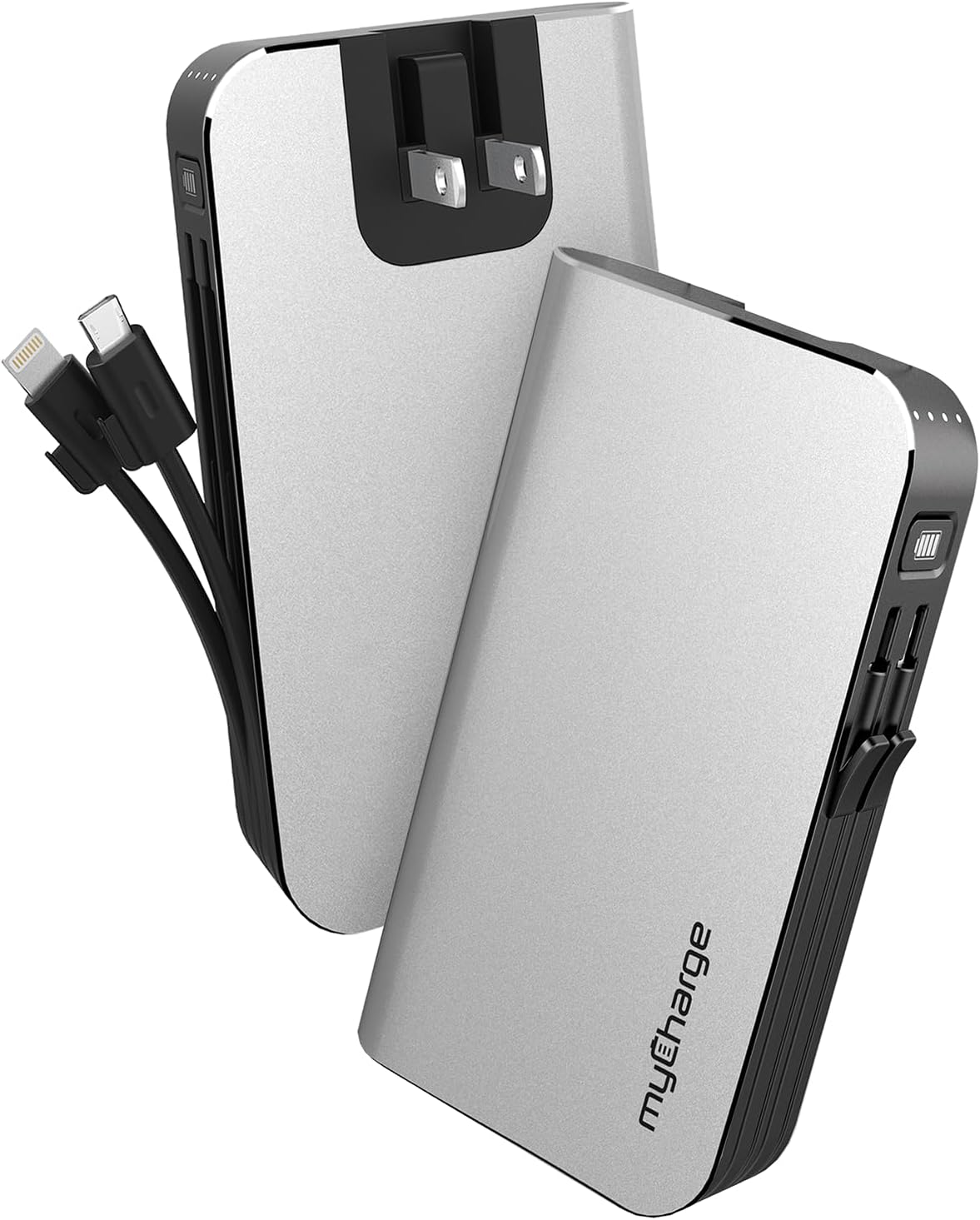
The myCharge HubMax portable charger, model HB10V, is a versatile power bank designed to provide on-the-go power for your mobile devices. It features a 10050mAh internal battery, integrated Lightning and Micro USB charging cables, and a built-in wall plug for convenient recharging of the power bank itself. This manual provides instructions for the proper use and care of your HubMax charger.
Setup
Initial Charging of the HubMax
Before first use, fully charge your myCharge HubMax. The device features a foldable wall plug for direct connection to a standard AC outlet.
- Locate the foldable wall prongs on the side of the HubMax.
- Flip out the prongs and plug the HubMax directly into a wall outlet.
- The LED indicators on the device will illuminate to show the charging status. A full recharge typically takes approximately 4.6 hours.
- Once fully charged, unplug the device and fold the prongs back into the unit for storage.
Istruzzjonijiet Operattivi
Iċċarġjar ta' Apparat Mobbli
The HubMax allows you to charge up to three devices simultaneously using its built-in cables and USB-A port.
- Użu ta' Kejbils Integrati: Extend the integrated Lightning cable for Apple devices or the Micro USB cable for compatible Android and other devices. Connect the appropriate cable to your device's charging port.
- Bl-użu tal-Port USB-A: For devices requiring a different cable type (e.g., USB-C), connect your device's standard USB charging cable to the USB-A output port on the HubMax.
- The HubMax will automatically begin charging your connected device(s). The LED indicators will show the remaining battery capacity of the HubMax.
- For optimal charging speed, ensure your device is compatible with Power Delivery or Quick Charge 3.0 standards, which the HubMax supports for faster charging (up to 2.4x faster than standard chargers).


Manutenzjoni
Proper maintenance ensures the longevity and optimal performance of your myCharge HubMax.
- Tindif: Uża drapp ratba u niexfa biex tnaddaf in-naħa ta 'barra tal-apparat. Evita li tuża kimiċi ħarxa jew materjali li joborxu.
- Ħażna: Store the HubMax in a cool, dry place away from direct sunlight and extreme temperatures.
- Kura tal-batterija: Għall-aħjar saħħa tal-batterija, evita li tiċċarġja kompletament il-power bank ta' spiss. Erġa' ċċarġjah meta l-livell tal-batterija jkun baxx.
- Kura tal-Cable: Handle the built-in cables gently. Avoid excessive bending or pulling to prevent damage.
Issolvi l-problemi
If you encounter issues with your myCharge HubMax, refer to the following common solutions:
- HubMax Not Charging:
- Ensure the wall plug is fully extended and securely inserted into a working AC outlet.
- Iċċekkja jekk is-sokit hux qed jaħdem billi tqabbad apparat ieħor.
- Device Not Charging from HubMax:
- Verify that the HubMax itself has sufficient charge (check LED indicators).
- Ensure the built-in cables or your external USB cable are securely connected to both the HubMax and your device.
- Try a different cable or device to isolate the issue.
- Iċċarġjar bil-mod:
- Ensure your device is compatible with fast charging protocols supported by the HubMax.
- Evita li tuża t-tagħmir tiegħek b'mod estensiv waqt li jkun qed jiċċarġja, għax dan jista' jnaqqas il-proċess tal-iċċarġjar.
Speċifikazzjonijiet
| Karatteristika | Dettall |
|---|---|
| Numru tal-Mudell | HB10V |
| Brand | myCharge |
| Kapaċità tal-batterija | 10050mAh (Polimeru tal-Litju) |
| Dimensjonijiet tal-Prodott | 0.9 x 2.8 x 4.6 pulzieri |
| Piż tal-oġġett | 3.53 uqija |
| Tipi ta' Konnettur | Built-in Lightning Cable, Built-in Micro USB, USB-A Output Port |
| Karatteristiċi Speċjali | Built-in Wall Plug, Integrated Cables |
| Ħin ta 'Iċċarġjar | Approximately 4.6 hours (via wall plug) |
Garanzija u Appoġġ
For warranty information and customer support, please refer to the official myCharge webis-sit jew ikkuntattja lis-servizz tal-konsumatur tagħhom direttament. Żomm il-prova tax-xiri tiegħek għal kwalunkwe talba ta' garanzija.
Manifattur: myCharge
Għal aktar għajnuna, żur: www.mycharge.com


