1. Introduzzjoni
This manual provides instructions for the proper setup, operation, and maintenance of your HCDZ replacement remote control. This remote is designed to function as a direct replacement for specific Onkyo A/V AV receiver models without requiring any programming.
2. Prodott Aktarview
The HCDZ replacement remote control is an infrared (IR) device compatible with Onkyo TX-SA605, TX-SA8560, and HT-R340 A/V AV receivers. It is designed for immediate use upon battery installation, requiring no additional setup or code entry.

Figura 1: Lura view of the HCDZ replacement remote control with the battery cover securely in place.
3. Setup
3.1 Installazzjoni tal-batterija
To begin using your remote control, install two AA batteries (not included) into the battery compartment.
- Sib il-kompartiment tal-batterija fuq wara tal-kontroll remot.
- Żerżaq l-għatu tal-kompartiment tal-batterija 'l isfel u erfa'h.
- Daħħal żewġ batteriji AA ġodda, waqt li tiżgura li t-terminali pożittivi (+) u negattivi (-) ikunu allinjati sew mal-marki ġewwa l-kompartiment.
- Erġa’ poġġi l-għatu tal-kompartiment tal-batterija billi tiżżerżaqha lura f’postu sakemm tikklikkja sew.
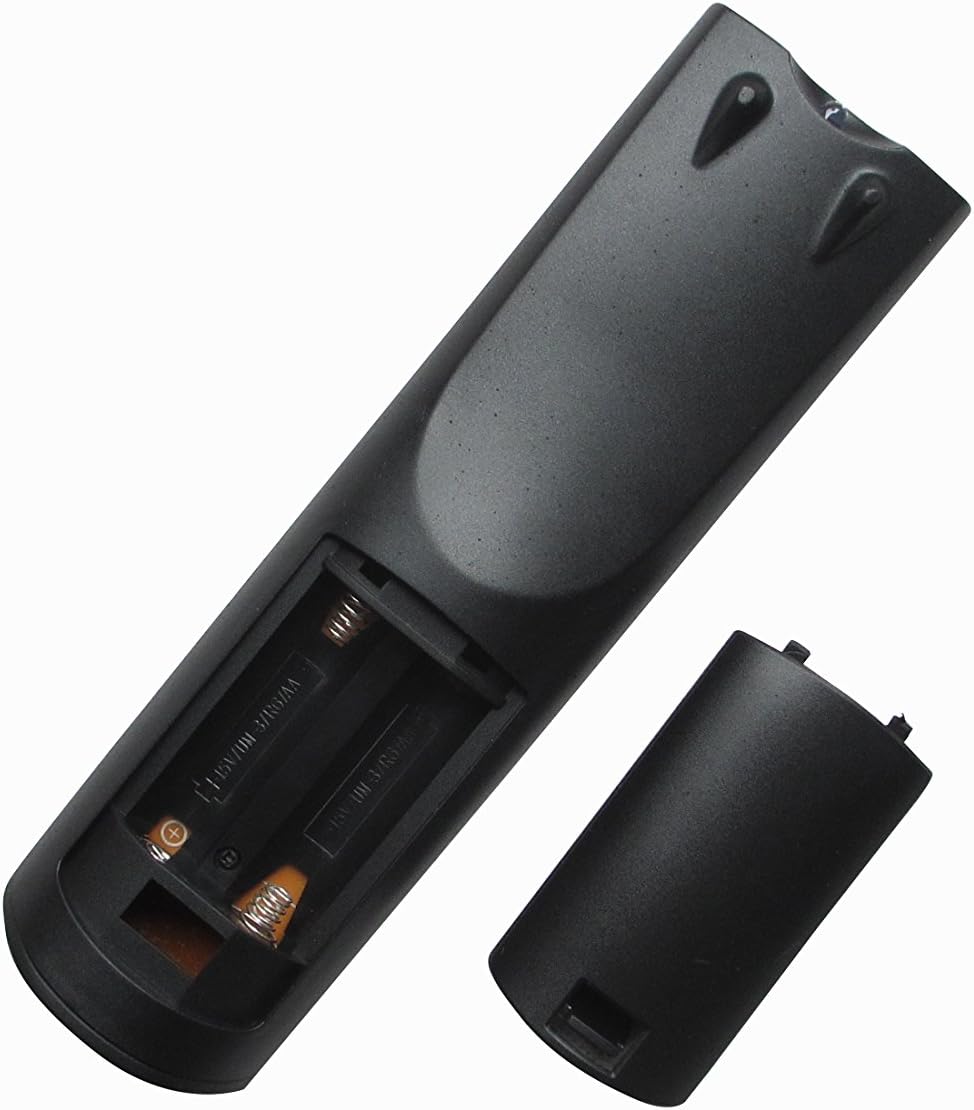
Figura 2: Lura view of the remote control with the battery compartment open for battery installation.
Once batteries are installed, the remote control is ready for use with your compatible Onkyo A/V AV receiver. No programming is required.
4. Istruzzjonijiet Operattivi
To operate your Onkyo A/V AV receiver with the HCDZ replacement remote control:
- Point the remote control directly towards the infrared sensor on your Onkyo A/V AV receiver.
- Press the desired function button (e.g., Power, Volume Up/Down, Input Select).
- Ensure there are no obstructions between the remote control and the receiver.
The maximum effective range for operation is approximately 10 meters (33 feet).
5. Manutenzjoni
5.1 Tindif
Imsaħ il-kontroll remot b'ċarruta ratba u niexfa. Tużax prodotti tat-tindif likwidi jew materjali li joborxu, għax jistgħu jagħmlu ħsara lill-wiċċ jew lill-komponenti interni.
5.2 Sostituzzjoni tal-batterija
Replace batteries when the remote control's response becomes inconsistent or stops working. Always replace both batteries simultaneously with new AA batteries. Do not mix old and new batteries or different types of batteries.
5.3 Ħażna
Jekk il-kontroll remot ma jkunx se jintuża għal perjodu twil ta' żmien, neħħi l-batteriji biex tevita t-tnixxija u ħsara potenzjali.
6 Issolvi l-problemi
6.1 Il-Kontroll mill-Bogħod Mhux Jirrispondi
- Iċċekkja Batteriji: Kun żgur li l-batteriji huma mdaħħla sew bil-polarità korretta (+/-) u li mhumiex eżawriti. Ibdel b'batteriji AA ġodda jekk meħtieġ.
- Linja tal-Vista: Verify that there is a clear, unobstructed path between the remote control's IR emitter and the receiver's IR sensor.
- Distanza: Ensure you are within the effective operating range (up to 10 meters).
- Qawwa tar-riċevitur: Confirm that your Onkyo A/V AV receiver is powered on.
7. Speċifikazzjonijiet
| Brand | HCDZ |
| Numru tal-Mudell | HCDZ-9560 |
| Teknoloġija tal-Konnettività | Infra-aħmar (IR) |
| Tip ta' Kontrollur | Kontroll mill-bogħod |
| Numru Massimu ta' Apparat Appoġġjat | 1 (Onkyo A/V AV Receiver) |
| Medda Massimu | 10 Meters |
| Numru ta' Batteriji Meħtieġa | 2 batteriji AA |
| Karatteristika Speċjali | Ergonomiku |
8. Appoġġ
For any questions or further assistance regarding your HCDZ replacement remote control, please contact the seller or manufacturer directly. Specific warranty information is not provided in this manual; please refer to your purchase documentation for details.


