1. Prodott Aktarview
The Excelvan Wireless Weather Station (Model AOK-5061A) is designed to provide accurate indoor and outdoor temperature and humidity readings, along with weather forecasts and an alarm clock function. It features a large, colorful LCD display with LED backlight for easy readability.
Karatteristiċi ewlenin:
- Indoor/Outdoor Temperature and Humidity Measurement
- Weather Forecast with 5 Icons (Sunny, Partially Sunny, Cloudy, Rain, Heavy Rain)
- DCF Radio-Controlled Clock with Manual Setting
- Alarm with Snooze Function
- Large Color LCD Display with LED Backlight
- DST (Daylight Saving Time) Automatic Update
- Wireless Outdoor Sensor with up to 50m range

Figura 1: Quddiem view of the Excelvan Wireless Weather Station main unit, displaying weather forecast, outdoor/indoor temperature and humidity, and time.
2. Gwida ta' Setup
2.1 Kontenut tal-Pakkett
Before proceeding with the setup, ensure all items are present in the package:
- 1 x Unità Prinċipali tal-Istazzjon tat-Temp
- 1 x Sensor tal-Bogħod mingħajr Fili
- 1 x AC Power Adapter
- 1 x Manwal għall-Utent

Figure 2: The complete package contents, including the main weather station unit, wireless remote sensor, power adapter, and user manual.
2.2 L-Ixgħel tal-Unità Prinċipali
- Battery Installation (Optional): Open the battery compartment on the back of the main unit. Insert 3 x 1.5V AA batteries (not included), ensuring correct polarity. The LED backlight will stay on for 5 minutes when powered by batteries.
- AC Power Adapter (Recommended): For continuous backlight, connect the provided AC power adapter (4.5V, 150mA) to the main unit's power input and then plug it into a wall outlet.

Figura 3: Wara view of the main unit showing the battery compartment with the cover removed, ready for battery insertion.

Figura 4: Wara view of the main unit with the AC power adapter connected, illustrating the power input port.
2.3 Powering the Wireless Remote Sensor
- Open the battery compartment of the wireless remote sensor.
- Daħħal 2 batteriji AAA ta' 1.5V (mhux inklużi), waqt li tiżgura l-polarità korretta.
- Agħlaq il-kompartiment tal-batterija sew.

Figure 5: The wireless remote sensor, showing its display and the battery compartment on the back.
2.4 Tqegħid tas-Sensor
- The main unit is intended for indoor use only.
- Place the wireless remote sensor outdoors in a sheltered area, away from direct sunlight and rain, to ensure accurate readings.
- Ensure the sensor is within 50 meters (open space) of the main unit for optimal signal reception.
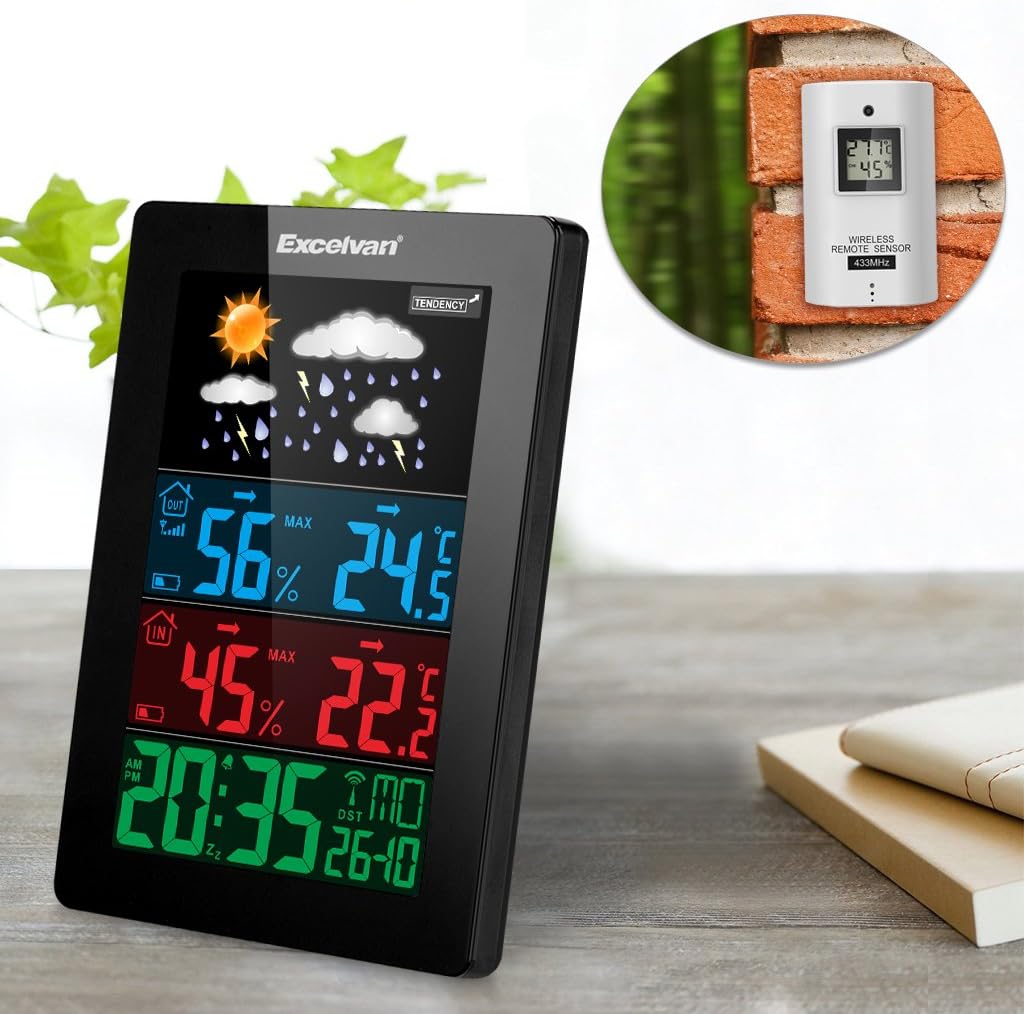
Figure 6: An illustration showing the main weather station unit indoors and the wireless remote sensor mounted on an outdoor wall.

Figure 7: A diagram highlighting the effective wireless transmission distance of 50 meters between the main unit and the remote sensor.
3. Istruzzjonijiet Operattivi
3.1 Sinkronizzazzjoni Inizjali
After powering both units, the main unit will automatically attempt to synchronize with the remote sensor and receive the DCF radio-controlled time signal. This process may take a few minutes.
3.2 Display Overview
The large LCD display shows various information:
- Taqsima ta' Fuq: Weather forecast icons (sunny, cloudy, rainy, etc.) and weather tendency indicator.
- Middle-Top Section (Blue): Outdoor humidity and temperature.
- Middle-Bottom Section (Red): Indoor humidity and temperature.
- Bottom Section (Green): Current time (12/24 hour format), day of the week, and date.
Figure 8: Close-up of the main unit's display, illustrating the different data sections for weather, outdoor/indoor conditions, and time.
3.3 Issettjar tal-Ħin u d-Data Manwalment
While the unit is radio-controlled, manual adjustments can be made:
- Agħfas il- MODALITÀ buttuna biex tiċċaqlaq bejn il-modi tal-wiri.
- Żomm il- MODALITÀ button for a few seconds to enter time setting mode.
- Uża l- + u - buttuni biex jaġġustaw il-valuri.
- Agħfas MODALITÀ again to confirm and move to the next setting (e.g., hour, minute, year, month, day, language for day of week).
3.4 Funzjoni ta' Allarm u Snooze
- Agħfas il- ALLARM buttuna biex view or set the alarm time.
- Żomm il- ALLARM buttuna biex tidħol fil-modalità tas-settings tal-allarm. Uża + u - biex taġġusta.
- Biex tattiva/tiddiżattiva l-allarm, agħfas il-buttuna ALLARM Agħfas il-buttuna fil-qosor. Ikona ta' allarm tidher/tisparixxi fuq id-displej.
- Meta l-allarm ħsejjes, tmiss il- SNOOZE / DAWL button on top of the unit to activate the snooze function. The alarm will sound again after a few minutes.
- To stop the alarm completely, press any other button.

Figure 9: Top edge of the main unit, highlighting the "SNOOZE/LIGHT" touch-sensitive button for alarm snooze and backlight activation.
3.5 Għażla tal-Unità tat-Temperatura
Agħfas il- - button to switch between Celsius (°C) and Fahrenheit (°F) temperature units.
3.6 Tbassir tat-Temp
The weather station predicts weather conditions based on atmospheric pressure changes. The icons (sunny, partially sunny, cloudy, rain, heavy rain) indicate the forecast for the next 12-24 hours, not the current weather.
4. Manutenzjoni
- Tindif: Imsaħ l-unità prinċipali u s-sensor b'ċarruta ratba uamp drapp. Tużax tindif jew solventi li joborxu.
- Sostituzzjoni tal-batterija: Replace batteries in both the main unit and the remote sensor when the low battery indicator appears on the display. Ensure correct polarity.
- Tqegħid tas-Sensor: Periodically check the outdoor sensor's placement to ensure it remains sheltered and within range.
- Ħażna: Jekk taħżen l-unità għal perjodu estiż, neħħi l-batteriji kollha biex tevita t-tnixxija.
5 Issolvi l-problemi
| Problema | Kawża Possibbli | Soluzzjoni |
|---|---|---|
| L-ebda qari tat-temperatura/umdità ta' barra. |
|
|
| Wirja tal-ħin mhux korretta. |
|
|
| Id-displej huwa mudlam jew vojt. |
|
|
6. Speċifikazzjonijiet
| Karatteristika | Dettall |
|---|---|
| Arloġġ Ikkontrollat bir-Radju | DCF77 |
| Medda ta 'Temperatura ta' ġewwa | 0 ° C sa +50 ° C (32 ° F sa 122 ° F) |
| Firxa ta 'Temperatura ta' Barra | -20 °C sa +60 °C (-4 °F sa 140 °F) |
| Preċiżjoni tal-Kejl tat-Temperatura | ±2 °C |
| Firxa ta' Umdità ta' Ġewwa/Barra | 20-90 % RH |
| Riżoluzzjoni ta 'umdità | 1 % |
| Frekwenza tas-Sensor bla Fili | 433 MHz |
| Medda tas-Sinjal Wireless | Sa 50 metru (spazju miftuħ) |
| Probe Cable Length (for external probe, if applicable) | 1 m |
| Waterproof Level of Sensor | IPX3 |
| Main Station Power | 3 x 1.5V AA batteries (not included) or 4.5V, 150mA AC adapter (included) |
| Qawwa tas-Sensor Remot | 2 x 1.5V batteriji AAA (mhux inklużi) |
| Main Station Dimensions | 148 × 110 × 30 mm |
| Main Station Weight (without batteries) | 242 g |
| Dimensjonijiet tas-Sensor Remot | 60 × 100 × 20 mm |
| Remote Sensor Weight (without batteries) | 50 g |
| Day of Week Languages | German, English, Italian, French, Dutch, Spanish, Danish |
7. Garanzija u Appoġġ
For warranty information or technical support, please refer to the documentation provided with your purchase or contact Excelvan customer service through their official webjew il-bejjiegħ bl-imnut tiegħek.
Nota: Dan il-manwal huwa għal skopijiet informattivi biss. L-ispeċifikazzjonijiet jistgħu jinbidlu mingħajr avviż.


