1. Introduzzjoni
This manual provides essential information for the safe and efficient operation of your ViewSonic VX2476-SMHD 24-inch Full HD IPS Monitor. Please read this manual thoroughly before using the product and retain it for future reference.
2. Informazzjoni dwar is-Sigurtà
Dejjem segwi dawn il-prekawzjonijiet bażiċi ta’ sigurtà biex tnaqqas ir-riskju ta’ nar, xokk elettriku, u korriment:
- Tesponix il-monitor għax-xita jew għall-umdità.
- Tiftaħx il-monitor casing. Ġewwa m'hemm l-ebda partijiet li jistgħu jiġu sservisjati mill-utent.
- Żgura ventilazzjoni xierqa madwar il-monitor.
- Use only the power adapter and cables provided by ViewSonic.
- Disconnect the power plug from the AC outlet if the monitor will not be used for an extended period.
3. X'hemm fil-Kaxxa
Ivverifika li l-oġġetti kollha huma preżenti fil-pakkett:
- VX2476-SMHD Display
- Adapter AC/DC
- Kejbil tal-Enerġija
- Kejbil VGA
- Cable HDMI
- Cable Awdjo
- Gwida Quick Start
- ViewSonic Wizard CD-ROM

Figura 3.1: Kontenut tal-Pakkett
4. Setup
4.1 Assemblaġġ Fiżiku
Attach the stand to the monitor or mount it using a VESA-compatible bracket. The monitor supports 75 x 75mm VESA mounting.

Figura 4.1: Monitor bl-Istand

Figure 4.2: VESA Mount Compatibility
4.2 Konnettività
Connect your device to the monitor using one of the available ports:
- HDMI: Għal vidjow u awdjo diġitali.
- DisplayPort: Għal vidjow u awdjo diġitali.
- VGA: For analog video.
- Awdjo In/Out: For external audio devices or headphones.
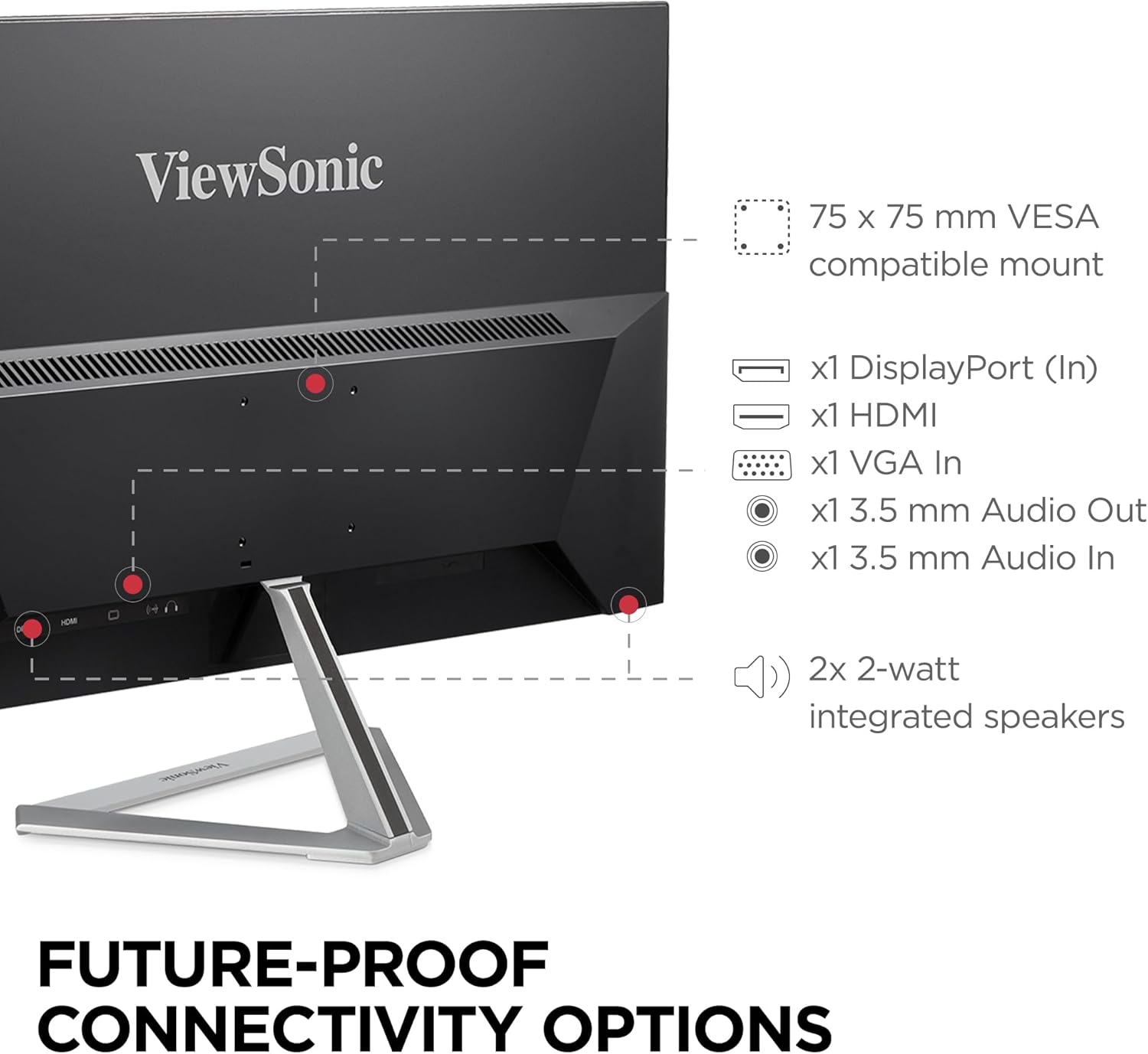
Figura 4.3: Għażliet ta' Konnettività

Figure 4.4: Connecting Cables
4.3 Konnessjoni tal-Enerġija
Qabbad l-adapter AC/DC mad-dħul tal-enerġija tal-monitor, imbagħad daħħal il-kejbil tal-enerġija f'sokit tal-ħajt.
5. Istruzzjonijiet Operattivi
5.1 Power On/Off
Press the power button located on the bottom right of the monitor to turn it on or off.
5.2 Navigazzjoni tal-Menù tal-OSD
Use the buttons on the bottom right of the monitor to navigate the On-Screen Display (OSD) menu. The OSD menu allows you to adjust various display settings.
5.3 Settings tal-wiri
The monitor offers several features to optimize your viewesperjenza:
- ViewModalità: Select from preset modes like 'Game', 'Movie', 'Web', 'Text', and 'Mono' for optimized viewing.
- Filtru tad-Dawl Blu: Inaqqas l-emissjoni tad-dawl blu biex jimminimizza l-istress fuq l-għajnejn.
- Teknoloġija Ħieles Flikkjaturi: Eliminates screen flickering for enhanced viewkumdità.

Figura 5.1: ViewPresets tal-Modalità

Figure 5.2: Eye-Care Technology
5.4 FreeSync Technology
This monitor supports FreeSync technology, which synchronizes the refresh rate of the monitor with your graphics card to reduce screen tearing and stuttering during gaming. Ensure your graphics card supports FreeSync and enable it in your graphics card settings.
6. Manutenzjoni
6.1 Tindif tal-Iskrin
Imsaħ l-iskrin bil-mod b'ċarruta ratba u mingħajr suf. Għal marki persistenti, nixxef bil-modampen the cloth with water or a mild, non-abrasive screen cleaner. Avoid using harsh chemicals.
6.2 Tindif tas-Casing
Uża drapp artab u niexef biex tnaddaf il-monitor casing. Do not use liquid or aerosol cleaners directly on the monitor.
7 Issolvi l-problemi
Jekk tiltaqa' ma' problemi bil-monitor tiegħek, irreferi għas-soluzzjonijiet komuni li ġejjin:
- L-ebda immaġni: Check if the power cable is securely connected and the monitor is turned on. Verify that the video cable is properly connected to both the monitor and the source device.
- Image is blurry or distorted: Adjust the resolution settings on your computer to match the monitor's native resolution (1920x1080). Check the video cable for damage.
- Ebda ħoss: Ensure the audio cable is connected (if using VGA) or that HDMI/DisplayPort audio is selected as the output on your computer. Check the monitor's volume settings.
- Skrin li jteptep: Enable Flicker-Free technology in the OSD menu. Ensure your graphics card drivers are up to date.
8. Speċifikazzjonijiet
| Karatteristika | Speċifikazzjoni |
|---|---|
| Daqs tal-wiri tal-iskrin wieqaf | 24 Pulzier |
| Riżoluzzjoni tal-Iskrin | 1920x1080 |
| Riżoluzzjoni Massima tal-Iskrin | 1920 x 1080 Pixels |
| Serje | VX2476-smhd |
| Numru tal-mudell tal-oġġett | VX2476-SMHD |
| Piż tal-oġġett | 6.53 liri |
| Dimensjonijiet tal-Prodott | 8.2 x 21.3 x 15.7 pulzieri |
| Dimensjonijiet tal-oġġett LxWxH | 8.2 x 21.3 x 15.7 pulzieri |
| Kulur | Iswed/fidda |
| Sors tal-Enerġija | AC |
| Voltage | 240 Volts |
| Daqs tal-Iskrin | 24 Pulzier |
| Riżoluzzjoni | FHD 1080p |
| Proporzjon ta' l-aspett | 16:9 |
| Deskrizzjoni tal-wiċċ tal-iskrin | Kontra d-dija, Kisi iebes (3H) |
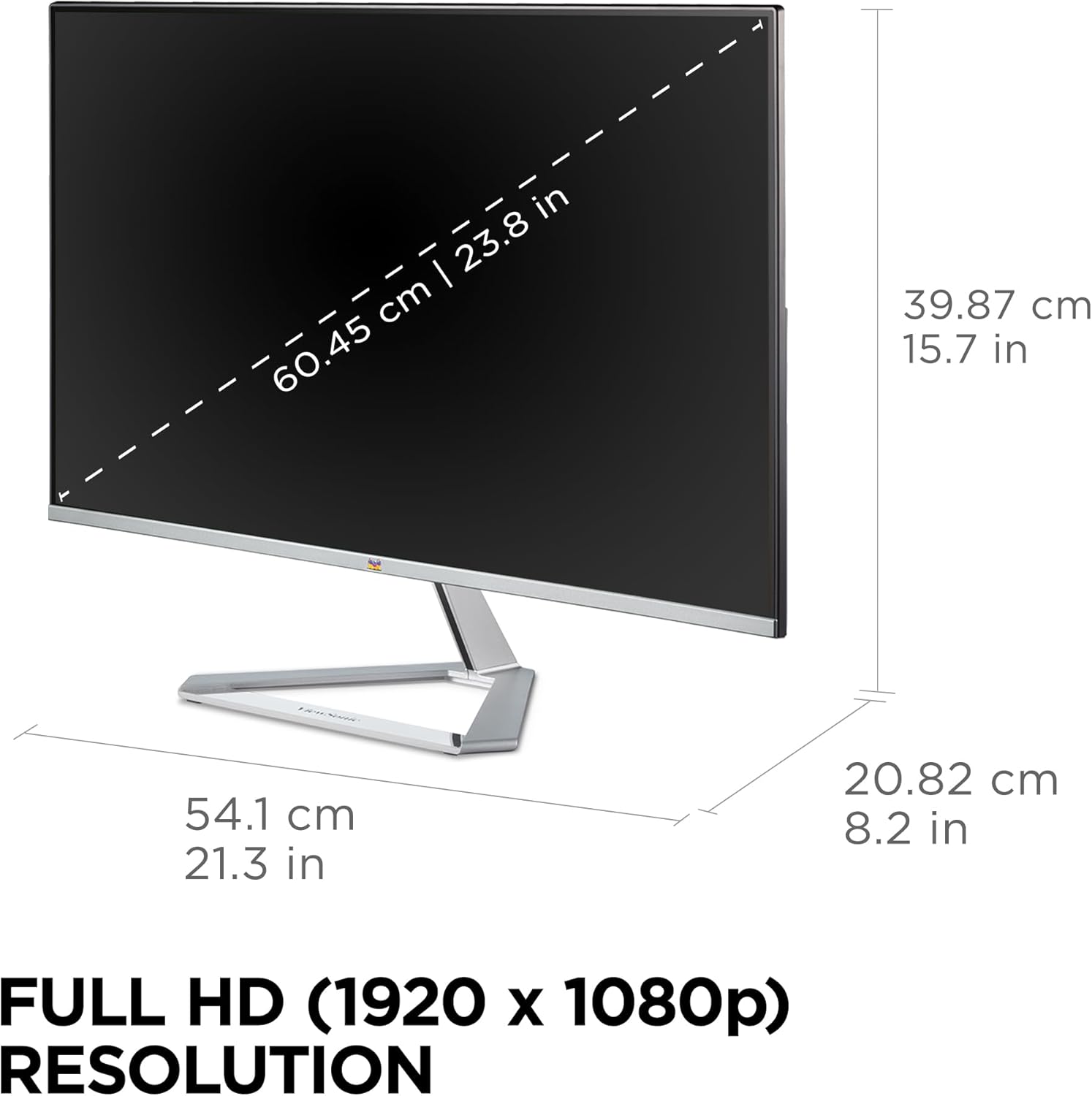
Figura 8.1: Dimensjonijiet tal-Monitor

Figure 8.2: Full HD Resolution

Figure 8.3: Wide Viewing Angoli
9. Garanzija u Appoġġ
Tiegħek ViewSonic monitor is backed by a 3-year limited warranty. For technical assistance or customer service, please contact our US-based customer support.

Figura 9.1: Informazzjoni dwar il-Garanzija u l-Appoġġ
10. Informazzjoni Addizzjonali
10.1 Prodott Fuqview

Figure 10.1: Modern and Minimalist Style

Figure 10.2: Monitor in a Home Environment

Figure 10.3: Multi-Monitor Setup

Figure 10.4: Integrated Speakers
10.2 Vidjows Uffiċjali tal-Prodott
ViewSonic 24 Inch VX2476-SMHD Monitor Overview
Dan il-filmat jipprovdi ħarsa fil-qosor lejnview tal- ViewSonic VX2476-SMHD monitor, highlighting its key features and design.
ViewSonic Product Video
An official product video from ViewSonic showcasing various aspects and benefits of their monitors.


