1. Introduzzjoni
The Soundstream VM-22B is a versatile Single DIN Digital Media Receiver designed to enhance your in-car audio experience. It offers a range of features including Bluetooth connectivity, SD/USB media playback, and an AM/FM radio tuner. This manual provides detailed instructions for the setup, operation, and maintenance of your device.

Figure 1: Soundstream VM-22B Single DIN Digital Media Receiver
Karatteristiċi ewlenin:
- Konnettività Bluetooth: Għal sejħiet hands-free u streaming awdjo mingħajr fili.
- Daqq SD/USB: Supports MP3, WMA, M4A audio files, AVI, MP4, H264 video files, and JPEG, GIF, PNG, BMP image files.
- Tuner AM/FM: Access your favorite radio stations.
- Integrata Ampaktar ħaj: Features a Class A/B integrated circuit audio ampaktar ħaj.
- Equalizer: Customizable audio settings with several pre-set genre EQs.
- Iċċarġjar Fast USB: Keep your devices powered.
- Funzjonalità tal-Mirror Link: Sync your smartphone to the display (when parked).
2. Setup
2.1. Installazzjoni
The VM-22B is designed for Single DIN installation. Ensure your vehicle's dashboard opening is compatible. Professional installation is recommended for optimal performance and safety.
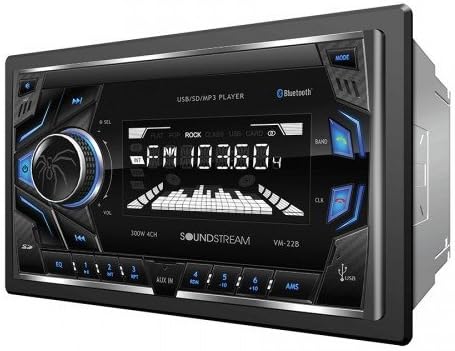
Figura 2: Quddiem view of the Soundstream VM-22B unit.
2.2. Konnessjonijiet tal-Wiring
Before connecting, ensure the vehicle's ignition is turned off and the negative battery terminal is disconnected. Use the provided wiring harness and refer to the diagram below for correct connections. It is highly recommended to use a wiring adapter specific to your vehicle to avoid cutting original car wires.

Figure 3: General Wiring Diagram for the VM-22B. Consult your vehicle's specific wiring diagram for accurate connections.
Ensure all speaker wires are connected with correct polarity (positive to positive, negative to negative) to prevent phase issues and poor sound quality. Secure all connections properly, preferably by soldering and heat-shrinking, rather than crimping.
The unit features RCA line outputs for connecting external amplifiers and an antenna input for the AM/FM tuner. A dedicated wire is available for connecting to a reverse camera, which will automatically display the camera feed when the vehicle is in reverse.
3. Istruzzjonijiet Operattivi
3.1. Kontrolli tal-Panew ta 'quddiem
- Buttuna tal-Enerġija / Modalità: Press to turn on/off, short press to cycle through audio sources (FM, AM, Bluetooth, AUX, USB, SD).
- Buttuna tal-Volum: Rotate to adjust volume. Press to access audio settings (Bass, Treble, Balance, Fade, EQ).
- Track Skip/Search Buttons: Use to skip tracks or search radio stations.
- Port USB: Għall-daqq tal-midja u l-iċċarġjar tal-apparat.
- Slot tal-Kard SD: Għall-daqq tal-midja.
- Input AUX: Jack ta' 3.5mm għal apparati awdjo esterni.
- Mikrofonu: Għal sejħiet mingħajr idejn.
3.2. Operazzjoni Bluetooth
To pair your smartphone:
- Kun żgur li l-Bluetooth huwa attivat fuq l-ismartphone tiegħek.
- Select 'Bluetooth' as the source on the VM-22B. The unit will enter pairing mode.
- Fittex għal 'VM-22B' on your smartphone's Bluetooth device list and select it to connect.
- Once paired, you can make/receive calls hands-free and stream audio wirelessly.
The unit supports hands-free profile for dialing, receiving calls, and displaying call logs. Advanced Audio Distribution Profile (A2DP) allows for wireless audio streaming.
3.3. Daqq tal-Midja
Insert a USB drive or SD card into the respective slots. The unit will automatically switch to the USB or SD source and begin playback of compatible media files. Supported formats include MP3, WMA, M4A for audio, and AVI, MP4, H264 for video. Image files like JPEG, GIF, PNG, and BMP are also viewkapaċi.

Figure 4: VM-22B supports various audio, video, and image file formati.
3.4. Settings Equalizer
Press the volume knob to cycle through audio settings. You can adjust Bass, Treble, Balance (left/right speakers), and Fade (front/rear speakers). The unit also includes several pre-set genre equalizers (EQs) such as Flat, Rock, Pop, Classic, and Jazz to tailor the sound to your preference.

Figure 5: Customize your audio with various equalizer settings.
3.5. Konnessjoni tal-Mera
The Mirror Link function allows you to display your smartphone's screen on the VM-22B's display. This feature is intended for passenger use only when the vehicle is safely parked. Consult your smartphone's manual for specific Mirror Link setup instructions.
4. Manutenzjoni
To ensure the longevity and optimal performance of your Soundstream VM-22B, follow these maintenance guidelines:
- Tindif: Use a soft, dry cloth to clean the unit's display and buttons. Avoid abrasive cleaners or solvents.
- Temperatura: Evita li tesponi l-unità għal temperaturi estremi, dawl tax-xemx dirett għal perjodi twal, jew umdità għolja.
- Konnessjonijiet: Iċċekkja l-konnessjonijiet tal-wajers kollha perjodikament biex tiżgura li huma sikuri u ħielsa mill-korrużjoni.
5 Issolvi l-problemi
If you encounter issues with your VM-22B, refer to the following common troubleshooting steps:
| Problema | Kawża Possibbli | Soluzzjoni |
|---|---|---|
| Ebda Qawwa | Blown fuse, incorrect wiring, loose power connection. | Check vehicle's fuse box and unit's fuse. Verify power and ground connections. |
| Ebda Ħoss | Volume too low, incorrect source selected, speaker wiring issues. | Increase volume. Select correct audio source. Check speaker connections and polarity. |
| Bluetooth Mhux Konnessjoni | Unit not in pairing mode, Bluetooth off on phone, interference. | Ensure unit is in Bluetooth mode. Restart phone and unit. Try re-pairing. |
| USB/SD Playback Error | Inkompatibbli file format, corrupted media, faulty USB/SD card. | Iċċekkja file formats. Try a different USB/SD card. Ensure media is not corrupted. |
6. Speċifikazzjonijiet
| Karatteristika | Dettall |
|---|---|
| Numru tal-Mudell | VM-22B |
| Dimensjonijiet tal-Prodott | 4 x 7 x 4 pulzieri |
| Piż tal-oġġett | 2.31 liri |
| Teknoloġija tal-Konnettività | Bluetooth, USB |
| Komunikazzjoni bla fili | Bluetooth |
| Karatteristiċi Speċjali | Equalizer, Spotify (via connected device) |
| Apparati Kompatibbli | Smartphone, Speaker |
| Modalità tal-Ħruġ tal-Awdjo | Stereo |
| Surround Sound Channel Konfigurazzjoni | 4.0 |
| Qawwa tal-Ħruġ | 75 Watts |
| Kulur | Iswed |
7. Garanzija u Appoġġ
For warranty information, technical support, or service inquiries, please refer to the documentation included with your Soundstream VM-22B Digital Media Receiver or visit the official Soundstream websit. Żomm il-prova tax-xiri tiegħek għal talbiet ta' garanzija.


