1. Introduzzjoni
This manual provides comprehensive instructions for the installation, operation, and maintenance of your Intellitronix LED Digital Gauge Panel. Designed for Chevy Trucks from 1973-87, this panel offers precise digital readouts for various vehicle parameters, enhancing your driving experience with modern accuracy and visibility.
2. Informazzjoni dwar is-Sigurtà
Always prioritize safety during installation and operation. Disconnect the vehicle's battery before beginning any electrical work. Ensure all wiring connections are secure and properly insulated to prevent short circuits. If you are unsure about any step, consult a qualified automotive technician.
- Ensure the vehicle is turned off and the battery is disconnected before installation.
- Ilbes tagħmir protettiv personali xieraq, bħal nuċċalijiet tas-sigurtà.
- Timmodifikax il-prodott bl-ebda mod li mhux deskritt f'dan il-manwal.
- Keep the product away from excessive moisture or extreme temperatures.
3. X'hemm fil-Kaxxa
Your Intellitronix LED Digital Gauge Panel package includes the following components:
- LED Digital Gauge Panel (Bezel NOT included)
- All required sending and sensor units (Water Temperature Sender S8013, Oil Pressure Sender)

Figure 3.1: Included components of the Intellitronix LED Digital Gauge Panel. This image shows the main circuit boards for the gauges, along with various sensors and wiring harnesses that are part of the kit.
4. Setup u Installazzjoni
Installation of the Intellitronix LED Digital Gauge Panel requires careful attention to electrical connections. While designed for compatibility, some modifications to the vehicle's existing dashboard bucket may be necessary for a direct fit. The bezel is not included and must be sourced separately.
4.1 Konnessjonijiet tal-Wiring
Refer to the detailed wiring diagram provided with your product for specific connections. Key connections include:
- Qawwa: Qabbad ma' sors ta' enerġija ta' 12V swiċċjat.
- Art: Ensure a solid chassis ground connection.
- Takometru: Connect to the vehicle's tachometer signal wire (0-9900 RPM).
- Temperatura tal-Ilma: Connect the included S8013 sender to the engine's water temperature port. Specify 1/2 inch bushing size if needed.
- Pressjoni taż-Żejt: Connect the included oil pressure sender to the engine's oil pressure port (0-100 PSI).
- Voltmetru: No sending unit required; connects directly to vehicle power (7.0-25.5 volts).
- Livell tal-Fjuwil: Works with existing GM fuel level sending unit (0-99%).
- Turn Signals & High Beam: Connect to respective vehicle indicator wires.

Figure 4.1: Main circuit board detail. This image highlights the primary board with digital readouts for RPM and MPH, indicating connection points for various signals.
4.2 Installazzjoni tas-Sensor
Install the provided water temperature and oil pressure senders into their designated ports on the engine. Ensure a tight seal to prevent leaks.

Figure 4.2: Included sensors. This image displays the water temperature sender, oil pressure sender, and associated wiring, which are crucial for accurate gauge readings.
5. Istruzzjonijiet Operattivi
Once installed and powered, the Intellitronix LED Digital Gauge Panel will display real-time vehicle information. The digital readouts are designed for clear visibility.
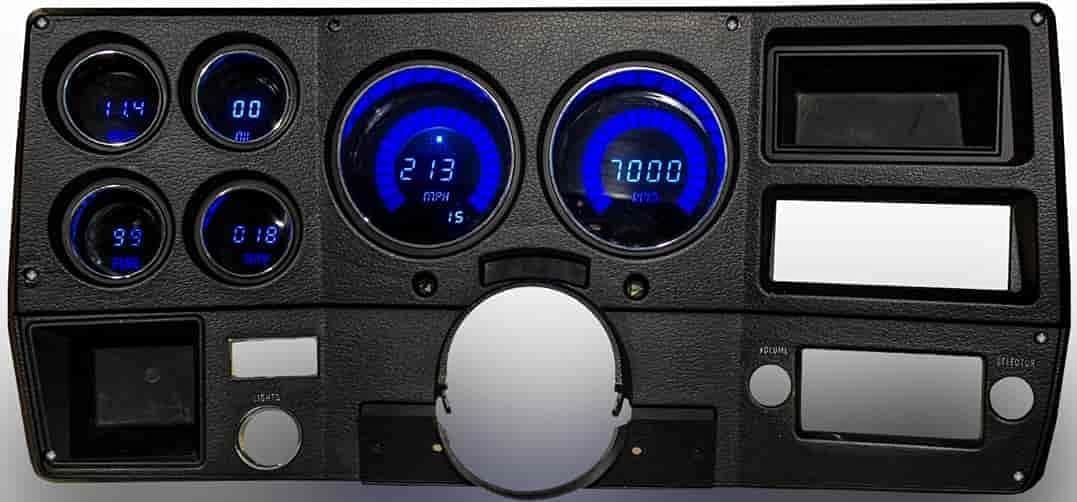
Figure 5.1: Fully assembled Intellitronix LED Digital Gauge Panel. This image shows the panel installed, displaying bright blue digital numbers for speed, RPM, fuel level, oil pressure, water temperature, and voltage.
5.1 Gauge Readouts
- Takometru: Displays engine RPM from 0-9900 in 100 RPM increments.
- Temperatura tal-Ilma: Displays engine coolant temperature from 100-300°F.
- Pressjoni taż-Żejt: Displays engine oil pressure from 0-100 PSI.
- Voltmetru: Displays vehicle system voltage minn 7.0-25.5 volt.
- Livell tal-Fjuwil: Displays fuel tank level from 0-99% in 1% increments.
5.2 Kalibrazzjoni
The gauge panel may require calibration for certain functions, particularly the speedometer if applicable (order in MPH or KPH). Refer to the specific instructions provided with your unit for calibration button functions. Calibration may require some electrical experience.
6. Manutenzjoni
The Intellitronix LED Digital Gauge Panel is designed for durability and requires minimal maintenance. Keep the display clean using a soft, dry cloth. Avoid abrasive cleaners or solvents that could damage the display surface.
- Regularly check all wiring connections for security.
- Ensure sensors are free from debris and corrosion.
- Clean the display with a microfiber cloth to prevent scratches.
7 Issolvi l-problemi
| Problema | Kawża Possibbli | Soluzzjoni |
|---|---|---|
| Gauges not illuminating or displaying. | No power, poor ground connection, or blown fuse. | Check power supply, ground wire, and vehicle fuses. Ensure battery is connected. |
| Inaccurate readings for specific gauges. | Faulty sender unit, incorrect wiring, or calibration needed. | Verify sender unit connections. Check wiring for continuity. Perform calibration if applicable. |
| Cruise control system disabled after installation. | Known compatibility characteristic with some vehicle systems. | This is a known potential side effect. Consult vehicle service manual or Intellitronix support for specific workarounds if available. |
| Difficulty with calibration. | Instructions may be vague, or electrical experience is limited. | Review the specific calibration instructions carefully. Seek assistance from an experienced installer if necessary. |
8. Speċifikazzjonijiet
| Karatteristika | Dettall |
|---|---|
| Brand | Intellitronix |
| Numru tal-Mudell | DP6004 |
| Kulur | Blu |
| Mod ta' Operazzjoni | Manwal |
| Vol Operattivtage | 7.0-25.5 volt |
| Firxa tat-Takometru | 0-9900 RPM (100 RPM increments) |
| Firxa tat-Temperatura tal-Ilma | 100-300°F |
| Oil Pressure Range | 0-100PSI |
| Fuel Level Range | 0-99% (inkrementi ta' 1%) |
| Dimensjonijiet tal-oġġett (L x W x H) | 14.3 x 8.4 x 4.7 pulzieri |
| Piż tal-oġġett | 3 liri |
| Materjal | Copper, Brass, Aluminum |
| Tip ta 'Immuntar | Immonta fuq il-Panew |
| UPC | 012658002640 |
9. Garanzija u Appoġġ
Intellitronix products are manufactured to high standards. For warranty information and technical support, please refer to the documentation included with your purchase or visit the official Intellitronix website. You can also contact Intellitronix Corp., the seller, for assistance.
Bejjiegħ: Intellitronix Corp.


