1. Introduzzjoni
This manual provides detailed instructions for the proper use, setup, and maintenance of your SimpTronic True Wireless Earbuds. Please read this manual thoroughly before using the product to ensure optimal performance and longevity.
2. Prodott Aktarview
2.1 Kontenut tal-Pakkett
- SimpTronic True Wireless Earbuds (Left and Right)
- Kawża tal-Iċċarġjar
- Cable tal-Iċċarġjar tal-USB
- Manwal għall-Utent
2.2 Karatteristiċi ewlenin
- Stereo bla fili veru (TWS): Enjoy a completely cable-free audio experience.
- Bluetooth 5.0: Provides stable connectivity and efficient power consumption.
- HD Stereo Sound with Deep Bass: Customized 8mm speaker drivers deliver clear audio.
- Li ma jgħaddix ilma minnha (IPX6): Resistant to strong jets of water, suitable for sports and outdoor activities.
- Mikrofonu li Jħassar l-Istorbju: Enhances call clarity.
- Ħin tal-logħob estiż: Sa 30 siegħa ta' ħin ta' daqq totali bil-kaxxa tal-iċċarġjar.
- Kontroll b'buttuna waħda: Manage music, calls, and voice assistant with a single button on each earbud.
- 15-Meter Wireless Range: Strong signal for reliable connection.
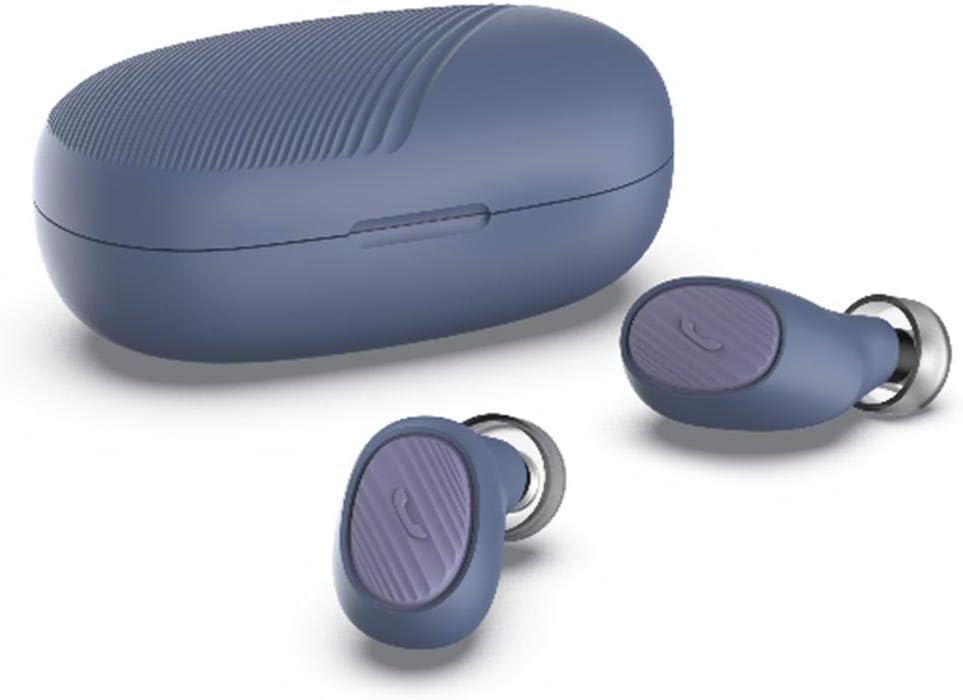
Image: SimpTronic True Wireless Earbuds and their charging case.
3. Setup
3.1 Iċċarġjar tal-Earbuds u l-Kaxxa
- Iċċarġjar tal-Każ: Connect the provided USB charging cable to the charging port on the case and a USB power source. The indicator light on the case will show charging status.
- Iċċarġjar tal-Earbuds: Place the earbuds into their respective slots in the charging case. Ensure the charging contacts align. The earbuds will automatically begin charging. The indicator lights on the earbuds will show charging status and turn off when fully charged.
3.2 Tqabbil ma' Apparat
- Qawwa Mixgħul: Take both earbuds out of the charging case. They will automatically power on and enter pairing mode. You may hear a voice prompt indicating pairing mode.
- Attiva l-Bluetooth: Fuq l-ismartphone tiegħek jew apparat ieħor li jaħdem bil-Bluetooth, mur fis-settings tal-Bluetooth u attiva l-Bluetooth.
- Agħżel Apparat: Look for "SimpTronic Earbuds" (or similar name) in the list of available devices and select it to connect.
- Konferma: Once connected, you will hear a voice prompt confirming the successful pairing. The earbud indicator lights may change or turn off.
Nota: Il-earbuds jerġgħu jikkonnettjaw awtomatikament mal-aħħar apparat imqabbad meta joħorġu mill-kaxxa, jekk il-Bluetooth ikun attivat fuq l-apparat.

Image: Illustration showing an earbud with a strong signal icon (V5.0+EDR) connecting to a smartphone, indicating a 15-meter wireless range.
4. Istruzzjonijiet Operattivi
4.1 One-Button Control Functions
Each earbud features a multi-function button for easy control of various functions:
- Ilgħab/Pawża Mużika: Agħfas darba waħda l-buttuna fuq kwalunkwe earbud.
- Tweġiba/Tmiem Sejħa: Single press the button on either earbud during an incoming call or active call.
- Irrifjuta Sejħa: Agħfas u żomm il-buttuna fuq kull earbud għal żewġ sekondi waqt telefonata li tkun dieħla.
- Kanzunetta li jmiss: Double press the button on the right earbud.
- Kanzunetta ta' qabel: Double press the button on the left earbud.
- Volum 'il fuq: Triple press the button on the right earbud.
- Volum 'l isfel: Triple press the button on the left earbud.
- Attiva l-Assistent tal-Vuċi (Siri/Google Assistant): Press and hold the button on either earbud for 2 seconds (when not on a call).

Image: Visual guide to the one-button control functions on the earbud, including volume, track navigation, call management, and voice assistant activation.
5. Manutenzjoni
5.1 Tindif
- Imsaħ bil-mod il-earbuds u l-kaxxa tal-iċċarġjar b'ċarruta ratba, niexfa u mingħajr suf.
- Tużax kimiċi ħarxa, solventi tat-tindif, jew deterġenti qawwija.
- Clean the charging contacts on both the earbuds and the case regularly to ensure proper charging.
5.2 Ħażna
- Meta ma tkunx qed tużahom, aħżen il-earbuds fil-kaxxa tal-iċċarġjar tagħhom biex tipproteġihom u żżommhom iċċarġjati.
- Aħżen l-apparat f'post frisk u niexef, 'il bogħod minn temperaturi estremi u dawl tax-xemx dirett.

Image: The earbuds and charging case are shown on a wet surface, highlighting their IPX6 waterproof rating, indicating resistance to water splashes and sweat.
6 Issolvi l-problemi
If you encounter any issues with your SimpTronic True Wireless Earbuds, please refer to the following common solutions:
- Ebda Ħsejjes:
- Kun żgur li l-earbuds huma ċċarġjati.
- Iċċekkja li l-earbuds huma mqabbda sew mat-tagħmir tiegħek.
- Aġġusta l-volum kemm fuq l-apparat tiegħek kif ukoll fuq il-earbuds.
- Try restarting your device and reconnecting the earbuds.
- Earbuds Mhux Tqabbil:
- Make sure both earbuds are out of the charging case and powered on.
- Turn off Bluetooth on other nearby devices to avoid interference.
- Insieh l-apparat mil-lista tal-Bluetooth tat-telefon tiegħek u erġa' pprova tqabbad.
- Kun żgur li l-earbuds huma ċċarġjati biżżejjed.
- Kwistjonijiet ta' Iċċarġjar:
- Iċċekkja li l-kejbil tal-iċċarġjar huwa konness sew kemm mal-kaxxa kif ukoll mas-sors tal-enerġija.
- Kun żgur li l-kuntatti tal-iċċarġjar fuq il-earbuds u ġewwa l-kaxxa huma nodfa u ħielsa minn debris.
- Try using a different USB charging cable or power adapter.
- Konnessjoni intermittenti:
- Ensure you are within the 15-meter wireless range of your device.
- Evita ostakli fiżiċi bejn il-earbuds u l-apparat tiegħek.
- Imminimizza l-interferenza minn apparati oħra mingħajr fili.
7. Speċifikazzjonijiet
| Mudell | TWS Mini Headset (B01GC4NC6G) |
| Verżjoni Bluetooth | 5.0 + EDR |
| Firxa Wireless | Sa 15 metri (49 pied) |
| Sewwieqa tal-Ispeaker | 8mm customized drivers |
| Klassifikazzjoni li ma jgħaddix ilma minnha | IPX6 |
| Ħin tal-logħob totali | Sa 30 siegħa (b'kaxxa tal-iċċarġjar) |
| Piż tal-Earbud | Approximately 0.13 oz (3.8g) per earbud |
| Dimensjonijiet tal-Pakkett | 8.5 x 6.5 x 1.1 pulzieri |
| Piż tal-Oġġett (Total) | 1.6 uqija |

Immaġni: Dettaljata view of an 8mm speaker driver, emphasizing the HD stereo sound capability.

Image: An earbud balanced on a fingertip, illustrating its lightweight design at 0.13 ounces (3.8 grams).
8. Garanzija u Appoġġ
SimpTronic is committed to providing high-quality products. Your purchase is backed by a 100% Satisfaction Guarantee.
For any product-related inquiries, technical support, or warranty claims, please contact the seller directly through your purchase platform. Provide your order number and a detailed description of the issue for prompt assistance.


