1. Introduzzjoni
This manual provides detailed instructions for the installation, operation, and maintenance of your Zenec Z-E2026 Navigation System. Please read this manual thoroughly before using the device to ensure proper functionality and to prevent damage.
The Zenec Z-E2026 is an advanced in-car navigation and entertainment system designed for specific vehicle platforms, including the VW Golf V. It features a DSP-based crossover with HPF/LPF functions, a phase diversity RDS system, 4.2 pre-amplified outputs (4V), voice support for Bluetooth phone operation (SIVR), and SD card navigation.
2. Informazzjoni dwar is-Sigurtà
Dejjem osserva l-prekawzjonijiet tas-sigurtà li ġejjin:
- Tħaddimx l-apparat b'mod li jtellifk l-attenzjoni mis-sewqan.
- Kun żgur li l-konnessjonijiet kollha huma sikuri qabel ma tħaddem il-vettura.
- Ikkonsulta professjonist għall-installazzjoni jekk m'intix ċert dwar xi passi.
- Keep the device away from extreme temperatures and moisture.
3. Kontenut tal-Pakkett
Ivverifika li l-oġġetti kollha huma preżenti fil-pakkett:
- Zenec Z-E2026 Navigation System Unit
- Konnettur Fakra
- Tuner doppju
- Antenna Adapter (ZE-NC-ANT 2, if applicable for specific vehicle models)
- Manwal għall-Utent (dan id-dokument)
4. Setup u Installazzjoni
The Zenec Z-E2026 is designed for integration into specific vehicle platforms. Professional installation is recommended.
4.1 Konnessjoni tal-antenna
The Z-E2026 features a dual Fakra connector and a dual tuner. Installation is only possible in vehicles equipped with a compatible antenna system from the factory.
- For Radio Generation III (e.g., RCD 310, RCD 510): Direct connection is possible. (Note: RCD 210 radio is not compatible for single antenna factory connection).
- For Radio Generation II (e.g., RCD 300, RCD 500): The antenna adapter ZE-NC-ANT 2 must be used in addition.
4.2 Qawwa Inizjali
After installation, turn on your vehicle's ignition. The system should power on automatically. Follow any on-screen prompts for initial setup, such as language selection and time zone settings.
5. Istruzzjonijiet Operattivi
The Zenec Z-E2026 features a touchscreen interface for intuitive control.
5.1 Main Interface Overview

The main screen provides access to key functions: HOME, TUNER, MEDIA, NAV, and BT (Bluetooth). Use the touchscreen to select desired functions.
5.2 Sistema ta' Navigazzjoni
The integrated navigation system provides detailed maps and route guidance.
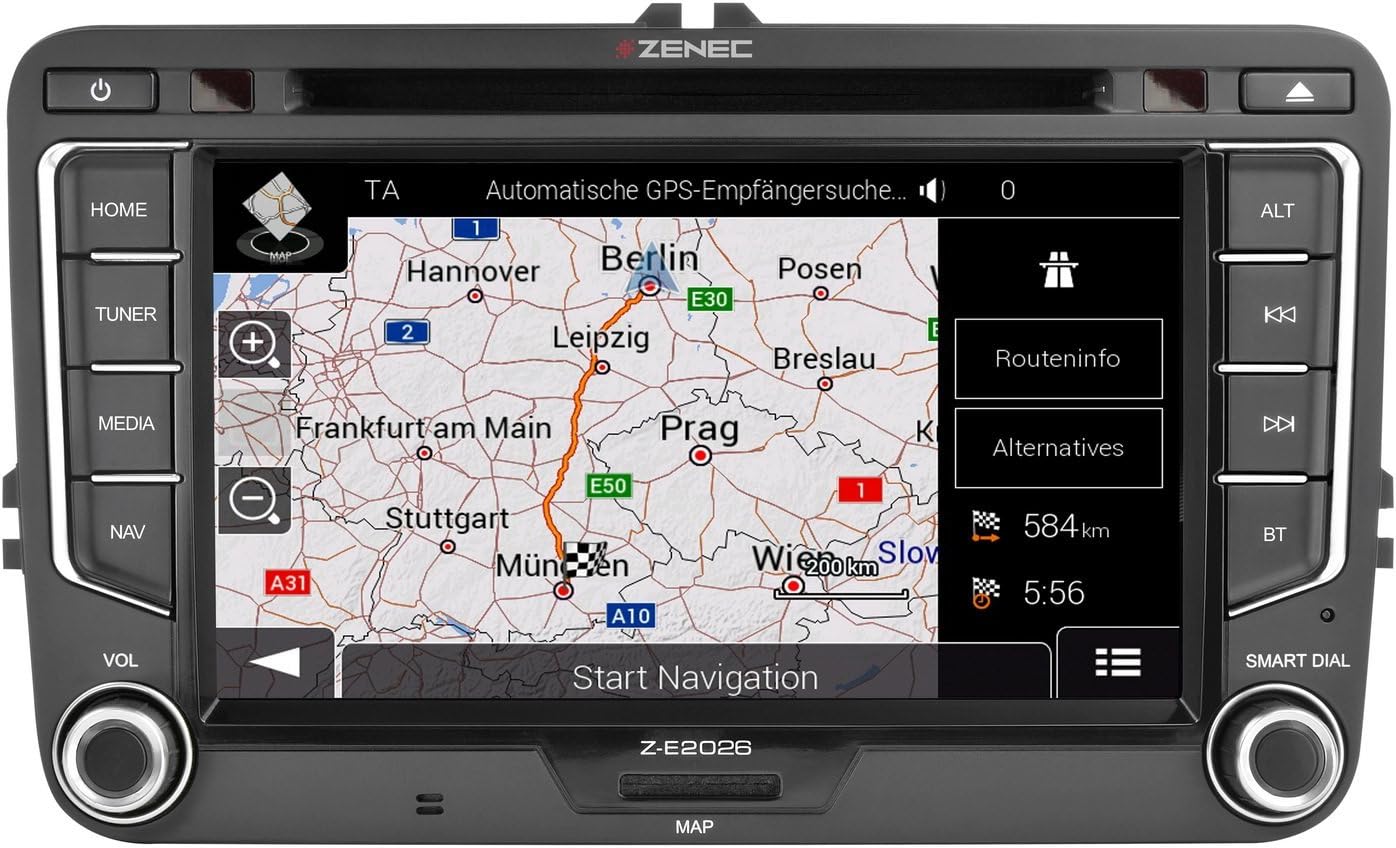
Biex tibda n-navigazzjoni:
- Agħfas il- NAV button or touch the NAV icon on the screen.
- Daħħal id-destinazzjoni tiegħek billi tuża t-tastiera fuq l-iskrin.
- Select your preferred route options (e.g., fastest, shortest).
- Confirm to start route guidance.
The system supports SD card navigation for map data.
5.3 Konnettività Bluetooth
Connect your mobile phone via Bluetooth for hands-free calling and audio streaming.

Tqabbil ta' apparat:
- Agħfas il- BT button or touch the BT icon.
- Ippermetti l-Bluetooth fuq il-mowbajl tiegħek u fittex apparati disponibbli.
- Select "Zenec Z-E2026" from the list on your phone.
- Ikkonferma l-kodiċi tat-tqabbil fuq iż-żewġ apparati jekk tintalab.
The system supports Voice Support for Bluetooth phone operation (SIVR).
5.4 Daqq tal-Midja
The Z-E2026 supports various media formats and sources, including USB and MP3 playback.

To access media functions:
- Agħfas il- MEDIA button or touch the MEDIA icon.
- Select your desired media source (e.g., USB, Bluetooth Audio).
- Use the on-screen controls to play, pause, skip tracks, and adjust audio settings.
The system features a DSP-based crossover with HPF/LPF functions for advanced audio customization.
6. Manutenzjoni
6.1 Tindif tal-Apparat
Use a soft, dry cloth to clean the screen and exterior of the unit. Do not use abrasive cleaners or solvents, as these can damage the surface.
6.2 Aġġornamenti tas-Software
Periodically check the official Zenec website for available software and map updates. Follow the instructions provided with the update files bir-reqqa biex tiżgura installazzjoni xierqa.
7 Issolvi l-problemi
If you encounter issues with your Zenec Z-E2026, refer to the following common problems and solutions:
| Problema | Kawża Possibbli | Soluzzjoni |
|---|---|---|
| Ebda qawwa | Wiring mhux korrett, fjus minfuħ | Check power connections and vehicle fuses. Consult an installer if necessary. |
| L-ebda ħoss | Volume too low, mute activated, incorrect audio settings | Increase volume, check mute status, verify audio output settings. |
| Sinjal tal-GPS mitluf jew mhux preċiż | Poor satellite reception, faulty GPS antenna | Ensure the vehicle is in an open area. Check GPS antenna connection. |
| Kwistjonijiet ta 'tqabbil tal-Bluetooth | Bluetooth not enabled, incorrect pairing procedure | Ensure Bluetooth is active on both devices. Re-attempt pairing following instructions in Section 5.3. |
| Touchscreen ma jirrispondix | Glitch temporanju tas-softwer | Restart the vehicle ignition. If the problem persists, perform a factory reset (refer to advanced settings, if available). |
If the problem persists after attempting these solutions, please contact Zenec customer support or your authorized dealer.
8. Speċifikazzjonijiet
| Karatteristika | Dettall |
|---|---|
| Numru tal-Mudell | Z-E2026 |
| Brand | zenec |
| Daqs tal-Iskrin | 7 Pulzier |
| Apparat tal-Input | Touchscreen |
| Teknoloġiji tal-Konnettività | Bluetooth, HDMI |
| Teknoloġiji ta' Komunikazzjoni mingħajr Fili | Bluetooth |
| Karatteristiċi Speċjali | Touchscreen, DSP-based crossover (HPF/LPF), Phase Diversity RDS, SIVR Voice Support |
| Modalità tal-Ħruġ tal-Awdjo | Stereo (4.2 pre-amplified outputs, 4V) |
| Komponenti Inklużi | Fakra connector, Dual Tuner, Antenna Adapter |
| Piż tal-oġġett | 4.04 Kilogrammi |
| Dimensjonijiet (Pakkett) | 39.2 x 26.6 x 17.8 ċm |
| Tip ta 'Servizz tal-Vettura | Karozza |
| Tip ta 'Immuntar | Immonta fuq il-Panew |
9. Garanzija u Appoġġ
For warranty information, please refer to the documentation provided at the time of purchase or visit the official Zenec website. For technical support, contact your authorized Zenec dealer or Zenec customer service.
Manifattur: zenec
L-Ewwel Data Disponibbli: 15 ta’ Jannar, 2020


