Introduzzjoni
This manual provides essential information for the proper handling, installation, and maintenance of the Aquascape 95046 UltraKlear 2500 28-Watt UV Quartz Sleeve. This component is designed as a replacement part for the Aquascape UltraKlear 2500 UV Clarifier/Sterilizer (G2) to ensure its continued effective operation in maintaining clear pond water.
Informazzjoni Importanti dwar is-Sigurtà
- Skonnettja l-Enerġija: Always disconnect power to the UV clarifier unit before attempting any installation, maintenance, or replacement procedures.
- Komponent Fraġli: The quartz sleeve is made of glass and is fragile. Handle with extreme care to prevent breakage.
- Evita Kuntatt: Do not touch the quartz sleeve or UV lamp directly with bare hands. Oils from skin can create hot spots and reduce efficiency or lifespan. Use gloves or a clean cloth.
- Issikkar tal-Ilma: Ensure all seals and connections are properly seated and tightened after installation to prevent water leaks and electrical hazards.
- Partijiet Oriġinali: Use only genuine Aquascape replacement parts to ensure compatibility and safe operation.
Kontenut tal-Pakkett
Il-pakkett tiegħek għandu jkun fih l-oġġett li ġej:
- One (1) Aquascape 95046 UltraKlear 2500 28-Watt UV Quartz Sleeve
Istruzzjonijiet għall-installazzjoni
This quartz sleeve is a replacement component. Refer to your Aquascape UltraKlear 2500 UV Clarifier/Sterilizer (G2) owner's manual for specific disassembly and reassembly instructions. The general steps for replacing the quartz sleeve are as follows:
- Skonnettjar tal-Enerġija: Ensure the UV clarifier unit is completely disconnected from its power source.
- Ixxotta l-Ilma: If the unit is installed in-line, drain any water from the clarifier housing.
- Access Sleeve: Carefully open the UV clarifier housing to access the existing quartz sleeve and UV lamp. This typically involves unscrewing end caps or clamps.
- Remove Old Sleeve: Gently remove the old quartz sleeve. Dispose of it responsibly, as it may contain broken glass.
- Akkomodazzjoni Nadifa: Clean the interior of the UV clarifier housing to remove any debris or algae buildup.
- Install New Sleeve: With clean hands or gloves, carefully insert the new Aquascape 95046 UltraKlear 2500 28-Watt UV Quartz Sleeve into the clarifier housing. Ensure it is seated correctly and securely.
- Erġa' arma: Erġa' installa l-UV lamp and reassemble the clarifier unit according to your main unit's manual, ensuring all seals (O-rings) are properly in place and connections are watertight.
- Test għal Tnixxijiet: Before reconnecting power, allow water to flow through the unit (if applicable) and check for any leaks.
- Erġa' qabbad l-Enerġija: Once confirmed leak-free, reconnect the power to the UV clarifier.
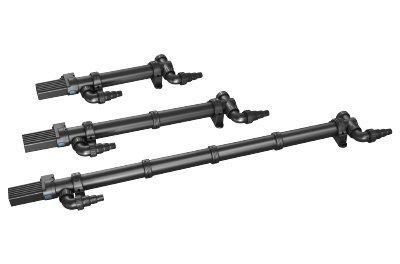
This image displays three Aquascape UltraKlear UV Clarifier/Sterilizer units, which utilize the 28-Watt UV Quartz Sleeve. The quartz sleeve is an internal component of these units, protecting the UV lamp from water while allowing UV light to pass through.
Istruzzjonijiet Operattivi
The Aquascape 95046 UltraKlear 2500 28-Watt UV Quartz Sleeve is a passive component. Its operation is directly tied to the proper functioning of your Aquascape UltraKlear 2500 UV Clarifier/Sterilizer (G2) unit. Once correctly installed, the quartz sleeve allows the UV light from the lamp to effectively treat the water flowing through the clarifier, helping to control green water algae.
Ensure the UV clarifier unit is powered on and operating according to its own manual. The quartz sleeve requires no separate operational steps beyond correct installation.
Manutenzjoni
Regular maintenance of the quartz sleeve is crucial for the optimal performance of your UV clarifier.
- Tindif: Periodically (e.g., every 3-6 months, or as recommended by your main UV unit manual), disconnect power and carefully remove the quartz sleeve. Clean its exterior surface with a soft cloth and a mild acid solution (like vinegar) to remove mineral deposits or algae film. Rinse thoroughly with clean water before reinstallation.
- Spezzjoni: During cleaning, inspect the quartz sleeve for any cracks, chips, or signs of wear. A damaged sleeve must be replaced immediately to prevent water ingress to the UV lamp u komponenti elettriċi.
- Sostituzzjoni: While the quartz sleeve itself does not "wear out" in the same way a UV lamp does, it can become permanently stained or damaged over time. Replace the quartz sleeve if it is cracked, chipped, or if cleaning does not restore its clarity.
Issolvi l-problemi
If you experience issues after replacing the quartz sleeve, consider the following:
- UV Lamp Mhux Dawl:
- Ensure the UV lamp is correctly seated within the quartz sleeve and connected to the ballast.
- Check the power supply to the UV clarifier unit.
- L-UV lamp itself may need replacement (typically annually).
- The ballast (power supply for the UV lamp) may be faulty.
- Tnixxijiet tal-Ilma:
- Skonnettja l-enerġija immedjatament.
- Check all O-rings and seals for proper placement and condition. Replace if damaged.
- Ensure all end caps and connections are securely tightened.
- Inspect the quartz sleeve for any cracks that may have occurred during installation.
- Poor Water Clarity (Green Water):
- Ensure the UV lamp is functioning (emitting light).
- Clean the quartz sleeve if it has mineral deposits or algae film, which can block UV light.
- L-UV lamp may be old and require replacement (UV lamps lose effectiveness over time, even if still glowing).
- Ensure the water flow rate through the UV clarifier is within the recommended range for your unit.
Speċifikazzjonijiet
| Numru tal-Mudell | 95046 |
| Kompatibilità | Aquascape UltraKlear 2500 UV Clarifier/Sterilizer (G2) |
| Wattage (Associated UV Lamp) | 28-Watt |
| Dimensjonijiet tal-Prodott | 25 x 2 x 2 pulzieri |
| Piż tal-oġġett | 8 uqija |
| Manifattur | AQUASCAPE |
Garanzija u Appoġġ
For warranty information regarding your Aquascape 95046 UltraKlear 2500 28-Watt UV Quartz Sleeve, please refer to the documentation provided with your original Aquascape UltraKlear 2500 UV Clarifier/Sterilizer (G2) unit or visit the official Aquascape website. For technical support or further assistance, please contact Aquascape customer service directly.
Uffiċjali tal-Aquascape Websit: www.aquascapeinc.com


