RF Explorer Digital Handheld Spectrum Analyzer
Model: WSUB1G (240 - 960 MHz)
Manwal ta' Istruzzjoni għall-Utent
1. Introduzzjoni
The RF Explorer WSUB1G is a compact, lightweight, and highly integrated digital handheld spectrum analyzer designed for working with popular sub-1GHz ISM bands. It provides essential functionality for analyzing radio frequency environments, making it suitable for both outdoor and indoor applications. This device offers various spectrum analysis modes and can be connected to a PC for enhanced functionality.
2. Kontenut tal-Pakkett
Iċċekkja li l-oġġetti kollha elenkati hawn taħt huma preżenti fil-pakkett tiegħek:
- RF Explorer model WSUB1G unit
- Nagoya NA-773 wideband telescopic antenna
3. Setup
3.1. Iċċarġjar Inizjali
The RF Explorer WSUB1G is equipped with a high-capacity Lithium-Ion battery, providing over 16 hours of continuous operation. Before first use, or if the battery is depleted, charge the device using a standard mini-USB 2.0 cable (not included). Connect the mini-USB end to the device and the other end to a compatible USB power source.
3.2. Twaħħil tal-Antenna
To begin using the spectrum analyzer, attach the provided Nagoya NA-773 wideband telescopic antenna to the RF 50Ω connector on the device. Ensure the connection is secure but do not overtighten.

Immaġni: Wara view of the RF Explorer showing the RF 50Ω antenna connector and the mini-USB port.

Image: RF Explorer with the telescopic antenna fully extended and attached to the device.
3.3. Tixgħil / Mitfi
Locate the ON/OFF switch on the top right side of the device. Slide the switch to the 'ON' position to power on the unit. Slide it to 'OFF' to power down.
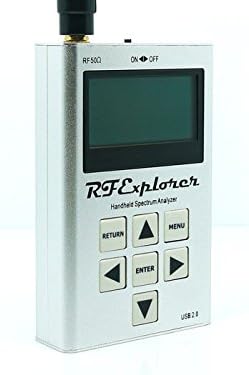
Immaġni: Quddiem view of the RF Explorer, highlighting the display, control buttons, and the ON/OFF switch at the top right.
4. Istruzzjonijiet Operattivi
4.1. Navigazzjoni Bażika
The RF Explorer features a simple button interface for navigation and control:
- MENU: Access the main menu and settings.
- Daħħal: Ikkonferma l-għażliet jew idħol fis-submenus.
- RITORN: Mur lura għall-iskrin jew il-menu preċedenti.
- Buttuni tal-Vleġeġ ('il fuq, 'l isfel, Xellug, Lemin): Navigate through menu options and adjust parameters.

Image: Front panel of the RF Explorer, clearly showing the display and the arrangement of the MENU, RETURN, ENTER, and arrow buttons.
4.2. Spectrum Analyzer Modes
The device supports several spectrum analyzer modes to suit different analysis needs:
- Peak Max and Hold: Displays the maximum signal strength detected over time.
- Normali: Provides real-time spectrum analysis.
- Ikteb: Continuously updates the display with new sweep data.
- Medja: Smooths out the signal display by averaging multiple sweeps.
These modes can be selected via the device's menu system.
4.3. Frequency Range and Span
The RF Explorer WSUB1G covers a wide frequency range from 240 MHz to 960 MHz. This includes popular ISM bands such as 315MHz, 433MHz, 868MHz, and 915MHz, as well as UHF TV, 70cm and 33cm HAM radio, and GSM frequencies.
The frequency span can be adjusted from 112 KHz up to 100 MHz, allowing for detailed analysis of specific frequency segments or broader overviews.
4.4. PC Client Software
For advanced analysis, data logging, and visualization, the RF Explorer can be connected to a Windows PC using a standard mini-USB 2.0 cable. The open-source PC client software provides additional functionality beyond the device's built-in display. Refer to the official RF Explorer website for software downloads and detailed instructions on its use.
5. Manutenzjoni
5.1. Firmware Upgrades
Lifetime free firmware upgrades are available for the RF Explorer WSUB1G. Regularly check the official RF Explorer website for the latest firmware versions. Firmware updates often include new features, performance improvements, and bug fixes. Instructions for performing firmware upgrades are typically provided with the firmware download.
5.2. Kura tal-batterija
Biex timmassimizza l-ħajja u l-prestazzjoni tal-batterija:
- Evita li tiċċarġja l-batterija kompletament ta' spiss.
- Aħżen l-apparat f'post frisk u niexef meta ma jkunx qed jintuża għal perjodi twal.
- Erġa' ċċarġja l-batterija perjodikament jekk tinħażen għal żmien twil biex tevita li tiskarika kompletament.
6 Issolvi l-problemi
6.1. L-Apparat Mhux Qed Jixgħel
- Kun żgur li s-swiċċ ON/OFF ikun fil-pożizzjoni 'ON'.
- Connect the device to a USB power source using a mini-USB cable to check if the battery requires charging.
6.2. No Signal Detected / Incorrect Readings
- Verify that the antenna is securely attached to the RF 50Ω connector.
- Ensure the selected frequency range and span are appropriate for the signals you intend to analyze.
- Check for potential external interference sources if readings appear erratic.
6.3. PC Client Connectivity Issues
- Confirm that the mini-USB cable is properly connected to both the RF Explorer and the PC.
- Ensure the necessary drivers for the RF Explorer are installed on your Windows PC. These are typically available on the official RF Explorer websit.
- Try a different mini-USB cable, as some cables may be for charging only and lack data transfer capabilities.
7. Speċifikazzjonijiet Tekniċi
| Karatteristika | Speċifikazzjoni |
|---|---|
| Banda ta' Frekwenza | 240 - 960 MHz |
| Span tal-Frekwenza | 112 KHz - 100 MHz |
| AmpRiżoluzzjoni tal-lititudni | 0.5 dBm |
| Medda Dinamika | -115 dBm sa 0 dBm |
| Absolute Max Input Power | +5 dBm |
| Average Noise Level (typical) | -110 dBm |
| Frequency Stability and Accuracy (typical) | ±10 ppm |
| Amplitude Stability and Accuracy (typical) | ±3 dBm |
| Riżoluzzjoni tal-Frekwenza | 1 KHz |
| Wisa' tal-Banda tar-Riżoluzzjoni (RBW) | Automatic 2.6 KHz to 600 KHz |
| Dimensjonijiet (LxWxH) | 6.7 x 4.5 x 1.2 pulzieri (170 x 114 x 30 mm) |
| Piż | 9.8 uqija (278 g) |
| Batterija | Lithium Ion (16+ hours continuous run) |
| Proċessur | 1 GHz Tegra (ARM) |
| Konnettività | Mini-USB 2.0 |
| Materjal tal-Każ | Solid Aluminum Metal |
8. Appoġġ u Garanzija
For technical support, additional resources, and the latest firmware updates, please visit the official seeed studio website or the RF Explorer product page. The manufacturer provides lifetime free firmware upgrades to enhance the device's functionality and performance.
Information regarding specific warranty terms and conditions can typically be found on the product packaging or the manufacturer's official websit. Jekk jogħġbok żomm il-prova tax-xiri tiegħek għal talbiet ta' garanzija.


