Introduzzjoni
This manual provides detailed instructions for the setup, operation, maintenance, and troubleshooting of your EZCAP284 HD 1080P Capture HDMI YPbPr Recorder. Please read this manual thoroughly before using the device to ensure proper functionality and to prevent damage.
Informazzjoni dwar is-Sigurtà
- Tesponix l-apparat għall-umdità, xita, jew temperaturi estremi.
- Evita li twaqqa’ jew tissuġġetta l-apparat għal impatti qawwija.
- Uża biss l-adapter tal-enerġija speċifikat.
- Tippruvax tiżżarma jew timmodifika l-apparat. Dan jannulla l-garanzija.
- Żomm l-apparat 'il bogħod mit-tfal.
Kontenut tal-Pakkett
Ivverifika li l-oġġetti kollha huma preżenti fil-pakkett tiegħek:
- EZCAP284 HD 1080P Capture Device
- Kontroll mill-bogħod
- Adapter tal-Enerġija (mhux elenkat espliċitament iżda implikat għall-operazzjoni)
- Manwal għall-Utent (dan id-dokument)
Prodott Overview
The EZCAP284 is a standalone HD video capture device designed for recording gameplay and other HDMI/YPbPr sources directly to a USB storage device without the need for a PC. It features HDMI pass-through for real-time viewing.

Figura 1: Fuq view of the EZCAP284 device, featuring a prominent record button.

Figura 2: Dettaljat view of the input and output ports on the EZCAP284.
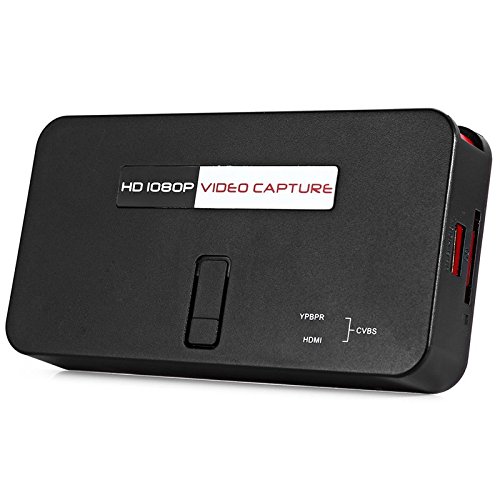
Figura 3: Qiegħ view of the EZCAP284 device, indicating model and certification information.
Setup
- Qabbad Sors tal-Vidjo: Connect your game console (e.g., PS3) or other video source to the HDMI-IN or YPbPr IN port on the EZCAP284 using the appropriate cables.
- Qabbad id-Displej: Qabbad it-TV jew il-monitor tiegħek mal- HDMI OUT port on the EZCAP284. This allows you to view your gameplay in real-time while recording.
- Qabbad il-Ħażna USB: Insert a USB flash drive or external hard drive (formatted as FAT32 or NTFS) into the USB 2.0 port on the EZCAP284. This is where your recordings will be saved.
- Qabbad l-Enerġija: Connect the power adapter to the DC IN port on the EZCAP284 and then plug it into a power outlet. The device will power on.
- Optional Audio Input: If you wish to record live commentary, connect a microphone to the 3.5mm Awdjo In port.
Istruzzjonijiet Operattivi
Recording Gameplay
- Ensure all connections are secure as described in the Setup section.
- Turn on your video source (e.g., game console) and your display.
- Agħfas il- REC button on the EZCAP284 device or the remote control to start recording. The indicator light will change to show recording is in progress.
- Agħfas il- REC button again to stop recording. The indicator light will revert to its standby state.
- Your recorded video file will be saved to the connected USB storage device.
Adding Live Commentary
To record your voice along with the gameplay:
- Qabbad mikrofonu mal- 3.5mm Awdjo In port before starting your recording.
- The device will automatically mix the microphone audio with the video source audio during recording.
Daqq
Biex view your recorded videos, safely remove the USB storage device from the EZCAP284 and connect it to a computer or a media player that supports the recorded video format.
Manutenzjoni
- Tindif: Uża drapp artab u niexef biex tnaddaf il-barra tal-apparat. Tużax prodotti tat-tindif likwidi jew solventi.
- Ħażna: Aħżen l-apparat f'post frisk u niexef 'il bogħod mix-xemx diretta u minn temperaturi estremi meta ma jkunx qed jintuża.
- Firmware: Iċċekkja l-manifattur webŻur is-sit perjodikament għal kwalunkwe aġġornament tal-firmware li jista' jtejjeb il-prestazzjoni jew iżid karatteristiċi.
Issolvi l-problemi
| Problema | Kawża Possibbli | Soluzzjoni |
|---|---|---|
| L-ebda output tal-vidjo fuq il-wiri. | Incorrect cable connection; input source not active; display input not selected. | Check HDMI/YPbPr connections. Ensure video source is on. Select correct input on your TV/monitor. |
| Recording fails or stops unexpectedly. | USB storage full; USB drive not compatible; power interruption. | Ensure USB drive has sufficient space. Try a different USB drive (FAT32/NTFS). Check power connection. |
| No audio in recording. | Audio cables not connected; source audio muted; microphone not connected or faulty. | Verify audio connections from source. Ensure source audio is not muted. Check microphone connection and functionality. |
| Il-kontroll mill-bogħod ma jaħdimx. | Batteries low or inserted incorrectly; IR sensor blocked. | Replace batteries. Ensure line of sight to the device's IR sensor. |
Speċifikazzjonijiet
| Karatteristika | Deskrizzjoni |
|---|---|
| Mudell | EZCAP284 |
| Tip | Adapter / Video Capture Device |
| Materjal | Ram (komponenti interni) |
| Interfaces | 3.5mm Audio In, HDMI In, HDMI Out, YPbPr In, USB 2.0 |
| Riżoluzzjoni tal-Qbid tal-Vidjo | Sa 1080p |
| Kompatibilità tal-Pjattaforma | PlayStation (and other HDMI/YPbPr sources) |
| Komponenti Inklużi | Kontroll mill-bogħod |
| Kulur | Iswed |
| Dimensjonijiet (L x W x H) | 14.00 x 7.40 x 2.00 ċm (madwar) |
| Piż | 0.463 kg (piż approssimattiv tal-pakkett) |
Garanzija u Appoġġ
Għal informazzjoni dwar il-garanzija u appoġġ tekniku, jekk jogħġbok irreferi għad-dokumentazzjoni pprovduta max-xiri tiegħek jew ikkuntattja lill-bejjiegħ/manifattur direttament. Żomm il-prova tax-xiri tiegħek għal talbiet ta' garanzija.


