Introduzzjoni
This manual provides detailed instructions for the setup, operation, and maintenance of your Acer R271 bid 27-inch IPS Full HD (1920 x 1080) Display. Please read this manual thoroughly before using your monitor to ensure proper functionality and to maximize your viewing esperjenza.

Quddiem view of the Acer R271 bid 27-inch IPS Full HD Display.
Setup
Kontenut tal-Pakkett
Ivverifika li l-komponenti kollha huma preżenti fil-pakkett:
- Acer R271 bid 27-inch Display
- Monitor Stand
- Korda tal-Enerġija
- Kejbil HDMI (jista' jvarja skont ir-reġjun)
- VGA Cable (may vary by region)
Monitor Assemblea
To assemble the monitor, carefully attach the stand to the back of the display panel. Ensure it clicks securely into place. Place the monitor on a stable, flat surface.
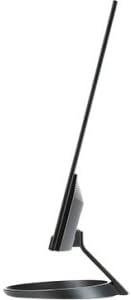
Ġenb view illustrating the slim design of the Acer R271 bid monitor.
Konnessjoni tal-Monitor
The Acer R271 bid monitor supports multiple input options. Connect the appropriate cable from your computer or device to the corresponding port on the monitor.
- HDMI: Għal vidjow u awdjo diġitali ta' definizzjoni għolja.
- DVI (w/HDCP): Għal konnessjoni ta' vidjow diġitali.
- VGA: Għal konnessjoni ta' vidjow analogu.
Wara li tqabbad il-kejbil tal-vidjo, qabbad il-korda tal-enerġija mal-monitor u mbagħad ma' sokit tal-enerġija.
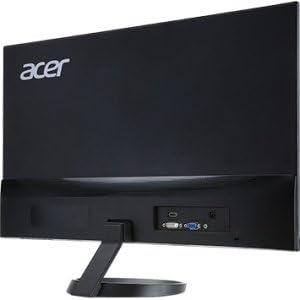
Wara view of the Acer R271 bid monitor, highlighting the HDMI, DVI, and VGA input ports.
Tixgħel
Press the power button, usually located on the bottom right side of the monitor, to turn on the display. The monitor will automatically detect the active input source.
Istruzzjonijiet Operattivi
Funzjonijiet Bażiċi
Use the buttons located on the bottom bezel of the monitor to navigate the On-Screen Display (OSD) menu. These buttons typically allow you to:
- Power On/Off the monitor.
- Select input source (HDMI, DVI, VGA).
- Adjust volume (if applicable).
- Access the OSD menu for advanced settings.
Display Settings
The OSD menu provides options to customize your display. Common adjustments include:
- Luminożità: Aġġusta l-luminanza ġenerali tal-iskrin.
- Kuntrast: Modify the difference between light and dark areas.
- Settings tal-Kulur: Irfina t-temperatura tal-kulur, il-gamma, u l-livelli individwali tal-RGB.
- Modalità Stampa: Select preset modes for different content types (e.g., Standard, Movie, Game).
Karatteristiċi Ewlenin
The Acer R271 bid monitor incorporates several features designed to enhance your viewesperjenza:
- Teknoloġija IPS: Provides clear and bright colors from wide viewing angles (up to 178 degrees).
- Disinn ZeroFrame: An edge-to-edge display that minimizes bezels, ideal for multi-monitor setups.
- Eye Protect Technology: Includes features like Blue Light Filter, Flicker-less, and ComfyView biex tnaqqas it-tensjoni tal-għajnejn waqt użu fit-tul.
Wirja uffiċjali tal-vidjo tal-prodottasing the Acer R1 Series monitor's features, including ZeroFrame design, Full HD resolution, IPS technology for wide viewing angles, and Eye Protect technology for user comfort.
Manutenzjoni u Kura
Tindif tal-Monitor
Biex tnaddaf l-iskrin, imsaħ bil-mod b'ċarruta ratba u mingħajr suf. Għal marki persistenti, dampen the cloth with a mild, non-abrasive screen cleaner. Avoid using alcohol-based cleaners or spraying liquid directly onto the screen.
Kura Ġenerali
Keep the monitor away from direct sunlight, excessive heat, and moisture. Do not block the ventilation openings. Avoid placing heavy objects on the monitor or its cables.
Issolvi l-problemi
No Display or "No Signal" Message
- Kun żgur li l-kejbil tal-enerġija huwa konness sew kemm mal-monitor kif ukoll mas-sokit tal-enerġija.
- Verify that the video cable (HDMI, DVI, or VGA) is firmly connected to both the monitor and your computer.
- Iċċekkja jekk is-sors tad-dħul korrett huwiex magħżul fuq il-monitor billi tuża l-menù OSD.
- Confirm your computer is powered on and not in sleep mode.
Kwalità Fqira tal-Immaġni
- Adjust the brightness, contrast, and color settings through the OSD menu.
- Kun żgur li r-riżoluzzjoni tal-wiri tal-kompjuter tiegħek hija ssettjata għar-riżoluzzjoni nattiva tal-monitor (1920 x 1080).
- Iċċekkja għal xi ħsara fiżika fil-kejbil tal-vidjo jew fil-portijiet.
Speċifikazzjonijiet
| Karatteristika | Speċifikazzjoni |
|---|---|
| Daqs tal-Iskrin | 27 Pulzier |
| Riżoluzzjoni tal-Iskrin | 1920 x 1080 (Full HD) |
| Tip ta' Panel | IPS |
| Ħin ta' Rispons | 4ms |
| Pixel Pitch | 0.311mm |
| Luminożità | 250 nit |
| Inputs tas-Sinjali | 1 x HDMI, 1 x DVI (w/HDCP), 1 x VGA |
| Proporzjon ta' l-aspett | 16:9 |
| Piż tal-oġġett | 8.05 liri |
| Dimensjonijiet tal-Prodott (LxWxH) | 24.8 x 18.1 x 9.4 pulzieri |
| Kulur | Iswed |

Detailed dimensions of the Acer R271 bid monitor.
Informazzjoni dwar Garanzija
The Acer R271 bid monitor typically comes with a 3-year limited warranty. Please refer to the warranty card included with your product or visit the official Acer website for specific terms and conditions, as warranty details may vary by region and retailer.
Appoġġ għall-Klijent
For further assistance, technical support, or to download the latest drivers and software, please visit the official Acer support websit:
You may also contact Acer customer service directly for personalized support.


