1. Istruzzjonijiet Importanti dwar is-Sigurtà
Meta tuża apparat elettriku, għandhom jiġu segwiti prekawzjonijiet bażiċi ta 'sikurezza, inklużi dawn li ġejjin:
- Aqra l-istruzzjonijiet kollha qabel tuża l-apparat.
- Tippruvax tħaddem dan il-forn bil-bieba miftuħa għax dan jista' jirriżulta f'espożizzjoni ta' ħsara għall-enerġija tal-microwave.
- Tpoġġi l-ebda oġġett bejn il-wiċċ ta 'quddiem tal-forn u l-bieb jew tħalli l-ħamrija jew residwi aktar nodfa jakkumulaw fuq l-uċuħ tas-siġillar.
- Tħaddimx il-forn jekk ikun bil-ħsara. Huwa partikolarment importanti li l-bieba tal-forn tagħlaq sewwa u li ma jkun hemm l-ebda ħsara lil: (1) bieb (mgħawweġ), (2) ċappetti u lukketti (imkissrin jew maħlula), (3) siġilli tal-bibien u uċuħ tas-siġillar.
- Il-forn m'għandux jiġi aġġustat jew imsewwi minn ħadd ħlief persunal tas-servizz kwalifikat kif suppost.
- Kun żgur li l-apparat ikun ertjat kif suppost.
- Tgħaddix il-korda jew il-plagg fl-ilma.
- Superviżjoni mill-qrib hija meħtieġa meta l-apparat jintuża minn jew ħdejn it-tfal.
- Do not use the oven for purposes other than heating food.
2. Prodott Aktarview
2.1. Microwave Oven Components

Figura 1: Quddiem view of the Sharp R-369T Microwave Oven, showcasing its 33L capacity, 6 microwave power levels, and various cooking functions.
The Sharp R-369T is a 33-liter solo microwave oven designed for efficient food preparation. It features a sleek silver finish and a black glass door. Key components include the oven cavity, glass turntable, control panel, and door with a push-open mechanism.

Figura 2: Intern view of the microwave oven, showing the spacious 33L cavity and the removable glass turntable for even cooking.
The interior includes a 272mm glass turntable that rotates during operation to ensure food is heated evenly. The oven door opens with a simple push mechanism.
2.2. Panel tal-Kontroll
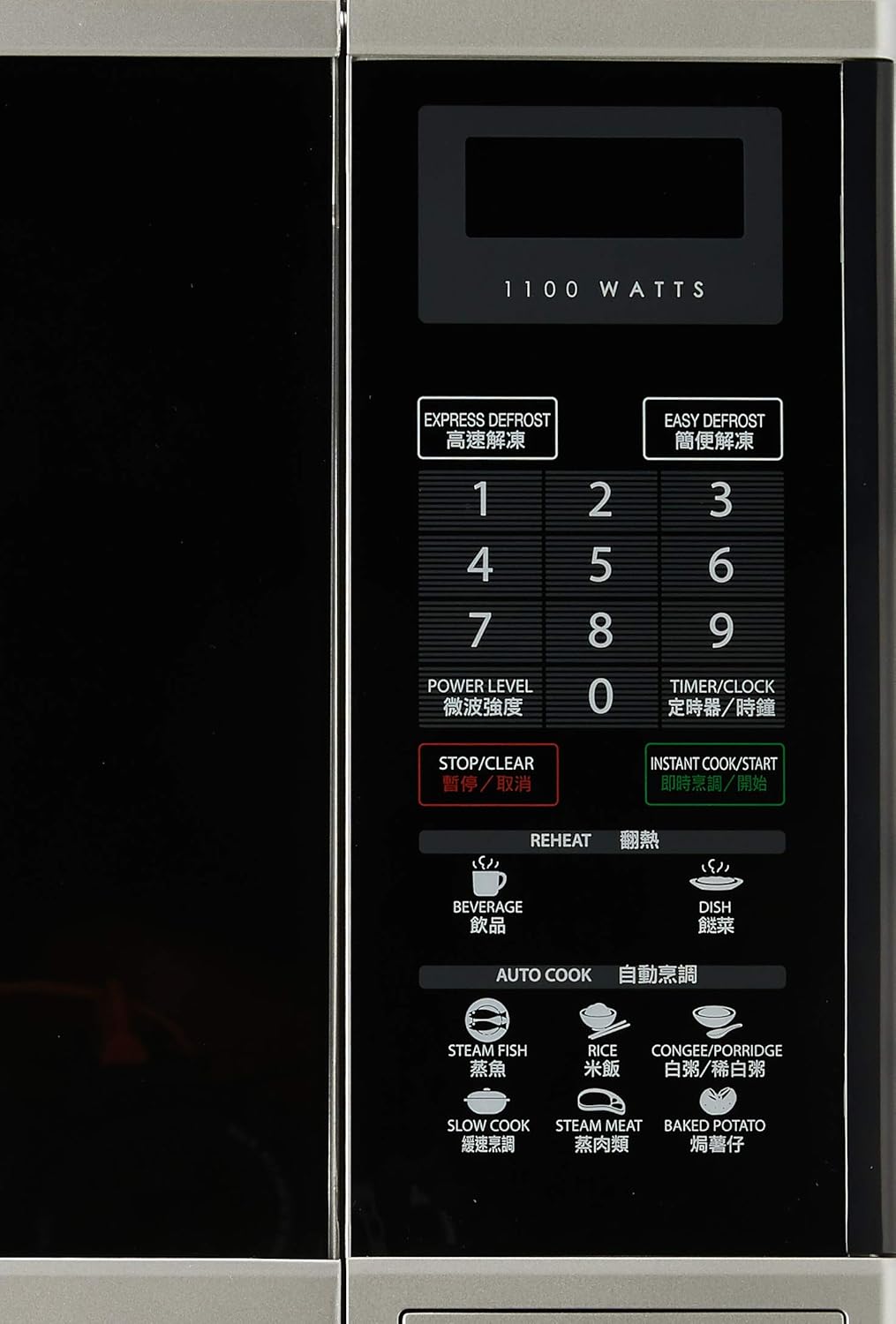
Figura 3: Dettaljat view of the control panel, featuring numerical keys, function buttons, and the digital display.
The control panel is located on the right side of the oven and features a digital display, numerical keypad (0-9), and various function buttons:
- EXPRESS DEFROST / EASY DEFROST: For quick and convenient defrosting.
- LIVELL TAL-QAWWA: Adjusts microwave power output.
- TIMER/ARLOĠĠ: Sets the cooking timer or the current time.
- Waqqaf/ĊALAR: Iwaqqaf l-operazzjoni kurrenti jew iħassar is-settings.
- INSTANT COOK/START: Starts cooking immediately or confirms settings.
- SAĦĦAN MILL-ĠDID: Dedicated buttons for reheating beverages and dishes.
- AUTO COOK: Pre-programmed settings for various food types like Steam Fish, Rice, Congee/Porridge, Slow Cook, Steam Meat, and Baked Potato.
3. Setup u Installazzjoni
3.1. Spakkjar
Carefully remove the microwave oven and all packing materials from the carton. Check the oven for any damage, such as dents or a misaligned door. Do not operate the oven if it is damaged. Contact your dealer or authorized service center.
3.2 Tqegħid
- Place the oven on a flat, stable surface strong enough to hold its weight (approximately 17kg).
- Aċċerta ruħek li jkun hemm ventilazzjoni adegwata. Ħalli minimu ta' 10 ċm (4 pulzieri) spazju fuq wara, 20 ċm (8 pulzieri) fil-parti ta' fuq, u 5 ċm (2 pulzieri) fuq kull naħa għal fluss tal-arja xieraq.
- Timblokkax il-ventijiet tal-arja.
- Żomm il-forn 'il bogħod minn sorsi ta' sħana, fwar, jew titjir ta' likwidi.
- Tpoġġix il-forn ħdejn radju jew televiżjoni, għax jista' jikkawża interferenza.
3.3. Konnessjoni Elettrika

Figura 4: Wara view of the microwave oven, illustrating the power cord connection and important safety warnings regarding microwave energy.
- Plug the oven into a properly grounded 220V, 50Hz AC outlet with a dedicated circuit.
- Tużax estensjoni jew adapters.
- Kun żgur li l-korda tal-enerġija mhix bil-ħsara jew maqbuda.
4. Istruzzjonijiet Operattivi
4.1. L-issettjar tal-Arloġġ
- Agħfas il- TIMER/ARLOĠĠ buttuna darba.
- Use the numerical keypad to enter the current time (e.g., 12:30 for 12:30 PM).
- Agħfas il- TIMER/ARLOĠĠ buttuna għal darb'oħra biex tikkonferma.
4.2. Tisjir Bażiku fil-Microwave
- Poġġi l-ikel f'kontenitur li jista' jintuża fil-microwave fuq it-turntable tal-ħġieġ.
- Agħlaq il-bieb tal-forn sew.
- Agħfas il- LIVELL TAL-QAWWA button repeatedly to select the desired power level (e.g., P100 for 100% power, P80 for 80% power). The oven offers 6 microwave power levels.
- Use the numerical keypad to enter the cooking time.
- Agħfas INSTANT COOK/START biex tibda tisjir.
4.3. Id-defrosting
The oven offers two defrost functions:
- EXPRESS DEFROST: For quick defrosting of smaller items. Follow on-screen prompts or manual for specific weight settings.
- EASY DEFROST: For more controlled defrosting. Refer to the manual for weight and food type guidelines.
- Poġġi l-ikel iffriżat fuq it-turntable.
- Agħfas jew DEFROST ESPRESS or EASY DEFROST.
- Enter the weight of the food using the numerical keypad.
- Agħfas INSTANT COOK/START.
4.4. Reheat Functions
The oven includes 2 Reheat Menu keys for common items:
- XORB: Għat-tisħin mill-ġdid tax-xorb.
- DISH: For reheating prepared meals.
- Place the item to be reheated on the turntable.
- Agħfas il-parti xierqa SAĦĦAN MILL-ĠDID button (BEVERAGE or DISH).
- The oven will automatically set the time. Press INSTANT COOK/START biex tibda.
4.5. Auto Cook Functions
Il- COOK AUTO menu provides pre-programmed settings for various foods:
- ĦUT FWAR
- ROSS
- CONGEE/PORRIDGE
- Sajjar bil-mod
- LAĦAM BIL-FWAR
- PATATA MOĦMIA
- Place the food in a suitable container on the turntable.
- Agħfas dak mixtieq COOK AUTO buttuna.
- Select the quantity or weight if prompted (refer to the full manual for specific auto cook settings).
- Agħfas INSTANT COOK/START.
5. Manutenzjoni u Tindif
Tindif regolari tal-forn tal-microwave tiegħek jiżgura l-lonġevità u t-tħaddim effiċjenti tiegħu.
5.1. Tindif ta' barra
- Imsaħ l-uċuħ ta 'barra b'artab, damp drapp.
- Tużax tindif li joborxu jew kimiċi ħarxa.
5.2. Tindif Intern
- Clean the oven cavity after each use with a mild detergent and a soft cloth.
- For stubborn food splatters, place a bowl of water with lemon slices inside and microwave on high for 2-3 minutes. The steam will loosen the residue, making it easier to wipe clean.
- Ensure the door seals and sealing surfaces are clean to maintain proper operation.
5.3. Turntable tal-ħġieġ
- It-turntable tal-ħġieġ u ċ-ċirku tar-romblu jistgħu jitneħħew għat-tindif.
- Aħsilhom f'ilma sħun u bis-sapun jew fil-magna tal-ħasil tal-platti.
- Kun żgur li jkunu niexfa għalkollox qabel ma terġa' tpoġġihom fil-forn.
6 Issolvi l-problemi
Qabel ma tikkuntattja lis-servizz, iċċekkja l-kwistjonijiet komuni li ġejjin:
| Problema | Kawża Possibbli | Soluzzjoni |
|---|---|---|
| Il-forn ma jibdax | Il-korda tal-enerġija mhux imdaħħla; Il-bieb mhux magħluq sew; Il-fjus maħruq jew is-circuit breaker qabad. | Ipplaggja l-korda tal-enerġija; Agħlaq il-bieb sew; Iċċekkja l-fjus jew irrisettja s-circuit breaker. |
| Ikel mhux tisħin | Ħin tat-tisjir jew livell ta’ qawwa ssettjat ħażin; Il-bieb mhux magħluq sew. | Adjust time/power; Ensure door is latched. |
| Turntable ma ddurx | It-turntable mhux imqiegħed sew; Ostruzzjoni taħt it-turntable. | Erġa' poġġi t-turntable u ċ-ċirku tar-romblu; Neħħi kwalunkwe ostaklu. |
| Xrar ġewwa l-forn | Metal or foil in oven; Food splatters. | Remove metal objects; Clean oven interior thoroughly. |
If the problem persists after checking these points, please contact an authorized service technician.
7. Speċifikazzjonijiet
| Brand | Sharp |
| Mudell | R-369T |
| Kapaċità | 33 Litri |
| Qawwa tal-Ħruġ | 800W (Microwave) |
| Wattage | 1100 watt (Input) |
| Dijametru tat-turntable | 272mm |
| Dimensjonijiet ta' barra (W x H x D) | 520 x 310 x 448 mm |
| Piż | 16.96 kg |
| Voltage | 220 Volts |
| Frekwenza | 50 Hz |
| Materjal | Azzar |
| Karatteristiċi Speċjali | Programmable, 6 Microwave Power Levels, 2 Reheat Menu Keys, Easy Defrost, Slow Cook Key, Black Glass Door |

Figure 5: Dimensional drawing of the Sharp R-369T Microwave Oven, illustrating its width (520 mm / 52 cm), height (310 mm / 31 cm), and depth (448 mm / 44.8 cm).
8. Garanzija u Appoġġ
For warranty information and customer support, please refer to the warranty card included with your product or visit the official Sharp websit għar-reġjun tiegħek. Żomm l-irċevuta tax-xiri tiegħek bħala prova tax-xiri għal kwalunkwe talba ta' garanzija.
For technical assistance or service inquiries, please contact Sharp customer service.


