1. Introduzzjoni
This manual provides essential instructions for the safe and efficient operation of your InFocus IN128HDx 1080p DLP Professional Network Projector. Please read this manual thoroughly before using the projector and retain it for future reference. The InFocus IN128HDx is designed to deliver high-definition content with clarity and brightness, suitable for various professional and educational environments.
2. Prodott Aktarview
2.1 Karatteristiċi ewlenin
- Native 1080p resolution for high-definition content display without scaling.
- 4000 lumens brightness and 15,000:1 contrast ratio for clear, readable images in various lighting conditions.
- Integrated 10-watt speaker for audio output.
- Common throw ratio (1.3:1) for flexible installation and replacement.
- Multiple connectivity options: HDMI, VGA, composite, S-video, and LAN port for network management.
2.2 Komponenti tal-Proġettur

Figura 2.1: Quddiem view of the InFocus IN128HDx projector. This image shows the main lens and the overall compact design of the unit.

Figura 2.2: Fuq view of the InFocus IN128HDx projector, highlighting the control panel with buttons for power, menu, source selection, and navigation. Also visible are the focus and zoom rings near the lens.

Figura 2.3: Ġenb view of the InFocus IN128HDx projector, illustrating the ventilation grilles for heat dissipation and the overall profile tal-apparat.
3. Setup
3.1 Spakkjar u Tqegħid
- Carefully remove the projector from its packaging.
- Place the projector on a stable, flat surface or mount it securely according to installation guidelines. Ensure adequate ventilation around the unit.
- Position the projector at the desired distance from the screen. Refer to the specifications for throw ratio details.
3.2 Konnessjoni mal-Enerġija
- Qabbad il-korda tal-enerġija mad-daħla tal-enerġija tal-proġettazzjoni.
- Ipplaggja t-tarf l-ieħor tal-korda tad-dawl fi żbokk elettriku ertjat.
3.3 Konnessjoni ta' Sorsi tal-Vidjo
The IN128HDx supports multiple input sources:
- HDMI: For high-definition digital video and audio. Connect an HDMI cable from your source device to the projector's HDMI port.
- VGA: For analog video signals from computers. Connect a VGA cable from your computer to the projector's VGA port.
- Vidjow kompost: For standard definition video. Connect a composite video cable (yellow RCA) to the corresponding port.
- Vidjo S: For improved standard definition video. Connect an S-Video cable to the S-Video port.
- LAN: For network control and management. Connect an Ethernet cable to the LAN port.
4. Istruzzjonijiet Operattivi
4.1 Tixgħel/Jitfi
- Qawwa Mixgħul: Agħfas il- Qawwa button on the projector's control panel or remote control. The power indicator light will illuminate.
- Itfi: Agħfas il- Qawwa button again. A confirmation message may appear; press Qawwa a second time to confirm shutdown. Allow the projector to cool down before unplugging.
4.2 Aġġustament tal-Fokus u ż-Zoom
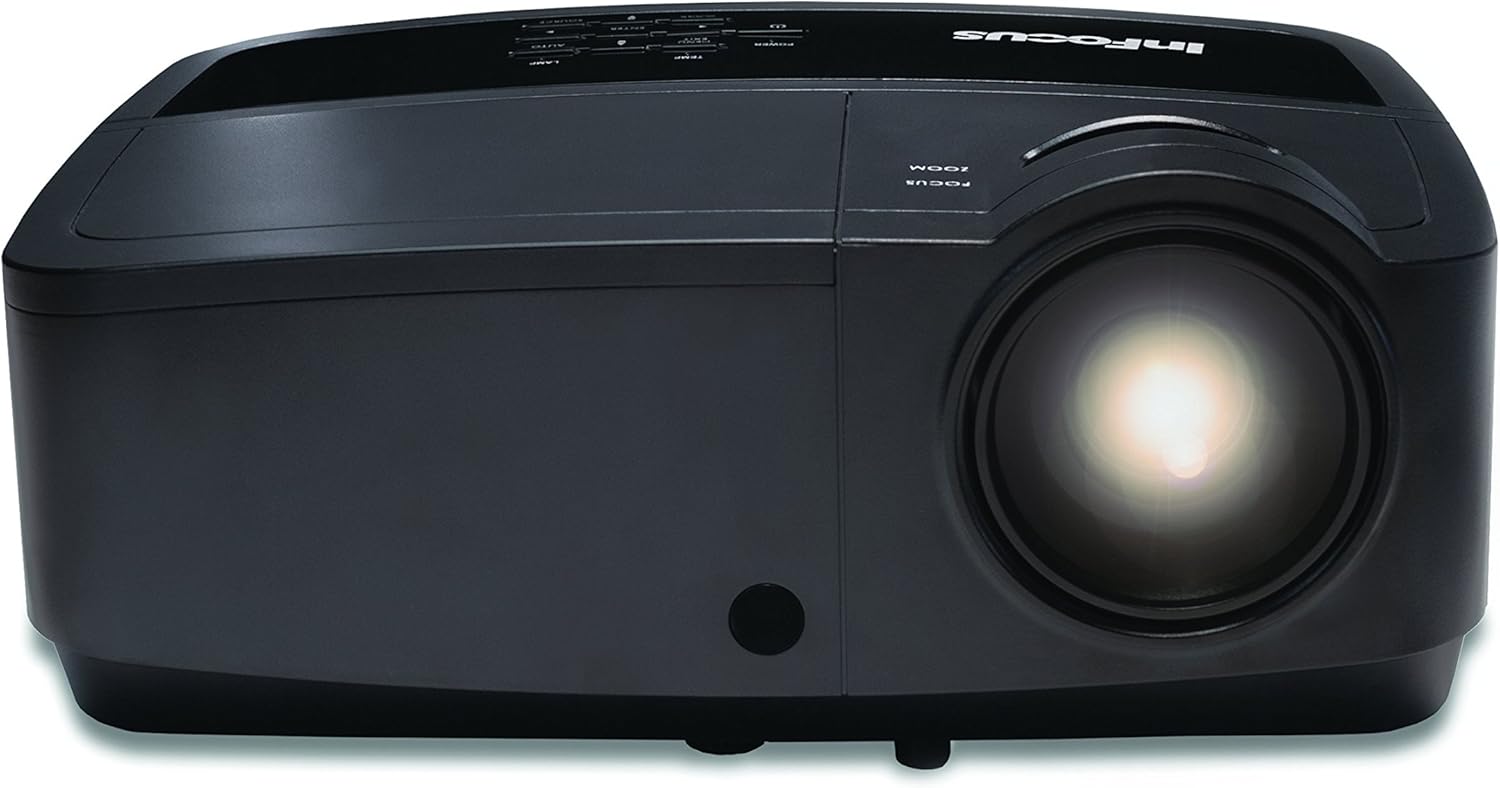
Figura 4.1: Close-up view of the projector lens, showing the manual focus and zoom adjustment rings. These rings are used to sharpen the image and adjust its size on the screen.
- Fokus: Dawwar il- Iffoka ring around the lens until the image appears sharp and clear on the screen.
- Zoom: Dawwar il- Zoom ring to adjust the size of the projected image.
4.3 L-Għażla tas-Sors tal-Input
Agħfas il- Sors button on the control panel or remote control to cycle through available input sources (HDMI, VGA, Composite, S-Video). Alternatively, use the menu to select the desired source.
4.4 Navigazzjoni tal-Menu
Agħfas il- Menu buttuna biex taċċessa l-menù tal-wiri fuq l-iskrin (OSD). Uża l-buttuni tal-vleġeġ biex tinnaviga u l- Daħħal buttuna biex tagħżel l-għażliet. Agħfas Menu or Ħruġ biex tagħlaq il-menu.
5. Manutenzjoni
5.1 Lamp Sostituzzjoni
Il-proġekter lamp għandu ħajja finita. Meta l-lamp indicator illuminates or the image brightness significantly decreases, the lamp jista' jkun jeħtieġ sostituzzjoni. Irreferi għall-manwal sħiħ tas-servizz għal aktar dettaljiamp replacement procedures. Always use genuine InFocus replacement lamps.
5.2 Tindif tal-Proġettur
- Barra: Uża drapp ratba u mingħajr ħelu dampened with a mild cleaning solution to wipe the exterior casing. Tużax prodotti tat-tindif jew solventi li joborxu.
- Lenti: Gently clean the projector lens with a lens cleaning cloth or lens paper. Avoid touching the lens surface with your fingers.
- Filtri tal-arja: Regularly check and clean the air filters to ensure proper ventilation and prevent overheating. Refer to the full service manual for filter access and cleaning instructions.
6 Issolvi l-problemi
| Problema | Kawża Possibbli | Soluzzjoni |
|---|---|---|
| Ebda immaġini murija |
|
|
| L-immaġni hija mċajpra |
|
|
| L-ebda awdjo |
|
|
For more detailed troubleshooting, please consult the comprehensive user manual available on the InFocus support websit.
7. Speċifikazzjonijiet
| Karatteristika | Dettall |
|---|---|
| Numru tal-Mudell | IN128HDX |
| Tip ta 'Wiri | DLP |
| Riżoluzzjoni Nattiva | 1920 x 1080 (1080p) |
| Luminożità | 4000 Lumens |
| Proporzjon ta' Kuntrast | 15,000:1 |
| Konnettività | HDMI, VGA, Composite, S-Video, LAN |
| Speaker integrat | 10-watt |
| Piż tal-oġġett | 5.06 liri (2.29 kg) |
| Dimensjonijiet tal-Prodott | 8.66 x 11.5 x 3.86 pulzieri (22 x 29.2 x 9.8 ċm) |

Figura 7.1: InFocus IN128HDx projector illustrating its physical dimensions: approximately 29.2 cm (11.5 inches) in length, 22 cm (8.66 inches) in width, and 12.1 cm (4.76 inches) in height.
8. Garanzija u Appoġġ
For information regarding the product warranty, please refer to the warranty card included with your projector or visit the official InFocus website. For technical support, service, or to purchase replacement parts, please contact InFocus customer service or visit their support portal online.
InFocus Official Websit: www.infocus.com


