1. Introduzzjoni
This instruction manual provides detailed guidance for the safe and efficient installation, operation, and maintenance of your Chamberlain T1EML-05 Basic Timer. Please read this manual thoroughly before attempting to install or use the device. Retain this manual for future reference.
The Chamberlain T1EML-05 is an embedded timer designed for various electrical applications, offering reliable time-based control for your devices.
2. Informazzjoni Importanti dwar is-Sigurtà
TWISSIJA: Riskju ta' Xokk Elettriku!
- Dejjem skonnettja l-enerġija mis-circuit breaker jew mill-kaxxa tal-fjużijiet qabel ma tinstalla jew tagħmel manutenzjoni fuq it-tajmer.
- Installation should only be performed by a qualified electrician or competent person in accordance with all local electrical codes and regulations.
- Do not use this device with loads exceeding its specified electrical ratings.
- Do not expose the timer to water or extreme moisture.
- Kun żgur li l-konnessjonijiet tal-wajers kollha huma siguri u iżolati kif suppost.
3. Package Contents and Product Overview
3.1 Kontenut tal-Pakkett
- 1 x Chamberlain T1EML-05 Basic Timer
- Manwal ta 'Istruzzjoni (dan id-dokument)
3.2 Prodott Fuqview
The Chamberlain T1EML-05 is a compact, embedded timer designed for flush-mounting. It features a digital display and three control buttons for easy programming.

Figura 1: Quddiem view of the Chamberlain T1EML-05 Basic Timer. This image displays the timer's white casing, a central square digital screen, and three rectangular buttons positioned horizontally below the screen. The buttons appear to have symbols for 'Up', 'Mode/Select', and 'Down'.
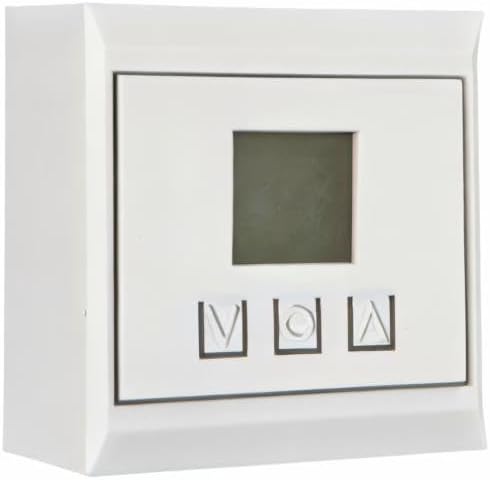
Figura 2: Side perspective view of the Chamberlain T1EML-05 Basic Timer. This image illustrates the depth of the timer unit, highlighting its design for embedded or flush installation within a wall or panel. The front face with the display and buttons is visible from an angle.
4. Installazzjoni u Setup
This timer is designed for embedded installation. Ensure you have the necessary tools and electrical knowledge before proceeding. If unsure, consult a qualified electrician.
4.1 Għodod Meħtieġa
- Screwdriver (appropriate type for terminal screws)
- prodotti għat-tqaxxir tal-wajer
- Voltagtester
- Mounting box (if not already present)
4.2 Passi ta' Installazzjoni
- Skonnettjar tal-Enerġija: Sib is-circuit breaker jew il-fjus li jikkontrolla l-enerġija għaż-żona tal-installazzjoni u itfih. Ivverifika li l-enerġija hija mitfija billi tuża voltagtester.
- Ipprepara l-Wajers: Carefully remove the existing switch or outlet, if applicable. Strip the ends of the electrical wires (Live, Neutral, Load) to the appropriate length as indicated by the timer's terminals.
- Qabbad Wajers: Connect the electrical wires to the corresponding terminals on the Chamberlain T1EML-05 timer. Refer to the wiring diagram provided with the product packaging (if available) or standard electrical wiring practices. Typically:
- Live (L) to Live input
- Neutral (N) to Neutral input
- Load (OUT) to the device being controlled
- Immonta t-Tajmer: Gently push the wired timer into the wall mounting box. Secure it with screws provided (if applicable) or by tightening the mounting clamps.
- Installa Faceplate: Attach the decorative faceplate (if separate) to the timer.
- Irrestawra l-Enerġija: Erġa’ ixgħel il-provvista tal-enerġija mis-circuit breaker jew mill-kaxxa tal-fjużijiet.
- Test Inizjali: The timer display should illuminate. Proceed to the operating instructions.
5. Istruzzjonijiet Operattivi
The Chamberlain T1EML-05 timer features a digital display and three control buttons: Up (▲), Mode/Set (M), and Down (▼).
5.1 Issettjar tal-Ħin Attwali
- Agħfas u żomm il- Mode/Set (M) button for approximately 3 seconds until the time display starts flashing.
- Uża l- 'Il fuq (▲) or 'L isfel (▼) buttuni biex taġġusta s-siegħa.
- Agħfas il- Mode/Set (M) button again to move to the minutes setting. Use 'Il fuq (▲) or 'L isfel (▼) biex taġġusta l-minuti.
- Agħfas Mode/Set (M) once more to confirm and exit the time setting mode.
5.2 Programming On/Off Cycles
The timer allows you to set multiple ON/OFF programs. The exact number of programs may vary, but the general procedure is as follows:
- Agħfas il- Mode/Set (M) button briefly to cycle through program settings (e.g., P1 ON, P1 OFF, P2 ON, P2 OFF, etc.).
- When you reach the desired program (e.g., "P1 ON"), the time will flash. Use the 'Il fuq (▲) or 'L isfel (▼) buttons to set the desired ON time (hour and then minutes).
- Agħfas Mode/Set (M) to confirm the ON time and move to the OFF time for that program (e.g., "P1 OFF").
- Uża l- 'Il fuq (▲) or 'L isfel (▼) buttons to set the desired OFF time.
- Irrepeti għal programmi addizzjonali kif meħtieġ.
- Wara li tissettja l-programmi kollha, agħfas il-buttuna Mode/Set (M) button until the display returns to the current time.
5.3 Manwal Override
To manually switch the connected device ON or OFF outside of the programmed schedule, briefly press the 'Il fuq (▲) or 'L isfel (▼) button while the timer is displaying the current time. This will typically cycle through ON, OFF, and AUTO modes. Select AUTO for programmed operation.
6. Manutenzjoni
The Chamberlain T1EML-05 Basic Timer requires minimal maintenance.
- Tindif: Wipe the surface of the timer with a soft, dry cloth. Do not use abrasive cleaners, solvents, or excessive moisture, as these can damage the unit.
- Spezzjoni: Periodically check the timer for any visible damage or loose connections. If any issues are found, disconnect power and consult a qualified electrician.
7 Issolvi l-problemi
If you encounter issues with your Chamberlain T1EML-05 timer, refer to the following common problems and solutions:
| Problema | Kawża Possibbli | Soluzzjoni |
|---|---|---|
| Il-wiri tat-tajmer huwa vojt. | Ebda provvista ta 'enerġija. | Check circuit breaker/fuse. Ensure wiring connections are secure. |
| L-apparat imqabbad ma jixgħelx/jitfiex kif ipprogrammat. | Incorrect program settings; Timer in manual mode; Wiring issue. | Verify program times. Ensure timer is in AUTO mode. Check load wiring. |
| Il-buttuni ma jirrispondux. | Problema temporanju tas-softwer; Ħsara fiżika. | Try cycling power to the timer (turn off/on at breaker). If issue persists, contact support. |
| Il-ħin mhuwiex preċiż. | Il-ħin inizjali mhux issettjat sew. | Re-set the current time as per Section 5.1. |
If the problem persists after attempting these solutions, please contact Chamberlain customer support.
8. Speċifikazzjonijiet Tekniċi
| Karatteristika | Dettall |
|---|---|
| Brand | Chamberlain |
| Numru tal-Mudell | T1EML-05 |
| Kulur | Abjad |
| Materjal | Plastik |
| Dimensjonijiet tal-Prodott (L x W x H) | 19.5 x 8.5 x 8 ċm |
| Piż tal-oġġett | 12 g |
| Numru ta' Settings | 14 (as per product specifications, likely referring to program slots) |
| International Article Number (EAN/UPC) | 04014243213833 |
| Pajjiż ta' Oriġini | il-Ġermanja |
9. Informazzjoni dwar Garanzija
Chamberlain products are manufactured to high-quality standards. This product is covered by a limited warranty against defects in materials and workmanship. The specific terms and duration of your warranty may vary by region and purchase date. Please retain your proof of purchase for warranty claims. For detailed warranty information, refer to the documentation included with your product or visit the official Chamberlain websit.
10. Appoġġ għall-Klijent
If you have any questions, require technical assistance, or need to report a problem with your Chamberlain T1EML-05 Basic Timer, please contact Chamberlain customer support.
- Appoġġ onlajn: Visit the official Chamberlain websit għal FAQs, riżorsi ta' appoġġ, u formoli ta' kuntatt.
- Appoġġ bit-Telefon: Refer to your product packaging or the Chamberlain websit għal numri ta' kuntatt reġjonali.
When contacting support, please have your product model number (T1EML-05) and proof of purchase readily available.


