1. Introduzzjoni
The Macurco DVP-120 Control Panel is an advanced exhaust fan controller designed to work in conjunction with Macurco gas transducers. It provides automatic control to help maintain an acceptable environment in various facilities, such as parking garages. This system is engineered to meet safety specifications for enclosed spaces, including compliance with the Uniform Building Code and OSHA 50ppm CO requirements. The DVP-120 is capable of controlling up to twelve gas sensors in any combination.
2. Informazzjoni dwar is-Sigurtà
Please read and understand all safety instructions before installing, operating, or performing maintenance on the DVP-120 Control Panel. Failure to follow these instructions may result in property damage, injury, or death.
- Sigurtà Elettrika: Ensure all power is disconnected before performing any wiring or maintenance. Installation should only be performed by qualified personnel in accordance with all local and national electrical codes.
- Kundizzjonijiet Ambjentali: Install the control panel in an environment free from excessive moisture, dust, or extreme temperatures. Refer to the specifications for operating temperature and humidity ranges.
- Użu xieraq: Use the DVP-120 only for its intended purpose as an environmental control panel with compatible Macurco gas sensors.
- Manutenzjoni: Regular maintenance should be performed as outlined in this manual to ensure optimal performance and safety.
3. Prodott Aktarview
The Macurco DVP-120 Control Panel offers robust features for environmental monitoring and control:
- External keypad for user selection of transducer/alarm display and configuration settings.
- Externally visible LCD display showing the status of each transducer and relay.
- Externally visible system, alarm, and relay status indicators.
- Compatible with all Macurco 6-series gas sensors.
- Twelve Analog (current loop) input channels.
3.1 Komponenti tal-Panew tal-Kontroll
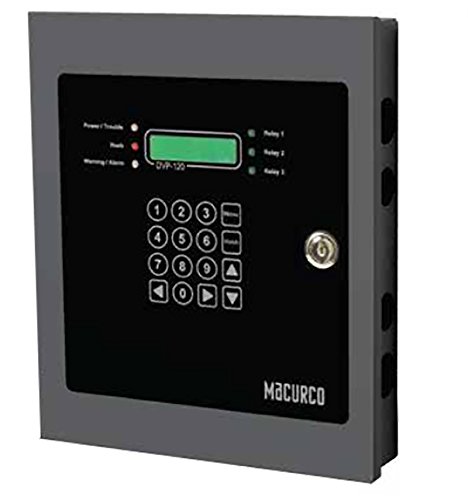
Figure 1: Macurco DVP-120 Control Panel Front View
This image displays the front of the Macurco DVP-120 Control Panel. It features a dark gray enclosure with a black faceplate. On the faceplate, a green LCD screen is visible, labeled 'DVP-120'. To the left of the screen are indicators for 'Power/Trouble', 'Peak', and 'Warning/Alarm'. To the right, indicators for 'Relay 1', 'Relay 2', and 'Relay 3' are present. Below the LCD and indicators is a numeric keypad (0-9) with additional navigation buttons. A key lock is located on the right side of the faceplate. The 'Macurco' logo is printed at the bottom right.
4. Setup u Installazzjoni
Proper installation is crucial for the reliable operation of the DVP-120 Control Panel.
4.1 Immuntar
The DVP-120 is designed for panel mounting. Select a suitable location that is easily accessible for operation and maintenance, free from vibrations, and within the specified environmental conditions. Ensure adequate space for wiring and ventilation.
4.2 Wiring Elettriku
All wiring must comply with local and national electrical codes. Use appropriate gauge wiring for power and sensor connections. Ensure all connections are secure to prevent intermittent operation or electrical hazards.
4.2.1 Konnessjoni tal-Enerġija
Connect the DVP-120 to a 120V AC power source. Ensure the power circuit is protected by an appropriate circuit breaker or fuse. Verify the power supply matches the panel's voltagRekwiżiti e qabel il-konnessjoni.
4.2.2 Konnessjonijiet tas-Sensor
The DVP-120 features twelve analog (current loop) input channels. Connect compatible Macurco 6-series gas sensors to these inputs. Refer to the specific sensor's manual for detailed wiring instructions. Each sensor should be wired to its designated input channel.
4.2.3 Konnessjonijiet tar-Relay
The control panel includes three relays. These relays can be wired to control external devices such as exhaust fans, alarms, or other ventilation equipment. Consult the wiring diagram provided with the product for specific relay connection details based on your application.
5. Istruzzjonijiet Operattivi
The DVP-120 is designed for straightforward operation through its external user interface.
5.1 Interface tal-Utent
The front panel provides all necessary controls and indicators for monitoring and configuration.
5.1.1 Tastiera
The numeric keypad allows for navigation through menus and inputting values for configuration. Use the arrow keys for menu navigation and the number keys for data entry. Refer to the detailed programming guide for specific menu structures and functions.
5.1.2 Display LCD
The LCD display provides real-time status information for each connected transducer and the operational status of the relays. It also displays menu options during configuration.
5.1.3 Indikaturi tal-Istat
- Power/Trouble: Indicates the power status and any system faults.
- Il-quċċata: Illuminates when a peak gas concentration has been detected.
- Twissija/Allarm: Indicates active warning or alarm conditions based on sensor readings.
- Relay 1, 2, 3: Indicate the activation status of the corresponding relays.
5.2 Konfigurazzjoni
The external keypad allows users to select the transducer/alarm display and set various configuration parameters. This includes setting alarm thresholds, relay activation logic, and other operational preferences. Consult the comprehensive programming manual for detailed instructions on accessing and modifying these settings.
5.3 Modalità ta' Operazzjoni
The DVP-120 operates in an ON-OFF mode, activating relays based on programmed sensor thresholds to control connected equipment.
6. Manutenzjoni
Regular maintenance ensures the longevity and accuracy of your DVP-120 Control Panel.
- Spezzjoni Viżwali: Periodically inspect the control panel for any signs of damage, loose connections, or environmental ingress (dust, moisture).
- Tindif: Keep the exterior of the panel clean using a soft, dry cloth. Do not use abrasive cleaners or solvents.
- Kalibrazzjoni tas-Sensor: Ensure that all connected gas sensors are calibrated according to their respective manufacturer's recommendations and local regulations. The accuracy of the DVP-120's readings depends on the accuracy of its connected sensors.
- Aġġornamenti tal-Firmware: Check the Macurco website for any available firmware updates for the DVP-120 to ensure optimal performance and access to new features.
7 Issolvi l-problemi
This section provides guidance for common issues. For more complex problems, contact Macurco technical support.
- Ebda Qawwa: Check the 120V AC power connection and the circuit breaker. Ensure the panel is securely connected to a live power source.
- Sensor Reading Errors: Verify sensor wiring, ensure sensors are properly calibrated, and check for any physical damage to the sensors or their cables.
- Ir-Relays Mhux Qed Jattivaw: Check the programmed alarm thresholds and relay logic. Ensure the sensor readings are exceeding the set points. Verify the external devices connected to the relays are functioning correctly.
- Ħsara fil-wiri LCD: If the display is blank or unreadable, power cycle the unit. If the issue persists, contact technical support.
- It-Tastiera Ma Tirrispondix: Ensure the keypad is clean and free from debris. If individual keys or the entire keypad is unresponsive, contact technical support.
8. Speċifikazzjonijiet
| Karatteristika | Speċifikazzjoni |
|---|---|
| Numru tal-Mudell | DVP-120 |
| Brand | Macurco |
| Voltage | 120 Volts |
| Klassifikazzjoni kurrenti | 10 Amps |
| Mod ta' Operazzjoni | ON-OFF |
| Tip ta 'Immuntar | Immonta fuq il-Panew |
| Kanali ta' Input Analog | 12 (current loop) |
| Relays | 3 |
| Dimensjonijiet tal-Pakkett | 12 x 10 x 2 pulzieri |
| Piż | 3 Liri |
9. X'hemm fil-Kaxxa
- Macurco DVP-120 Control Panel
10. Garanzija u Appoġġ
For information regarding product warranty, technical support, or service, please refer to the documentation provided with your purchase or visit the official Macurco websit. Żomm l-irċevuta tax-xiri tiegħek għal pretensjonijiet ta' garanzija.


