1. Introduzzjoni
Grazzi tax-xiriasing the Vivitar 4-Device Jumbo Universal Remote Control. This remote is designed to simplify your home entertainment experience by controlling up to four different audio/video devices from a single unit. It is compatible with most major brands of televisions, Blu-Ray players, DVD players, VCRs, cable boxes, satellite receivers, and home theater systems. Please read this manual thoroughly to ensure proper setup and operation.
2. Setup
2.1 Installazzjoni tal-batterija
The Vivitar Jumbo Universal Remote requires two (2) AAA batteries (not included).
- Sib l-għatu tal-kompartiment tal-batterija fuq wara tal-kontroll remot.
- Agħfas 'l isfel fuq it-tab u żżerżaq l-għatu 'l barra.
- Insert two new AAA batteries, ensuring the positive (+) and negative (-) terminals match the diagrams inside the compartment.
- Żerżaq l-għatu tal-kompartiment tal-batterija lura f'postu sakemm tikklikkja sew.
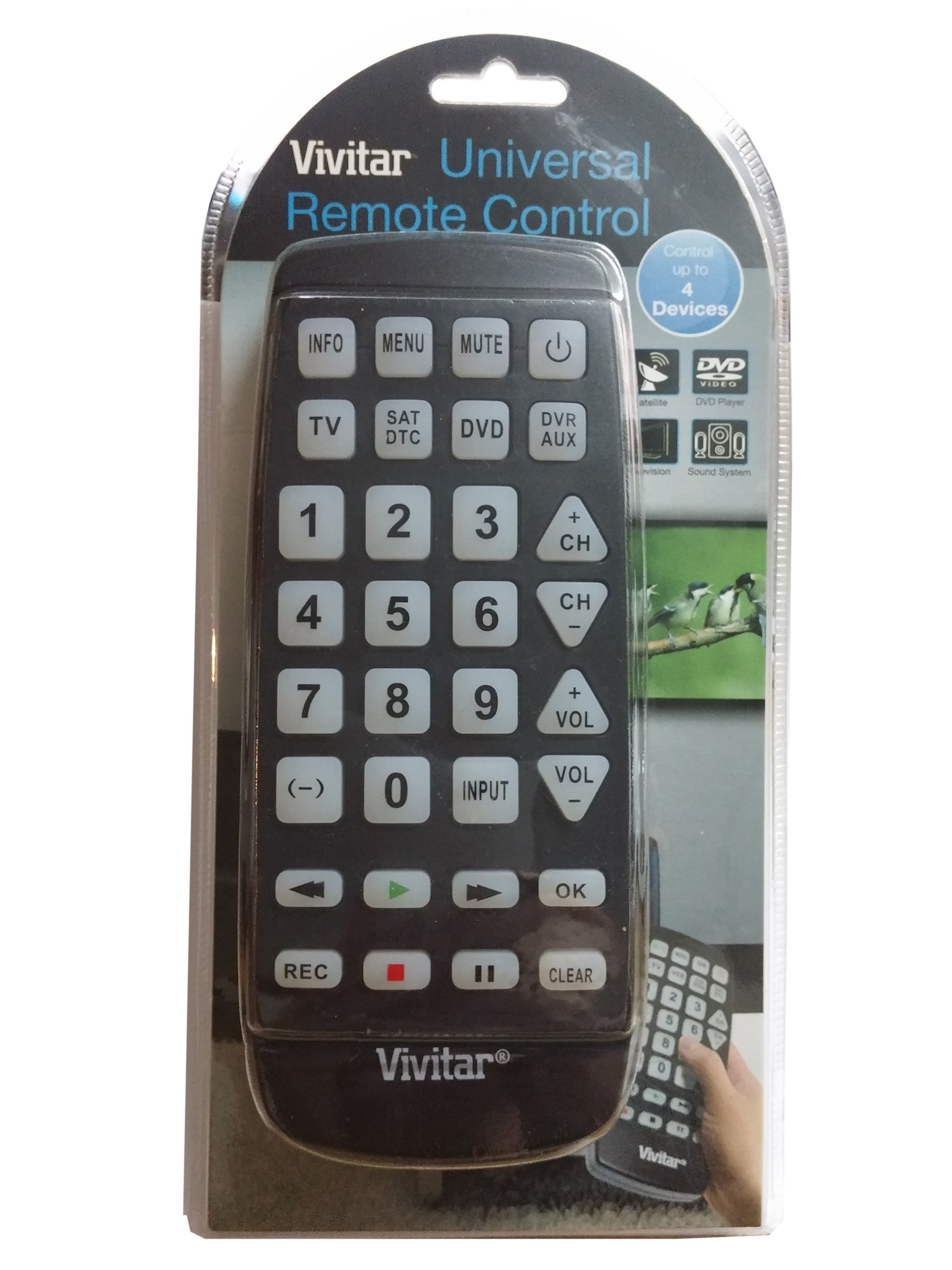
Immaġni: Quddiem view of the Vivitar 4-Device Jumbo Universal Remote Control, showing its large buttons and ergonomic design. The battery compartment is located on the rear.
2.2 Programming Your Remote (Code Entry Method)
To program the remote for your specific device, you will need to enter a 3-digit code corresponding to your device's brand. A list of common codes is usually provided in a separate code booklet (not included in this digital manual).
- Ixgħel l-apparat li tixtieq tikkontrolla (eż., TV, DVD player).
- Agħfas u żomm il- SET button on the remote until the red indicator light illuminates.
- Waqt li żżomm SET, press the desired device button (e.g., TV, DVD, CBL) once. The red indicator light will blink once and then remain lit.
- Irrilaxxa l- SET buttuna.
- Enter the 3-digit code for your device brand using the number buttons. After entering the third digit, the red indicator light should turn off.
- Ittestja r-remote billi tagħfas il-buttuna QAWWA button. If the device turns off, the code was accepted. If not, repeat the process with the next code listed for your brand.
Nota: If your device does not respond after trying all codes for its brand, proceed to the Auto Code Search method.
2.3 Tiftix Auto Code
If you cannot find a working code for your device, the remote can search for it automatically.
- Ixgħel l-apparat li tixtieq tikkontrolla.
- Agħfas u żomm il- SET Agħfas il-buttuna sakemm id-dawl indikatur aħmar jixgħel.
- Waqt li żżomm SET, press the desired device button (e.g., TV, DVD, CBL) once. The red indicator light will blink once and then remain lit.
- Irrilaxxa l- SET buttuna.
- Ipponta r-remote lejn l-apparat u agħfas ripetutament il-buttuna QAWWA buttuna (jew CH+ for TV/VCR, PLAY for DVD/VCR) slowly, pausing briefly after each press. The remote is sending different codes with each press.
- As soon as your device turns off (or performs the desired function), immediately press the SET button once to save the code. The red indicator light will turn off.
- Test the remote's functions (Volume, Channel, Playback) to ensure all controls work correctly. If not, repeat the auto code search.
3. Operating Your Remote
Once programmed, operating your Vivitar Jumbo Universal Remote is straightforward.
3.1 Għażla tal-Apparat
Biex tikkontrolla apparat speċifiku, agħfas il-buttuna tal-apparat korrispondenti fil-parti ta' fuq tar-remote (TV, DVD, CBL, AUX). The remote will then send commands only to the selected device.
3.2 Funzjonijiet Bażiċi
- QAWWA: Jixgħel jew jitfi l-apparat magħżul.
- VOL+/VOL-: Increases or decreases the volume of the selected device.
- CH+/CH-: Changes the channel up or down on the selected device.
- MUTE: Issikket jew jitneħħa l-awdjo.
- NUMRU BUTTONI (0-9): Used for direct channel entry or code programming.
- PLAY/PAUSE/STOP/REW/FF: Controls playback functions for DVD, Blu-Ray, or VCR devices.
- MENU: Jaċċessa l-menù tal-apparat magħżul.
- GWIDA: Displays the program guide (for Cable/Satellite boxes).
- INPUT/SORS: Changes the input source on your TV.
4. Manutenzjoni
4.1 Tindif
Biex tnaddaf il-kontroll remot tiegħek, uża drapp artab u kemxejn nadif.amp cloth. Do not use abrasive cleaners, solvents, or harsh chemicals, as these can damage the remote's finish or internal components. Ensure no liquid enters the remote.
4.2 Sostituzzjoni tal-batterija
Replace batteries when the remote's performance degrades or the indicator light fails to illuminate. Always replace both batteries at the same time with new AAA batteries. Do not mix old and new batteries, or different types of batteries. Remove batteries if the remote will not be used for an extended period to prevent leakage.
4.3 Ħażna
Aħżen il-kontroll remot f'post frisk u niexef 'il bogħod mix-xemx diretta u minn temperaturi estremi.
5 Issolvi l-problemi
5.1 Remote Not Working
- Iċċekkja Batteriji: Kun żgur li l-batteriji huma mdaħħla sew bil-polarità korretta (+/-) u li mhumiex eżawriti. Ibdel b'batteriji AAA ġodda jekk meħtieġ.
- Linja tal-Vista: Make sure there is a clear line of sight between the remote and the device you are trying to control. Obstructions can block the infrared signal.
- Għażla tal-Apparat: Confirm you have pressed the correct device button (TV, DVD, CBL, AUX) for the device you intend to control.
5.2 Device Not Responding to Commands
- Kodiċi Mhux Korrett: The remote may be programmed with an incorrect code. Try reprogramming the remote using a different code from the code list for your device's brand, or use the Auto Code Search method.
- Kompatibbiltà tal-Apparat: While this remote is universal, some older or very new devices may not be compatible.
5.3 Indicator Light Not Illuminating
- This usually indicates dead or incorrectly inserted batteries. Replace batteries and check polarity.
5.4 Resetting the Remote
If you encounter persistent issues, you can try resetting the remote to its factory default settings. Remove the batteries, wait for 30 seconds, then reinsert them. You will need to reprogram all your devices after a reset.
6. Speċifikazzjonijiet
| Numru tal-Mudell: | 4330255290 |
| Ditta: | Vivitar |
| Dimensjonijiet tal-Prodott: | 11.3 x 1.8 x 5.6 pulzieri |
| Piż tal-oġġett: | 13.1 uqija |
| Tip ta 'batterija: | 2 x AAA (mhux inklużi) |
| Numru ta' Apparati: | 4 (TV, DVD, Cable/Satellite, AUX) |
| Karatteristika Speċjali: | Kompatibilità Universali |
| Tip ta 'Kontrollur: | Kontroll tal-buttuna |
7. Garanzija u Appoġġ
7.1 Garanzija Limitata
Vivitar warrants this product against defects in materials and workmanship for a period of one (1) year from the original date of purchase. This warranty does not cover damage caused by misuse, abuse, accident, unauthorized modification, or normal wear and tear. Proof of purchase is required for all warranty claims.
7.2 Appoġġ għall-Klijent
For technical assistance, troubleshooting, or warranty inquiries, please contact Vivitar Customer Support. Refer to the Vivitar official webis-sit għall-aktar informazzjoni ta' kuntatt aġġornata, inklużi numri tat-telefon u indirizzi tal-email.