1. Introduzzjoni
The HP USB Slim Business Keyboard is designed to provide efficient data entry and seamless connectivity for your HP Business PCs. This full-sized keyboard offers a comfortable and productive typing experience, optimized for use across multiple operating systems.
Il-karatteristiċi ewlenin jinkludu:
- 3 indicator lights for Caps Lock, Num Lock, and Scroll Lock.
- Integrated number pad for quick data entry.
- Spill-resistant construction for enhanced durability.
- Adjustable legs for customizable typing angles.
- Full-size 104-key layout, including Windows, Function, and Page Keys.
- Quiet key strokes to minimize typing noise.
- Plug-and-play USB connectivity for instant setup.

Figura 1.1: Angolat view of the HP USB Slim Business Keyboard, showcasing huwa pro slimfile and full layout with the attached USB cable.
2. Gwida ta' Setup
Setting up your HP USB Slim Business Keyboard is a straightforward process due to its plug-and-play design.
2.1 Konnessjoni tat-Tastiera
- Sib port USB disponibbli fuq il-kompjuter tiegħek.
- Daħħal il-konnettur USB tat-tastiera sew fil-port USB.
- Your operating system will automatically detect and install the necessary drivers. This process typically takes a few seconds.
- Once installed, the keyboard is ready for immediate use.
2.2 Aġġustament tal-Angolu tat-Tastiera
For optimal comfort, you can adjust the typing angle of your keyboard:
- Flip the keyboard over to reveal the two adjustable legs located at the top corners of the underside.
- Gently pull out the legs to raise the back of the keyboard, providing a slight incline.
- Push the legs back in to return the keyboard to a flat position.

Figura 2.1: Ġenb view of the keyboard illustrating its slim profile and the adjustable leg extended for an inclined typing position.
3. It-Tħaddim tat-Tastiera
The HP USB Slim Business Keyboard provides a standard 104-key layout for efficient and familiar typing.
3.1 It-tqassim u l-funzjonijiet taċ-ċwievet
The keyboard features a full QWERTY layout, a dedicated numeric keypad, and function keys (F1-F12) that may have secondary functions depending on your operating system and installed software.
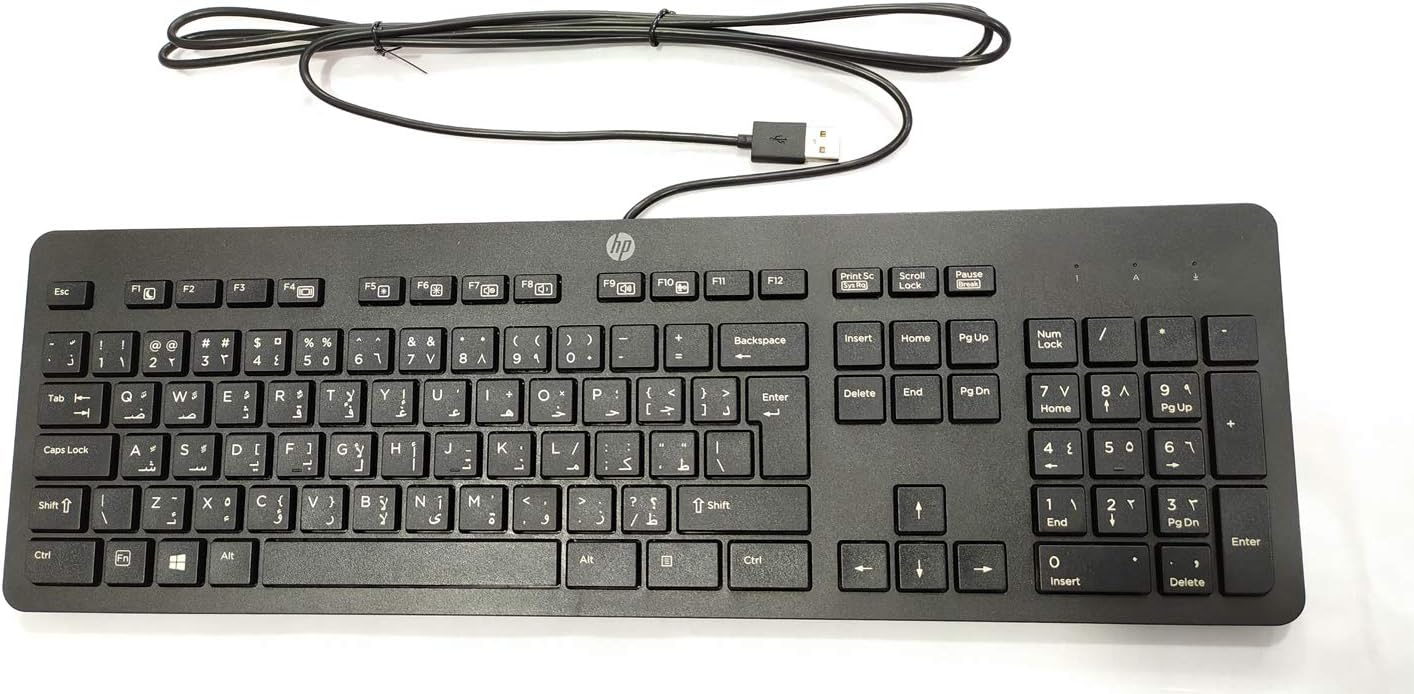
Figura 3.1: Minn fuq għal isfel view of the keyboard, highlighting the full 104-key layout including the numeric keypad and function keys.
3.2 Dwal Indikaturi
Three LED indicator lights are located above the numeric keypad:
- Num Lock: Illuminates when the numeric keypad is active. Press the "Num Lock" key to toggle on/off.
- Caps Lock: Illuminates when Caps Lock is active, indicating that all typed letters will be uppercase. Press the "Caps Lock" key to toggle on/off.
- Scroll Lock: Illuminates when Scroll Lock is active. Its function varies by application but is rarely used in modern operating systems.
3.3 Kompatibilità bejn Sistemi Operattivi Multipli
This keyboard is designed to interact seamlessly with various operating systems, including Windows 10 and other compatible systems. Standard keyboard functions will operate without additional software installation.
4. Manutenzjoni u Kura
Proper care will extend the life and maintain the performance of your HP USB Slim Business Keyboard.
4.1 Istruzzjonijiet għat-Tindif
- Skonnettja t-tastiera mill-kompjuter tiegħek qabel ma tnaddafha.
- Uża ċarruta ratba u mingħajr ħelu dampmaħsul bl-ilma jew b'soluzzjoni tat-tindif ħafifa u mhux abrażiva.
- Wipe the keycaps and keyboard surface gently. Avoid excessive moisture.
- Għat-trab u l-fdalijiet bejn iċ-ċwievet, uża arja kkompressata.
- Kun żgur li t-tastiera tkun niexfa għalkollox qabel ma terġa' tqabbadha mal-kompjuter tiegħek.
4.2 Reżistenza għat-Tixrid
The keyboard features spill-resistant construction. While designed to withstand minor spills, it is not waterproof. In case of a liquid spill:
- Skonnettja t-tastiera mill-kompjuter tiegħek immedjatament.
- Invert the keyboard to allow liquid to drain.
- Imsaħ il-wiċċ niexef b'ċarruta nadifa.
- Allow the keyboard to air dry completely for several hours (or overnight) before reconnecting.
5 Issolvi l-problemi
Jekk tiltaqa' ma' problemi bit-tastiera tiegħek, irreferi għall-passi komuni li ġejjin għas-soluzzjoni tal-problemi:
| Problema | Kawża / Soluzzjoni Possibbli |
|---|---|
| It-tastiera mhix qed tirrispondi. |
|
| Certain keys are not working. |
|
| Indicator lights (Num Lock, Caps Lock) are not working. |
|
| Keyboard input is delayed or erratic. |
|
6. Speċifikazzjonijiet
| Brand | HEWLETT PACKARD |
| Numru tal-Mudell | 803181 |
| Teknoloġija tal-Konnettività | USB (fili) |
| Tip ta' Apparat | Tastiera |
| Kulur | Iswed |
| Piż tal-oġġett | 7.2 uqija (madwar 204 gramma) |
| Dimensjonijiet tal-Prodott (LxWxH) | 18 x 6.6 x 1.1 pulzieri (madwar 45.7 x 16.8 x 2.8 ċm) |
| Numru ta' Ċwievet | 104 |
| Kompatibilità tas-Sistema Operattiva | Windows 10 (optimized for multiple operating systems) |
| Karatteristika Speċjali | Ergonomic, Spill-resistant |
| X'hemm fil-Kaxxa | HP USB Slim Business Keyboard, USB Cable (integrated) |
7. Garanzija u Appoġġ
7.1 Garanzija Limitata
The HP USB Slim Business Keyboard comes with a one-year limited warranty. This warranty covers defects in materials and workmanship under normal use. Please retain your proof of purchase for warranty claims.
7.2 Appoġġ għall-Klijent
For technical assistance, warranty service, or additional product information, please visit the official HP support website or contact HP customer service. Refer to your product packaging or HP's official webis-sit għall-aktar informazzjoni ta' kuntatt u riżorsi ta' appoġġ aġġornati.
Note: Specific support contact details may vary by region.


