Introduzzjoni
This manual provides essential instructions for the setup, operation, maintenance, and troubleshooting of your HP Flexible Thin Client T520. Please read this document thoroughly before using the device to ensure proper functionality and longevity.
1. Setup
1.1 Żpakkjar u Verifika tal-Kontenut
Neħħi bir-reqqa l-komponenti kollha mill-imballaġġ. Ivverifika li l-oġġetti li ġejjin huma preżenti:
- HP Flexible Thin Client T520 unit
- Adapter tal-enerġija u kejbil
- Tastiera
- Ġurdien
- Vertical stand (if included)
- Dokumentazzjoni (dan il-manwal)
1.2 Konnessjoni tal-Periferali
Before powering on the thin client, connect all necessary peripherals.
- Qabbad id-Displej: Use a DisplayPort or VGA cable to connect your monitor to the corresponding port on the rear of the thin client. The T520 supports up to 3840x2160 resolution via DisplayPort.
- Qabbad Apparat USB: Plug the keyboard and mouse into any available USB ports. The thin client features USB 3.0 (SuperSpeed) ports on the front and USB 2.0 ports on the rear.
- Qabbad in-Netwerk: For a wired connection, insert an Ethernet cable into the RJ-45 network port on the rear.
- Qabbad Awdjo: If using external speakers or a headset, connect them to the audio output jack. A microphone can be connected to the microphone input jack.
- Qabbad l-Enerġija: Insert the power adapter cable into the DC-in port on the rear of the thin client, then plug the power cord into an electrical outlet.
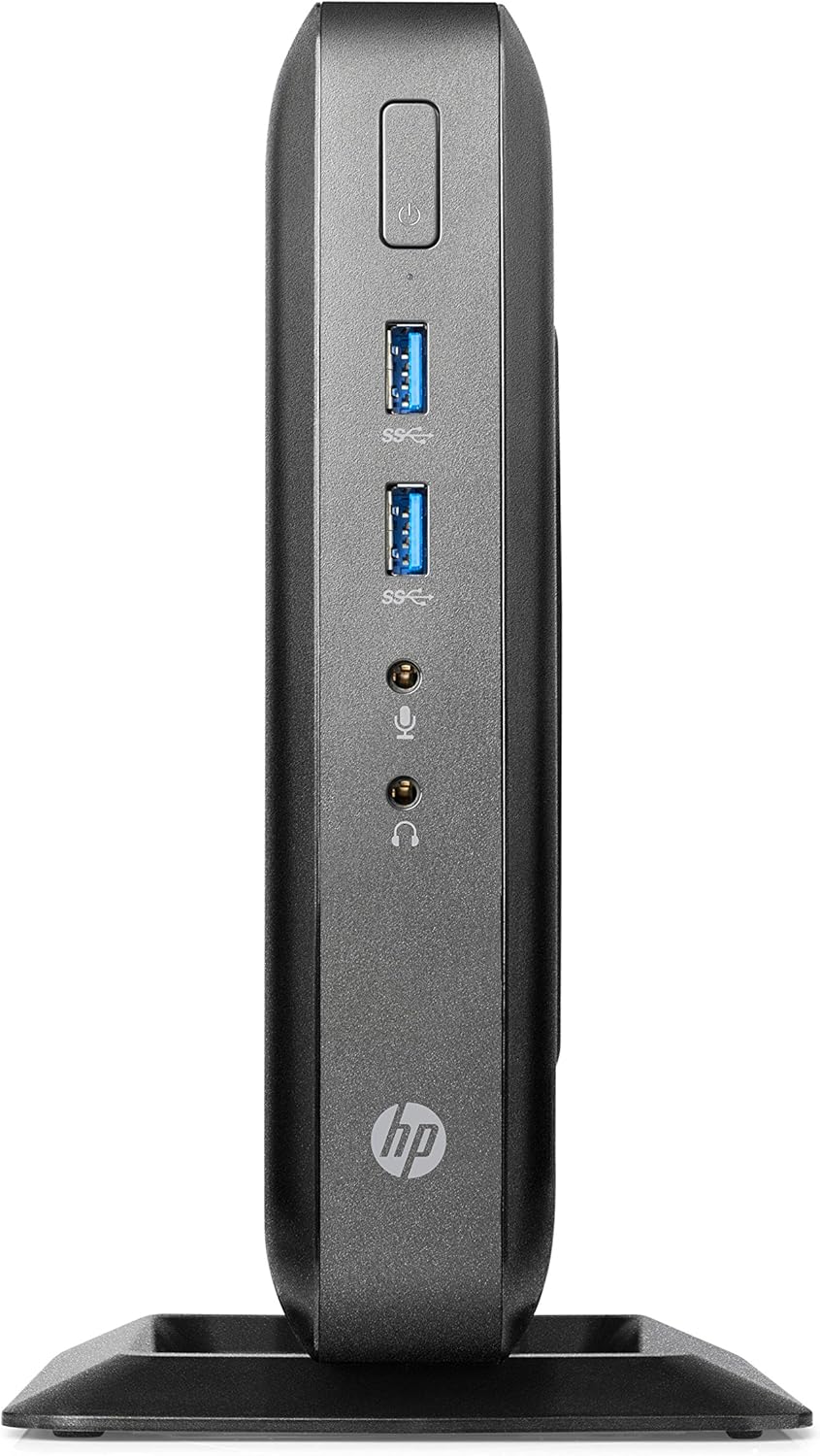
Figure 1: Front panel connections of the HP Flexible Thin Client T520. This view shows the power button, two SuperSpeed USB (USB 3.0) ports, a headphone jack, and a microphone jack.

Figure 2: Rear panel connections of the HP Flexible Thin Client T520. This view includes the Ethernet port, DisplayPort, HDMI port, VGA port, multiple USB 2.0 ports, and the DC power input.
1.3 Qawwa Inizjali
After connecting all peripherals and power, press the power button located on the front of the thin client. The device will boot into the Windows Embedded Standard 7E operating system.
2. Istruzzjonijiet Operattivi
2.1 Tixgħel u Mitfi
- Biex Tixgħel: Agħfas il-buttuna tal-qawwa fuq il-pannell ta 'quddiem.
- Biex tagħlaq: From the Windows Embedded Standard 7E desktop, click the Ibda buttuna, imbagħad agħżel Itfi. Allow the system to power off completely before disconnecting power.
- Biex terġa' tibda: From the Windows Embedded Standard 7E desktop, click the Ibda buttuna, imbagħad agħżel Ibda mill-ġdid.
2.2 Sistema Operattiva Fuqview
The HP Flexible Thin Client T520 runs on Windows Embedded Standard 7E, a specialized operating system designed for thin client environments. It provides a familiar Windows interface for accessing remote desktops, virtual applications, and web-based services.
2.3 Konnettività tan-Netwerk
The thin client is designed for network-centric operations. Ensure a stable wired Ethernet connection for optimal performance. Network settings can be configured through the Windows Control Panel, typically managed by your IT administrator in a corporate environment.
3. Manutenzjoni
3.1 Tindif tal-Apparat
Biex iżżomm prestazzjoni u dehra ottimali:
- Ensure the thin client is powered off and disconnected from the power source before cleaning.
- Uża ċarruta ratba u mingħajr ħelu dampmaħsul bl-ilma jew b'soluzzjoni tat-tindif ħafifa u mhux abrażiva.
- Tisprejx likwidi direttament fuq l-apparat.
- Evita li tuża kimiċi ħarxa, solventi, jew materjali li joborxu.
3.2 Aġġornamenti tas-Software
Regularly check for and apply any available operating system or firmware updates as recommended by HP or your IT department. This ensures security and performance enhancements.
3.3 Ġestjoni tal-Ħażna
The T520 features a 16 GB SSD. While primarily used for the operating system and client software, it is advisable to monitor available storage space. Avoid storing large, unnecessary files directly on the thin client's local drive.
4 Issolvi l-problemi
This section addresses common issues you might encounter with your HP Flexible Thin Client T520.
4.1 Ebda Qawwa
- Verify the power cable is securely connected to both the thin client and the electrical outlet.
- Kun żgur li l-iżbokk tad-dawl jiffunzjona billi ttestjah b'apparat ieħor.
- Iċċekkja l-adapter tal-enerġija għal xi ħsara viżibbli.
4.2 L-ebda Output tal-Wiri
- Confirm the monitor is powered on and connected correctly to the thin client's DisplayPort or VGA port.
- Kun żgur li s-sors tad-dħul korrett huwa magħżul fuq il-monitor tiegħek.
- Test with a different monitor or display cable if available.
4.3 Kwistjonijiet ta' Konnettività tan-Netwerk
- Check that the Ethernet cable is securely plugged into both the thin client and the network router/switch.
- Verify network status lights on the Ethernet port are active.
- Consult your network administrator for network configuration assistance.
4.4 Peripheral Devices Not Responding
- Ensure USB devices (keyboard, mouse) are properly connected to the USB ports.
- Try connecting the devices to different USB ports.
- Test the peripherals on another computer to confirm they are functional.
5. Speċifikazzjonijiet
The following table outlines the key technical specifications for the HP Flexible Thin Client T520 (G9F08AA#ABA):
| Karatteristika | Speċifikazzjoni |
|---|---|
| Proċessur | AMD G-Series GX-212JC 1.2 GHz |
| RAM | 4 GB DDR3 SDRAM |
| Ħażna | 16 GB SSD |
| Sistema Operattiva | Windows Embedded Standard 7E |
| Koproċessur tal-Grafika | AMD Embedded G-Series (Integrated) |
| Riżoluzzjoni Massima tal-Iskrin | 3840x2160 (via DisplayPort) |
| Portijiet (ta' Quddiem) | 2x USB 3.0, Headphone, Microphone |
| Portijiet (ta' wara) | Ethernet (RJ-45), DisplayPort, HDMI, VGA, Multiple USB 2.0, DC-in |
| Piż tal-oġġett | 7.73 liri |
| Dimensjonijiet (Pakkett) | 20 x 12 x 6.9 pulzieri |
6. Garanzija u Appoġġ
6.1 Garanzija tal-Manifattur
The HP Flexible Thin Client T520 typically comes with a 3-year manufacturer warranty. Please refer to the warranty documentation included with your product or visit the official HP support websit għal termini u kundizzjonijiet speċifiċi.
6.2 Appoġġ Tekniku
For technical assistance, driver downloads, or further troubleshooting, please visit the official HP support website or contact HP customer service. Have your product model (T520) and serial number ready when seeking support.


