Introduzzjoni
This manual provides comprehensive instructions for the setup, operation, and maintenance of your RCA 4 Device Universal Remote. This remote is designed to control up to four different audio/video components, simplifying your home entertainment experience. Please read this manual thoroughly before using the remote to ensure proper functionality and to maximize its capabilities.
Prodott Overview
The RCA 4 Device Universal Remote (Model: LYSB01B0MKAHY-ELECTRNCS) is an infrared (IR) remote control capable of operating various electronic devices such as televisions, satellite/cable boxes, DVD players, and VCRs. Its ergonomic design and clearly labeled buttons facilitate ease of use.
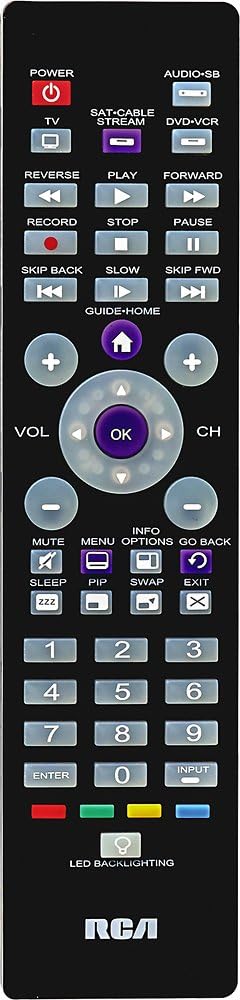
Stampa 1: Quddiem view of the RCA 4 Device Universal Remote. This image displays the full layout of the remote control, including the power button, device selection buttons (TV, SAT/CABLE, DVD-VCR), numeric keypad, channel and volume controls, playback buttons, and other function keys. The RCA logo is visible at the bottom.
Setup
1. Installazzjoni tal-batterija
The remote requires two (2) AA batteries (not included). Ensure correct polarity when inserting the batteries.
- Iftaħ il-qoxra tal-kompartiment tal-batterija fuq in-naħa ta' wara tar-remote.
- Insert two AA batteries, matching the (+) and (-) terminals as indicated inside the compartment.
- Ibdel l-għatu tal-kompartiment tal-batterija.
2. Programmazzjoni tar-Remote
To control your devices, the remote must be programmed with the correct codes. There are typically two methods:
Metodu A: Dħul Dirett tal-Kodiċi
This method involves entering a specific code for your device's brand. A code list is usually provided with the remote (refer to the separate code list document if available).
- Ixgħel l-apparat li tixtieq tipprogramma (eż., it-TV).
- Agħfas u żomm il-buttuna tal-apparat mixtieq (eż., TV) fuq il-bogħod.
- While holding the device button, press and hold the QAWWA buttuna fl-istess ħin.
- Release both buttons. The QAWWA Il-buttuna għandha tibqa' mixgħula.
- Enter the 4-digit code for your device's brand using the numeric keypad.
- If the code is valid, the QAWWA button will turn off. If it blinks and stays on, the code is invalid; try another code.
- Ittestja r-remote billi tagħfas il-buttuna QAWWA button. If the device turns off, the programming was successful. If not, repeat the process with the next code for your brand.
Metodu B: Tiftix Awtomatiku tal-Kodiċi
If you cannot find a code or prefer not to use direct entry, the remote can search for the correct code.
- Ixgħel l-apparat li tixtieq tipprogramma.
- Agħfas u żomm il-buttuna tal-apparat mixtieq (eż., TV) for approximately 5 seconds until the QAWWA buttuna tixgħel.
- Itlaq il-buttuna tal-apparat.
- Ipponta r-remote lejn l-apparat u agħfas ripetutament il-buttuna QAWWA buttuna (jew CH+) until the device turns off. This may take several presses.
- Ladarba l-apparat jintefa, agħfas immedjatament il-buttuna DĦUL buttuna biex issalva l-kodiċi. Il- QAWWA buttuna se tintefa.
- Test the remote's functions. If not all functions work, repeat the search process to find a better code.

Stampa 2: Naħa angolata view of the RCA 4 Device Universal Remote. This perspective shows the remote's ergonomic shape and thickness, providing a better understanding of its physical design.
Istruzzjonijiet Operattivi
Once programmed, your universal remote can control your selected devices. Always ensure the remote is pointed directly at the device's IR receiver.
1. Selecting a Device
Biex tikkontrolla apparat speċifiku, agħfas il-buttuna tal-apparat korrispondenti fil-parti ta' fuq tar-remote:
- TV: For your television.
- SAT-CABLE-STREAM: For satellite receiver, cable box, or streaming device.
- DVD-VCR: For DVD player or VCR.
- AUDIO-SB: For audio systems or soundbars.
The selected device button will light up briefly to confirm your selection.
2. Funzjonijiet Bażiċi
- QAWWA: Jixgħel jew jitfi l-apparat magħżul.
- VOL (+/-): Iżżid jew inaqqas il-volum.
- CH (+/-): Tibdel il-kanal 'il fuq jew 'l isfel.
- MUTE: Silences the audio. Press again to restore.
- Tastiera numerika (0-9): For direct channel entry or menu navigation.
- Daħħal: Jikkonferma l-għażliet jew jikkompleta d-dħul tal-kanal.
- DĦUL: Iċċikla bejn is-sorsi tad-dħul tal-vidjo fuq it-TV tiegħek.
3. Kontrolli tal-daqq
These buttons are primarily used for DVD players, VCRs, or streaming devices when the DVD-VCR or SAT-CABLE-STREAM device is selected.
- tilgħab: Tibda daqq.
- PAWŻA: Jieqaf id-daqq.
- Waqqaf: Jieqaf daqq.
- REKORD: Initiates recording (if supported by the device).
- REVERSI: Iġib lura d-daqq.
- QUDDIEM: Daqq 'il quddiem mgħaġġel.
- SKIP BACK / SKIP FWD: Skips backward or forward (e.g., chapter skip).
- Bil-mod: Activates slow-motion playback (if supported).
4. Funzjonijiet Avvanzati
- GWIDA-DAR: Jaċċessa l-gwida tal-programmi jew il-menù tad-dar.
- INFORMAZZJONI: Juri informazzjoni dwar il-programm.
- MENU: Opens the device's main menu.
- GĦAŻLIET: Jaċċessa għażliet jew settings addizzjonali.
- MUR LURA: Terġa' lura għall-iskrin jew il-menu preċedenti.
- Rqad: Jissettja tajmer tal-irqad għat-TV.
- PIP: Picture-in-Picture function (if supported by TV).
- Skambju: Swaps between main and PIP screens.
- ĦRUĠ: Joħroġ mill-menus jew mid-displejs fuq l-iskrin.
- DAWL TA' WARA LED: Activates the button backlighting for use in low-light conditions.

Stampa 3: Another angled side view of the RCA 4 Device Universal Remote. This view provides an alternative perspective of the remote's design and button placement, aiding in visual identification of controls.
Manutenzjoni
Kura xierqa se testendi l-ħajja tar-remote universali tiegħek.
- Tindif: Uża drapp artab u niexef biex tnaddaf ir-remote. Tużax prodotti tat-tindif likwidi jew materjali li joborxu.
- Sostituzzjoni tal-batterija: Replace batteries when the remote's response becomes sluggish or the indicator light fails to illuminate. Always replace both batteries at the same time with new AA batteries.
- Ħażna: If the remote will not be used for an extended period, remove the batteries to prevent leakage and potential damage. Store in a cool, dry place.
- Evita l-espożizzjoni: Do not expose the remote to extreme temperatures, direct sunlight, or moisture.
Issolvi l-problemi
If you encounter issues with your remote, refer to the following common problems and solutions:
| Problema | Kawża Possibbli | Soluzzjoni |
|---|---|---|
| Ir-remote ma jħaddemx l-apparat. | Incorrect device code entered; batteries are low or dead; remote not pointed at device. |
|
| Xi buttuni ma jaħdmux. | The programmed code may not support all functions of your device. | Try programming the remote with another code from the code list for your device's brand. Some universal remotes may not fully support all advanced functions of every device. |
| Id-dawl indikatur mill-bogħod ma jixgħelx. | Il-batteriji huma mejta jew installati ħażin. | Iċċekkja l-polarità tal-batterija u ibdelha b'batteriji AA ġodda. |
Speċifikazzjonijiet
- Ditta: RCA
- Numru tal-Mudell: LYSB01B0MKAHY-ELECTRNCS
- Dimensjonijiet tal-Prodott: 10 x 6 x 3 pulzieri (bejn wieħed u ieħor)
- Piż tal-oġġett: 4.2 uqija
- Batteriji: 2 batteriji AA meħtieġa (mhux inklużi)
- Numru Massimu ta' Apparat Appoġġjat: 4
- Teknoloġija tal-Konnettività: Infra-aħmar (IR)
- Karatteristika Speċjali: Universali
- Apparati Kompatibbli: Television, Satellite/Cable Box, DVD Player, VCR, Audio System/Soundbar
Appoġġ
For further assistance, troubleshooting, or to obtain a complete list of device codes, please refer to the official RCA support website or contact RCA customer service. Keep your product model number (LYSB01B0MKAHY-ELECTRNCS) handy when seeking support.
Nota: L-ispeċifikazzjonijiet u l-karatteristiċi tal-prodott jistgħu jinbidlu mingħajr avviż.


