
Prodott Overview
This manual provides essential information for the proper use and maintenance of your Mars Replacement Controller for the Original Xbox system. This controller is designed to offer a familiar gaming experience, serving as a direct replacement for your existing or worn Original Xbox controllers. It features a classic layout with ten buttons, a D-pad, and two joysticks, built for durability and extended gameplay sessions.
Setup Istruzzjonijiet
Follow these steps to connect your new controller to your Original Xbox console:
- Sib il-Port tal-Kontrollur: Identify an available controller port on the front of your Original Xbox console. The Original Xbox typically has four controller ports.
- Qabbad il-Kontrollur: Align the proprietary connector of the Mars Replacement Controller with the chosen port on the console. Gently push the connector firmly into the port until it clicks into place.
- Ixgħel il-Konsola: Turn on your Original Xbox console. The controller should be automatically recognized by the system.
- Funzjonalità tat-Test: Once the console is on, test all buttons, joysticks, and the D-pad to ensure proper functionality before starting a game.
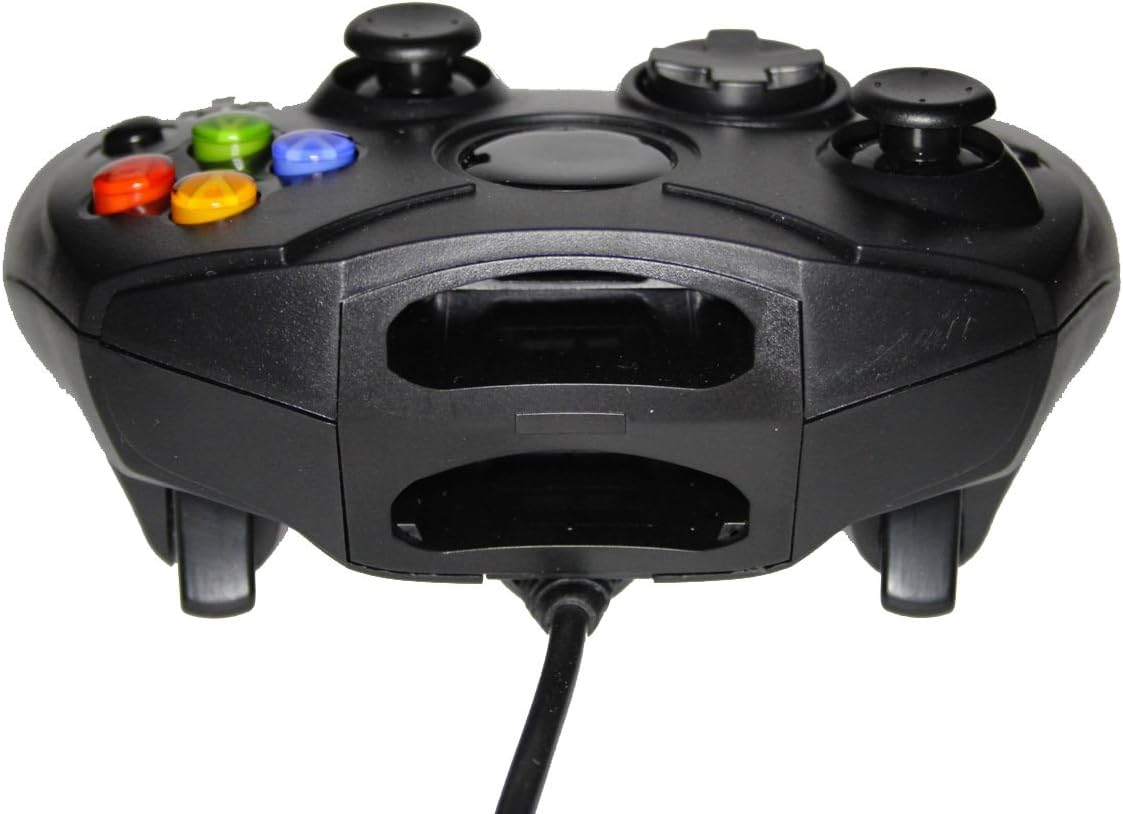
Figura 1: Quddiem view of the controller, highlighting the proprietary Xbox connector and memory card slots.
Operating Your Controller
The Mars Replacement Controller features the standard button layout for the Original Xbox, providing intuitive control for your games.

Figura 2: Fuq view of the controller, displaying the button layout.
Funzjonijiet tal-buttuna:
- Buttuni A, B, X, Y: Primary action buttons, typically used for jumping, attacking, interacting, or confirming selections.
- D-Pad (Pad Direzzjonali): Used for precise directional input, menu navigation, or specific in-game actions.
- Sticks Analogiċi tax-Xellug u tal-Lemin: Provide 360-degree movement and camera control. Pressing them down often activates additional functions (L3/R3).
- Black and White Buttons: Auxiliary action buttons, often used for secondary actions or specific game mechanics.
- Buttuna tal-Ibda: Tipikament jintuża biex iwaqqaf il-logħob, jaċċessa l-menus fil-logħba, jew jikkonferma l-għażliet.
- Buttuna Lura: Often used to access maps, inventories, or return to previous menus.
- Left and Right Triggers: Analog triggers on the underside of the controller, commonly used for acceleration, braking, or firing weapons.
Specific button assignments may vary depending on the game. Refer to your game's instruction manual for detailed control schemes.
Kura u Manutenzjoni
To ensure the longevity and optimal performance of your Mars Replacement Controller, follow these care guidelines:
- Tindif: Uża drapp artab u niexef biex timsaħ il-kontrollur regolarment. Għal ħmieġ iebes, nixxef ftit.ampen the cloth with water or a mild, non-abrasive cleaner. Avoid excessive moisture, especially near buttons and ports.
- Ħażna: Store the controller in a clean, dry place away from direct sunlight, extreme temperatures, and excessive dust. Avoid wrapping the cable too tightly around the controller to prevent damage.
- Immaniġġjar: Do not drop the controller or subject it to strong impacts. Avoid pulling the cable forcefully when disconnecting it from the console; always grasp the connector itself.
- Espożizzjoni għal Likwidu: Keep the controller away from liquids. Spills can cause internal damage and void any potential warranty.
Issolvi l-problemi
Jekk tiltaqa' ma' problemi bil-kontrollur tiegħek, irreferi għall-problemi u s-soluzzjonijiet komuni li ġejjin:
| Problema | Soluzzjoni Possibbli |
|---|---|
| Il-kontrollur mhux qed jirrispondi. |
|
| Buttons or joysticks are unresponsive or sticky. |
|
| Controller disconnects intermittently. |
|
Jekk il-problema tippersisti wara li tipprova dawn is-soluzzjonijiet, jekk jogħġbok ikkuntattja l-appoġġ għall-klijenti.
Speċifikazzjonijiet Tekniċi
| Karatteristika | Dettall |
|---|---|
| Dimensjonijiet tal-Prodott | 7 x 5.6 x 2.4 pulzieri |
| Piż tal-oġġett | 3.99 uqija |
| Apparati Kompatibbli | Original Xbox Console |
| Tip ta' Kontrollur | Gamepad |
| Konnettività | Wired (Proprietary Xbox Connector) |
| Kulur | Iswed |
| Manifattur | Mars Devices |
Informazzjoni dwar Garanzija
This Mars Replacement Controller is covered by a manufacturer's warranty. For specific details regarding warranty duration, coverage, and claims procedures, please refer to the official Mars Devices webis-sit jew ikkuntattja l-appoġġ għall-klijenti tagħhom direttament. Żomm il-prova tax-xiri tiegħek għall-validazzjoni tal-garanzija.
Appoġġ għall-Klijent
For further assistance, technical support, or inquiries regarding your Mars Replacement Controller, please contact Mars Devices customer support. Contact information can typically be found on the product packaging or the official Mars Devices websit.
Riżorsi onlajn: Mars Devices Store on Amazon


