1. Introduzzjoni
The Muse M-192 CR is a versatile clock radio designed to provide reliable timekeeping, alarm functions, and FM radio reception. It features a large, easy-to-read digital display, dual alarms, and convenient functions such as snooze, sleep, and NAP. This manual provides detailed instructions for the proper setup, operation, and maintenance of your device.
2. Istruzzjonijiet tas-Sigurtà
- Aqra l-istruzzjonijiet kollha bir-reqqa qabel ma tħaddem l-apparat.
- Żomm l-apparat 'il bogħod mill-ilma jew mill-umdità.
- Do not block any ventilation openings. Ensure adequate space around the unit for proper airflow.
- Use only the AC adapter supplied with the unit.
- Evita li tesponi l-apparat għal temperaturi estremi, dawl tax-xemx dirett, jew umdità għolja.
- Tippruvax tiżżarma jew timmodifika l-unità. Irreferi kull servizz lil persunal kwalifikat.
3. Kontenut tal-Pakkett
Jekk jogħġbok iċċekkja l-pakkett għall-oġġetti li ġejjin:
- 1 x Muse M-192 CR Clock Radio
- 1 x adapter AC
- 1 x Manwal tal-Istruzzjonijiet (dan id-dokument)
4. Prodott Aktarview
Familiarize yourself with the various parts and controls of your Muse M-192 CR Clock Radio.

Figura 1: Angolat minn quddiem view of the Muse M-192 CR Clock Radio, showcasinbid-displej diġitali kbir tiegħu u l-buttuni ta' kontroll.
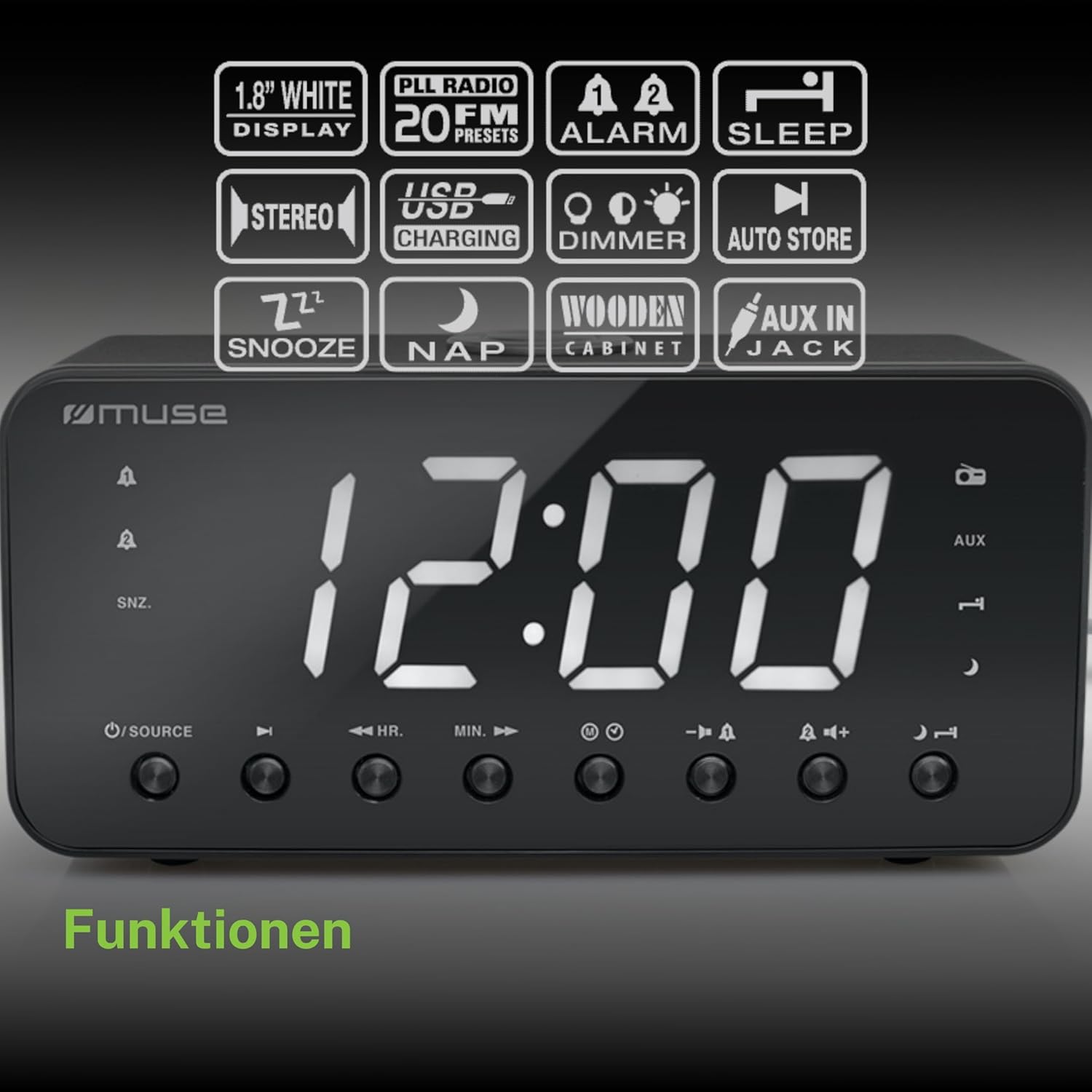
Figure 2: Diagram illustrating the key features and control buttons on the Muse M-192 CR Clock Radio, including the 1.8-inch white display, PLL FM radio with 20 presets, dual alarms, sleep, snooze, NAP functions, USB charging, dimmer, auto store, and AUX input jack.
Kontrolli tal-Panew ta' Quddiem:
- Wiri: Large 1.8-inch white LED display for time and status.
- Buttuna SORS: Selects between FM radio and AUX input.
- HR (Hour) Button: Adjusts hour for time and alarm settings.
- MIN (Minute) Button: Adjusts minute for time and alarm settings.
- Buttuna tal-ALLARM 1: Sets and activates/deactivates Alarm 1.
- Buttuna tal-ALLARM 2: Sets and activates/deactivates Alarm 2.
- Buttuna SNOOZE/DIMMER: Activates snooze during an alarm; adjusts display brightness (High/Low/Off) when not alarming.
- Buttuna SLEEP: Sets the sleep timer for radio playback.
- NAP Button: Sets a short nap alarm.
- Buttuni Volum 'il fuq /' l isfel: Jaġġusta l-volum tal-awdjo.
Konnessjonijiet tal-Panew ta' wara:
- Jack AUX IN: Tqabbad apparati awdjo esterni.
- Port tal-Iċċarġjar tal-USB: Provides power to charge compatible devices.
- DC IN Jack: Connects the AC adapter for power.
- Kompartiment tal-batterija: Holds backup batteries.
5. Setup
5.1 Konnessjoni tal-Enerġija
- Insert the small plug of the supplied AC adapter into the DC IN jack on the rear of the clock radio.
- Plug the AC adapter into a standard wall outlet. The display will light up.
5.2 Installazzjoni ta' Backup tal-Batterija
The clock radio requires 2 x 1.5V AAA batteries (not included) for backup power. These batteries maintain the time and alarm settings during a power outage.
- Iftaħ l-għatu tal-kompartiment tal-batterija fil-qiegħ tal-unità.
- Daħħal żewġ batteriji AAA, waqt li tosserva l-polarità korretta (+ u -) kif indikat ġewwa l-kompartiment.
- Agħlaq l-għatu tal-kompartiment tal-batterija sew.
Note: Battery backup only preserves settings; the display will not illuminate and alarms will not sound during a power outage if only running on battery backup.
6. Istruzzjonijiet Operattivi
6.1 Issettjar tal-Ħin
- In standby mode (when the radio is off), press and hold the IL-ĦIN IPPOST button (if available, otherwise use HR/MIN directly or a dedicated time set button not explicitly listed but implied by HR/MIN). If no dedicated button, proceed to step 2.
- Agħfas il- HR buttuna biex taġġusta s-siegħa.
- Agħfas il- MIN buttuna biex taġġusta l-minuta.
- Release the buttons to confirm the time. The time will automatically set after a few seconds of inactivity.
6.2 Issettjar tal-Allarmi (Allarm 1 & Allarm 2)
The Muse M-192 CR features two independent alarms.
- Agħfas u żomm il- ALLARM 1 button until the alarm time flashes on the display.
- Uża l- HR u MIN buttuni biex tissettja l-ħin tal-allarm mixtieq.
- Agħfas il- ALLARM 1 Agħfas il-buttuna mill-ġdid biex tagħżel is-sors tal-allarm: Buzzer or Radju.
- Agħfas il- ALLARM 1 button a third time to confirm and activate Alarm 1. An alarm icon will appear on the display.
- Irrepeti l-proċess għal ALLARM 2 bl-użu tal- ALLARM 2 buttuna.
Biex tiddiżattiva allarm, agħfas il-buttuna korrispondenti ALLARM button until its icon disappears from the display.
6.3 Funzjoni Snooze
Meta tinstema' allarm, agħfas il-buttuna SNOOZE / DIMMER buttuna biex isikket l-allarm temporanjament. L-allarm jerġa' jdoqq wara madwar 9 minuti.
6.4 Funzjoni Sleep
The sleep function allows you to fall asleep to the radio, which will automatically turn off after a set period.
- Waqt li r-radju jkun qed idoqq, agħfas il-buttuna L-IRQAD Agħfas il-buttuna ripetutament biex tgħaddi mill-ħinijiet ta' rqad disponibbli (eż., 90, 60, 30, 15 minuta, jew MITFI).
- Ir-radju se jdoqq għat-tul magħżul u mbagħad jintefa awtomatikament.
6.5 NAP Function
The NAP function sets a short alarm for a specified duration.
- Agħfas il- NAP button repeatedly to select a nap duration (e.g., 10, 20, 30, 60, 90, 120 minutes, or OFF).
- The alarm will sound after the selected duration.
6.6 Radio Operation (FM)
- Agħfas il- SORS buttuna biex tagħżel il-modalità tar-radju FM.
- Agħfas u żomm il- HR or MIN button to automatically scan for the next available station. Briefly press to manually tune.
- Aġġusta l-volum billi tuża Volum 'il fuq/'l isfel buttuni.
Issettjar tal-Presets tar-Radju:
The unit supports up to 20 FM radio presets.
- Tune to your desired FM station.
- Agħfas u żomm il- Issettjat minn qabel button (often combined with a number or memory button, if not explicitly labeled, refer to the full manual for specific button). If no dedicated PRESET button, the HR/MIN buttons might serve this function in radio mode.
- Uża l- HR or MIN buttuni biex tagħżel numru preset (P01-P20).
- Agħfas il- Issettjat minn qabel Agħfas il-buttuna mill-ġdid biex issalva l-istazzjon.
- Biex tirrevoka preset, agħfas fil-qosor il-buttuna Issettjat minn qabel buttuna u mbagħad uża HR or MIN biex tagħżel in-numru ssettjat minn qabel mixtieq.
6.7 Input AUX
Connect an external audio device (e.g., MP3 player, smartphone) to the AUX IN jack on the rear of the unit using a 3.5mm audio cable (not included).
- Connect one end of the audio cable to your external device's headphone jack.
- Connect the other end to the AUX IN jack on the clock radio.
- Agħfas il- SORS button to select AUX mode. The display will show "AUX".
- Play audio from your external device. Adjust volume using the clock radio's Volum 'il fuq/'l isfel buttons and your external device's volume control.
6.8 Iċċarġjar USB
The USB port on the rear of the unit can be used to charge compatible devices.

Figure 3: The Muse M-192 CR Clock Radio highlighting its jumbo white display and the USB charging port located on the rear of the unit.
- Connect your device's USB charging cable to the USB charging port on the clock radio.
- Kun żgur li r-radju tal-arloġġ ikun mixgħul.
- L-apparat tiegħek għandu jibda jiċċarġja.
Note: The USB port is for charging only and does not support data transfer or audio playback.
6.9 Dimmer tal-Wiri
Adjust the brightness of the display to suit your preference.
- Fil-modalità standby, agħfas il- SNOOZE / DIMMER buttuna ripetutament.
- Cycle through the brightness levels: High, Low, and Off.
7. Manutenzjoni
- Tindif: Imsaħ l-unità b'ċarruta ratba u niexfa. Tużax prodotti tat-tindif, xama', jew solventi li joborxu.
- Ventilazzjoni: Żomm il-fetħiet tal-ventilazzjoni ħielsa mit-trab u l-fdalijiet.
- Ħażna: If storing the unit for an extended period, disconnect it from the power outlet and remove the backup batteries.
8 Issolvi l-problemi
| Problema | Kawża Possibbli | Soluzzjoni |
|---|---|---|
| Bla enerġija / Wiri mitfi | L-adapter tal-AC mhux imqabbad jew difettuż. | Kun żgur li l-adapter tal-AC huwa mdaħħal sew fl-unità u f'sokit tal-ħajt li jaħdem. |
| L-allarm ma ħossx | L-allarm mhux attivat jew issettjat ħażin. | Verify alarm time and source are set correctly and the alarm icon is visible on the display. |
| Riċeviment ħażin tar-radju FM | L-antenna mhux estiża jew hemm interferenza. | Extend the FM wire antenna fully. Reposition the unit to improve reception. |
| Display too bright/dim | Is-setting tad-dimmer jeħtieġ aġġustament. | Agħfas il- SNOOZE / DIMMER buttuna biex tiċċaqlaq bejn il-livelli ta' luminożità. |
9. Speċifikazzjonijiet

Figure 4: Technical drawing illustrating the dimensions of the Muse M-192 CR Clock Radio (226mm length, 86mm width, 108mm height).
- Mudell: M-192 CR
- Wiri: 1.8-inch White Digital LED
- Radju: FM PLL Radio with 20 Presets
- Funzjonijiet ta' allarm: Dual Alarm, Snooze, Sleep, NAP
- Sors tal-allarm: Radju jew Buzzer
- Konnettività: AUX-in, USB Charging Port
- Qawwa: AC Power (Adapter Included), Battery Backup (2 x 1.5V AAA batteries, not included)
- Qawwa tal-Ħruġ: 2 Watts
- Dimensjonijiet (L x W x H): 22.6 x 8.6 x 10.8 ċm
- Piż: 800 g
10. Garanzija u Appoġġ
For detailed warranty information and technical support, please refer to the documentation provided with your purchase or contact your retailer. Keep your proof of purchase for any warranty claims.


