1. Introduzzjoni u Fuqview
The PXN 6603 is a wireless Bluetooth gamepad designed to enhance your gaming experience on various devices. This MFi (Made for iPhone/iPad/iPod) certified controller offers precise control and broad compatibility, primarily with Apple iOS devices, but also supports Windows and Android TV platforms. This manual provides essential information for setting up, operating, and maintaining your gamepad.

Image 1.1: PXN 6603 Wireless Bluetooth Gamepad, highlighting compatibility with iPod, iPhone, and iPad, supporting iOS 7.0+ devices.
2. Kontenut tal-Pakkett
Jekk jogħġbok ivverifika li l-oġġetti kollha elenkati hawn taħt huma inklużi fil-pakkett tiegħek:
- PXN 6603 Wireless Bluetooth Gamepad
- Cable tal-Iċċarġjar tal-USB
- Adapter Mikro USB
- Manwal għall-Utent
- Thumb Grips (2 pieces)

Image 2.1: Contents of the PXN 6603 package, showing the gamepad, detachable phone clamp, USB charging cable, user manual, and two thumb grips.
3. Karatteristiċi tal-prodott
The PXN 6603 Gamepad incorporates several features for an optimized gaming experience:
- Konnettività mingħajr fili Bluetooth: Provides a stable and responsive connection to your devices.
- Ċertifikat MFi: Ensures full compatibility and optimal performance with Apple iOS devices.
- Batterija rikarikabbli: Equipped with a 500mAh lithium-polymer battery, offering over 30 hours of play time on a 2-3 hour charge.
- Dual Analog Joysticks: Features 360-degree rotation for precise control.
- Responsive Trigger Buttons: Includes fast-response R1/R2 and L1/L2 trigger buttons.
- 8-Direction D-Pad: Għal input direzzjonali preċiż.
- Durable ABXY Buttons: Designed for comfort and longevity.
- Adjustable Phone Clamp: An extendable stand that can hold phones up to 6 inches, with an adjustable angle from 90 to 160 degrees.
- Buttuni Sensittivi għall-Pressjoni: Offers precise control and accurate response in supported games.

Image 3.1: 360-degree rotation joystick.

Image 3.2: Fast response trigger buttons.

Image 3.3: 8-direction D-Pad.

Image 3.4: Comfortable and durable ABXY buttons.

Image 3.5: Adjustable and extendable phone clamp.

Immaġni 3.6: Ħajja tal-batterija u dettalji dwar l-iċċarġjar.
4. Setup
4.1. Iċċarġjar tal-Gamepad
Before first use, fully charge the gamepad. Connect the provided USB charging cable to the gamepad's USB interface and plug the other end into a USB power source (e.g., computer USB port, USB wall adapter). The charging indicator light will illuminate during charging and turn off when fully charged. A full charge typically takes 2-3 hours.
4.2. Tqabbil ma' Apparati iOS
- Ensure your iOS device (iPhone, iPad, iPod Touch, Apple TV) has Bluetooth enabled. You can do this through the device's Settings menu.
- Press and hold the Power Key on the PXN 6603 Gamepad until the Bluetooth indicator light begins to flash, indicating it is in pairing mode.
- On your iOS device, navigate to the Bluetooth settings and search for available devices.
- Select "PXN 6603" from the list of found devices to initiate the pairing process.
- Once successfully paired, the Bluetooth indicator light on the gamepad will become solid.
For Apple TV, ensure the Apple TV is updated to the latest software version for optimal compatibility.
5. Istruzzjonijiet Operattivi
5.1. It-Tqassim u l-Funzjonijiet tal-Buttuni
Iffamiljarizza ruħek mad-disinn tal-buttuni tal-gamepad:
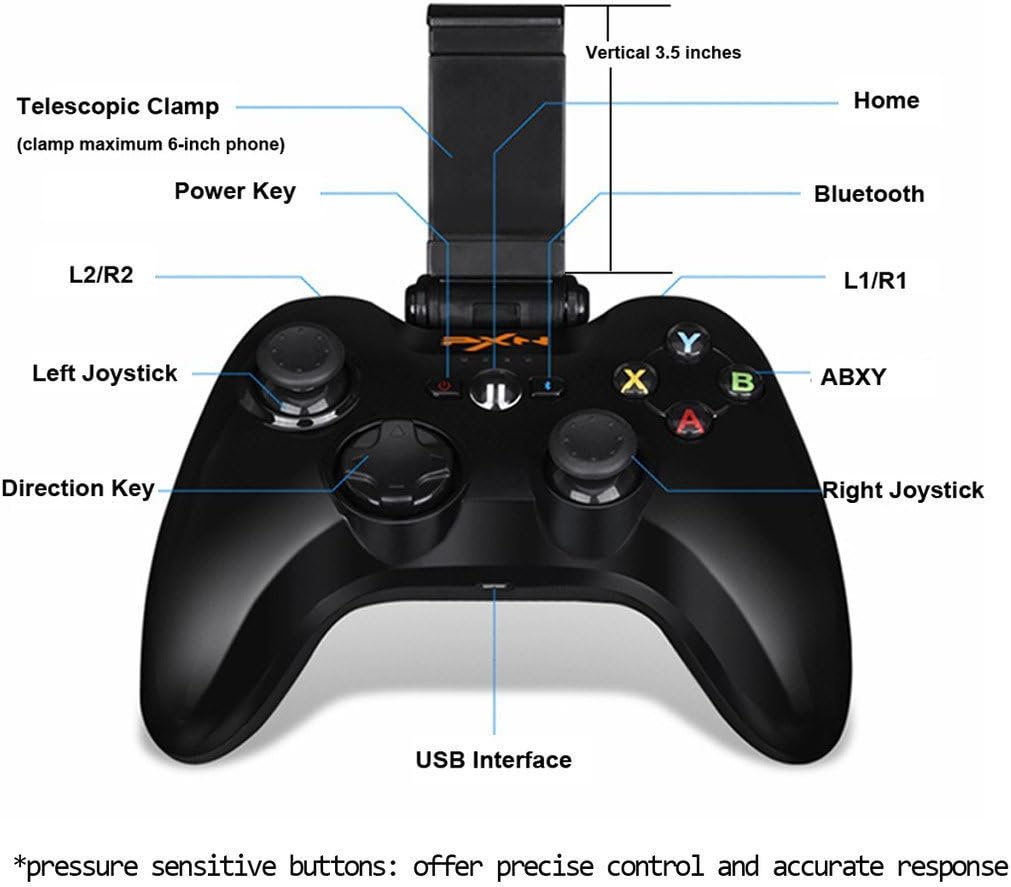
Image 5.1: PXN 6603 Gamepad button layout with labels.
- Ċavetta tal-Enerġija: Turns the gamepad on/off.
- Buttuna tad-dar: Returns to the home screen on connected devices.
- Indikatur Bluetooth: Juri l-istatus tal-konnessjoni.
- Buttuni L1/R1: Buttuni tal-ispalla tax-xellug u tal-lemin.
- Triggers L2/R2: Left and Right analog triggers.
- Joystick tax-Xellug: Analog stick for movement and camera control.
- Joystick tal-lemin: Analog stick for movement and camera control.
- Direction Key (D-Pad): Input direzzjonali diġitali.
- Buttuni ABXY: Action buttons, typically color-coded.
- Interface USB: Għall-iċċarġjar tal-gamepad.
- Telescopic Clamp: Holds mobile devices.
5.2. Using the Phone Clamp
The PXN 6603 includes an integrated telescopic clamp to securely hold your smartphone, transforming your device into a portable gaming console. To use:
- Gently pull the top part of the clamp upwards to extend it.
- Poġġi l-ismartphone tiegħek bir-reqqa fil-klampamp, u tiżgura li jkun iċċentrat u miżmum sew. Il-clamp can accommodate phones up to 6 inches in size.
- Aġġusta l-angolu tal-clamp għall-aħjar viewing. Il-clamp allows for angle adjustments between 90 and 160 degrees.

Image 5.2: Gamepad with the phone clamp estiża.
6. Kompatibilità
The PXN 6603 Gamepad is designed for broad compatibility:
- Apparati iOS: Fully compatible with iPhone, iPad, iPod Touch, and Apple TV running iOS 7.0 or above.
- Windows: Supports Windows XP, Windows 7, and Windows 8.
- Android: Compatible with Android TV boxes and Android TVs.
For optimal performance, ensure your device's operating system is up to date. Game compatibility may vary; check individual game requirements for controller support.

Image 6.1: The PXN 6603 supports all Apple devices running iOS 7.0 and above.
7. Manutenzjoni
To ensure the longevity and optimal performance of your PXN 6603 Gamepad, follow these maintenance guidelines:
- Tindif: Use a soft, dry cloth to clean the gamepad. Avoid using harsh chemicals, solvents, or abrasive materials.
- Ħażna: Aħżen il-gamepad f'post frisk u niexef 'il bogħod mix-xemx diretta u minn temperaturi estremi.
- Kura tal-batterija: Charge the battery regularly, even if not in frequent use, to prevent deep discharge. Avoid leaving the battery completely depleted for extended periods.
- Evita l-Impatt: Twaqqax il-gamepad jew tissottomettixh għal impatti qawwija, għax dan jista' jagħmel ħsara lill-komponenti interni.
- Espożizzjoni għal Likwidu: Keep the gamepad away from water and other liquids to prevent electrical damage.
8 Issolvi l-problemi
If you encounter issues with your PXN 6603 Gamepad, refer to the following common troubleshooting steps:
- Gamepad does not turn on: Ensure the battery is charged. Connect the gamepad to a power source using the USB cable and try again.
- Ma tistax tqabbad mat-tagħmir:
- Ivverifika li l-Bluetooth huwa attivat fuq it-tagħmir tiegħek.
- Ensure the gamepad is in pairing mode (Bluetooth indicator flashing).
- Mexxi l-gamepad eqreb lejn it-tagħmir tiegħek.
- Restart both the gamepad and your device, then attempt pairing again.
- Check if the gamepad is already paired with another device. Disconnect it if necessary.
- Buttons are unresponsive or lag:
- Iċċekkja l-livell tal-batterija u recharge jekk baxx.
- Ensure the gamepad is within the effective range of your device's Bluetooth connection.
- Erġa' qabbad il-gamepad mat-tagħmir tiegħek.
- Aġġorna s-sistema operattiva tat-tagħmir tiegħek għall-aħħar verżjoni.
- Gamepad disconnects frequently:
- Kun żgur li m'hemm l-ebda interferenzi elettromanjetiċi qawwija fil-qrib.
- Keep the gamepad and device close to each other.
- Recharge the gamepad's battery.
9. Speċifikazzjonijiet
| Brand | PXN estensjoni |
| Numru tal-Mudell | PXN-6603 |
| Teknoloġija tal-Konnettività | Bluetooth |
| Sistemi Operattivi Kompatibbli | iOS 7.0+, Windows XP/7/8, Android TV |
| Tip ta 'batterija | Lithium-polimer |
| Kapaċità tal-batterija | 500 mAh |
| Ħin tal-Iċċarġjar | 2-3 sigħat |
| Ħin tal-logħob | 30+ siegħa |
| Numru ta' Buttuni | 16 |
| Materjal | Plastik |
| Piż tal-oġġett | 1.09 Liri (madwar 494g) |
10. Garanzija u Appoġġ
Specific warranty information for the PXN 6603 Gamepad is not provided in this manual. For details regarding warranty coverage, returns, or technical support, please refer to the official PXN webis-sit jew ikkuntattja lill-bejjiegħ tiegħek. Żomm l-irċevuta tax-xiri tiegħek bħala prova tax-xiri għal kwalunkwe talba ta' garanzija.


