Introduzzjoni
This manual provides comprehensive instructions for the operation and maintenance of your ONN X5 HiFi Music Player. Please read this manual thoroughly before using the device to ensure proper functionality and to maximize your listening experience. The ONN X5 is designed to deliver high-fidelity audio playback in a compact and user-friendly format.
Prodott Overview
The ONN X5 is a portable HiFi music player featuring a 2.0-inch TFT screen and an aluminum alloy shell. It supports a wide range of audio formats, including lossless files, and offers expandable storage via a MicroSD card.
Karatteristiċi ewlenin:
- Awdjo ta' fedeltà għolja: Supports WAV, FLAC, ALAC, APE, OGG lossless formats, and high-definition music up to 24Bit/192 KHz.
- Wiri: 2.0-inch TFT screen (176x220 pixels) for clear navigation and information display.
- Ħażna: 8GB internal memory, expandable up to 32GB with a MicroSD/TF card.
- Disinn Durabbli: Lightweight aluminum alloy body (60g) for enhanced durability and reduced external interference noise.
- Interface tal-Utent: Intuitive key-based operation.
- Karatteristiċi addizzjonali: FM Radio support.
- Batterija: High-capacity rechargeable lithium polymer battery.
- Appoġġ f'diversi lingwi: English, Russian, Korean, German, Japanese, Polish, Indonesian, Chinese.
Disinn tal-Apparat:

Immaġni: Quddiem view of the ONN X5 HiFi Music Player, showing its display and control buttons. The screen displays track information, audio quality (e.g., 24BIT, 88HHZ), and playback status.

Immaġni: Ġenb view of the ONN X5 HiFi Music Player, illustrating the location of the MicroSD card slot on the right side of the device.

Immaġni: Quddiem u wara view of the ONN X5 HiFi Music Player. The back panel shows the model number "X5" and branding information.
Setup
1. Iċċarġja l-Apparat:
- Connect the ONN X5 to a power source using the provided USB cable.
- L-indikatur tal-batterija fuq l-iskrin se juri l-istatus tal-iċċarġjar.
- A full charge is recommended before first use. The device uses a high-capacity rechargeable lithium polymer battery.
2. Inserting a MicroSD/TF Card:
- Locate the MicroSD/TF card slot on the side of the player.
- Gently insert a compatible MicroSD/TF card (up to 32GB) into the slot until it clicks into place.
- Ensure the card is inserted correctly to avoid damage.

Image: Contents of the ONN X5 package, showing the player, USB charging cable, and other accessories. This illustrates the components available for setup.
3. Trasferiment tal-Mużika Files:
- Connect the ONN X5 to your computer using the USB cable.
- The device will appear as a removable storage drive.
- Iddreggja u qiegħed l-awdjo mixtieq tiegħek files (MP3, WMA, APE, FLAC, WAV, ALAC, OGG) into the player's internal storage or the MicroSD card.
- Oħroġ l-apparat mill-kompjuter tiegħek b'mod sigur qabel ma skonnettja l-kejbil USB.
Istruzzjonijiet Operattivi
Power On/Off:
- To power on, press and hold the power button (usually marked with a universal power symbol) until the screen illuminates.
- Biex titfi, agħfas u żomm il-buttuna tal-qawwa sakemm l-apparat jintefa.
Navigazzjoni:
The ONN X5 uses physical buttons for navigation. Refer to the device layout for button identification.
- VOL: Jaġġusta l-volum.
- M (Menù): Jaċċessa l-menus u jikkonferma l-għażliet.
- Buttuni tal-Vleġġa (< / >): Navigate through menus, select tracks, or fast forward/rewind during playback.
- Buttuna tal-Qawwa: Also functions as a play/pause button during music playback.
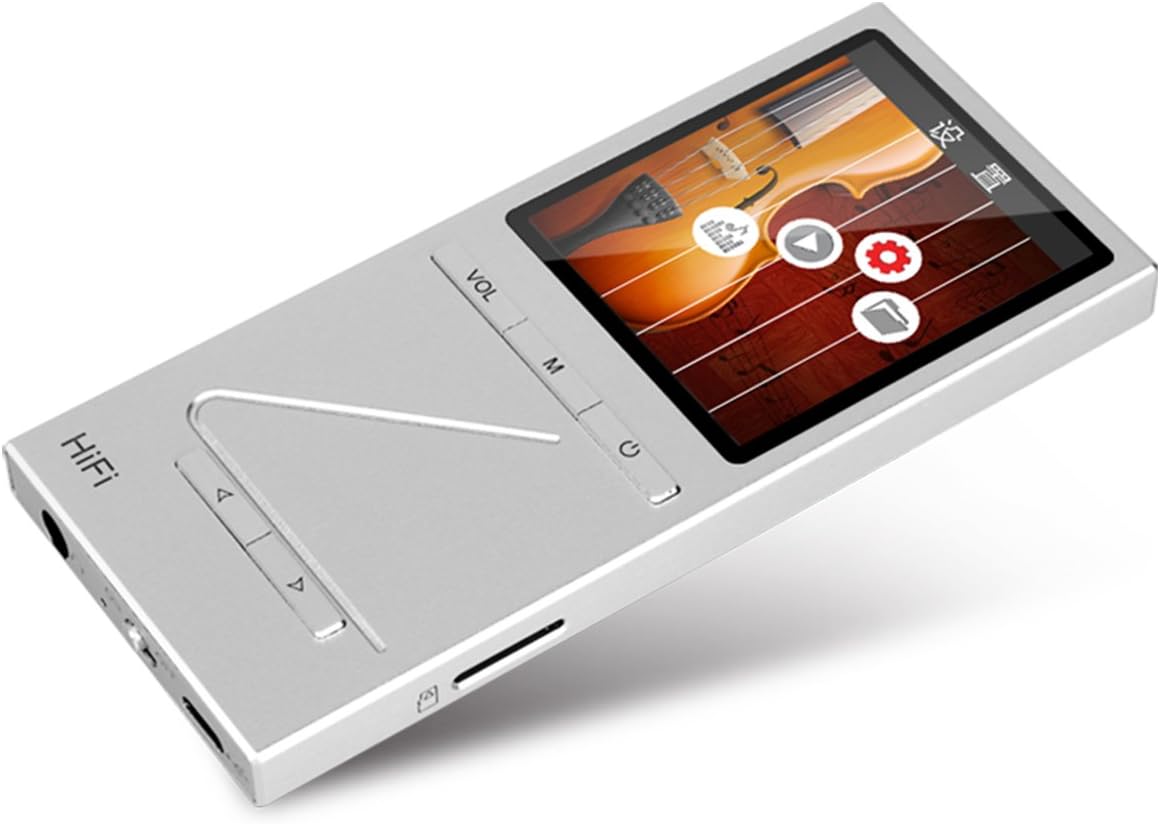
Immaġni: Angolata view of the ONN X5 HiFi Music Player, showing the screen with various menu icons, indicating the user interface for navigation.
Daqq tal-mużika:
- From the main menu, navigate to "Music" or "Files”.
- Browse through your folders and select a track to play.
- Press the Power/Play button to start or pause playback.
- Use the arrow buttons to skip tracks or fast forward/rewind.
- Adjust volume using the VOL button.
Radju FM:
- Navigate to the "FM Radio" option from the main menu.
- Use the navigation buttons to scan for stations or manually tune to a frequency.
- Ensure headphones are connected as they often act as the antenna for FM radio.
Settings tal-Lingwa:
The device supports multiple languages. To change the language:
- Go to "Settings" from the main menu.
- Select "Language" and choose your preferred language from the list (English, Russian, Korean, German, Japanese, Polish, Indonesian, Chinese).
Manutenzjoni
- Tindif: Uża drapp artab u niexef biex tnaddaf l-apparat. Evita prodotti tat-tindif likwidi jew materjali li joborxu.
- Ħażna: Aħżen il-plejer f'post frisk u niexef 'il bogħod mix-xemx diretta u minn temperaturi estremi.
- Kura tal-batterija: Biex ittawwal il-ħajja tal-batterija, evita li tiċċarġja kompletament il-batterija ta' spiss. Iċċarġja l-apparat regolarment, anke jekk ma jkunx qed jintuża għal perjodi twal.
- Evita l-Impatt: The aluminum alloy shell provides durability, but avoid dropping the device or subjecting it to strong impacts.
- Espożizzjoni għall-Ilma: Dan l-apparat mhuwiex reżistenti għall-ilma. Evita l-espożizzjoni għall-ilma jew umdità għolja.
Issolvi l-problemi
L-Apparat Mhux Se Jixgħel:
- Ensure the battery is charged. Connect the device to a power source and allow it to charge for at least 30 minutes before attempting to power on again.
- Try performing a hard reset (if applicable, refer to manufacturer's specific instructions for hard reset, usually involves holding power button for an extended period).
Ebda Ħsejjes:
- Check the volume level and ensure it is not muted.
- Verify that headphones or external speakers are properly connected.
- Test with different headphones or audio output devices.
- Żgura l-awdjo file is not corrupted or in an unsupported format.
Ma nistax nittrasferixxi Files:
- Kun żgur li l-kejbil USB huwa konness sew kemm mal-plejer kif ukoll mal-kompjuter.
- Ipprova port USB differenti fuq il-kompjuter tiegħek jew kejbil USB differenti.
- Verify that the device is recognized by your computer as a removable drive.
- Check if the MicroSD card is properly inserted and not full.
Screen Not Responding / Frozen:
- Agħfas u żomm il-buttuna tal-qawwa għal madwar 10-15-il sekonda biex terġa' tibda.
- If the issue persists, ensure the battery is charged.
Speċifikazzjonijiet
| Karatteristika | Dettall |
|---|---|
| Numru tal-Mudell | X5 |
| Brand | ONN |
| Daqs tal-Iskrin | 2.0 Inches TFT (176x220 PIXEL) |
| Memorja Interna | 8 GB |
| Ħażna espansibbli | MicroSD/TF card up to 32 GB |
| Formati Awdjo Appoġġjati | APE, FLAC, ALAC, WAV, WMA, OGG, MP3 (up to 24Bit/192 KHz) |
| Teknoloġija tal-Konnettività | Aux, USB |
| Karatteristika Speċjali | Radju FM |
| Batterija | 1 Lithium Ion battery required (High-capacity rechargeable lithium polymer) |
| Piż tal-oġġett | 7 uqija (madwar 0.2 Kilogrammi) |
| Dimensjonijiet tal-Pakkett | 6.21 x 4.7 x 1.2 pulzieri |
| Manifattur | SZTZWY |
Garanzija u Appoġġ
For detailed warranty information, please refer to the warranty card included with your purchase or visit the official ONN product support website. For technical assistance or further inquiries, please contact ONN customer support through their official channels.


