Introduzzjoni
The ZEALOT S1 is a versatile portable Bluetooth speaker designed for outdoor activities. It integrates a Bluetooth speaker, LED flashlight, and power bank functionality into a compact, durable unit. This manual provides detailed instructions for the proper setup, operation, and maintenance of your S1 speaker.
Kontenut tal-Pakkett
Jekk jogħġbok iċċekkja l-pakkett għall-oġġetti li ġejjin:
- ZEALOT S1 Speaker (1 unit)
- Handlebar Mounting Bracket (1 unit)
- Carabiner Clip (1 unit)
- 3.5mm Audio Cable (1 unit)
- Kejbil għall-Iċċarġjar tal-USB (unità waħda)
- User Guide (1 unit)
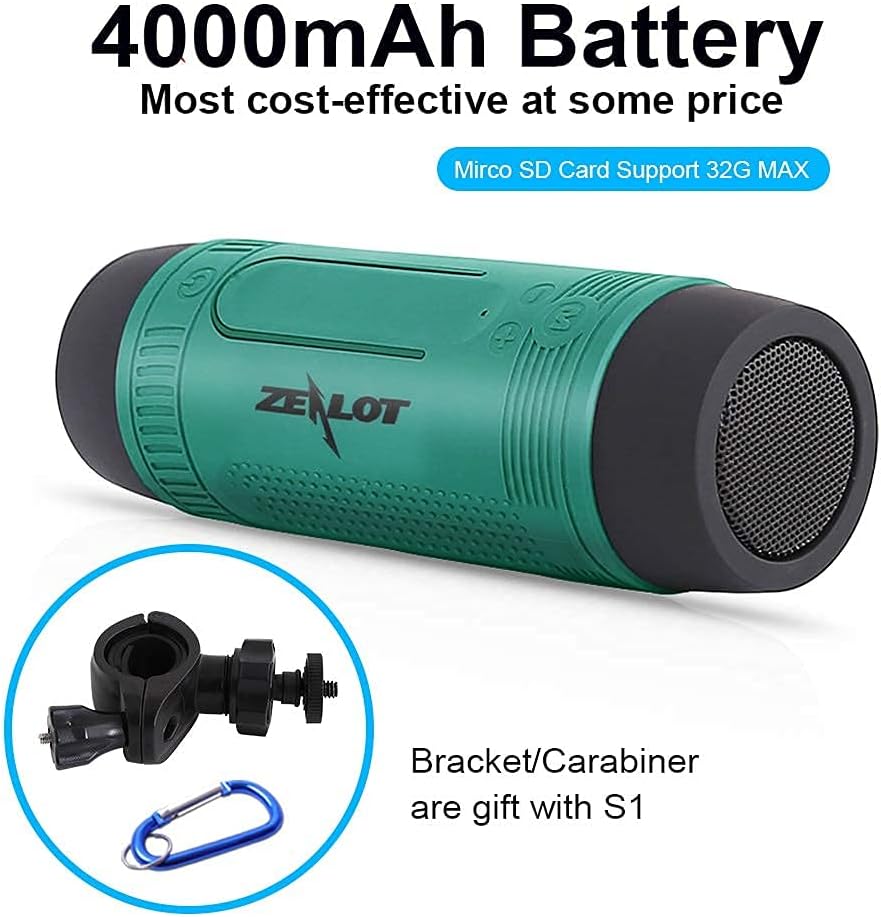
Image: ZEALOT S1 speaker shown with its 4000mAh battery capacity, alongside the included handlebar mounting bracket and carabiner clip.
Prodott Overview
The ZEALOT S1 features a cylindrical design with controls located on the top surface and ports on the side, protected by a silicone cover. The front houses the LED flashlight, and the side features a speaker grille.

Image: The ZEALOT S1 speaker in green, securely mounted on a bicycle handlebar, highlighting its integrated flashlight and accessible controls.
Setup
1. Iċċarġja l-Ispeaker
- Connect the provided USB charging cable to the micro USB port on the S1 speaker.
- Qabbad it-tarf l-ieħor tal-kejbil USB ma' adapter tal-enerġija USB (mhux inkluż) jew mal-port USB tal-kompjuter.
- Id-dawl indikatur tal-iċċarġjar jixgħel. Iċċarġjar sħiħ jieħu madwar 5 sigħat.
2. Mounting on a Handlebar
- Attach the handlebar mounting bracket to your bicycle handlebar. Ensure it is securely fastened.
- Screw the ZEALOT S1 speaker onto the bracket. Do not overtighten to prevent damage to the hinge pin.
- Adjust the speaker's position for optimal sound direction and flashlight visibility.

Image: The ZEALOT S1 speaker securely mounted on a bicycle handlebar, illustrating its suitability for outdoor activities with splash-proof, dust-proof, and anti-dropping features.
Istruzzjonijiet Operattivi
1. Power On/Off
- Agħfas u żomm il-buttuna Power (U) għal 3 sekondi biex tixgħel jew titfi l-ispiker.
2. Tqabbil tal-Bluetooth
- Turn on the S1 speaker. It will automatically enter Bluetooth pairing mode, indicated by a flashing LED.
- Fuq it-tagħmir mobbli tiegħek, ippermetti l-Bluetooth u fittex tagħmir disponibbli.
- Select "ZEALOT S1" from the list. Once paired, the LED indicator will stop flashing.
3. Daqq tal-mużika
- Modalità Bluetooth: Wara tqabbil b'suċċess, daqq il-mużika mit-tagħmir konness tiegħek.
- Modalità TF Card: Insert a Micro SD (TF) card (up to 32GB) with MP3 files fl-islott tal-kard tat-TF. L-ispiker awtomatikament jaqleb għall-modalità tal-kard tat-TF u jibda d-daqq.
- Modalità AUX-in: Connect an external audio device using the provided 3.5mm audio cable to the AUX port. The speaker will switch to line-in mode.
- Modalità tar-Radju FM: Press the 'M' button to cycle through modes until you reach FM Radio. Connect the USB charging cable as an antenna for better reception.
4. Kontrolli
- Volum Up / Track Li jmiss: Short press '+' for volume up; long press '+' for next track.
- Volume Down / Track Preċedenti: Short press '-' for volume down; long press '-' for previous track.
- Play/Pawża/Tweġiba Sejħa: Agħfas qasir il-buttuna Play/Pause.
- Swiċċ tal-Modalità: Press the 'M' button to switch between Bluetooth, TF Card, AUX-in, and FM Radio modes.
5. LED Flashlight Operation
- Press the flashlight button to cycle through light modes: High, Low, SOS (flashing).
- Press and hold the flashlight button to turn off the light.

Image: The ZEALOT S1 speaker's LED torch light in action, providing illumination on a path at night, with indicators for High, Low, and SOS light modes.
6. Sejħiet mingħajr idejn
- Meta tidħol telefonata, agħfas il-buttuna Play/Pause biex twieġeb.
- Agħfas il-buttuna Play/Pause mill-ġdid biex ittemm is-sejħa.
7. Funzjoni tal-Bank tal-Enerġija
- The S1 speaker can be used as an emergency power bank. Open the silicone cover on the side.
- Connect your mobile device to the USB-A output port using your device's charging cable.
- The S1's 4000mAh battery can provide a charge to your devices.

Image: A blue ZEALOT S1 speaker acting as a power bank, charging a smartphone via a USB cable, illustrating its external battery function.
Manutenzjoni
- The S1 speaker is IPX5 waterproof (splash-proof), dust-proof, and shockproof. Avoid submerging it in water.
- Clean the speaker with a soft, dry cloth. Do not use harsh chemicals or abrasive cleaners.
- Aħżen l-ispiker f'post frisk u niexef meta ma jkunx qed jintuża.
- Iċċarġja l-batterija mill-inqas darba kull tliet xhur biex iżżommha f'saħħitha jekk ma tintużax regolarment.
Issolvi l-problemi
| Problema | Soluzzjoni |
|---|---|
| L-ispeaker ma jixgħelx. | Kun żgur li l-batterija hija ċċarġjata. Qabbad ma' sors ta' enerġija permezz tal-kejbil USB. |
| Ma tistax tqabbad permezz tal-Bluetooth. | Ensure the speaker is in pairing mode. Turn off and on your device's Bluetooth. Move closer to the speaker. |
| L-ebda ħoss. | Check volume levels on both the speaker and your connected device. Ensure the correct mode (Bluetooth, TF card, AUX) is selected. |
| Ir-riċeviment tar-radju FM huwa fqir. | Connect the USB charging cable to the micro USB port; it acts as an antenna. Adjust the speaker's position. |
| Power bank not charging device. | Ensure the S1 speaker has sufficient charge. Check the connection cable. |
Speċifikazzjonijiet
- Isem tal-Mudell: S1
- Ditta: ZELOT
- Konnettività: Bluetooth 5.0, USB, 3.5mm AUX
- Tip ta' Kelliem: Outdoor, Portable
- Karatteristiċi Speċjali: Built-in Microphone, LED Light, Power Bank
- Kapaċità tal-batterija: 4000mAh (2 batteriji tal-jone tal-litju)
- Ħin tal-logħob: Up to 24 hours (TF card playback)
- Ħin tal-Iċċarġjar: Madwar sagħtejn
- Klassifikazzjoni li ma jgħaddix ilma minnha: IPX5 (Reżistenti għall-ilma)
- Medda bla fili: Sa 10 metri (33 pied)
- Qawwa tal-Ħruġ tal-Ispeaker: 5 Watts
- Rispons tal-Frekwenza: 20 KHz
- Dimensjonijiet: 2.01"D x 2.01"W x 6.14"H
- Piż: 260 Gram (9.2 uqija)
- Apparati Kompatibbli: iPhone, Android phones, etc.
Garanzija u Appoġġ
The ZEALOT S1 comes with a limited warranty. For detailed warranty information or technical support, please refer to the official ZEALOT website or contact customer service through your purchase platform. Please retain your proof of purchase for warranty claims.
Għal aktar għajnuna, tista' żżur il- ZEALOT Store on Amazon.


