
1. Introduzzjoni
This manual provides essential information for the safe and efficient operation of your Roadstar CLR-2615 Portable FM PLL Clock Radio. Please read these instructions carefully before using the device and retain them for future reference.
The Roadstar CLR-2615 is a compact clock radio featuring a large 1.8-inch white LCD display, FM PLL radio with 20 preset stations, dual alarm functionality (radio or buzzer), and convenient sleep and snooze functions. It operates on AC power with a battery backup for time and alarm settings during power outages.
2. Informazzjoni dwar is-Sigurtà
- Tesponix l-unità għax-xita jew għall-umdità biex tevita nar jew xokk elettriku.
- Aċċerta ruħek li jkun hemm ventilazzjoni xierqa; timblokkax xi fetħiet tal-ventilazzjoni.
- Uża biss aċċessorji/aċċessorji speċifikati mill-manifattur.
- Disconnect the apparatus during lightning storms or when unused for long periods.
- Irreferi l-manutenzjoni kollha lil persunal tas-servizz kwalifikat.
- Armi l-batteriji użati b'mod responsabbli skont ir-regolamenti lokali.
3. Kontenut tal-Pakkett
Jekk jogħġbok iċċekkja li l-oġġetti li ġejjin huma inklużi fil-pakkett tiegħek:
- Roadstar CLR-2615 Clock Radio Unit
- Adapter tal-Enerġija AC/DC
- Manwal ta' Istruzzjoni
4. Prodott Aktarview
Pannell ta' Quddiem u Wiri
The front panel features a large 1.8-inch white LCD display for clear visibility of time and radio information.

Immaġni: Quddiem view of the Roadstar CLR-2615 clock radio, highlighting the 1.8-inch white digital display showing '23:59'.
Kontrolli tal-Panel Fuq
The top panel houses various control buttons for easy access to functions:
- Buttuna SNOOZE/SLEEP: Activates snooze during an alarm or sets the sleep timer.
- Buttuna M (Memorja): Used for storing and recalling radio presets.
- << / >> Buttons: Used for tuning radio frequencies or adjusting time/alarm settings.
- Buttuni + / -: Used for volume control or adjusting time/alarm values.

Immaġni: Close-up view of the top panel of the Roadstar CLR-2615, showing the 'SNOOZE/SLEEP' button and other control buttons.
Pannell ta' wara u Konnessjonijiet
The rear panel includes the power input and the FM antenna.

Immaġni: Wara view of the Roadstar CLR-2615 clock radio, showing the integrated stand, power input, and FM antenna wire.
5. Setup
5.1 Konnessjoni tal-Enerġija
- Insert the DC plug of the supplied AC/DC adapter into the DC IN jack located on the rear of the unit.
- Plug the AC adapter into a standard wall outlet (AC 230V~50Hz).
- L-unità tixgħel, u d-displej jixgħel.
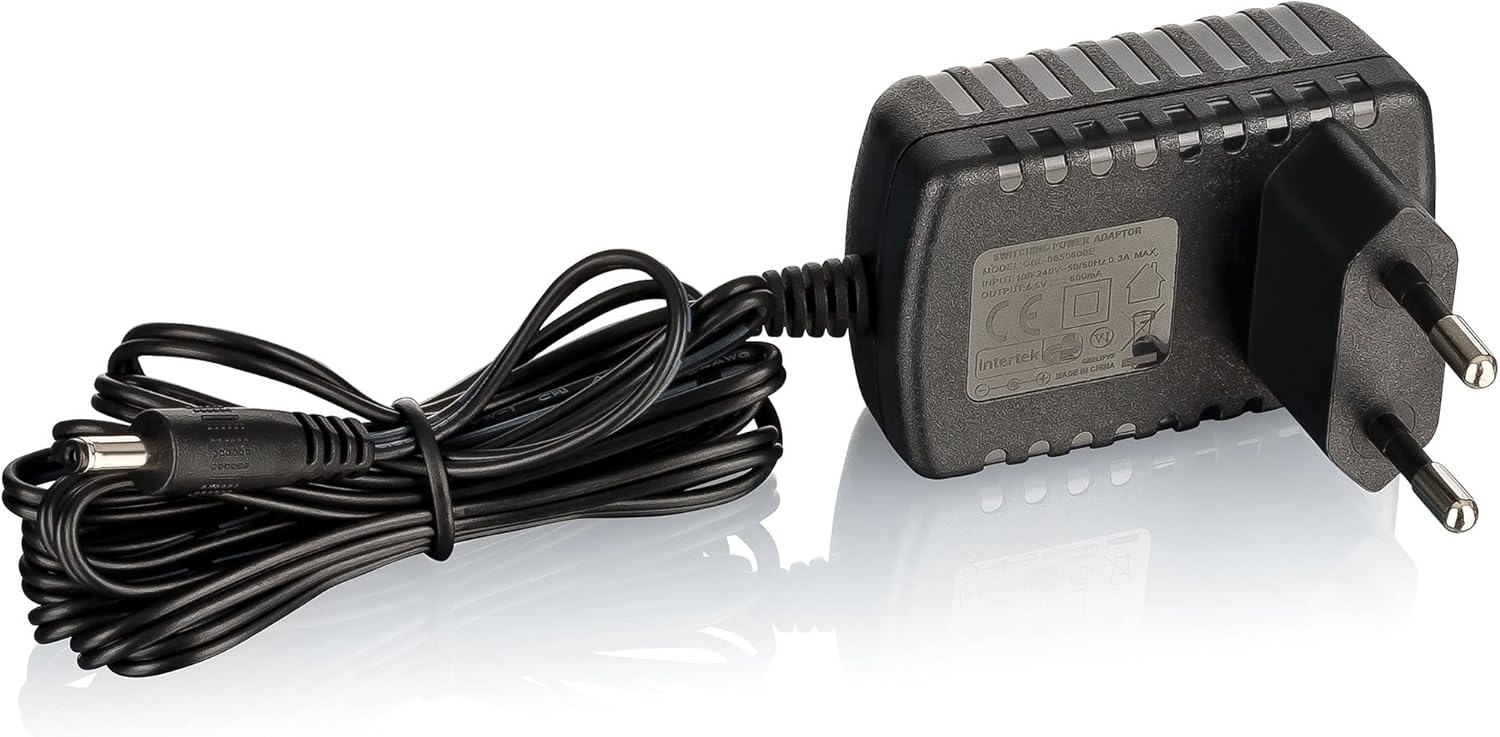
Image: The AC/DC power adapter with its cable and plug.
5.2 Installazzjoni ta' Backup tal-Batterija
The CLR-2615 uses a CR-2025 button cell battery (not always included) for backup power. This battery preserves time and alarm settings during a power outage.
- Locate the battery compartment on the bottom or rear of the unit.
- Iftaħ l-għatu tal-kompartiment tal-batterija.
- Daħħal batterija CR-2025 waħda, waqt li tiżgura l-polarità korretta (+/-).
- Agħlaq l-għatu tal-kompartiment tal-batterija sew.
5.3 Antenna FM
Extend the wire antenna located at the rear of the unit for optimal FM radio reception. Adjust its position for the best signal quality.
6. Istruzzjonijiet Operattivi
6.1 Issettjar tal-Arloġġ
- Fil-modalità standby, agħfas u żomm il- IL-ĦIN IPPOST button (if available, otherwise refer to specific button combination in your unit's quick start guide, often a combination of 'M' and '+/-').
- Iċ-ċifri tas-sigħat se jteptipu. Uża l- + or - buttuni biex taġġusta s-siegħa.
- Agħfas IL-ĦIN IPPOST again to confirm the hour. The minute digits will flash.
- Uża l- + or - buttuni biex jaġġustaw il-minuti.
- Agħfas IL-ĦIN IPPOST once more to save the time.
6.2 Operazzjoni tar-Radju
- Agħfas il- QAWWA buttuna biex tixgħel ir-radju.
- Agħfas il- MODALITÀ buttuna (jekk disponibbli) biex tagħżel il-modalità tar-radju FM.
- Irfinar awtomatiku: Agħfas u żomm il- >> or << buttuni biex tiskennja awtomatikament għall-istazzjon disponibbli li jmiss.
- Irfinar Manwali: Agħfas fil-qosor il- >> or << buttons to fine-tune the frequency step-by-step.
- Aġġustament tal-Volum: Uża l- + or - buttuni biex taġġusta l-livell tal-volum.
Storing and Recalling Presets (20 Stations)
- Intunazzjoni mal-istazzjon tar-radju mixtieq tiegħek.
- Agħfas u żomm il- M (Memorja) button until the preset number flashes on the display.
- Uża l- >> or << buttuni biex tagħżel in-numru preset mixtieq (1-20).
- Agħfas M għal darb'oħra biex tikkonferma u ssalva l-istazzjon.
- Biex tirrevoka stazzjon issettjat minn qabel, agħfas fil-qosor il-buttuna M button repeatedly to cycle through the stored stations.
6.3 Alarm Functions (Dual Alarm)
The CLR-2615 features two independent alarms (Alarm 1 and Alarm 2).
Twaqqif ta' Allarm
- Fil-modalità standby, agħfas u żomm il- ALLARM 1 or ALLARM 2 buttuna.
- The alarm hour digits will flash. Use the + or - buttuni biex tissettja s-siegħa tal-allarm mixtieqa.
- Agħfas il- ALLARM button again to confirm the hour. The minute digits will flash.
- Uża l- + or - buttuni biex tissettja l-minuti tal-allarm mixtieqa.
- Agħfas il- ALLARM button again to select the alarm source (Radio or BEEP). Use + or - li tagħżel.
- Agħfas il- ALLARM button once more to save the alarm setting.
Activating/Deactivating Alarms
Agħfas fil-qosor il- ALLARM 1 or ALLARM 2 button to toggle the respective alarm on or off. An alarm icon will appear/disappear on the display.
Funzjoni Snooze
Meta tinstema' allarm, agħfas il-buttuna SNOOZE/SLEEP button to temporarily silence the alarm for approximately 9 minutes. The alarm will sound again after this period.
Funzjoni Sleep
When the radio is playing, press the SNOOZE/SLEEP button repeatedly to set a sleep timer (e.g., 90, 60, 30, 15 minutes, or OFF). The radio will automatically turn off after the selected time.
7. Manutenzjoni
7.1 Tindif
Wipe the unit with a soft, dry cloth. Do not use abrasive cleaners, waxes, or solvents as they may damage the surface.
7.2 Sostituzzjoni tal-batterija
If the clock or alarm settings are lost during a power outage, the CR-2025 backup battery may need replacement. Follow the instructions in section 5.2 to replace the battery.
8 Issolvi l-problemi
| Problema | Kawża Possibbli | Soluzzjoni |
|---|---|---|
| L-unità ma tixgħelx. | L-adapter tal-enerġija mhux imqabbad jew difettuż. | Kun żgur li l-adapter tal-AC huwa pplaggjat sew fl-unità u f'sokit tal-ħajt li jaħdem. |
| L-ebda ħoss mir-radju. | Il-volum huwa baxx wisq jew siekta. | Żid il-volum billi tuża l- + buttuna. |
| Riċeviment ħażin tar-radju. | FM antenna not extended or positioned incorrectly. | Fully extend the FM wire antenna and adjust its position for better reception. Move the unit away from other electronic devices that may cause interference. |
| L-allarm ma jdoqqx. | L-allarm mhux attivat jew issettjat ħażin. | Verify that the alarm is set and activated (alarm icon visible on display). Check alarm time and source. |
| Time/alarm settings lost after power outage. | Il-batterija tal-backup hija mejta jew nieqsa. | Replace the CR-2025 backup battery. |
| Id-displej huwa qawwi wisq. | Brightness setting is high. | Refer to the quick start guide for specific instructions on adjusting display brightness, if available. This model typically has a fixed brightness. |
9. Speċifikazzjonijiet

Image: Detailed specifications table for the Roadstar CLR-2615.
| Karatteristika | Dettall |
|---|---|
| Numru tal-Mudell | CLR-2615 |
| Brand | Roadstar |
| Tip ta 'Wiri | Digital LCD, 1.8-inch, White |
| Tip tar-Radju | FM PLL Radio |
| Stazzjonijiet issettjati minn qabel | 20 |
| Funzjonijiet ta' Allarm | Dual Alarm (Radio or Buzzer), Snooze, Sleep Timer |
| Provvista tal-Enerġija | AC 230V~50Hz / DC 6.5V (via adapter) |
| Backup tal-batterija | CR-2025 (for time/alarm memory) |
| Max. Qawwa Mużika | 6 W |
| Dimensjonijiet (H x W x D) | 180 x 95 x 25 mm (madwar 7.09 x 3.74 x 0.98 pulzieri) |
| Piż | 0.28 kg (madwar 0.62 lbs) |
| Kulur | Iswed/fidda |
| Pajjiż ta' Oriġini | RPĊ |
10. Garanzija u Appoġġ
Roadstar products are designed and manufactured to the highest quality standards. For warranty information and customer support, please refer to the warranty card included with your product or visit the official Roadstar websit. Żomm il-prova tax-xiri tiegħek għal kwalunkwe talba ta' garanzija.


