Introduzzjoni
This manual provides detailed instructions for the setup, operation, and maintenance of your DIRECTV HR24-200 Digital Satellite Receiver. The HR24-200 is designed to enhance your television viewing experience by offering advanced recording capabilities and access to a wide range of content. It allows you to record two programs simultaneously, store up to 100 hours of HD content or 400 hours of SD programming, and access on-demand video and music services. With 500GB of storage, it provides personalized content management.
Informazzjoni dwar is-Sigurtà
Please read all safety instructions before operating this device. Keep this manual for future reference.
- Tesponix ir-riċevitur għax-xita jew l-umdità.
- Żgura ventilazzjoni xierqa biex tevita sħana żejda.
- Only use the power adapter supplied with the unit.
- Do not open the receiver casing; irreferi s-servizz kollu lil persunal kwalifikat.
Kontenut tal-Pakkett
Ivverifika li l-pakkett tiegħek fih l-oġġetti li ġejjin:
- DIRECTV HR24-200 Digital Satellite Receiver
- Korda tal-Enerġija
- DIRECTV Remote Control
- Cable HDMI
Note: Additional cables (e.g., component video, Ethernet) may be required depending on your setup and are sold separately.
Setup Istruzzjonijiet
1. Żpakkjar u Tqegħid
Carefully remove the receiver from its packaging. Place the receiver on a flat, stable surface with adequate ventilation. Avoid placing it near heat sources or in enclosed spaces.
2. Konnessjoni mat-Televiżjoni Tiegħek
The HR24-200 offers multiple connection options for your TV. HDMI is recommended for the best picture and sound quality.
- Konnessjoni HDMI: Qabbad tarf wieħed ta' kejbil HDMI mal- HDMI OUT port on the back of the receiver and the other end to an available HDMI-IN port fuq it-televiżjoni tiegħek.
- Component Video Connection (Optional): If your TV does not have an HDMI port, connect component video cables (red, green, blue) from the VIDEO OUT ports on the receiver to the corresponding KOMPONENT FI ports on your TV. Connect red and white audio cables from the Ħruġ tal-Awdjo ports on the receiver to the AWDJO IN portijiet fuq it-TV tiegħek.
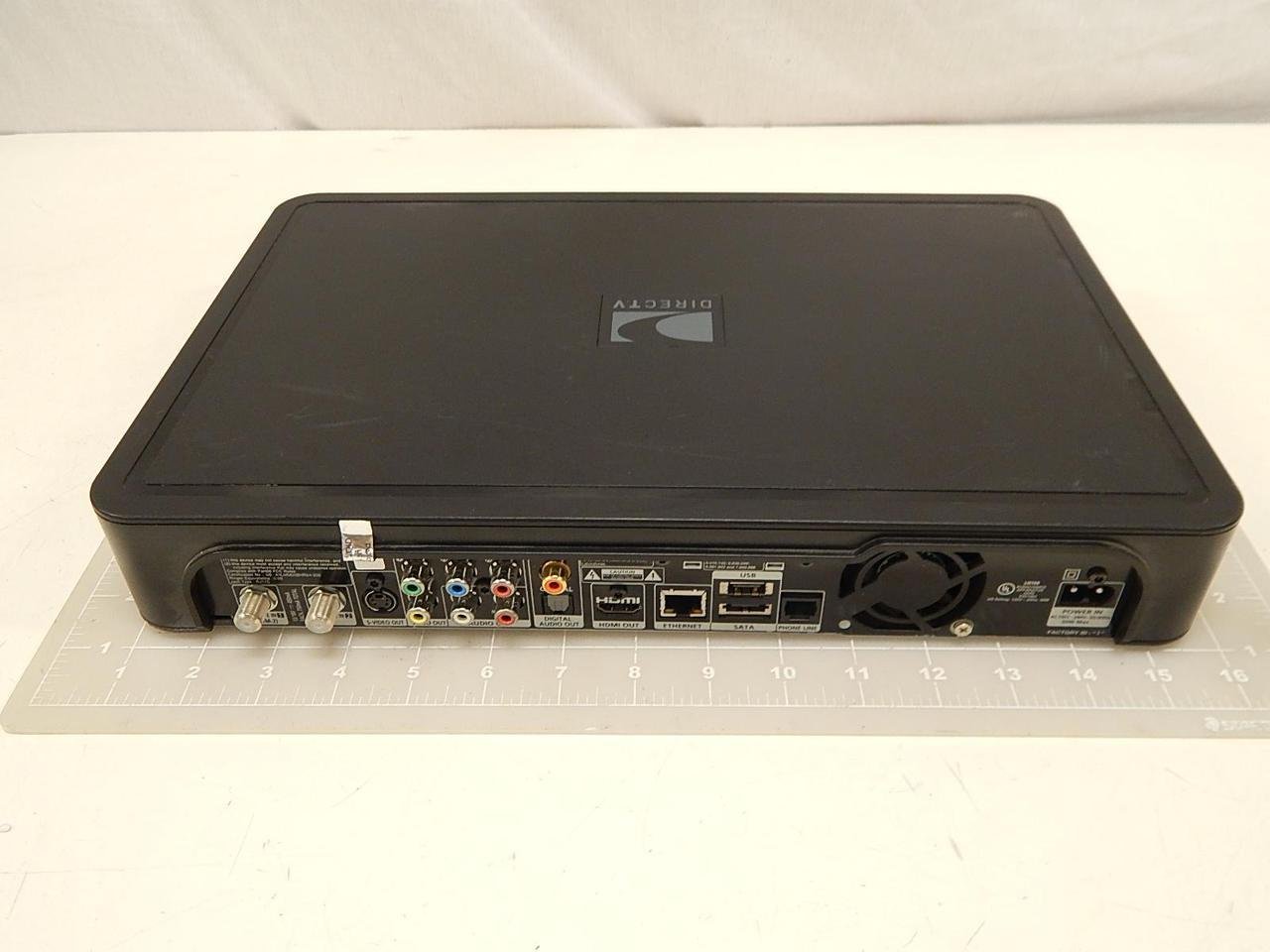
Immaġni: Rear panel of the DIRECTV HR24-200 receiver. This image displays the various input and output ports, including satellite in, video out (component and composite), audio out (stereo and digital optical), HDMI out, Ethernet, eSATA, and power input. This is where you connect the receiver to your satellite dish, television, and home network.
3. Konnessjoni ma' Dixx tas-Satellita
Connect the coaxial cable from your DIRECTV satellite dish to the SAT IN port on the back of the receiver.
4. Connecting to Network (Optional)
For access to on-demand content and other internet features, connect an Ethernet cable from your home router to the Ethernet port on the back of the receiver.
5. Tixgħel
Qabbad il-korda tad-dawl ma 'l-Internet QAWWA input on the receiver and then plug the other end into a wall outlet. The receiver will begin its startup sequence.
6. Inizjali Setup Wizard
Follow the on-screen instructions to complete the initial setup. This typically includes selecting your language, setting up your remote control, and configuring satellite dish settings. If you encounter issues, refer to the Troubleshooting section.
Istruzzjonijiet Operattivi
1. Kontrolli tal-Panew ta 'quddiem

Immaġni: Front panel of the DIRECTV HR24-200 receiver. This image shows the power button, guide, menu, select, and record buttons, along with channel up/down and volume up/down controls. The DIRECTV HD DVR logo is visible on the right.
The front panel provides basic controls for operating the receiver:
- QAWWA: Ixgħel jew jitfi r-riċevitur.
- GWIDA: Juri l-gwida tal-programm.
- MENU: Jaċċessa l-menu prinċipali.
- AGĦŻEL: Jikkonferma l-għażla.
- REC: Jibda r-reġistrazzjoni tal-programm kurrenti.
- CH +/-: Tibdel il-kanali.
- VOL +/-: Adjusts volume (if controlled by receiver).
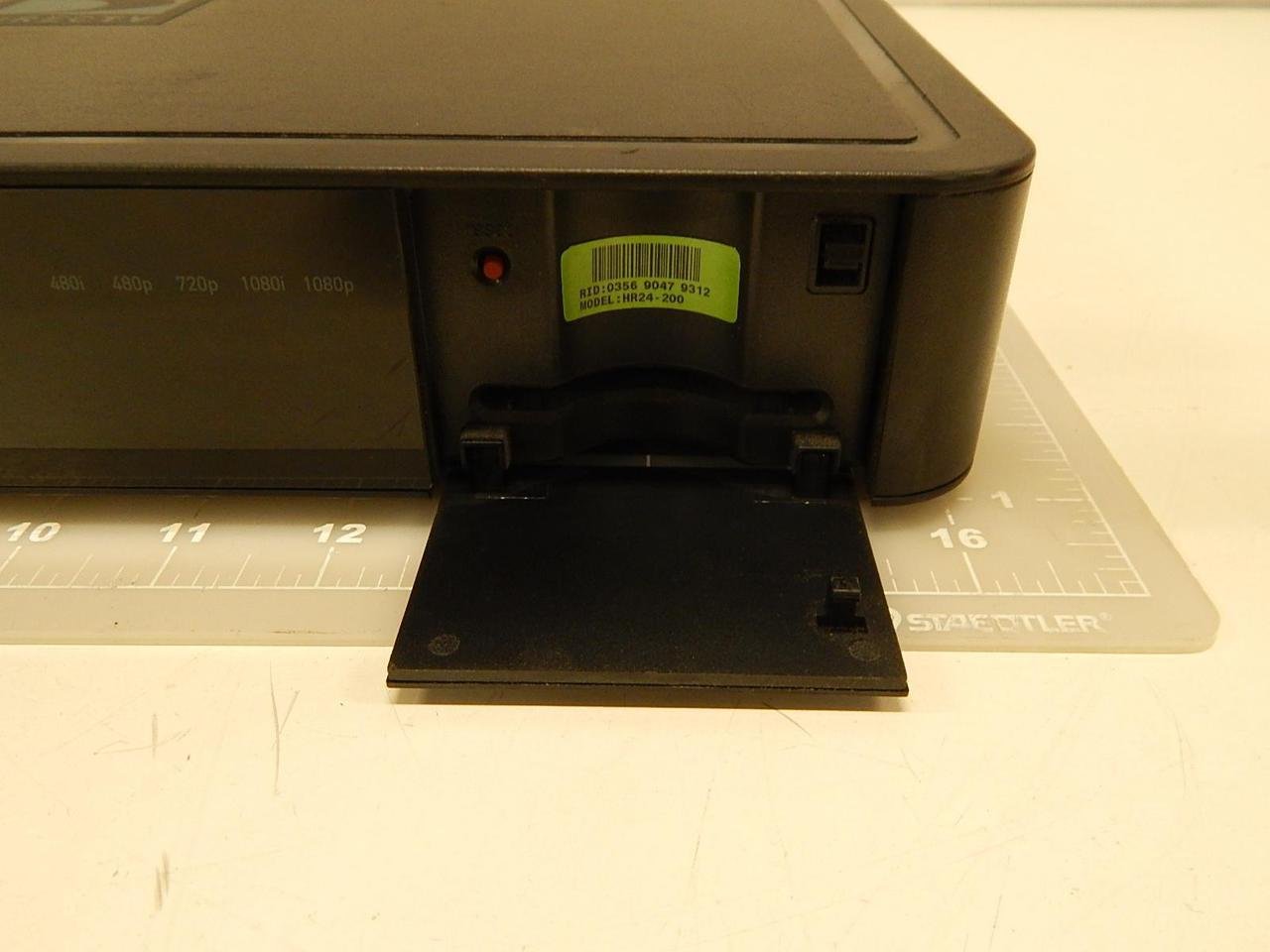
Immaġni: Front panel of the DIRECTV HR24-200 receiver with the access card flap open. This reveals the slot for the DIRECTV access card and a label indicating the model number (HR24-200) and other identification details. The access card is essential for receiving DIRECTV programming.
2. Funzjonijiet ta 'Kontroll mill-bogħod
Use the DIRECTV remote control for full functionality. Refer to your remote control's specific manual for detailed button descriptions.
- Qawwa: Turns the receiver and TV on/off.
- Gwida: Jaċċessa l-gwida tal-programm.
- Menu: Opens the main menu for settings and features.
- Rekord: Records the current program or schedules a recording.
- Lista: Accesses your recorded programs.
- Rewind/Fast Forward/Pause/Play: Control playback of live TV or recorded programs.
3. Programmi ta' Reġistrazzjoni
The HR24-200 allows you to record up to two programs simultaneously.
- Reġistrazzjoni Instantanja: Waqt li tkun qed tara programm, agħfas il-buttuna REC buttuna fuq il-bogħod tiegħek.
- Reġistrazzjoni Skedata: Navigate to the desired program in the Guide and press REC. You can choose to record a single episode or set up a Series Link for all episodes.
4. Playing Back Recordings
Agħfas il- LISTA button on your remote to access your recorded programs. Select the desired program and press AGĦŻEL biex tibda daqq.
5. On-Demand Content
If your receiver is connected to the internet, you can access DIRECTV's on-demand library. Navigate to the Fuq Talba section via the main menu to browse available content.
Manutenzjoni
1. Tindif
Wipe the exterior of the receiver with a soft, dry cloth. Do not use liquid cleaners or abrasive materials.
2. Aġġornamenti tas-Software
The HR24-200 receiver automatically downloads and installs software updates. Ensure the receiver remains powered on and connected to the satellite signal for updates to occur.
Issolvi l-problemi
If you experience issues with your HR24-200 receiver, try the following steps:
- Ebda Stampa/Ħoss:
- Check all cable connections (HDMI, component, audio).
- Ensure your TV is on the correct input source.
- Verify the receiver is powered on.
- No Satellite Signal:
- Check the satellite coaxial cable connection to the receiver.
- Ensure your satellite dish is clear of obstructions (e.g., snow, trees).
- Il-Kontroll mill-bogħod Mhux Jaħdem:
- Replace the batteries in your remote.
- Kun żgur li m'hemm l-ebda ostaklu bejn ir-remote u r-riċevitur.
- Reprogram the remote if necessary (refer to your remote's manual).
- Receiver Unresponsive:
- Perform a soft reset: Press the red reset button located behind the access card door on the front panel (see image in Operating Instructions).
- Perform a hard reset: Unplug the receiver's power cord from the wall outlet, wait 15 seconds, then plug it back in.
Speċifikazzjonijiet
| Karatteristika | Speċifikazzjoni |
|---|---|
| Numru tal-Mudell | HR24-200 |
| Kapaċità tal-Ħżin | 500 GB (approx. 100 hours HD / 400 hours SD) |
| Kapaċità ta' Reġistrar | Record two programs simultaneously |
| Konnettività | Ethernet, Satellite In, HDMI Out, Component Video Out, Composite Video Out, Digital Optical Audio Out, Stereo Audio Out, eSATA |
| Portijiet HDMI | 1 |
| Modalità tal-Ħruġ tal-Awdjo | Jdawru |
| Dimensjonijiet (L x W x H) | 14.88 x 9.92 x 2.36 pulzieri |
| Piż | 6.49 Liri |
| Manifattur | Direct TV |

Immaġni: Close-up view of the product label, typically found on the bottom or rear of the DIRECTV HR24-200 receiver. This label displays important information such as the Receiver ID, Serial Number, Model Number (HR24-200), Manufacturing Date, and Country of Origin (Made in Indonesia).
Informazzjoni dwar Garanzija
For detailed warranty information regarding your DIRECTV HR24-200 Digital Satellite Receiver, please refer to the warranty documentation provided at the time of purchase or visit the official DIRECTV websit. It-termini u l-kundizzjonijiet tal-garanzija jistgħu jvarjaw.
Appoġġ għall-Klijent
If you require further assistance or have questions not covered in this manual, please contact DIRECTV customer support:
- Websit: Visit the official DIRECTV support websit għal FAQs, gwidi għas-soluzzjoni tal-problemi, u għażliet ta’ kuntatt.
- Telefon: Refer to your DIRECTV service agreement or billing statement for customer service phone numbers.


