Introduzzjoni
This manual provides instructions for the installation, operation, and maintenance of your StarTech.com ST1030USBM 10-Port USB 3.0 Industrial Hub. This robust hub is designed for demanding environments, offering ten independent USB 3.0 (5Gbps) ports with advanced ESD and surge protection.
The ST1030USBM is built with a durable metal casing and offers versatile mounting options, including DIN rail, wall, or desk mounting, making it suitable for server rooms and industrial applications.
X'hemm fil-Kaxxa
- 1 - 10-port industrial USB 3.0 hub
- 1 - USB 3.0 host cable
- 1 - DIN rail mounting kit
- 1 - terminal block (2 wire)
- 1 - instruction manual
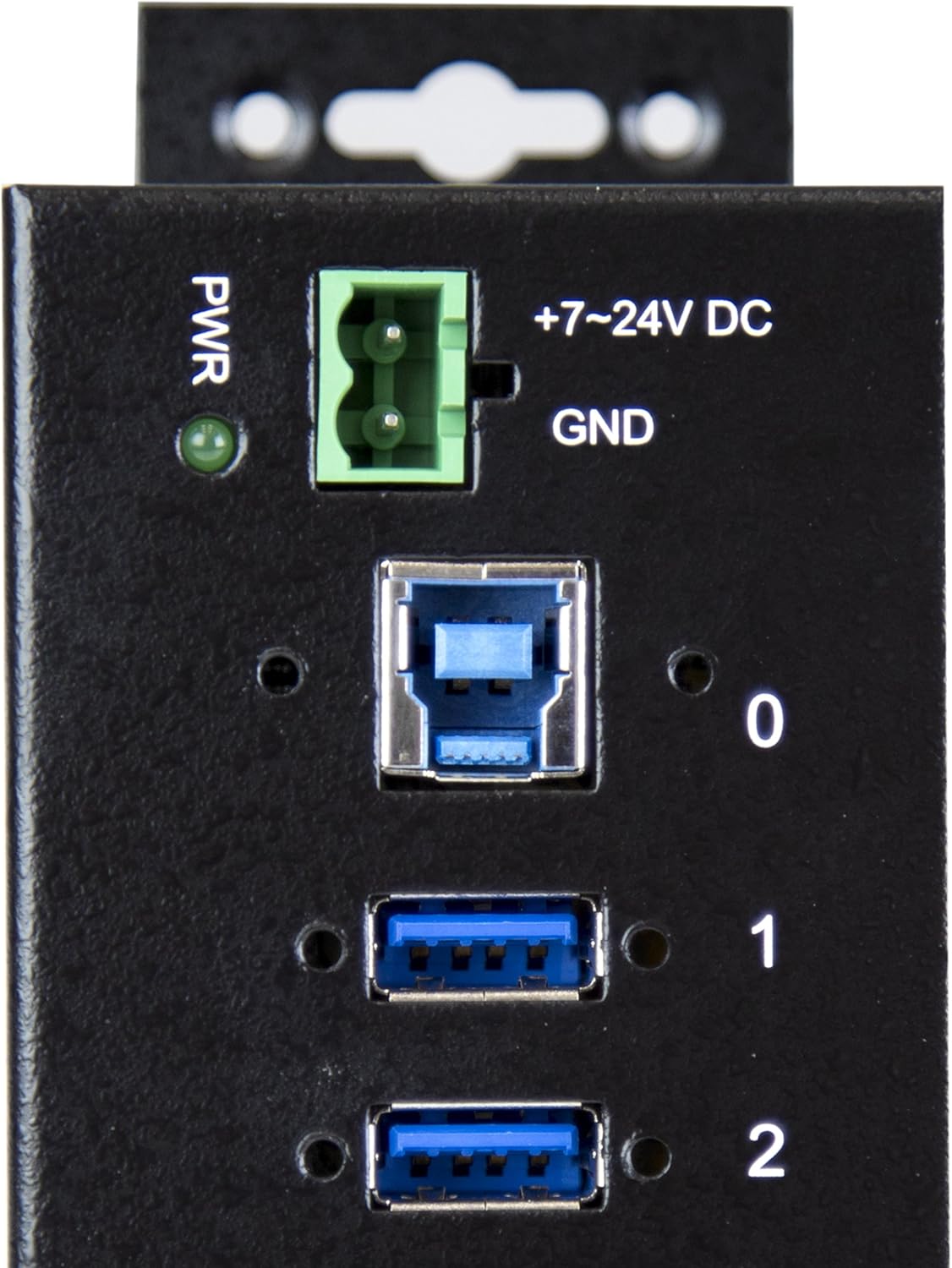
Image: Contents of the ST1030USBM package, including the hub, USB cable, DIN rail mounting kit, terminal block, and instruction manual.
Setup
Konnessjoni tal-Enerġija
The ST1030USBM hub requires external power. It operates with a 7-24V DC input via the included terminal block. An optional 65W external power adapter (not included) can also be used. Ensure the power source meets the specified voltagfirxa e.
- If using the terminal block connector, ensure it is already inserted into the hub.
- Loosen the two screws on the terminal block connector using a small flat-head screwdriver.
- Connect the positive and ground wires from your DC power source to the proper terminal block connections and fasten the screws. Ensure correct polarity for proper function.

Image: Detail of the power input terminal block (+7-24V DC, GND) and the upstream USB 3.0 port (Port 0) on the hub.
Konnessjoni Ospitanti
Connect the included USB 3.0 host cable from the upstream port (Port 0) on the hub to an available USB 3.0 port on your host computer.
Għażliet ta 'Immuntar
The hub can be mounted in various ways using the built-in mounting brackets or the included DIN rail mounting kit.
- Wall/Desk Mounting: Use the integrated mounting flanges on the sides of the hub to secure it to a flat surface with appropriate screws (not included).
- Immuntar tal-Ferrovija DIN: Attach the provided DIN rail clips to the hub using the included screws, then clip the hub onto a standard DIN rail.

Image: The ST1030USBM hub shown mounted on a DIN rail, illustrating a typical installation scenario in an industrial or server environment.
Tħaddim taċ-Ċentru
Once the hub is powered and connected to your host computer, it is ready for use. The hub is plug-and-play, requiring no additional drivers for most operating systems (Windows, macOS, Linux).
- Connect your USB devices to any of the ten available USB 3.0 ports (Ports 1-10).
- The hub supports USB 3.0 (5Gbps) data transfer rates, as well as backward compatibility with USB 2.0 and USB 1.1 devices.
- The hub provides 15kV Air and 8kV contact ESD protection, along with 350W surge protection on both downstream and upstream USB ports, safeguarding your connected devices.
- The power LED indicator will illuminate when the hub is receiving power.

Immaġni: Quddiem view of the ST1030USBM hub, showing the power input, upstream USB port (0), and ten downstream USB 3.0 ports (1-10).
Manutenzjoni
To ensure optimal performance and longevity of your USB hub, follow these general maintenance guidelines:
- Żomm l-apparat nadif u ħieles mit-trab. Uża drapp artab u niexef għat-tindif.
- Evita li tesponi l-hub għal temperaturi estremi, umdità, jew dawl tax-xemx dirett.
- Ensure proper ventilation around the hub, especially if it is installed in an enclosed space.
- Regularly check all cable connections to ensure they are secure.
Issolvi l-problemi
If you encounter issues with your StarTech.com ST1030USBM hub, refer to the following common troubleshooting steps:
- Ebda Qawwa:
- Verify that the power source is connected correctly to the terminal block and provides 7-24V DC.
- Check the polarity of the power connection if using the terminal block.
- Ensure the power source itself is functional.
- Apparati Mhux Rikonoxxuti:
- Ensure the hub is properly powered and the power LED is illuminated.
- Verify the USB 3.0 host cable is securely connected between the hub and the computer.
- Ipprova qabbad l-apparat USB direttament mal-kompjuter biex tikkonferma li qed jaħdem.
- Ittestja l-apparat fuq port differenti fuq il-hub.
- Ibda mill-ġdid il-kompjuter tiegħek.
- Trasferiment tad-Data bil-mod:
- Ensure both the host computer's USB port and the connected device support USB 3.0 (5Gbps) for optimal speeds.
- Check the USB cable quality; using a high-quality USB 3.0 cable is recommended.
- Avoid connecting too many high-bandwidth devices simultaneously if experiencing performance issues.
Speċifikazzjonijiet
| Karatteristika | Dettall |
|---|---|
| Numru tal-Mudell | ST1030USBM |
| USBStandard | USB 3.0 (USB 3.2 Ġen 1) |
| Rata ta' Trasferiment tad-Data | 5 Gbps |
| Numru ta' Portijiet | 10 (USB-A Downstream) + 1 (USB-A Upstream) |
| Protezzjoni ESD | 15kV Air, 8kV Contact |
| Protezzjoni minn Surge | 350W (Downstream & Upstream) |
| Sors tal-Enerġija | Blokk terminali (7-24V DC) |
| Materjal | Metall Casing |
| Għażliet ta 'Immuntar | DIN Rail, Wall, Desk |
| Kompatibilità tas-Sistema Operattiva | Linux, macOS, Windows |
| Dimensjonijiet (LxWxH) | 7.8 x 2.2 x 1.2 pulzieri (19.8 x 5.6 x 3.0 ċm) |
| Piż tal-oġġett | 12.6 uqija (357.2 gramma) |
Informazzjoni dwar Garanzija
The StarTech.com ST1030USBM 10-Port USB 3.0 Industrial Hub is backed by a 2-Sena Garanzija. This warranty covers defects in materials and workmanship under normal use. For specific terms and conditions, please refer to the official StarTech.com websit.
Appoġġ Tekniku
StarTech.com offers free lifetime 24/5 multi-lingual technical assistance. For support, visit the official StarTech.com webis-sit jew ikkuntattja lis-servizz tal-klijenti tagħhom direttament.
Riżorsi onlajn: StarTech.com Product Page (ST1030USBM)


