Introduzzjoni
This manual provides instructions for the safe operation, setup, and maintenance of your Stack-On PDS-1500 Drawer Safe with Electronic Lock. This safe is designed to secure pistols, ammunition, and other valuables. It features solid steel construction, pry-resistant plate steel doors, steel live-action locking bolts, and concealed hinges for enhanced security. The electronic lock includes a keypad for combination entry and a backup key for alternative access.
Informazzjoni Importanti dwar is-Sigurtà
- Always store the backup key in a secure location away from the safe and out of reach of unauthorized individuals.
- Do not store the backup key inside the safe.
- Ensure the safe is mounted to a solid surface (floor, shelf, or wall) to prevent unauthorized removal. Fastening hardware is included for this purpose.
- This safe is a California-approved Firearm Safety Device, meeting the requirements of Penal Code section 23655.
- Keep the safe closed and locked when not in use.
Kontenut tal-Pakkett
Ivverifika li l-oġġetti kollha huma preżenti:
- Stack-On PDS-1500 Drawer Safe
- Ċwievet tal-Backup (2)
- Batteriji AA (4)
- Ħardwer tal-Immuntar
- Manwal għall-Utent
Setup
1. Installazzjoni tal-batterija
- Sib il-kompartiment tal-batterija fuq ġewwa tal-bieba tas-safe.
- Iftaħ l-għatu tal-kompartiment tal-batterija.
- Daħħal 4 batteriji AA, filwaqt li tiżgura polarità korretta.
- Agħlaq l-għatu tal-kompartiment tal-batterija.
2. Setting Your Personal Combination
The safe comes with a default combination. It is highly recommended to change this to a personal combination immediately after battery installation.
- With the safe door open, locate the reset button on the back of the door.
- Press the reset button. The keypad will beep, indicating it is ready to accept a new combination.
- Enter your desired 3 to 6 digit combination on the keypad.
- Press the "check mark" button to confirm. The keypad will beep again, confirming the new combination is set.
- Test the new combination with the door open to ensure it works correctly before closing the safe.
3. Immuntar tas-Sejf
For optimal security, the safe should be mounted to a solid surface.
- Choose a suitable location for mounting (e.g., inside a drawer, to a floor, or wall).
- Use the pre-drilled holes on the safe as a template to mark drilling locations on the mounting surface.
- Ħaffer toqob pilota fil-wiċċ tal-immuntar.
- Position the safe and secure it using the provided fastening hardware. Ensure all bolts are tightened securely.

Figura 1: Quddiem view of the Stack-On PDS-1500 Drawer Safe, showing the electronic keypad and manual lock.
Istruzzjonijiet Operattivi
1. Opening the Safe with Electronic Lock
- Enter your personal combination on the keypad.
- Press the "check mark" button.
- Fi żmien 5 sekondi, dawwar il-manku lejn l-arloġġ biex tiftaħ il-bieba tas-safe.
2. Opening the Safe with Backup Key
Use the backup key if batteries are depleted or the combination is forgotten.
- Locate the keyhole cover on the electronic lock panel.
- Remove the keyhole cover.
- Insert the backup key into the keyhole and turn it clockwise.
- Dawwar il-manku lejn l-arloġġ biex tiftaħ il-bieba tas-safe.
3. Muting/Unmuting Keypad Beeps
The keypad beeps can be toggled on or off.
- Press the "megaphone" button on the keypad to mute or unmute the beeps.

Figure 2: Interior capacity of the Stack-On PDS-1500 Drawer Safe, illustrating typical items that can be stored.
Manutenzjoni
- Sostituzzjoni tal-batterija: Replace batteries annually or when the low battery indicator appears. Always use 4 new AA alkaline batteries.
- Tindif: Naddaf il-barra tas-sejf b'ċarruta ratba u damp drapp. Evita prodotti tat-tindif jew solventi li joborxu.
- Mekkaniżmu tas-Sokkjar: Do not lubricate the electronic lock or key mechanism.
Issolvi l-problemi
| Problema | Kawża Possibbli | Soluzzjoni |
|---|---|---|
| Safe does not open with combination. | Incorrect combination entered; depleted batteries. | Re-enter combination carefully. Replace batteries. Use backup key if necessary. |
| It-tastiera ma tirrispondix. | Depleted batteries; electronic malfunction. | Replace batteries. If issue persists, use backup key and contact customer support. |
| Safe opens without entering a code. | Kwistjoni ta' mekkaniżmu intern. | This indicates a potential security vulnerability. Immediately secure contents and contact customer support. |
| Rattling sound inside the safe. | Loose internal components. | This may indicate a manufacturing defect or damage. Contact customer support for assistance. |
| Taħlita minsija. | Combination not remembered. | Use the backup key to open the safe, then reset the combination as per "Setting Your Personal Combination" instructions. |
Speċifikazzjonijiet
- Ditta: Stack-On
- Mudell: PDS-1500
- Tip ta' serratura: Combination, Electronic, Key
- Kulur: Iswed
- Materjal: Azzar Liga
- Karatteristika Speċjali: Karatteristiċi ta' Sigurtà Mtejba
- Tip ta 'Immuntar: Floor Mount, Wall Mount
- Komponenti Inklużi: Safe, Keys, Batteries
- Piż tal-oġġett: 13.2 Liri
- Dimensjonijiet tal-Prodott: 12 x 8.75 x 4.5 pulzieri
- Batteriji: 4 batteriji AA (inklużi)
- Livell ta' Reżistenza għall-Ilma: Mhux Reżistenti għall-Ilma
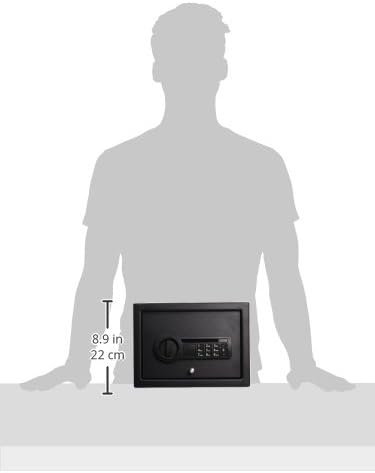
Figure 3: Dimensional representation of the safe.
Garanzija u Appoġġ għall-Klijent
For warranty claims or technical support, please contact Stack-On customer service. It is important to retain your proof of purchase (receipt) as it may be required to validate warranty coverage or receive assistance for product issues. Without a valid receipt, Stack-On may not be able to offer fixes, replacements, or other warranty services.
Contact information for Stack-On customer service can typically be found on their official webis-sit jew fuq l-imballaġġ tal-prodott.


