Introduzzjoni
Grazzi tax-xiriasing the SENTRY HPXBT150 Bluetooth Flat Cord Earbuds. This manual provides detailed instructions on how to set up, operate, and maintain your new wireless earbuds. Please read this manual thoroughly before use to ensure optimal performance and longevity of your device.
Kontenut tal-Pakkett
- SENTRY HPXBT150 Bluetooth Flat Cord Earbuds
- Kawża Protettiva
- Kejbil tal-Iċċarġjar USB (Mikro-USB)
- Removable Ear Hooks
- Manwal għall-Utent
Prodott Overview
The SENTRY HPXBT150 earbuds feature Bluetooth wireless technology, allowing for a cord-free listening experience. They include an in-line microphone for hands-free calls and media control buttons for easy operation. Removable ear hooks provide a secure fit, especially during physical activity.
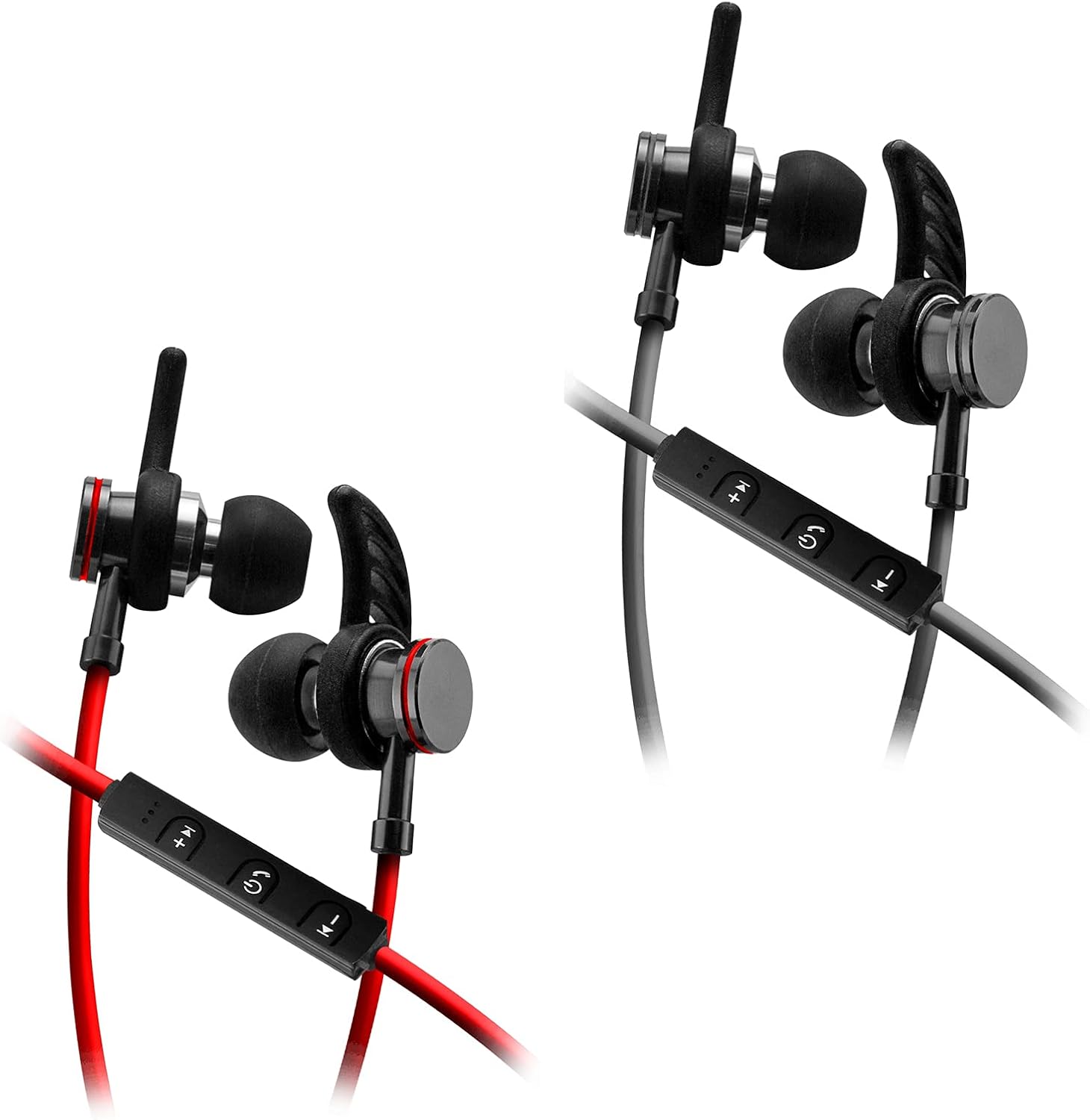
Image: SENTRY HPXBT150 Bluetooth Earbuds showing the in-line control panel and ear hooks. The control panel features volume up/next track, power/multifunction, and volume down/previous track buttons.
Setup
1. Iċċarġjar tal-Earbuds
- Locate the Micro-USB charging port on the in-line control unit.
- Connect the provided USB charging cable to the earbuds' charging port.
- Ipplaggja t-tarf l-ieħor tal-kejbil USB ma' sors ta' enerġija USB kompatibbli (eż., port USB tal-kompjuter, adapter tal-ħajt USB).
- The LED indicator light will illuminate during charging. It will change color or turn off once charging is complete. A full charge typically takes approximately 1-2 hours.
2. Tqabbil tal-Bluetooth
- Kun żgur li l-earbuds huma ċċarġjati kompletament qabel l-ewwel tqabbil.
- Press and hold the multi-function button (usually the center button on the in-line control) for approximately 5-7 seconds until the LED indicator light flashes red and blue alternately. This indicates the earbuds are in pairing mode.
- Fuq l-apparat tiegħek li jaħdem bil-Bluetooth (smartphone, tablet, kompjuter), mur fil-menù tas-settings tal-Bluetooth.
- Ippermetti Bluetooth u fittex tagħmir disponibbli.
- Select "HPXBT150" or a similar name from the list of found devices.
- Once successfully paired, the LED indicator on the earbuds will typically flash blue slowly or turn off, and you will hear an audible confirmation.
- Jekk tintalab għal password, daħħal "0000".
Istruzzjonijiet Operattivi
Qawwa mixgħul/mitfi
- Qawwa Mixgħul: Press and hold the multi-function button for approximately 3 seconds until the LED indicator flashes blue and you hear a power-on tone.
- Itfi: Press and hold the multi-function button for approximately 3-5 seconds until the LED indicator flashes red and you hear a power-off tone.
Daqq tal-Mużika
- Play/Pawsa: Agħfas il-buttuna b'diversi funzjonijiet darba.
- Volum 'il fuq: Agħfas il-buttuna '+'.
- Volum 'l isfel: Agħfas il-buttuna '-'.
- Track li jmiss: Agħfas u żomm il-buttuna '+'.
- Track preċedenti: Agħfas u żomm il-buttuna '-'.
Ġestjoni tas-Sejħiet
- Tweġiba/Tmiem Sejħa: Agħfas il-buttuna b'diversi funzjonijiet darba.
- Irrifjuta Sejħa: Agħfas u żomm il-buttuna multi-funzjoni għal madwar 2 sekondi.
- Isemmi mill-ġdid l-Aħħar Numru: Agħfas darbtejn il-buttuna multi-funzjoni.
Manutenzjoni
- Tindif: Use a soft, dry cloth to clean the earbuds. Do not use harsh chemicals or abrasive materials.
- Ħażna: When not in use, store the earbuds in the provided protective case to prevent damage.
- Kura tal-batterija: To preserve battery life, avoid fully discharging the earbuds frequently. Charge them regularly, even if not used for extended periods.
- Evita l-umdità: Keep the earbuds away from water and excessive moisture.
Issolvi l-problemi
| Problema | Soluzzjoni Possibbli |
|---|---|
| Il-earbuds ma jixegħlux. | Ensure the earbuds are fully charged. Connect to a power source and allow time to charge. |
| Ma tistax tqabbad mat-tagħmir. | Ensure earbuds are in pairing mode (flashing red/blue). Turn off and on Bluetooth on your device. Move earbuds closer to your device. Forget previous pairings on your device and try again. |
| L-ebda ħoss jew volum baxx. | Check volume levels on both the earbuds and your connected device. Ensure earbuds are properly paired. Try re-pairing the earbuds. |
| Konnessjoni intermittenti. | Ensure there are no obstructions between the earbuds and your device. Move closer to your device. Avoid environments with strong Wi-Fi or other wireless interference. |
Speċifikazzjonijiet
- Mudell: HPXBT150
- Teknoloġija tal-Konnettività: Wireless (Bluetooth)
- Unità tas-sewwieq: 10mm
- Impedenza: 32+/-3 Ohms
- Sensittività: 103dB +/-3dB
- Rispons tal-Frekwenza: 20Hz - 20kHz
- Apparati Kompatibbli: Phones, Tablets, MP3 Players, Computers, Gaming Consoles
- Tip ta' Kontroll: Kontroll tal-Midja
- Karatteristiċi Speċjali: Microphone Included, USB Connectivity, Removable Ear Hooks
- Piż tal-oġġett: 2.08 uqija
Informazzjoni dwar is-Sigurtà
- Do not expose the earbuds to extreme temperatures, direct sunlight, or fire.
- Do not disassemble or modify the earbuds. This may void the warranty and cause damage.
- Evita li tisma' f'livelli ta' volum għoljin għal perjodi estiżi biex tevita ħsara fis-smigħ.
- Żomm fejn ma jintlaħaqx mit-tfal u l-annimali domestiċi.
- Armi l-prodott b'mod responsabbli skont ir-regolamenti lokali.
Garanzija u Appoġġ
For warranty information and technical support, please refer to the documentation included with your purchase or contact SENTRY customer service directly. Keep your proof of purchase for warranty claims.