Introduzzjoni
The myTouchSmart Plug-In Indoor/Outdoor Digital Timer is designed to simplify the automation of your lighting and appliances. This weather-resistant timer features two grounded outlets, offering versatile control for landscape, patio, and seasonal lighting. It provides both customizable "My On/Off Time" settings and convenient daily preset options, along with a 24-hour countdown feature. The large LCD screen and blue LED indicators ensure easy programming and monitoring of active programs. Compatible with various light sources including CFL, LED, incandescent, and halogen, this UL listed product is built for convenience and energy efficiency.
Karatteristiċi tal-Prodott
- Easy-to-set digital timer with two grounded outlets for landscape, patio, and seasonal lights and appliances.
- Features simple daily preset options, fully customizable "My On/Off Time" settings, and a custom, up to 24-hour countdown feature.
- Weather resistant for both outdoor and indoor use. Includes an attached bracket for easy mounting and installation.
- Compatible with CFL, LED, incandescent, and halogen light sources.
- Large LCD screen and blue LED indicators to show active programs.
- Electrical Rating: 125V/60Hz, 15A/1875W General purpose/resistive.
- CSA listed for safety.

Figure 1: Control outdoor or indoor lights with the myTouchSmart timer.

Figure 2: The timer is weather resistant and suitable for outdoor use.
Setup Istruzzjonijiet
- Qawwa Inizjali: Plug the timer into a standard 125V AC outlet. The LCD screen will illuminate. If the screen is blank or not reading, plug it in for at least one hour to charge the internal battery.
- Issettja l-Ħin Kurrenti:
- Agħfas il- ARLOĠĠ buttuna.
- Uża l- LUP (▲) u NIŻEL (▼) vleġeġ biex taġġusta s-siegħa.
- Agħfas ARLOĠĠ again to move to minutes, then use the arrows to adjust.
- Agħfas ARLOĠĠ a third time to confirm and exit time setting.
- Immuntar: Use the integrated mounting bracket to securely attach the timer near your desired outlet. Ensure the timer is positioned to prevent water accumulation.

Figure 3: Simple setup involves setting the current time and custom ON/OFF times.
Video 1: An instructional video demonstrating how to set the current time and program ON/OFF times on the myTouchSmart timer.
Istruzzjonijiet Operattivi
Setting Custom ON/OFF Times ("My On/Off Time")
- Issettja l-Ħin ON:
- Agħfas il- TIEGĦI FIL-ĦIN button. The display will show the current ON time setting.
- Uża l- LUP (▲) u NIŻEL (▼) arrows to adjust the desired ON hour.
- Agħfas TIEGĦI FIL-ĦIN again to move to minutes, then use the arrows to adjust.
- Agħfas TIEGĦI FIL-ĦIN a third time to confirm and save the ON time. The blue LED indicator next to "my on time" will illuminate when active.
- Issettja l-Ħin MITFI:
- Agħfas il- IL-ĦIN LIBERU TIEGĦI button. The display will show the current OFF time setting.
- Uża l- LUP (▲) u NIŻEL (▼) arrows to adjust the desired OFF hour.
- Agħfas IL-ĦIN LIBERU TIEGĦI again to move to minutes, then use the arrows to adjust.
- Agħfas IL-ĦIN LIBERU TIEGĦI a third time to confirm and save the OFF time. The blue LED indicator next to "my off time" will illuminate when active.
L-Użu ta' Skedi Presetjati
The timer offers three convenient preset schedules:
- Filgħaxija (5pm-12am): Agħfas il- FILGĦAXIJA buttuna.
- Filgħodu (5am-8am): Agħfas il- FILGĦODU buttuna.
- Lejl Kollha (6pm-6am): Agħfas il- IL-LEJL KOLLU buttuna.
To activate a preset, simply press the corresponding button. The blue LED indicator next to the selected preset will light up.
24-Hour Countdown
To use the countdown feature:
- Agħfas il- IL-COUNTDOWN TIEGĦI buttuna.
- Uża l- LUP (▲) u NIŻEL (▼) arrows to set the desired countdown duration (up to 24 hours).
- Agħfas IL-COUNTDOWN TIEGĦI again to start the countdown. The timer will turn ON for the set duration and then turn OFF.

Figure 4: Program custom ON/OFF times or select from convenient preset schedules.
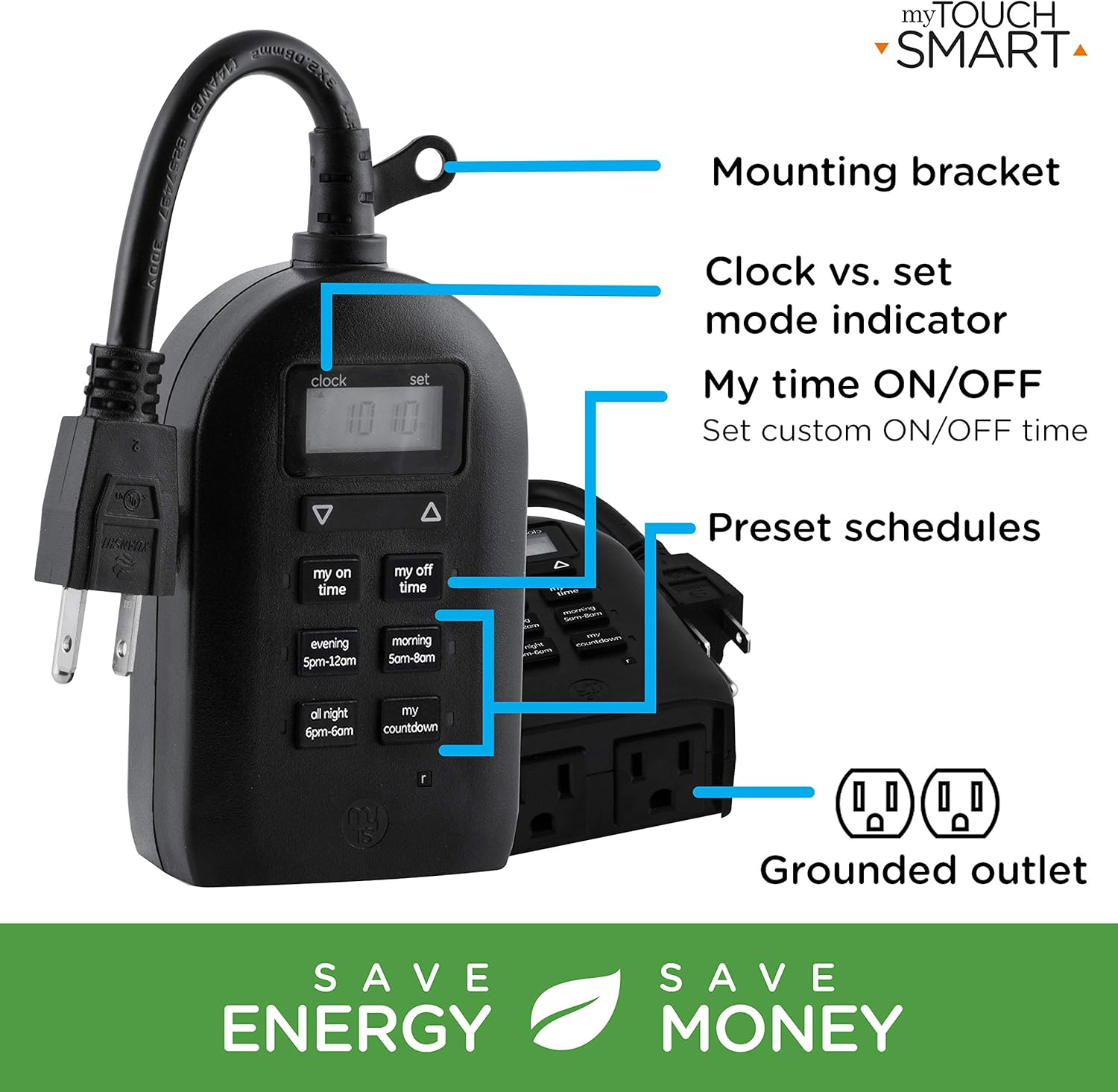
Figure 5: Key features and controls of the myTouchSmart timer.
Manutenzjoni
- Tindif: Skonnettja t-tajmer mill-iżbokk tal-enerġija qabel ma tnaddaf. Imsaħ il-barra b'ċarruta ratba u nadifa.amp drapp. Tużax kimiċi ħarxa jew tindif li joborxu.
- Ħażna: Meta ma tkunx qed tużah għal perjodi twal, aħżen it-tajmer f'post frisk u niexef 'il bogħod mix-xemx diretta u minn temperaturi estremi.
- Batterija Interna: The timer contains an internal battery to maintain settings during power outages. If the display is dim or blank, plug the timer into an outlet for at least one hour to recharge the battery.
Issolvi l-problemi
| Problema | Kawża Possibbli | Soluzzjoni |
|---|---|---|
| Il-wiri tat-tajmer huwa vojt jew mudlam. | Il-batterija interna hija baxxa jew eżawrita. | Plug the timer into a live outlet for at least one hour to charge the internal battery. |
| Connected device does not turn ON/OFF. |
|
|
| Timer is not responding to button presses. | Problema temporanja tas-softwer jew batterija baxxa. | Unplug the timer from the outlet for a few minutes, then plug it back in. Allow the internal battery to charge if the display was dim. |
Speċifikazzjonijiet
| Karatteristika | Dettall |
|---|---|
| Numru tal-Mudell | 26898-P1 |
| Klassifikazzjoni Elettrika | 125V AC, 60Hz, 15A, 1875W (General Purpose/Resistive) |
| Ħwienet | 2 Ħwienet bl-art |
| Dimensjonijiet | 3.2"D x 7"W x 7.5"Għ (madwar) |
| Piż tal-oġġett | 9.92 uqija |
| Tip ta 'Wiri | LCD |
| Tip ta 'Immuntar | Plug-In Mount |
| Ċertifikazzjonijiet | UL Listed, CSA Listed |
| Batterija Interna | Yes (for settings retention) |

Figure 6: Product dimensions for the myTouchSmart timer.
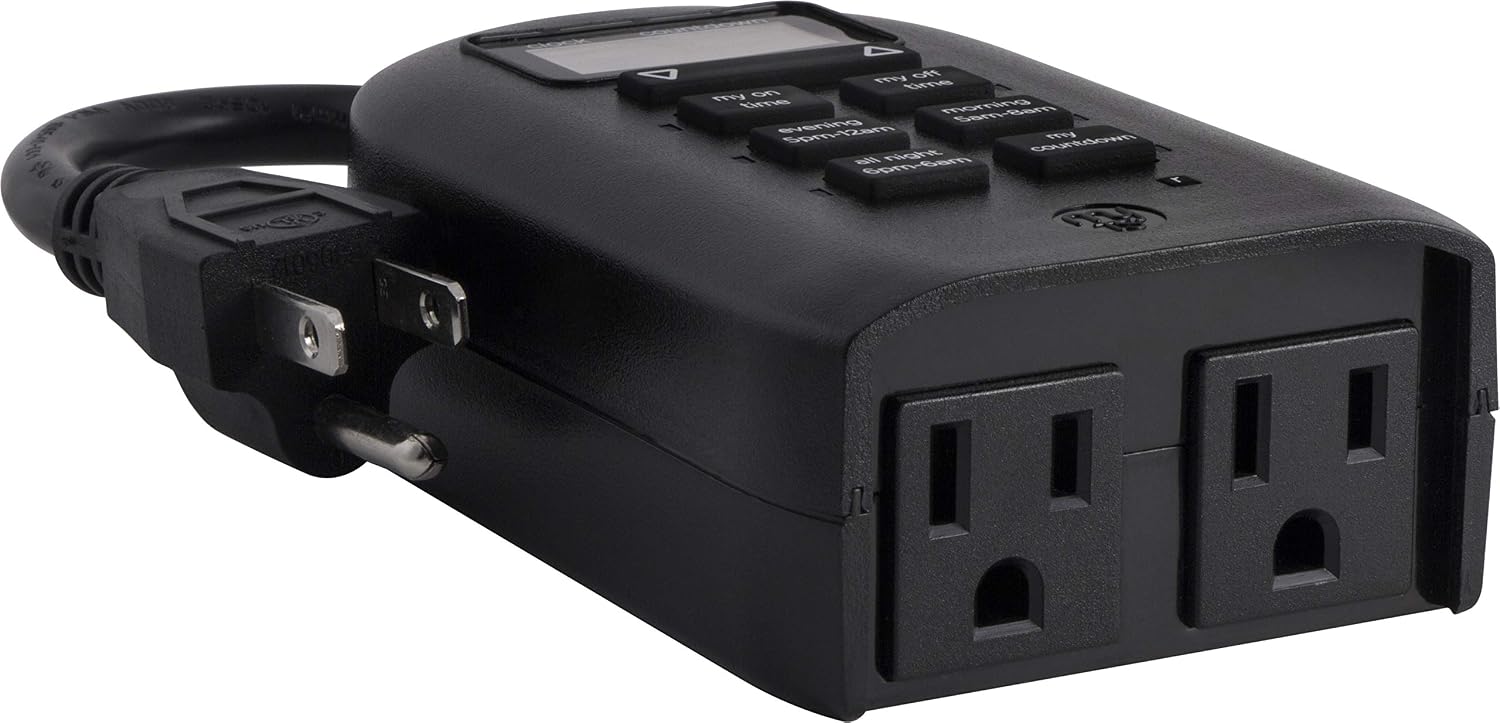
Figure 7: Dual grounded outlets for connecting devices.
Garanzija u Appoġġ
This myTouchSmart timer is backed by a garanzija limitata ta 'sena from the date of purchase. For warranty claims or technical support, please refer to the contact information provided with your product packaging or visit the official myTouchSmart websit.
Għal aktar riżorsi, tista' tirreferi wkoll għar-riżorsi uffiċjali Manwal għall-Utent (PDF) or Manwal tal-Installazzjoni (PDF) disponibbli online.


