Introduzzjoni
The ASTRO Gaming A40 TR Headset and MixAmp Pro TR are designed to provide a high-fidelity audio experience for gaming on PlayStation 4 and PC. The A40 TR headset offers user customization, allowing transformation from an open-back to a closed-back noise-canceling headset with optional Mod Kits. The MixAmp Pro TR features all-digital components for clear, interference-free audio and voice communication, with customizable settings via the ASTRO Command Center software.

Image: The ASTRO Gaming A40 TR Headset and MixAmp Pro TR, showcasing both components together. The headset is black with gold accents, and the MixAmp is a compact black unit with control dials.
Kontenut tal-Pakkett
Iċċekkja li l-oġġetti kollha elenkati hawn taħt huma inklużi fl-imballaġġ tal-prodott tiegħek:
- ASTRO A40 TR Headset
- ASTRO MixAmp Pro TR
- A40 TR Inline Mute Cable (2.0m)
- TOSlink Optical Cable (3.0m)
- Micro-USB Cable (3.0m)
- Digital Daisy Chain Cable (0.5m)
- Swappable Microphone
Setup
Konnessjoni ma' PlayStation 4 (PS4)
- Qabbad il- TOSlink Optical Cable from the MixAmp Pro TR's OPTICAL port to the PS4's Optical Out port.
- Qabbad il- Cable tal-Mikro-USB from the MixAmp Pro TR's USB port to an available USB port on the PS4.
- Qabbad il- A40 TR Inline Mute Cable from your A40 TR Headset to the headset port on the front of the MixAmp Pro TR.
- Fuq il-PS4 tiegħek, mur fuq Settings > Sound and Screen > Audio Output Settings.
- Issettja Port tal-Ħruġ Primarju biex Out Diġitali (Ottiku).
- Agħżel Dolby Digital (Bitstream) for the audio format.
- Mur fuq Settings> Mezzi> Mezzi tal-Awdjo.
- Issettja Apparat tal-Input biex USB Headset (ASTRO MixAmp Pro TR).
- Issettja Apparat tal-Output biex USB Headset (ASTRO MixAmp Pro TR).
- Aġġusta Kontroll tal-Volum (Headphones) sal-massimu.
- Issettja Output għal Headphones biex Chat Awdjo or Awdjo Kollha as preferred.
Konnessjoni mal-PC
- Qabbad il- Cable tal-Mikro-USB from the MixAmp Pro TR's USB port to an available USB port on your PC.
- Qabbad il- A40 TR Inline Mute Cable from your A40 TR Headset to the headset port on the front of the MixAmp Pro TR.
- On your PC, ensure the MixAmp Pro TR is selected as the default playback and recording device in your sound settings.
- Niżżel u installa l- ASTRO Command Center software from the official ASTRO Gaming website to customize settings, update firmware, and manage EQ presets.
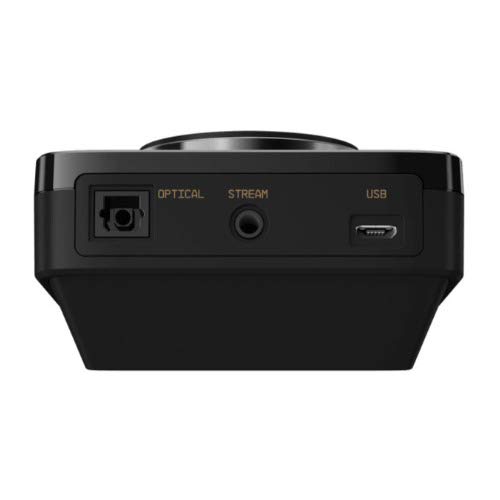
Immaġni: Wara view of the ASTRO MixAmp Pro TR, highlighting the Optical, USB, AUX, and Stream ports for various connections.
Operating the MixAmp Pro TR
It-TaħlitaAmp Pro TR provides intuitive controls for managing your audio experience:
- Dial tal-Volum Prinċipali: The large dial on the left controls the overall volume of your headset. Rotate clockwise to increase volume, counter-clockwise to decrease.
- Game/Voice Balance Dial: The smaller dial on the right allows you to adjust the balance between game audio and voice chat.
- Rotate towards "GAME" to prioritize game audio.
- Rotate towards "VOICE" to prioritize voice chat.
- EQ Presets Button: Located in the center, this button cycles through four customizable equalizer presets. The active preset is indicated by the illuminated icon (star, headphone, etc.). These presets can be configured using the ASTRO Command Center software.
- Dolby Button: Activates or deactivates Dolby Surround Sound. When active, the Dolby logo will illuminate.
- Buttuna Mute tal-Mikrofonu: Located on the A40 TR Inline Mute Cable, this switch mutes or unmutes your microphone. When muted, the MixAmp's volume dials will typically glow red.
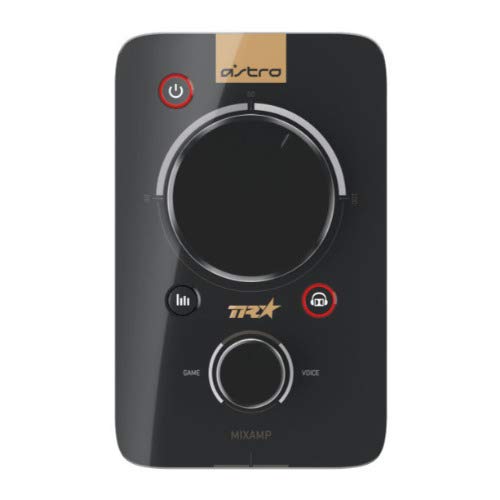
Immaġni: Fuq view of the ASTRO MixAmp Pro TR, showing the large master volume dial, the smaller game/voice balance dial, and the EQ preset buttons.
Manutenzjoni
- Tindif: Use a soft, dry cloth to clean the headset and MixAmp. Avoid abrasive cleaners or solvents.
- Ħażna: Store the headset and MixAmp f'post frisk u niexef 'il bogħod mid-dawl tax-xemx dirett u temperaturi estremi.
- Kura tal-Cable: Immaniġġja l-kejbils bil-mod biex tevita l-ħsara. Evita liwjiet qawwija jew ġbid eċċessiv.
- Kuxxini tal-widnejn: Periodically check ear cushions for wear and tear. Replacement cushions are available from ASTRO Gaming.
Issolvi l-problemi
If you encounter issues with your ASTRO Gaming A40 TR Headset or MixAmp Pro TR, try the following solutions:
| Problema | Soluzzjoni |
|---|---|
| L-ebda awdjo mill-headset. |
|
| Il-mikrofonu mhux qed jaħdem. |
|
| Kwalità tal-awdjo distorta jew fqira. |
|
For more detailed troubleshooting, please refer to the official ASTRO Gaming support resources.
Speċifikazzjonijiet
- Numru tal-Mudell: 939-001511
- Rispons tal-Frekwenza: 20 - 20,000 Hz
- Impedenza nominali: 48 ohms
- Pressjoni tar-ras: 2.6N
- Dimensjonijiet tal-Prodott: 9.06 x 13.87 x 4.33 pulzieri
- Piż tal-oġġett: 1.06 liri
- Konnettività: Ottiċi, USB
- Kompatibilità: PlayStation 4, PC
Garanzija u Appoġġ
For detailed warranty information and product support, please visit the official ASTRO Gaming webis-sit jew irreferi għad-dokumentazzjoni pprovduta:
Ensure you register your product on the ASTRO Gaming website for the latest updates and support.


