1. Introduzzjoni
Grazzi tax-xiriasing the eKids Li-B17 Millennium Falcon Bluetooth Speaker. This portable wireless speaker allows you to stream audio from your Bluetooth-enabled devices and enjoy hands-free calling. Its unique design, inspired by the iconic Millennium Falcon, includes light effects and plays the Star Wars theme. Please read this manual carefully to ensure proper use and maintenance of your speaker.
2. Informazzjoni dwar is-Sigurtà
- Rakkomandazzjoni dwar l-Età: Adattat għal etajiet ta' 3 snin 'il fuq.
- Do not expose the unit to extreme temperatures, direct sunlight, or moisture.
- Tippruvax tiżżarma jew timmodifika l-unità. Dan jannulla l-garanzija.
- Uża biss il-kejbil tal-iċċarġjar provdut jew wieħed ekwivalenti ċċertifikat.
- Żomm l-unità 'l bogħod minn kampi manjetiċi qawwija.
3. Kontenut tal-Pakkett
Kun żgur li l-oġġetti kollha huma preżenti fil-pakkett:
- eKids Li-B17 Millennium Falcon Bluetooth Speaker
- Cable tal-Iċċarġjar tal-USB

Figura 1: eKids Li-B17 Millennium Falcon Bluetooth Speaker on its clear stand, showcasing its detailed design and illuminated blue engine lights.
4. Karatteristiċi tal-prodott
- Bluetooth Wireless Audio: Stream music wirelessly from compatible devices.
- Funzjoni Ħieles bl-Idejn: Answer and end calls directly from the speaker.
- Effetti tad-Dawl: Integrated lights illuminate during operation.
- Batterija rikarikabbli: Built-in lithium battery provides up to 6 hours of playback.
- Star Wars Theme: Plays the iconic Star Wars main theme.
- Input AUX: Connect non-Bluetooth devices via the auxiliary port.

Figura 2: The eKids Li-B17 Millennium Falcon Bluetooth Speaker with text indicating powerful sound performance and illuminated engine lights, alongside a smartphone displaying music playback.
5. Setup
5.1 Iċċarġjar tal-Ispeaker
- Connect the small end of the included USB charging cable to the USB charging port on the speaker.
- Connect the larger end of the USB charging cable to a powered USB port (e.g., computer, USB wall adapter).
- Id-dawl indikatur tal-iċċarġjar jixgħel. Ladarba jkun iċċarġjat kompletament, id-dawl jista’ jibdel il-kulur jew jintefa.
- Ċarġ sħiħ jipprovdi madwar 6 sigħat ta' ħin ta' daqq.
5.2 Tixgħel/Jitfi
Locate the 3-position switch on the side of the speaker (refer to Figure 3).
- Għall-poter ON in Bluetooth mode, slide the switch to the Simbolu Bluetooth pożizzjoni.
- Għall-poter ON in AUX mode, slide the switch to the AUX pożizzjoni.
- Għall-poter OFF, żżerżaq is-swiċċ lejn OFF (nofs) pożizzjoni.
5.3 Tqabbil tal-Bluetooth
- Ensure the speaker is charged and powered ON in Bluetooth mode. The speaker will automatically enter pairing mode if no previously paired device is found.
- Fuq it-tagħmir tiegħek li jaħdem bil-Bluetooth (smartphone, tablet, eċċ.), attiva l-Bluetooth u fittex apparati disponibbli.
- Agħżel "eKids Li-B17" (or similar name) from the list of devices.
- Once paired, the speaker will indicate a successful connection (e.g., a tone or voice prompt).
- To pair a new device or re-enter pairing mode, press and hold the Bluetooth button on the top of the speaker.
5.4 Konnessjoni AUX
For devices without Bluetooth, you can use the AUX input:
- Slide the 3-position switch to the AUX pożizzjoni.
- Connect one end of a 3.5mm audio cable (not included) to your audio device's headphone jack.
- Connect the other end of the 3.5mm audio cable to the AUX port on the speaker (refer to Figure 3).
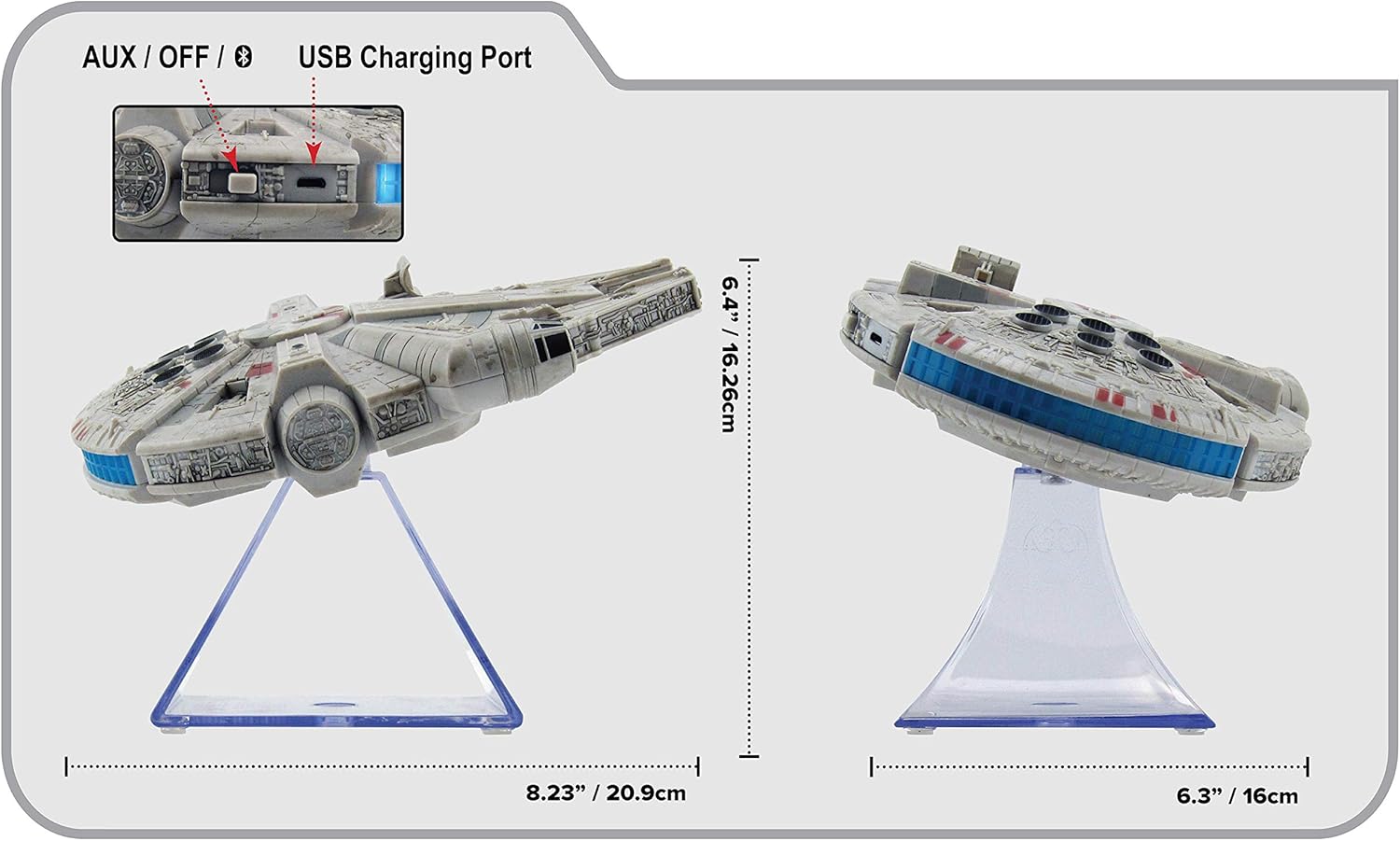
Figura 3: Ġenb view of the eKids Li-B17 Millennium Falcon Bluetooth Speaker, highlighting the AUX/OFF/Bluetooth switch, USB charging port, and product dimensions.

Figura 4: Image illustrating the eKids Li-B17 Millennium Falcon Bluetooth Speaker's compatibility with multiple devices including mobile phones, tablets, notebooks, smartwatches, game devices, and PCs.
6. Istruzzjonijiet Operattivi
6.1 Daqq tal-Awdjo
- Once connected via Bluetooth or AUX, start playing audio from your source device.
- Adjust the volume using the controls on your connected device. The speaker itself does not have volume controls.
6.2 Sejħiet mingħajr idejn
Meta tkun imqabbad permezz tal-Bluetooth ma' smartphone:
- Tweġiba għal Sejħa: Press the designated call button on the speaker (often integrated with the Bluetooth button or a separate small button near the main blaster area).
- Tmiem Sejħa: Press the call button again.
- Tagħmel Sejħa: Initiate the call from your smartphone; audio will route through the speaker.
6.3 Effetti tad-Dawl
The speaker features integrated blue engine lights that illuminate when the speaker is powered on and in use, enhancing the visual experience.
6.4 Star Wars Theme Playback
Press the large button located on the top of the speaker (the top blaster area) to play the Star Wars main theme.
7. Manutenzjoni
- Clean the speaker with a soft, dry cloth. Do not use liquid cleaners or abrasive materials.
- Aħżen l-ispiker f'post frisk u niexef meta ma jkunx qed jintuża.
- Evita li twaqqa’ l-ispiker jew li tissottomettih għal impatti qawwija.
8 Issolvi l-problemi
| Problema | Kawża Possibbli | Soluzzjoni |
|---|---|---|
| L-ispeaker ma jixgħelx. | Il-batterija hija eżawrita. | Iċċarġja l-kelliem billi tuża l-kejbil USB ipprovdut. |
| Ma tistax tqabbad permezz tal-Bluetooth. | Speaker is not in pairing mode or device's Bluetooth is off. | Ensure speaker is in Bluetooth mode and press the Bluetooth button to enter pairing. Turn Bluetooth on your device and search again. |
| L-ebda ħoss mill-ispiker. | Volum baxx wisq, mod ta' input mhux korrett, jew apparat mhux qed jilgħab. | Increase volume on your device. Ensure speaker is in correct mode (Bluetooth/AUX). Check if your device is playing audio. |
| Kwalità fqira tal-awdjo. | L-apparat wisq 'il bogħod mill-ispiker, interferenza, jew batterija baxxa. | Move device closer to speaker (within 30 feet). Avoid obstacles. Charge the speaker. |
9. Speċifikazzjonijiet
| Karatteristika | Speċifikazzjoni |
|---|---|
| Numru tal-Mudell | Li-B17 |
| Teknoloġija tal-Konnettività | Bluetooth |
| Firxa Wireless | Sa 30 pied (madwar 9 metru) |
| Sors tal-Enerġija | Lithium-Polymer Battery (rechargeable) |
| Ħajja tal-batterija | Sa 6 sigħat |
| Qawwa Massima tal-Ħruġ tal-Ispeaker | 25 Watts |
| Modalità tal-Ħruġ tal-Awdjo | Stereo |
| Materjal | Plastik |
| Tip ta 'Immuntar | Mejda |
| Dimensjonijiet (L x W x H) | 18.29 x 26.42 x 24.13 ċm (7.2 x 10.4 x 9.5 pulzieri) |
| Komponenti Inklużi | Millennium Falcon Bluetooth Speaker, USB Charging Cable |
10. Garanzija u Appoġġ
Dan il-prodott jiġi ma 'a Garanzija Limitata. For specific details regarding warranty coverage, duration, and how to obtain service, please refer to the warranty card included with your purchase or contact eKids customer support.
For technical support or further inquiries, please visit the official eKids websit jew ikkuntattja lid-dipartiment tas-servizz tal-konsumatur tagħhom.


