1. Introduzzjoni
This manual provides detailed instructions for the installation, operation, and maintenance of your THINKWARE X500D Dashcam with Rear View Camera. The X500D is designed to provide comprehensive front and rear surveillance of your vehicle, capturing Full HD 1080p video with a Sony Exmor image sensor for the front camera and a Full HD 1080p rear camera.
Key features include advanced driver assistance systems (ADAS) such as lane departure, front collision, red light, and speed camera alerts, as well as a built-in GPS tracker for recording time, speed, and location data. For optimal performance and longevity, please read this manual thoroughly before using the device.
2. Informazzjoni dwar is-Sigurtà
- Installazzjoni: Ensure the dash cam is installed in a location that does not obstruct the driver's view or interfere with vehicle safety features (e.g., airbags).
- Sors tal-Enerġija: Use only the provided cigarette power cable or an official THINKWARE hardwiring cable for power. Using unauthorized power sources may damage the device and void the warranty.
- Temperatura operattiva: The device is designed to operate within a specific temperature range. Avoid exposing the dash cam to extreme temperatures (e.g., direct sunlight for extended periods in hot climates) to prevent damage.
- Karta MicroSD: Use only genuine THINKWARE microSD cards or high-endurance cards from reputable brands. Frequent formatting of the microSD card is recommended to maintain optimal recording performance.
- Tindif: Clean the lens and screen with a soft, dry cloth. Do not use harsh chemicals or abrasive materials.
- Aġġornamenti tal-Firmware: Regularly check for and install firmware updates to ensure optimal performance and access to new features.
- Ċaħda ta' responsabbiltà: This device is pre-loaded with firmware and GPS data specific for use within the US only. Proper device operation cannot be guaranteed outside of the US.
3. Kontenut tal-Pakkett
Ivverifika li l-oġġetti kollha huma preżenti fil-pakkett tiegħek:
- Main Dash Cam Unit (THINKWARE X500D)
- Wara View Kamera
- Mount with Extra 3M Adhesive Tape
- Cigarette Power Cable
- Klipps tal-Cable Adeżivi
- THINKWARE 32GB MicroSD Card with SD Card Adapter
- Gwida ta' Bidu Mgħaġġel/Informazzjoni dwar il-Garanzija
- Wara View Cable tal-Kamera

Image: The THINKWARE X500D Dashcam main unit, rear camera, 32GB MicroSD card, and SD card adapter, representing the typical package contents.
4. Prodott Aktarview
4.1. Front Dash Cam Unit (X500D)

Immaġni: Quddiem view of the THINKWARE X500D Dashcam, showing the main lens and the "FHD Recorder" label.

Immaġni: Wara view of the THINKWARE X500D Dashcam, displaying the LCD screen with live view and control buttons on the left side.
The main unit features a Full HD 1080p camera with a Sony Exmor image sensor, a 2.7-inch LCD touchscreen for live view and settings, and various control buttons. It also includes a built-in GPS module and G-sensor for incident detection.
4.2. Wara View Kamera

Image: The compact THINKWARE rear view camera, designed for discreet installation on the rear window.
In-naħa ta’ wara view camera provides Full HD 1080p recording for the rear of your vehicle, connecting to the main dash cam unit via the provided cable.
4.3. Karta MicroSD

Image: A THINKWARE branded 32GB MicroSD card alongside its larger SD card adapter.
The included 32GB MicroSD card is specifically designed for THINKWARE Dash Cams, featuring SPOR (Sudden Power Off Recovery) technology to protect recorded data.
5. Setup u Installazzjoni
5.1. Iddaħħal il-MicroSD Card
- Kun żgur li l-kamera tad-daxxbord tkun mitfija.
- Sib is-slott tal-kard microSD fuq il-ġenb tal-unità prinċipali.
- Insert the 32GB MicroSD card into the slot until it clicks into place. Ensure the card is inserted with the correct orientation.
5.2. Immuntar tal-Dash Cam ta' Quddiem
- Naddaf iż-żona tal-windskrin fejn se titwaħħal il-kamera tad-daxxbord. Kun żgur li tkun ħielsa mit-trab u l-grass.
- Attach the mount to the dash cam unit.
- Remove the protective film from the 3M adhesive tape on the mount.
- Firmly press the mount onto the windshield, ideally behind the rearview mera, waqt li tiżgura li ma tostakolax il-vista tiegħek viewŻomm għal mill-inqas 30 sekonda.
- Adjust the camera angle to ensure the road ahead is clearly visible and centered in the frame.

Image: The THINKWARE X500D Dashcam mounted on a car's windshield, viewed from inside the vehicle, showing the screen and controls.
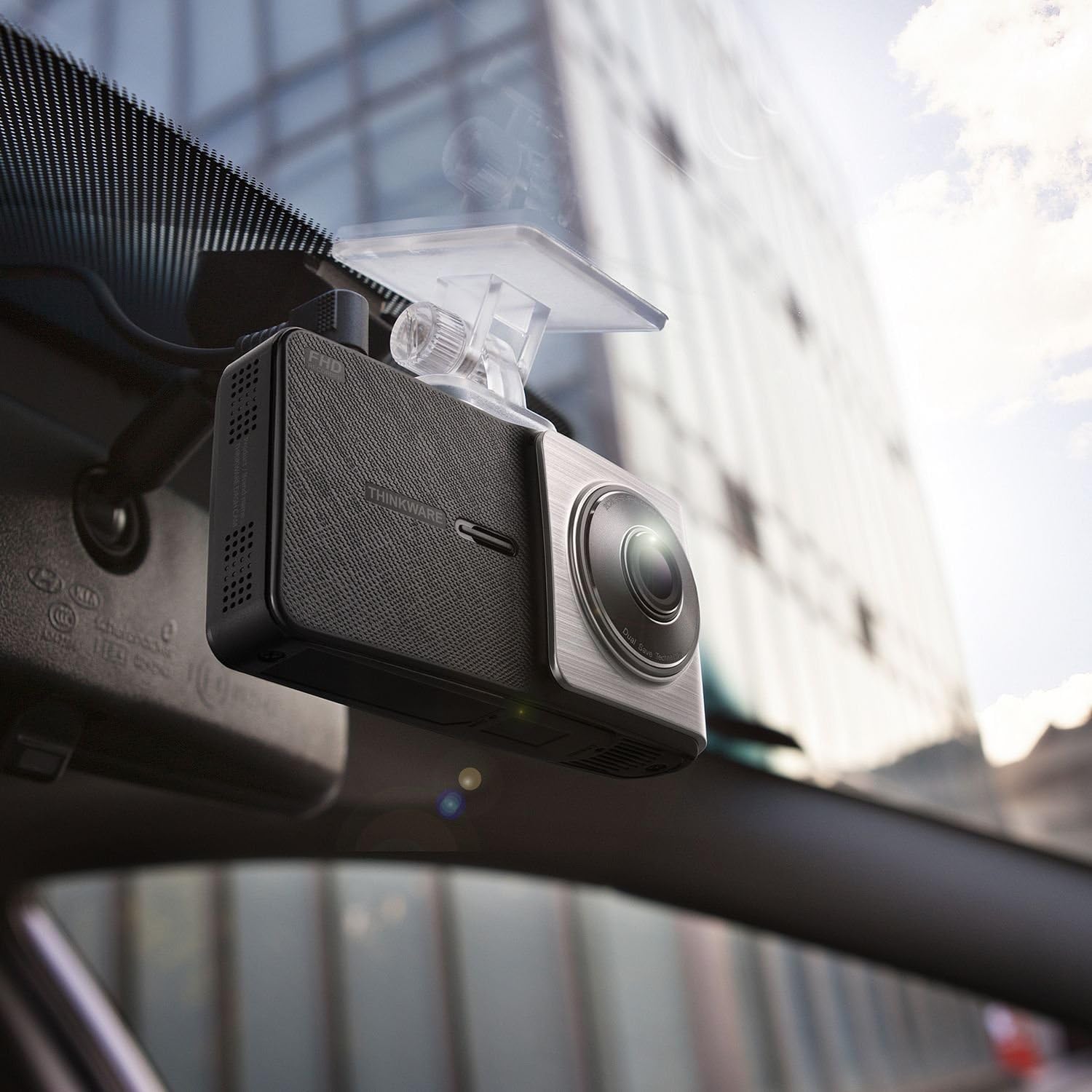
Immaġni: Angolata view of the THINKWARE X500D Dashcam installed on a car's windshield, showing its compact design and how it blends with the interior.
5.3. Mounting the Rear View Kamera
- Clean the rear windshield area where the rear camera will be mounted.
- Remove the protective film from the adhesive tape on the rear camera mount.
- Firmly press the rear camera onto the rear windshield, ensuring it captures a clear view tat-triq ta’ wara.
- Connect the rear camera cable to the rear camera and route it neatly along the vehicle's headliner and pillars to the main dash cam unit. Use the provided adhesive cable clips to secure the cable.
- Connect the other end of the rear camera cable to the designated port on the main dash cam unit.
5.4. Qawwa tal-Konnessjoni
- Connect the cigarette power cable to the power port on the main dash cam unit.
- Plug the other end of the cigarette power cable into your vehicle's 12V power outlet (cigarette lighter socket).
- Upon starting your vehicle, the dash cam will power on automatically and begin recording.
- Fakultattiv: For Parking Surveillance mode, a separate hardwiring cable (sold separately) is required. Refer to the hardwiring kit's instructions for installation.
6. Istruzzjonijiet Operattivi
6.1. Modi ta' Reġistrazzjoni
- Reġistrazzjoni Kontinwa: The dash cam automatically records continuously when the vehicle's ignition is on. Videos are saved in 1-minute segments.
- Reġistrazzjoni tal-Inċidenti: In the event of an impact or sudden braking, the built-in G-sensor triggers incident recording. These files are saved separately and are protected from being overwritten by continuous recording.
- Reġistrazzjoni manwali: Press the manual recording button on the device to initiate a manual recording of an event.
- Modalità ta' Sorveljanza tal-Parkeġġ: If the dash cam is hardwired, it can record events while the vehicle is parked. This mode includes motion detection and impact detection.
6.2. Funzjonalità tal-GPS
The built-in GPS module records your vehicle's speed, location, and time data, which can be viewed during video playback using the THINKWARE PC Viewer software.
6.3. Advanced Driver Assistance Systems (ADAS)
The X500D includes ADAS features to enhance driving safety:
- Sistema ta' Twissija ta' Ħruġ mill-Karreġġjata (LDWS): Javżak jekk il-vettura tiegħek toħroġ mill-karreġġjata tagħha.
- Sistema ta' Twissija ta' Ħabta minn Quddiem (FCWS): Alerts you to potential collisions with the vehicle ahead.
- Red Light Camera Alert: Notifies you of upcoming red light cameras.
- Twissija tal-Kamera tal-veloċità: Notifies you of upcoming speed cameras.
These features can be configured or toggled on/off via the dash cam's settings menu.
6.4. Using the LCD Screen and Buttons
The 2.7-inch LCD screen allows for live view, video playback, and access to settings. Navigate through menus using the physical buttons located on the side of the device.
- Buttuna tad-dar: Jirritorna għall-menu prinċipali.
- Buttuna Rekord: Initiates manual recording.
- Buttuna tal-Menù/Settings: Jaċċessa s-settings tat-tagħmir.
- Buttuni 'l fuq /' l isfel: Innaviga permezz tal-għażliet tal-menu.
- Buttuna OK: Jikkonferma l-għażla.
7. Manutenzjoni
7.1. Ġestjoni tal-Kard MicroSD
Regularly format the microSD card (at least once a month) to prevent recording errors and ensure optimal performance. This can be done through the dash cam's settings menu or using the THINKWARE PC Viewer software.
Note: Formatting the card will delete all recorded files. Back up important videos before formatting.
7.2. Tindif tal-Apparat
Use a soft, dry, lint-free cloth to clean the dash cam's lens and LCD screen. Do not use liquid cleaners or abrasive materials, as they may damage the device.
7.3. Aġġornamenti tal-Firmware
THINKWARE periodically releases firmware updates to improve performance, add features, or fix bugs. Visit the official THINKWARE website to download the latest firmware for your X500D model. Follow the instructions provided with the firmware update package carefully.
8 Issolvi l-problemi
| Problema | Kawża Possibbli | Soluzzjoni |
|---|---|---|
| Id-dash cam ma tixgħelx. | No power supply; faulty cable; vehicle's power outlet issue. | Check power cable connection. Ensure vehicle's power outlet is working. Try a different power source if available. |
| Ir-reġistrazzjoni tieqaf jew tiffriża. | MicroSD card error; card full; incompatible card. | Format the microSD card. Replace the microSD card if the issue persists. Ensure you are using a high-endurance card. |
| Il-kwalità tal-vidjow hija fqira. | Dirty lens; protective film still on lens; incorrect settings. | Naddaf il-lenti. Neħħi kwalunkwe film protettiv. Iċċekkja s-settings tar-riżoluzzjoni tal-vidjo fil-menù. |
| Is-sinjal tal-GPS mhux miksub. | Ostakolat view of sky; device location. | Kun żgur li l-kamera tad-daxxbord għandha viżibilità ċara view of the sky. Move the vehicle to an open area. GPS acquisition may take a few minutes on first use or after a long period of inactivity. |
| ADAS alerts are inaccurate or not working. | Incorrect calibration; environmental factors (weather, lighting). | Ensure the dash cam is properly calibrated and mounted centrally. ADAS performance can be affected by severe weather or poor lighting conditions. |
9. Speċifikazzjonijiet
| Karatteristika | Dettall |
|---|---|
| Isem tal-Mudell | X500D |
| Numru tal-Mudell tal-Oġġett | TW-X500D |
| Riżoluzzjoni tal-Qbid tal-Vidjo | 1080p (Full HD) Front & Rear |
| Sensor tal-Immaġni | Sony Exmor (Front) |
| Tip ta 'Wiri | LCD |
| Karatteristika Speċjali | GPS inkorporat |
| Teknoloġija tal-Konnettività | USB |
| Metodu ta' Kontroll | Touch (via LCD) |
| Piż tal-oġġett | 1.6 uqija (madwar 45 gramma) |
| Dimensjonijiet tal-Prodott | 4.1 x 1.1 x 2.2 pulzieri (madwar 10.4 x 2.8 x 5.6 ċm) |
| Komponenti Inklużi | Main Dash Cam Unit, Mount, Cigarette Power Cable, Adhesive Cable Clips, 32GB MicroSD Card with SD Adapter, Quick Start Guide/Warranty, Rear View Kamera, Wara View Cable tal-Kamera |
10. Garanzija u Appoġġ
10.1. Garanzija tal-Manifattur
The THINKWARE X500D Dashcam comes with a One-year Manufacturer's Limited Warranty. This warranty covers units sold at authorized retailers only. Please note that microSD cards typically have a shorter warranty period, often 6 months.
For specific warranty terms and conditions, please refer to the Quick Start Guide/Warranty information included in your package or visit the official THINKWARE websit.
10.2. Appoġġ għall-Klijent
For technical assistance, troubleshooting, or warranty claims, please contact THINKWARE customer support. Contact information can typically be found on the official THINKWARE webis-sit jew fid-dokumentazzjoni tal-prodott tiegħek.
When contacting support, please have your product model number (TW-X500D) and proof of purchase readily available.


