1. Introduzzjoni
The Alpine IVA-W520E is a full-featured 2DIN DVD player solution designed for in-car entertainment and media. It integrates advanced video and audio technologies, including a 7-inch LED touchscreen and a Burr-Brown 24-bit DAC, to deliver high-quality sound and clear images. This manual provides essential information for the proper installation, operation, and maintenance of your IVA-W520E unit.
2. Informazzjoni dwar is-Sigurtà
Jekk jogħġbok aqra l-istruzzjonijiet kollha tas-sigurtà bir-reqqa qabel ma tinstalla jew tħaddem l-unità. Jekk ma ssegwix dawn l-istruzzjonijiet, dan jista' jirriżulta f'korriment jew ħsara lill-unità jew lill-vettura.
- Installazzjoni Professjonali Rakkomandata: Due to the complexity of car audio-visual systems, professional installation is highly recommended to ensure proper wiring and functionality.
- Sors tal-Enerġija: Connect the unit only to a 12V DC negative ground power supply.
- Evita Distrazzjonijiet: Do not operate the unit's controls or view video content while driving, as this can lead to accidents. Always pull over to a safe location before making adjustments.
- Ventilazzjoni: Aċċerta ruħek li jkun hemm ventilazzjoni adegwata madwar l-unità biex tevita li tissaħħan iżżejjed. Timblokkax il-fetħiet tal-ventilazzjoni.
- Umdità u Likwidi: Keep the unit away from moisture and liquids. Do not expose it to rain or water.
- Tindif: Uża drapp artab u niexef għat-tindif. Evita prodotti tat-tindif jew solventi li joborxu.
3. Kontenut tal-Pakkett
Ivverifika li l-oġġetti kollha huma preżenti fil-pakkett qabel ma tipproċedi bl-installazzjoni:
- Alpine IVA-W520E Head Unit
- Qawwa/Speaker Xedd
- Ħardwer tal-Immuntar (viti, parentesi)
- Ittrimmja Ċirku
- Manwal għall-Utent (dan id-dokument)
- Informazzjoni dwar Garanzija
4. Setup u Installazzjoni
4.1. Linji Gwida għall-Installazzjoni
Proper installation is crucial for optimal performance and safety. It is highly recommended to have the unit installed by a qualified professional.
- Skonnettja l-batterija: Qabel ma tibda kwalunkwe xogħol elettriku, skonnettja t-terminal negattiv tal-batterija tal-vettura biex tevita short circuits.
- Immuntar: Securely mount the unit in the vehicle's double-DIN opening using the provided mounting brackets and screws. Ensure it is stable and does not obstruct any vehicle controls.
- Wiring: Connect the power harness, speaker wires, and other input/output cables according to the wiring diagram provided in the separate installation guide. Pay close attention to ground connections.
- Antenna and External Devices: Connect the radio antenna and any external devices such as a reverse camera or external ampliifikaturi.
4.2. Setup Inizjali
After installation, reconnect the battery and power on the unit for the first time.
- Għażla tal-Lingwa: Segwi l-istruzzjonijiet fuq l-iskrin biex tagħżel il-lingwa preferuta tiegħek.
- Ħin u Data: Set the correct time and date for accurate display.
- Settings tal-awdjo: Adjust basic audio settings such as volume, balance, and fader.
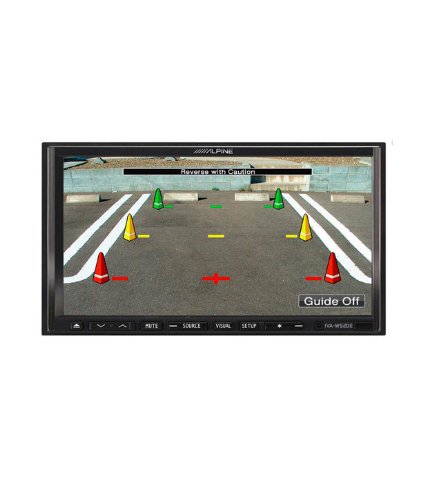
Figura 4.1: Eżample of the IVA-W520E displaying a reverse camera feed, showing parking guidelines. This feature aids in safe vehicle maneuvering.
5. It-tħaddim tal-Unità
5.1. Kontrolli tat-Touchscreen u l-Buttuni
The IVA-W520E features a responsive 7-inch LED touchscreen for primary control, supplemented by physical buttons for quick access to common functions.
- Touchscreen: Navigate menus, select sources, and control playback by touching the screen.
- Kontroll tal-Volum: Use the dedicated volume buttons or on-screen controls to adjust audio levels.
- Buttuna tas-Sors: Press to cycle through available audio/video sources (Radio, DVD, USB, iPod, AUX, Bluetooth).
- Buttuna Mute: Temporarily mutes the audio output.
- Buttuna Setup: Aċċessa l-menu tas-settings tas-sistema.
5.2. Daqq tal-Awdjo
The unit supports various audio formats and sources, enhanced by its Burr-Brown 24-bit DAC for superior sound quality.
- Awdjo USB: Qabbad apparat USB li fih awdjo files. The unit will display track information and allow navigation through folders.
- iPod/iPhone Connectivity: Connect your iPod or iPhone for direct audio playback and control.
- Daqq ta' DVD/CD: Insert a DVD or CD into the disc slot for audio or video playback.
- Tuner tar-Radju: Aċċessa l-istazzjonijiet tar-radju AM/FM.
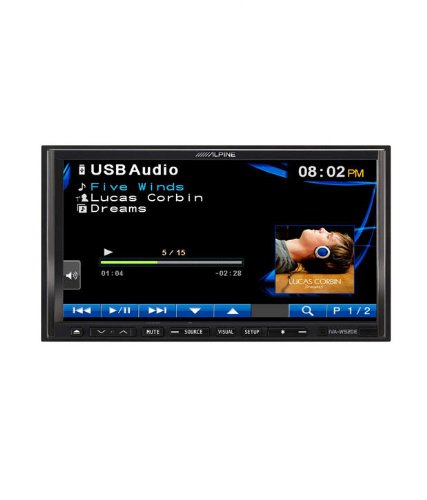
Figure 5.1: The IVA-W520E displaying the USB Audio interface, showing current track, artist, and playback controls. This allows for easy navigation of digital music files.
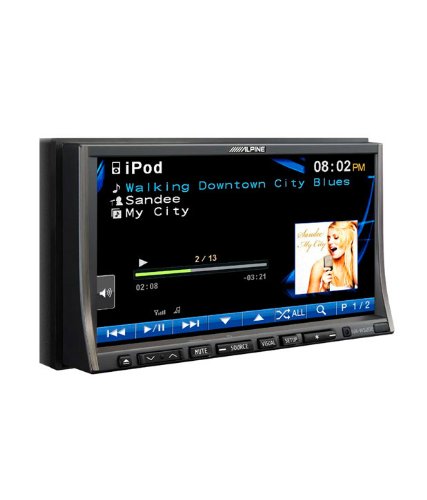
Figure 5.2: The IVA-W520E displaying the iPod interface, showing a list of songs and album art. This demonstrates seamless integration with Apple devices for music playback.
5.3. Daqq tal-vidjo
The 7-inch LED screen provides enhanced image quality with higher resolution, better contrast, and improved color reproduction compared to standard LCD screens.
- DVD Video: Insert a video DVD for playback. Ensure the parking brake safety wire is correctly connected for video to display while the vehicle is stationary.
- External Video Input: The unit supports external video sources, such as a reverse camera or other video devices.
5.4. Konnettività Bluetooth
The IVA-W520E is upgradable for Bluetooth hands-free system functionality, allowing for safe and convenient communication while driving.
- Tqabbil: Refer to the separate Bluetooth module manual (if applicable) for pairing instructions with your mobile phone.
- Sejħat mingħajr idejn: Make and receive calls directly through the unit.
- Streaming tal-Awdjo: Stream audio from your Bluetooth-enabled device.
5.5. Navigation System (Upgradable)
The unit is designed to be upgradable with a navigation system. Consult your Alpine dealer for compatible navigation modules and installation.
6. Manutenzjoni
Regular maintenance helps ensure the longevity and optimal performance of your Alpine IVA-W520E.
- Tindif tal-iskrin: Gently wipe the touchscreen with a soft, lint-free cloth. For stubborn smudges, slightly dampen the cloth with water or a screen-specific cleaner. Do not spray cleaner directly onto the screen.
- Slott tad-Diska: Keep the disc slot free of dust and debris. Avoid inserting bent, scratched, or irregular discs.
- Tindif Ġenerali: Use a soft, dry cloth to wipe the unit's exterior. Avoid harsh chemicals or abrasive materials.
7 Issolvi l-problemi
If you encounter issues with your IVA-W520E, refer to the following common problems and solutions:
| Problema | Kawża Possibbli | Soluzzjoni |
|---|---|---|
| Ebda Qawwa | Blown fuse, incorrect wiring, loose connection. | Check vehicle fuses and unit's fuse. Verify power and ground wiring connections. Ensure battery is connected. |
| Ebda Ħoss | Volum baxx wisq, mute attivat, problema bil-wajers tal-ispiker, sors mhux korrett magħżul. | Żid il-volum. Iddiżattiva l-mute. Iċċekkja l-konnessjonijiet tal-ispiker. Agħżel is-sors awdjo korrett. |
| Żball tad-Diska | Diska maħmuġa, imxarrba, jew inkompatibbli. | Naddaf id-diska. Ipprova diska differenti, magħrufa li hija tajba. Kun żgur li l-format tad-diska huwa appoġġjat. |
| Video Not Displaying (while driving) | Parking brake safety wire not connected or incorrectly connected. | This is a safety feature. Video playback is disabled while the vehicle is in motion. Ensure the parking brake wire is correctly connected to the vehicle's parking brake circuit. |
| Kwistjonijiet ta' Tqabbil tal-Bluetooth | Bluetooth module not connected, phone not in pairing mode, interference. | Ensure optional Bluetooth module is correctly installed. Put phone in pairing mode. Move closer to the unit. |
If the problem persists after trying these solutions, please contact your authorized Alpine dealer or customer support.
8. Speċifikazzjonijiet
Key technical specifications for the Alpine IVA-W520E:
- Mudell: IVA-W520E
- Daqs tal-Wiri: 7 Pulzier (18 ċm)
- Tip ta' wiri: LED LCD Touchscreen
- Riżoluzzjoni: 480 x 272 pixel
- Awdjo DAC: Burr-Brown 24-bit
- Apparati Kompatibbli: Smartphone (via USB/iPod, Bluetooth upgradable)
- Karatteristiċi Speċjali: Touchscreen, Bluetooth (upgradable)
- Modalità tal-Ħruġ tal-Awdjo: Speaker
- Manifattur: Alpini
- L-Ewwel Disponibbli: 20 ta’ Awwissu 2015
9. Garanzija u Appoġġ
For detailed warranty information, please refer to the warranty card included with your product package or visit the official Alpine websit. Żomm l-irċevuta tax-xiri tiegħek bħala prova tax-xiri.
For technical support, service, or inquiries about compatible accessories and upgrades (such as navigation modules or Bluetooth kits), please contact your authorized Alpine dealer or visit the Alpine customer support portal online.
Uffiċjal Alpin Websit: www.alpine.com


