Introduzzjoni
The My Weigh iBalance 2600 is a high-precision table top scale designed for accurate measurements up to 2600 grams with a 0.1 gram resolution. It features multiple weighing modes, a durable stainless steel platform, and a bright backlit LCD display, making it suitable for various applications requiring precise weight determination.
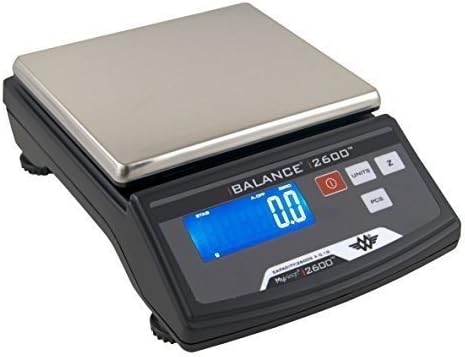
Figura 1: My Weigh iBalance 2600 Precision Scale. This image shows the scale from a slightly elevated front-right angle, highlighting its stainless steel weighing platform, the digital display showing "0.0", and control buttons for power, units, and piece counting.
Informazzjoni dwar is-Sigurtà
- Always operate the scale on a stable, level surface to ensure accurate readings.
- Avoid exposing the scale to extreme temperatures, humidity, or direct sunlight.
- Do not overload the scale beyond its maximum capacity of 2600 grams, as this can damage the weighing mechanism.
- Keep the scale away from strong electromagnetic fields, which may interfere with its operation.
- Use only the specified AC power adapter or batteries (6 AA batteries) for power.
- Do not disassemble the scale; refer to qualified service personnel for repairs.
Kontenut tal-Pakkett
Ivverifika li l-oġġetti kollha huma preżenti fil-pakkett:
- My Weigh iBalance 2600 Precision Scale
- Pjattaforma tal-Użin tal-Azzar li ma jsaddadx
- Adapter tal-Qawwa AC
- Manwal għall-Utent (dan id-dokument)
Setup
- Spakkjar: Carefully remove the scale and all components from the packaging.
- Pjazzament: Place the scale on a firm, level, and vibration-free surface. Ensure the surface is stable to prevent inaccurate readings.
- Invellar: The iBalance 2600 features adjustable feet and a built-in bubble level. Adjust the feet until the bubble is centered within the circle, indicating the scale is perfectly level.
- Konnessjoni tal-Enerġija:
- Qawwa AC: Connect the provided AC power adapter to the scale's power input port and then plug it into a suitable electrical outlet.
- Qawwa tal-batterija: If using batteries, open the battery compartment on the underside of the scale and insert 6 AA alkaline batteries, ensuring correct polarity.
- Qawwa Inizjali Mixgħula: Agħfas il- Qawwa button to turn on the scale. The display will illuminate and perform a self-test before showing "0.0".
Istruzzjonijiet Operattivi
Użin Bażiku
- Ensure the scale is on a level surface and powered on.
- Wait for the display to show "0.0".
- Gently place the item to be weighed onto the center of the stainless steel platform.
- Aqra l-piż muri fuq l-iskrin LCD.
Unitajiet li Jibdlu
The iBalance 2600 supports multiple weighing units including grams (g), ounces (oz), pounds (lb), troy ounces (ozt), pennyweights (dwt), carats (ct), and grains (gn).
- Agħfas il- UNITÀ button repeatedly to cycle through the available weighing units.
- L-unità magħżula se tkun indikata fuq id-displej.
Funzjoni Tara
The Tare function allows you to subtract the weight of a container, so only the net weight of the contents is measured.
- Poġġi kontenitur vojt fuq il-pjattaforma tal-użin.
- Agħfas il- Z (Zero/Tare) button. The display will reset to "0.0".
- Add the items to be weighed into the container. The display will show only the weight of the items.
- To clear the tare, remove the container from the platform and press the Z buttuna għal darb'oħra.
Counting Function (PCS)
The Piece Counting function allows you to count a large number of identical items.
- Poġġi bħalaample quantity of items (e.g., 10, 20, 50, or 100 pieces) on the platform.
- Agħfas u żomm il- PCS button until "PCS" appears on the display.
- The display will prompt you to select the sample size (e.g., "10", "20", "50", "100"). Use the UNITÀ button to select the correct sample size corresponding to the number of items you placed.
- Agħfas il- PCS button again to confirm the sample size. The scale will now display the count of the sample.
- You can now add more items, and the scale will display the total count.
- To exit counting mode, press the UNITÀ buttuna.
Kalibrazzjoni
Calibration ensures the accuracy of your scale. It is recommended to calibrate the scale periodically or if you suspect inaccurate readings. A 2000 gram calibration weight is required (not included).
- Ensure the scale is on a level surface and there is nothing on the platform.
- Turn the scale OFF.
- Agħfas u żomm il- UNITÀ buttuna, imbagħad agħfas il- Qawwa button simultaneously. Release both buttons when "CAL" appears on the display.
- The display will show "2000g" (or the required calibration weight).
- Carefully place a 2000 gram calibration weight onto the center of the platform.
- The display will show "PASS" and then return to normal weighing mode, indicating successful calibration.
- Remove the calibration weight.
Manutenzjoni
- Tindif: Imsaħ il-wiċċ tal-iskala b'ċarruta ratba u damp cloth. Do not use abrasive cleaners or immerse the scale in water. The stainless steel platform can be removed for separate cleaning.
- Ħażna: Store the scale in a clean, dry environment away from dust and extreme temperatures.
- Sostituzzjoni tal-batterija: If the display becomes dim or the scale does not power on with batteries, replace all 6 AA batteries.
Issolvi l-problemi
| Problema | Kawża Possibbli | Soluzzjoni |
|---|---|---|
| L-iskala ma tixgħel. | No power, dead batteries, or faulty AC adapter. | Check AC adapter connection. Replace batteries if using battery power. |
| Qari mhux preċiż. | Scale not level, unstable surface, overloaded, or needs calibration. | Adjust leveling feet. Move to a stable surface. Do not exceed 2600g. Perform calibration. |
| Display shows "EEEE". | L-iskala hija mgħobbija żżejjed. | Remove excess weight immediately. |
| Display shows "UNST". | Unstable reading due to vibration or movement. | Ensure scale is on a stable, vibration-free surface. |
Speċifikazzjonijiet
| Brand | Iżen tiegħi |
| Numru tal-Mudell | SCM2600BLACK |
| Kapaċità | 2600 Gramm |
| Preċiżjoni tal-Qari | 0.1g |
| Modi ta' Użin | Grams (g), Ounces (oz), Pounds (lb), Troy Ounces (ozt), Pennyweights (dwt), Carats (ct), Grains (gn) |
| Tip ta 'Wiri | LCD backlit |
| Materjal tal-Pjattaforma | Stainless Steel |
| Sors tal-Enerġija | AC Power Adapter (included) or 6 AA Batteries (not included) |
| Dimensjonijiet tal-Prodott | 8.7 x 5.6 x 11.3 pulzieri |
| Piż tal-oġġett | 3.45 liri |
| UPC | 716165162629 |
Garanzija u Appoġġ
The My Weigh iBalance 2600 Precision Scale comes with a Garanzija ta' 30 snin mill-manifattur. Din il-garanzija tkopri difetti fil-materjali u l-abbilità taħt użu normali.
For warranty claims, technical support, or service inquiries, please contact My Weigh customer service directly. Refer to the official My Weigh webis-sit għall-aktar informazzjoni ta' kuntatt aġġornata u termini dettaljati tal-garanzija.
Nota: Żomm l-irċevuta tax-xiri tiegħek bħala prova tax-xiri għal skopijiet ta' garanzija.


