1. Introduzzjoni
The GoWISE Power 2000W Pure Sine Wave Power Inverter converts 12V DC power from a battery source into 120V AC household power. This inverter is designed for use in various applications, including vehicles, boats, camping, and during power outages. It provides a stable and clean power source suitable for sensitive electronic equipment, offering 2000W of continuous power and a 4000W surge capacity.
1.1. X'hemm fil-Kaxxa
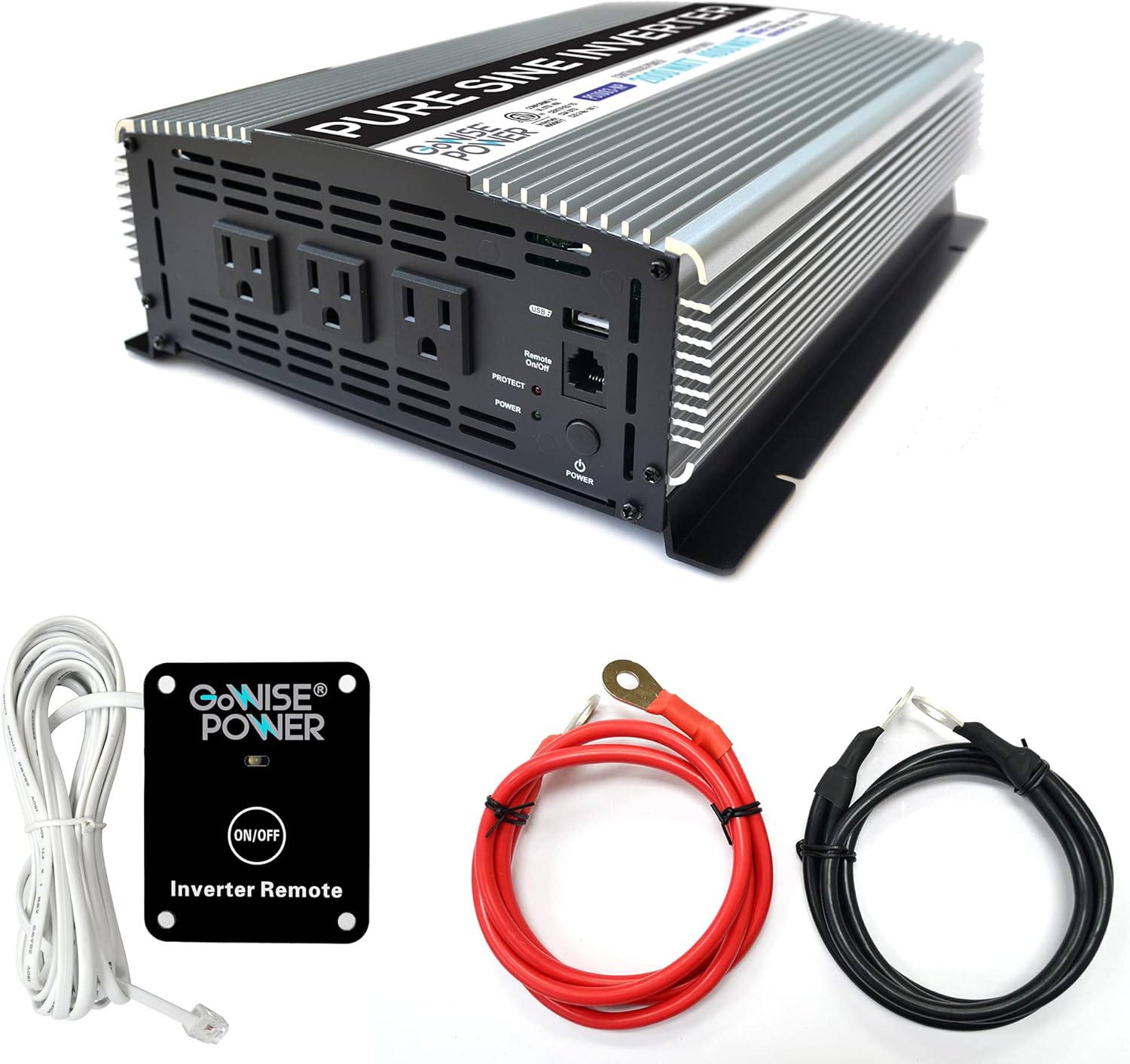
Image 1.1: GoWISE Power 2000W Pure Sine Wave Power Inverter with included accessories.
- GoWISE Power 2000W Pure Sine Wave Power Inverter (Model PS1003)
- Remote Switch with connecting cable
- One pair of Black and Red Battery Cables with ring terminals
- Manwal ta 'Istruzzjoni (dan id-dokument)
2. Informazzjoni dwar is-Sigurtà
Read all safety warnings and instructions carefully before installing or operating the inverter. Failure to follow these instructions may result in electric shock, fire, serious injury, or property damage.
2.1. Prekawzjonijiet Ġenerali tas-Sigurtà
- Keep the inverter away from moisture, water, rain, and snow.
- Tħaddimx l-inverter jekk ikun waqa' jew ġarrab ħsara.
- Do not disassemble the inverter. Incorrect reassembly may result in electric shock or fire.
- To reduce the risk of electric shock, unplug the inverter from the outlet before attempting any maintenance or cleaning.
- Avoid placing the inverter in direct sunlight or near heating vents.
- Kun żgur li jkun hemm ventilazzjoni adegwata madwar l-inverter. Timblokkax il-fetħiet tal-ventilazzjoni.
- Dan l-apparat mhuwiex maħsub għall-użu minn persuni (inklużi tfal) b’kapaċitajiet fiżiċi, sensorji jew mentali mnaqqsa, jew nuqqas ta’ esperjenza u għarfien, sakemm ma jkunux ingħataw superviżjoni jew struzzjoni dwar l-użu tal-apparat minn persuna responsabbli għas-sigurtà tagħhom. .
2.2. Sigurtà Elettrika
- Qabbad l-inverter biss ma' sors ta' enerġija ta' 12V DC.
- Ensure the battery cables are connected with correct polarity (red to positive, black to negative). Incorrect connection will damage the inverter.
- Tqabbadx l-inverter mal-wajers tad-distribuzzjoni tal-AC.
- Always connect the inverter to a properly grounded electrical system.
- Before connecting or disconnecting any cables, ensure the inverter is turned off.
- Ivverifika li l-wat totalitage of all connected appliances does not exceed the inverter's continuous power rating (2000W).
3. Setup u Installazzjoni
3.1. L-Għażla ta' Post
Select a location for the inverter that is:
- Dry and protected from water.
- Ventilat tajjeb biex jippermetti d-dissipazzjoni tas-sħana.
- 'Il bogħod mix-xemx diretta u minn sorsi ta' sħana.
- Securely mounted to prevent movement.
- As close as possible to the 12V DC power source to minimize cable length and voltagqatra e.
3.2. Istruzzjonijiet tal-Wiring
Follow these steps to connect the inverter to your 12V DC power source:
- Ipprepara l-Inverter: Kun żgur li s-swiċċ tal-enerġija tal-inverter ikun fil-pożizzjoni OFF.
- Qabbad Wajer tal-Art: Connect one end of a suitable ground wire (not supplied) to the inverter's ground terminal (marked with a ground symbol) and the other end to a proper earth ground point (e.g., vehicle chassis, ground rod).
- Qabbad il-Kejbils tad-DC mal-Inverter:Connect the ring terminal of the red battery cable to the positive (+) DC input terminal on the inverter. Connect the ring terminal of the black battery cable to the negative (-) DC input terminal on the inverter. Tighten the terminal nuts securely.

Image 3.1: Rear panel of the inverter with DC input terminals.
- Qabbad il-Kejbils tad-DC mal-Batterija: Connect the other end of the red battery cable to the positive (+) terminal of your 12V DC battery. Connect the other end of the black battery cable to the negative (-) terminal of your 12V DC battery. Ensure these connections are tight and secure.
- Remote Switch Connection (Optional): If using the remote switch, plug its cable into the RJ45 port labeled 'Remote On/Off' on the front panel of the inverter.

Image 3.2: Remote switch and battery cables.
Important: Always ensure proper cable gauge for your application. Inadequate cable size can lead to voltage drop and reduced performance or damage.
4. Istruzzjonijiet Operattivi
4.1. Tixgħil / Mitfi

Image 4.1: Front panel of the inverter.
- Biex Tixgħel: Press and hold the main POWER button on the inverter's front panel for a few seconds until the green POWER indicator light illuminates. If using the remote switch, ensure the main power button on the inverter is in the ON position, then press the ON/OFF button on the remote.
- Biex Tintefa: Press and hold the main POWER button on the inverter's front panel until the green POWER indicator light turns off. If using the remote switch, press the ON/OFF button on the remote.
4.2. Using AC Outlets and USB Port
- Once the inverter is powered on, you can plug your 120V AC appliances into the three standard AC outlets.
- For charging USB devices, connect them to the 5V USB port.
- Ensure the total power consumption of all connected devices does not exceed 2000W.
4.3. Operazzjoni ta 'Kontroll mill-Bogħod
The included remote switch allows you to turn the inverter on and off from a distance. Simply plug the remote cable into the designated RJ45 port on the inverter's front panel. The remote has an ON/OFF button and an indicator light.
5. Karatteristiċi ta 'protezzjoni
The GoWISE Power Inverter is equipped with multiple protection systems to ensure safe operation and protect both the inverter and your connected devices.

Image 5.1: Inverter protection systems.
- Protezzjoni Termali: Automatically shuts down the inverter if its internal temperature exceeds a safe limit. This prevents damage from overheating.
- Protezzjoni ta' tagħbija żejda: Activates if the total power draw from connected devices exceeds the inverter's rated capacity. The inverter will shut down to prevent damage.
- Fuq Voltage Protezzjoni: Protects the inverter from damage if the input DC voltage from the battery exceeds a safe operating level.
- Taħt Voltage Protezzjoni: Shuts down the inverter if the input DC voltage drops below a critical level, protecting the battery from deep discharge.
- Vol baxxtage Protection Alarm: An audible alarm will sound when the battery voltage is getting low, providing a warning before the inverter shuts down due to under voltage.
When a protection system is triggered, the inverter will typically shut down, and the PROTECT indicator light on the front panel may illuminate. Disconnect the load, resolve the issue, and then restart the inverter.
6. Manutenzjoni
Manutenzjoni regolari tiżgura prestazzjoni ottimali u lonġevità tal-inverter tiegħek.
- Tindif: Periodically clean the exterior of the inverter with a soft, dry cloth. Do not use abrasive cleaners or solvents. Ensure ventilation openings are free from dust and debris.
- Spezzjoni tal-Cable: Regularly inspect battery cables and connections for any signs of wear, corrosion, or looseness. Tighten connections as needed.
- Ventilazzjoni: Kun żgur li ż-żona madwar l-inverter tibqa' vojta biex tippermetti fluss tal-arja u tkessiħ xieraq.
- Ħażna: Jekk se taħżen l-inverter għal perjodu estiż, skonnettjah mill-batterija u aħżnu f'post frisk u niexef.
7 Issolvi l-problemi
Din it-taqsima tindirizza kwistjonijiet komuni li tista' tiltaqa' magħhom bl-inverter tiegħek.
| Problema | Kawża Possibbli | Soluzzjoni |
|---|---|---|
| L-inverter ma jixgħelx. | No DC input power; Loose battery connections; Inverter switch off; Remote switch off (if used). | Iċċekkja l-volum tal-batterijatage; Ensure battery cables are securely connected; Turn on inverter's main power switch; Turn on remote switch. |
| No AC output, PROTECT light on. | Tagħbija żejda; Tisħin żejjed; Volum baxx tal-batterijatage; High battery voltage. | Reduce connected load; Allow inverter to cool down; Recharge battery; Check battery charging system. |
| Vol baxxtage ħsejjes ta 'allarm. | Batterija voltage huwa baxx. | Recharge or replace the battery. Reduce load to extend battery life. |
| Connected appliance does not work. | Appliance requires more power than inverter can provide; Appliance is faulty. | Check appliance wattage; Try appliance with a standard AC outlet; Ensure inverter is providing power. |
| Fans are running loudly. | Inverter is under heavy load or operating in a warm environment. | This is normal operation. Ensure adequate ventilation. |
8. Speċifikazzjonijiet
Technical details for the GoWISE Power 2000W Pure Sine Wave Power Inverter (Model PS1003).

Image 8.1: Inverter dimensions.
| Karatteristika | Speċifikazzjoni |
|---|---|
| Mudell | PS1003 |
| Qawwa Kontinwa | 2000 Watts |
| Qawwa Żieda | 4000 Watts |
| Input Voltage | 12V DC (200A) |
| Ħruġ Voltage | 120V AC |
| Frekwenza tal-ħruġ | 60Hz |
| Output Waveform | Mewġa Sinjura Pura |
| Output USB | 5V DC, 2.1A |
| Distorsjoni Armonika Totali (THD) | <3% |
| Dimensjonijiet (L x W x H) | 17.1 x 9.3 x 4 inches (approx. 13" x 9.75" x 3.5" based on image) |
| Piż tal-oġġett | 11.4 liri |
| Sistemi ta' Protezzjoni | Thermal, Overload, Over Voltage, Taħt Voltage, Vol baxxtage Allarm |
9. Garanzija u Appoġġ
9.1. Informazzjoni dwar Garanzija
GoWISE Power products are designed for reliability. For specific warranty terms and conditions, please refer to the documentation included with your purchase or contact GoWISE Power customer support.
9.2. Appoġġ għall-Klijent
If you require further assistance or have questions not covered in this manual, please contact GoWISE Power customer support. You can also refer to the official PDF user manual for additional details:


