Introduzzjoni
This manual provides detailed instructions for the setup, operation, and maintenance of your Casio DQD-805J-2JF Digital Alarm Clock. Please read this manual thoroughly to ensure proper use and to fully utilize all features of your device.

Figura 1: Quddiem view of the Casio DQD-805J-2JF digital alarm clock. The display shows time, date, temperature, and humidity. Buttons for alarm, monitor, wave reception, set, reset, and snooze/light are visible below the display.
Karatteristiċi tal-Prodott
- Wirja Diġitali: Clear and easy-to-read time, date, temperature, and humidity.
- Radio-Controlled Timekeeping (Wave Ceptor): Automatically synchronizes with atomic time signals for accurate time.
- Funzjoni ta' allarm: Daily alarm with adjustable settings.
- Funzjoni Snooze: Temporarily pauses the alarm for additional rest.
- Dawl ta' wara: Illuminates the display for visibility in low-light conditions.
- Temperature and Humidity Monitor: Displays current indoor temperature and humidity levels.
- Disinn kompatt: Portable and suitable for various indoor environments.

Figura 2: The Casio DQD-805J-2JF clock is equipped with a temperature and humidity meter, making it suitable for creating a comfortable environment in bedrooms and desk areas. Its compact size also allows for easy portability.
Identifikazzjoni tal-Komponent
Iffamiljarizza ruħek mad-diversi partijiet u l-kontrolli tal-arloġġ tal-allarm tiegħek.
Kontrolli tal-Panew ta' Quddiem:
- Buttuna ta 'l-allarm: Activates or deactivates the alarm.
- Alarm Monitor Button: Previews the alarm sound.
- Wave Reception Button: Initiates manual radio wave time synchronization.
- Issettja Buttuna: Jidħol fil-modalità tas-settings għall-ħin, id-data, u l-allarm.
- Buttuna Irrisettja: Resets the clock to factory defaults (requires a pointed object).
- Buttuna Snooze/Dawl: Activates snooze during an alarm or illuminates the display.
- Buttuni +/-: Adjusts values during setting mode.
- Snooze ON/OFF Slider: Enables or disables the snooze function.
Indikaturi tal-Wiri:
- Wiri tal-Ħin: Shows current hour, minute, and second.
- Wiri tad-Data: Juri x-xahar u l-jum.
- Wiri tat-Temperatura: Juri t-temperatura ambjentali attwali f'Celsius.
- Wiri tal-Umdità: Juri l-perċentwal attwali tal-umdità ambjentalitage.
- Wave Reception Indicator: Shows status of radio signal reception.
- Alarm ON Indicator: Jidher meta l-allarm ikun attiv.
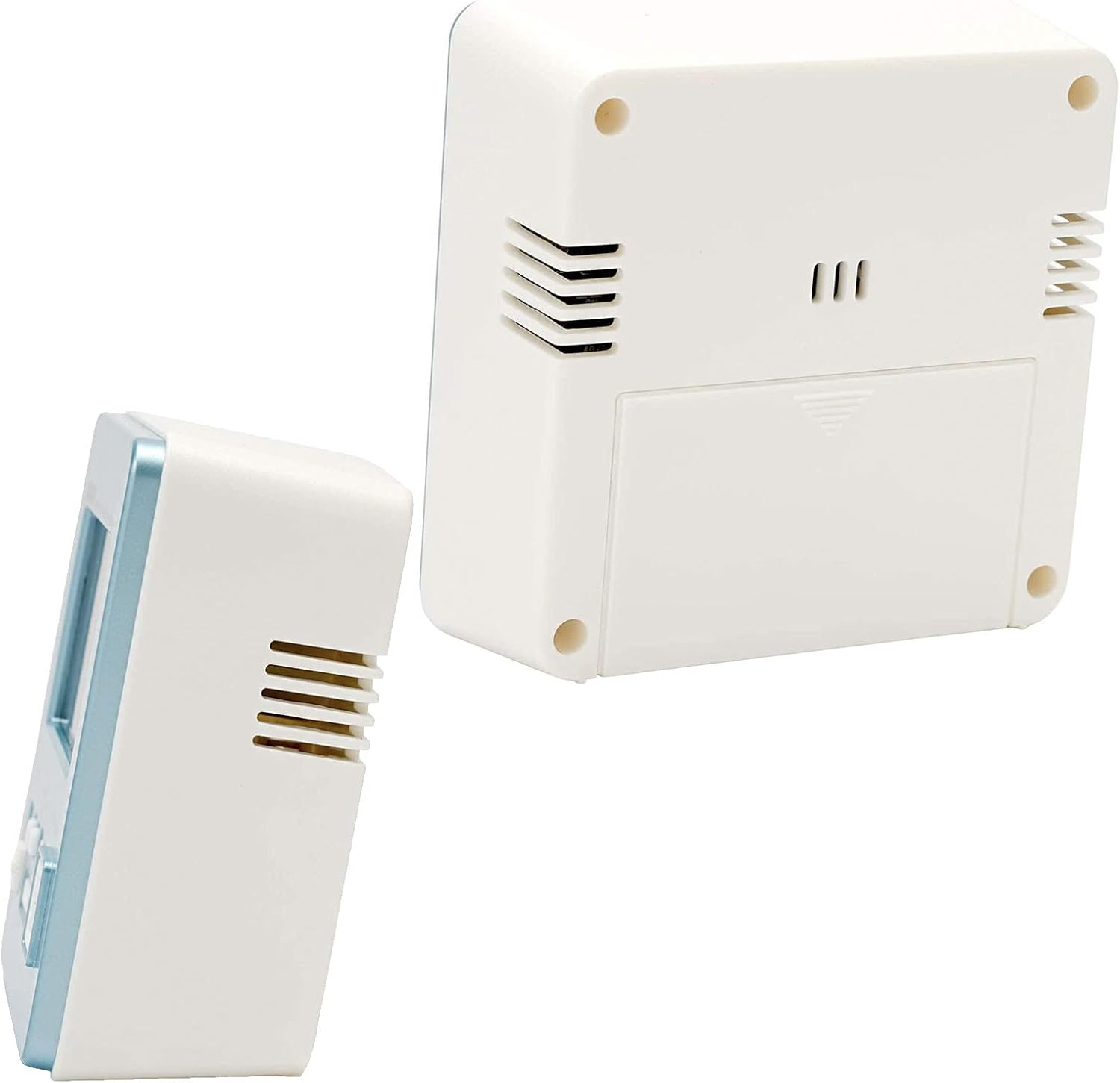
Figura 3: Wara u ġenb view of the alarm clock, showing the battery compartment and ventilation slots.
Setup
1. Installazzjoni tal-batterija
- Iftaħ il-qoxra tal-kompartiment tal-batterija li tinsab fuq wara tal-arloġġ.
- Insert the required batteries (typically AA or AAA, refer to the battery compartment label) ensuring correct polarity (+/-).
- Agħlaq l-għatu tal-kompartiment tal-batterija sew.
2. Initial Power On and Radio Wave Reception
Upon battery installation, the clock will attempt to receive the time calibration signal automatically. This process may take several minutes.
- Poġġi l-arloġġ ħdejn tieqa biex tirċievi s-sinjal b'mod ottimali.
- The wave reception indicator on the display will show the signal strength.
- Once successful, the clock will display the correct time and date automatically.

Figura 4: The Casio Wave Ceptor technology ensures accurate time display through radio signal reception.
3. Manual Time and Date Setting (if automatic reception fails)
- Agħfas u żomm il- Issettja Agħfas il-buttuna sakemm iċ-ċifri tal-ħin jibdew jteptep.
- Uża l- +/- buttuni biex taġġusta s-siegħa, imbagħad agħfas Issettja biex tikkonferma u tgħaddi għall-minuti.
- Irrepeti dan il-proċess għall-minuti, is-sena, ix-xahar u l-jum.
- Agħfas Issettja għal darb'oħra biex toħroġ mill-modalità tas-settings.
4. Issettjar tal-Allarm
- Agħfas il- Allarm Agħfas il-buttuna biex tidħol fil-modalità tas-settings tal-allarm. Il-ħin tal-allarm se jteptep.
- Uża l- +/- buttuni biex tissettja s-siegħa tal-allarm mixtieqa, imbagħad agħfas Allarm biex tikkonferma u tgħaddi għall-minuti.
- Uża l- +/- buttuni biex tissettja l-minuti tal-allarm mixtieqa.
- Agħfas Allarm again to exit alarm setting mode. The alarm ON indicator will appear on the display.
Istruzzjonijiet Operattivi
1. Viewing Time, Date, Temperature, and Humidity
The clock continuously displays the current time, date, temperature, and humidity. No specific action is required to view dawn.
2. Attivazzjoni/Diżattivazzjoni tal-Allarm
Agħfas il- Allarm button once to toggle the alarm ON or OFF. The alarm ON indicator will show its status.
3. L-Użu tal-Funzjoni Snooze
- Żerżaq il- Snooze ON/OFF switch to the ON position to enable snooze.
- Meta jdoqq l-allarm, agħfas il-buttuna l-kbira Snooze/Dawl button to activate snooze. The alarm will pause and sound again after a few minutes (typically 5 minutes).
- To stop the alarm completely, slide the Snooze ON/OFF switch to OFF or press any other button except Snooze/Dawl.
4. L-Użu tad-Dawl ta' Wara
Agħfas il-kbir Snooze/Dawl buttuna biex iddawwal id-displej għal ftit sekondi.
5. Manual Radio Wave Reception
If you wish to manually attempt time synchronization, press the Wave Reception button. The clock will begin searching for the signal. Ensure the clock is in an area with good reception.
Manutenzjoni
1. Tindif
- Imsaħ l-arloġġ b'ċarruta ratba u niexfa.
- Tużax prodotti tat-tindif li joborxu, solventi, jew sprejs kimiċi, għax dawn jistgħu jagħmlu ħsara lis-casing jew wiri.
2. Sostituzzjoni tal-batterija
When the display becomes dim or the clock functions erratically, it is time to replace the batteries. Follow the battery installation steps in the Setup section.
3. Ħażna
If storing the clock for an extended period, remove the batteries to prevent leakage and damage.
Issolvi l-problemi
| Problema | Kawża Possibbli | Soluzzjoni |
|---|---|---|
| Id-displej huwa vojt jew mudlam. | Batteriji baxxi jew mejta. | Ibdel il-batteriji b'oħrajn ġodda. |
| L-allarm ma jdoqqx. | L-allarm huwa diżattivat. | Agħfas il- Allarm button to activate the alarm (alarm ON indicator should appear). |
| Ħin muri ħażin. | Poor radio signal reception; manual time not set. | Move the clock to a location with better reception or perform manual time setting. |
| Radio wave reception fails. | Interference; clock too far from transmitter; environmental factors. | Place the clock near a window, away from electronic devices. Try manual reception. |
Speċifikazzjonijiet
- Ditta: Casio
- Numru tal-Mudell: DQD-805J-2JF
- Kulur: Blu ċar
- Dimensjonijiet tal-Prodott: 7.8 x 3.81 x 8.2 ċm (madwar 3.07 x 1.5 x 3.23 pulzieri)
- Piż tal-oġġett: 135 g (madwar 4.76 uqija)
- Tip ta' wiri: Diġitali
- Sors tal-Enerġija: Battery (Mechanical/Kinetic listed in product data, but typically battery for digital clocks)
- Użu fuq ġewwa/barra: Ġewwa

Figura 5: Dimensions of the Casio DQD-805J-2JF alarm clock: 7.8 cm width, 4.9 cm depth, and 8.2 cm height. Weight is approximately 135g.
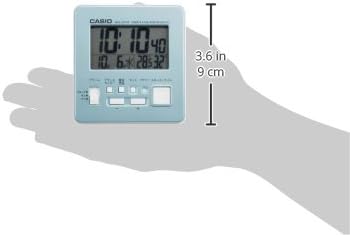
Figura 6: A hand holding the clock, illustrating its compact and portable design, with a height of approximately 9 cm (3.6 inches).
Informazzjoni dwar Garanzija
For specific warranty details, please refer to the warranty card included with your product or visit the official Casio website. Casio typically offers a limited warranty covering manufacturing defects from the date of purchase.
Appoġġ
If you encounter issues not covered in this manual or require further assistance, please contact Casio customer support through their official webis-sit jew l-informazzjoni ta' kuntatt ipprovduta fl-imballaġġ tal-prodott tiegħek.
Tista' żżur il-ħanut uffiċjali ta' Casio għal aktar informazzjoni: Ħanut Casio fuq Amazon


