Introduzzjoni
Thank you for choosing the Hype Bluetooth Selfie Stick. This extendable wireless monopod is designed to help you capture self-portraits and group photos with ease. This manual provides essential information for the safe and efficient use of your device. Please read it thoroughly before operation and retain it for future reference.
Informazzjoni dwar is-Sigurtà
- Tesponix l-apparat għal temperaturi estremi, dawl tax-xemx dirett, jew umdità għolja.
- Żomm l-apparat 'il bogħod mill-ilma u likwidi oħra.
- Tippruvax tiżżarma jew timmodifika l-apparat. Dan jannulla l-garanzija.
- Ensure your smartphone is securely mounted in the holder before extending the stick.
- Avoid using the selfie stick in crowded areas where it might cause injury to others.
- Żomm fejn ma jintlaħaqx mit-tfal.
Kontenut tal-Pakkett
Jekk jogħġbok iċċekkja l-kontenut tal-pakkett malli tiftaħ biex tiżgura li l-oġġetti kollha huma preżenti:
- Hype Bluetooth Selfie Stick
- Manwal għall-Utent (dan id-dokument)
- Charging Cable (if applicable, usually Micro USB) - Nota: The product description does not explicitly mention a charging cable, but Bluetooth devices typically require one.
Prodott Overview
Familiarize yourself with the components of your Hype Bluetooth Selfie Stick:
- Detentur ta' Smartphone: Adjustable grip to secure your mobile device.
- Monopod li jista' jiġi estiż: Telescopic arm for varying lengths.
- Manku: Qabda ergonomika għal żamma komda.
- Bluetooth Shutter Button: Integrated button on the handle to trigger your phone's camera.
- Port tal-Iċċarġjar: (If rechargeable) For connecting the charging cable.
- Power Button/LED Indicator: To turn the device on/off and show status.
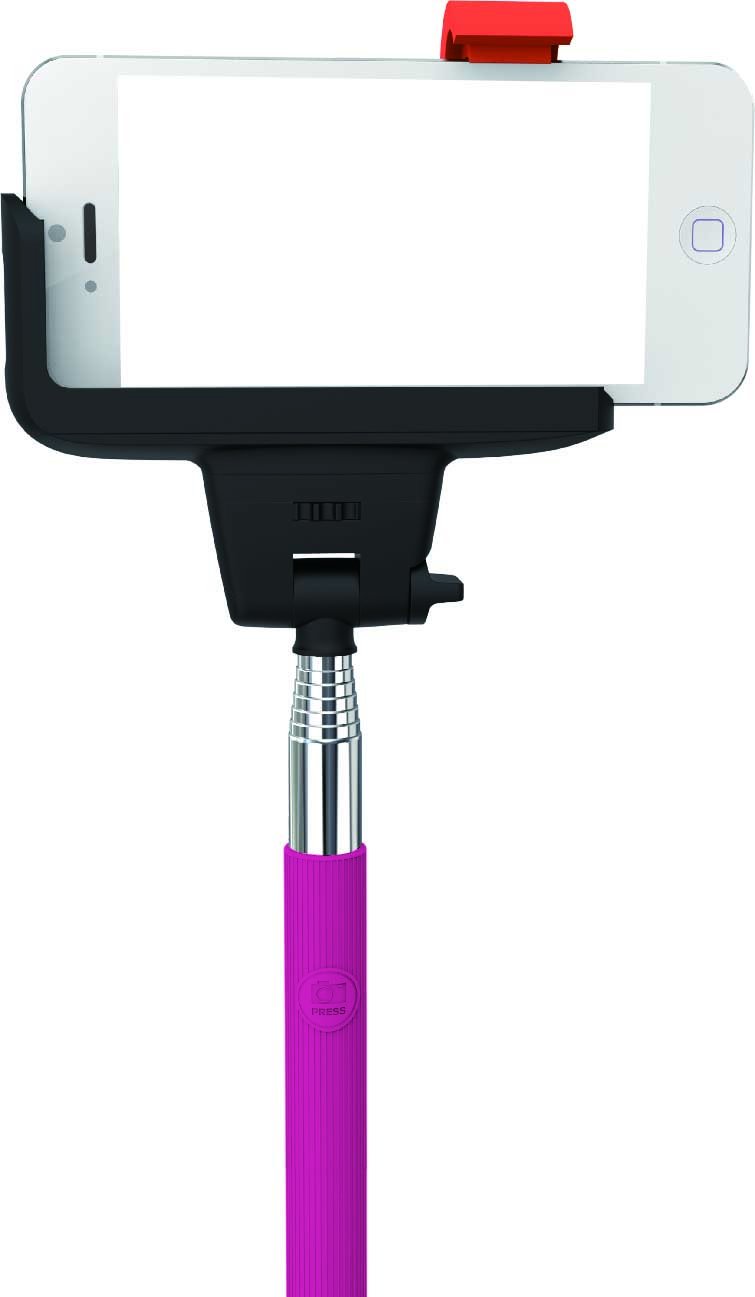
Image: Hype Bluetooth Selfie Stick with a smartphone mounted. The image displays the adjustable phone holder, the telescopic monopod arm, and the handle with the integrated Bluetooth shutter button. The phone is securely held in landscape orientation.
Setup Istruzzjonijiet
1. Charging the Selfie Stick (if applicable)
If your selfie stick is rechargeable, connect the provided charging cable to the charging port on the device and to a USB power source (e.g., computer USB port, wall adapter). The LED indicator will typically show red during charging and turn off or change color when fully charged. A full charge usually takes 1-2 hours.
2. Kif Twaħħal l-Ismartphone Tiegħek
- Gently pull apart the adjustable smartphone holder to expand its grip.
- Carefully insert your smartphone into the holder, ensuring it is centered and securely gripped. The holder is designed to fit devices with 4-5.5 inch screens.
- Verify that the phone is stable and will not slip out when the stick is extended or moved.
3. Tqabbil tal-Bluetooth
- Qawwa Mixgħul: Press and hold the power button on the selfie stick handle for a few seconds until the LED indicator light starts blinking, indicating it's in pairing mode.
- Attiva l-Bluetooth: On your smartphone, go to Settings > Bluetooth and turn Bluetooth ON.
- Fittex għal Apparati: Your phone will search for available Bluetooth devices. Look for "Hype Selfie Stick" or a similar name in the list.
- Par: Select the selfie stick from the list. The LED indicator on the selfie stick will typically stop blinking and remain solid, confirming a successful connection.
- Iftaħ l-App tal-Kamera: Ladarba tkun imqabbad, iftaħ l-applikazzjoni tal-kamera tal-ismartphone tiegħek.
Nota: The selfie stick should automatically reconnect to your phone when powered on if it was previously paired and your phone's Bluetooth is active.
Istruzzjonijiet Operattivi
1. Extending and Retracting the Monopod
- To extend: Gently pull the telescopic sections of the monopod outwards to your desired length. The stick can extend up to 40 inches (approximately 101 cm).
- To retract: Push the telescopic sections back into the handle until fully collapsed for compact storage.
2. L-aġġustament tal-Angolu
The smartphone holder features an adjustable head that allows for 180-degree rotation. Loosen the adjustment knob (if present) or gently pivot the holder to achieve the desired shooting angle, then tighten to secure it.
3. Teħid tar-Ritratti
- Ensure your smartphone is securely mounted and the selfie stick is paired via Bluetooth.
- Iftaħ l-applikazzjoni tal-kamera tal-ismartphone tiegħek.
- Position the selfie stick and your phone to frame your shot.
- Press the Bluetooth shutter button on the selfie stick handle to take a photo.
Tip: Some phones may require you to set the volume button function to "shutter" in the camera settings for the Bluetooth button to work correctly.
Manutenzjoni
- Tindif: Wipe the selfie stick with a soft, dry cloth. Do not use abrasive cleaners or solvents.
- Ħażna: Store the selfie stick in a cool, dry place away from direct sunlight and extreme temperatures. Retract the monopod fully before storage.
- Kura tal-batterija: If the device has a rechargeable battery, charge it periodically (e.g., every 3 months) even if not in use, to maintain battery health.
Issolvi l-problemi
| Problema | Soluzzjoni |
|---|---|
| Selfie stick does not power on. | Ensure the device is charged (if rechargeable). Press and hold the power button for a longer duration. |
| Ma tistax tqabbad ma' smartphone. |
|
| Shutter button does not take photos. |
|
| Phone is not secure in the holder. | Ensure your phone's screen size is within the supported range (4-5.5 inches). Adjust the holder carefully to grip the phone firmly. Remove any bulky phone cases if they interfere with the grip. |
Speċifikazzjonijiet
| Numru tal-Mudell | HY-SLF-BT-PNK |
| Brand | Hype |
| Konnettività | Bluetooth |
| Max. Extendable Length | Sa 40 pulzieri (madwar 101 ċm) |
| Kompatibbiltà Smartphone | Most Android and iOS smartphones with 4-5.5 inch screens |
| Dimensjonijiet tal-Prodott (Imqassmin) | 30.48 x 11.43 x 2.54 ċm (madwar 12 x 4.5 x 1 pulzieri) |
| Piż tal-oġġett | 141 g (madwar 0.31 libbra) |
| Kulur | Roża |
Garanzija u Appoġġ
For warranty information or technical support, please refer to the retailer where the product was purchased or visit the official Hype websit. Żomm il-prova tax-xiri tiegħek għal talbiet ta' garanzija.
Ċaħda ta' responsabbiltà: Specifications are subject to change without notice. Hype is not responsible for any damage or data loss caused by improper use of this product.


